



























In this article
Cloud repatriation fails more often than it succeeds, but the failure modes are predictable. This article breaks down the five most common reasons migrations go wrong, and what to do differently if you’re planning a second attempt.
You had a solid business case. Public cloud costs were climbing, your bill was unpredictable, and the math pointed clearly toward an exit. So you planned a migration, stood up new infrastructure, and started moving workloads.
Then something went wrong.
Maybe costs during the migration ballooned past projections. Maybe your team hit a wall with an unfamiliar platform. Maybe the move stalled halfway through and you ended up in a worse position than before, paying for two environments instead of one. Or maybe you crossed the finish line, only to find that the destination wasn’t what you expected.
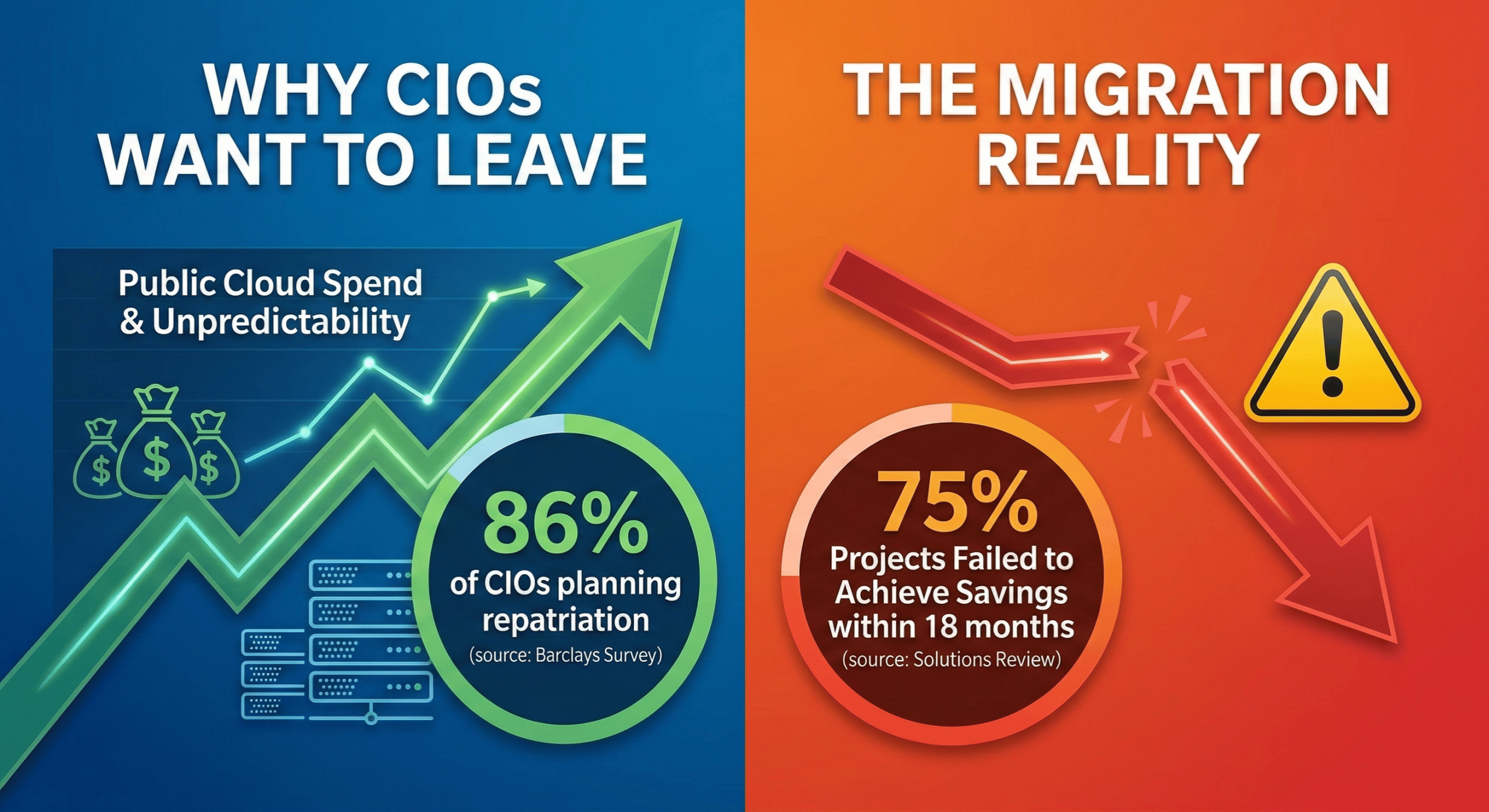
You’re not alone. According to a 2025 analysis published by Solutions Review, 75% of cloud repatriation projects failed to achieve their intended cost savings within 18 months, mainly due to unforeseen complexities. That’s a painful number, especially if you were in it.
The good news is that most repatriation failures follow recognizable patterns. If you understand what actually went wrong the first time, the second attempt looks a lot less risky.
Why Cloud Repatriation Is Still Worth Pursuing
Before getting into failure analysis, it’s worth affirming that the underlying logic of cloud repatriation is sound. 86% of CIOs planned to move some public cloud workloads back to private cloud or on-premises, the highest on record for the Barclays CIO Survey. This isn’t a fringe idea, but a mainstream infrastructure strategy being adopted at scale.
The motivations are well-documented. Public cloud pricing starts low and scales aggressively. Egress fees alone can wreck a budget. Steady-state workloads that run 24/7 are almost always cheaper to host on fixed-cost infrastructure. Managing cloud spend is the top cloud challenge, cited by 84% of organizations.
That said, wanting to leave is different from leaving successfully. The companies that tried and failed weren’t wrong about why to go. They stumbled on how.
The Five Most Common Failure Modes
1. You Mapped VMs, Not Dependencies
The most common starting mistake: treating migration as a VM inventory exercise instead of an application architecture exercise.
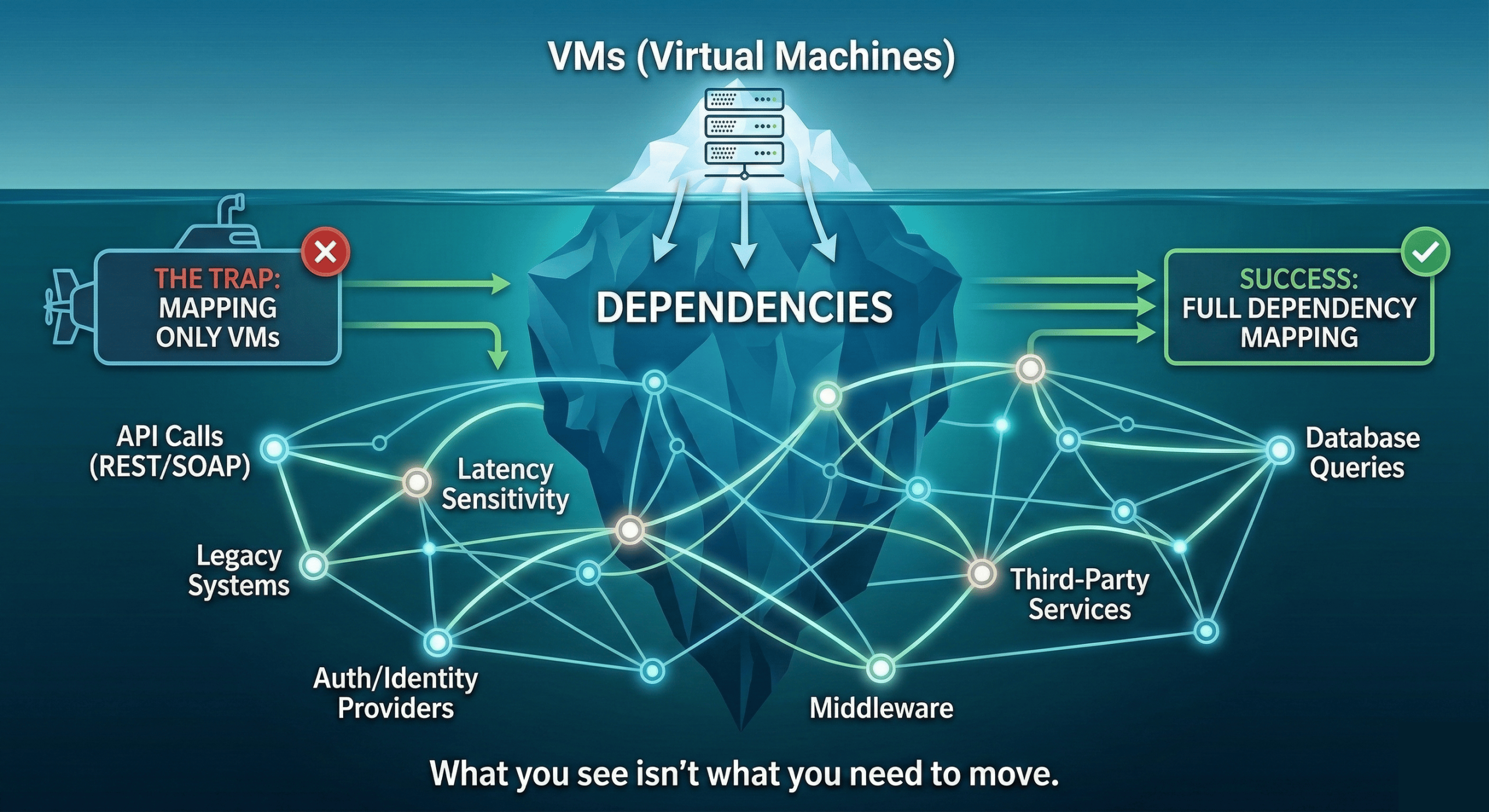
Teams pull an export of their instances, sort by size and cost, and build a migration list. What that list doesn’t show is which applications talk to each other, which services depend on specific latency thresholds, which databases are being hit by multiple workloads across regions, and which cloud-native managed services have quietly become load-bearing parts of your stack.
When you move a workload without mapping its dependencies first, you find out about them the hard way, as outages. Applications break in ways that aren’t obvious until traffic hits production. You spend weeks debugging connectivity issues that a proper dependency map would have flagged in the planning phase.
This is especially common when teams migrate in isolation. The database team moves their piece, the app team moves theirs, and nobody mapped the network paths between them on the new platform. For a deeper look at how migration strategy affects outcome, our guide to choosing your cloud migration strategy covers the tradeoffs in detail.
2. Data Transfer Costs Blew the Budget
Egress fees are the trap nobody fully accounts for. When you’re planning a migration, you’re focused on the destination costs: the new infrastructure, the new contracts. What you often underestimate is the cost of getting there.
Moving terabytes of data out of AWS, Azure, or GCP isn’t free. Public cloud providers charge egress fees on data leaving their networks, and those fees scale with volume. Hyperscalers have started waiving fees and providing credits when moving away, but this requires reaching out to support and is subject to approval. A migration that looks affordable in a spreadsheet can get expensive fast once you’re actually pushing data.
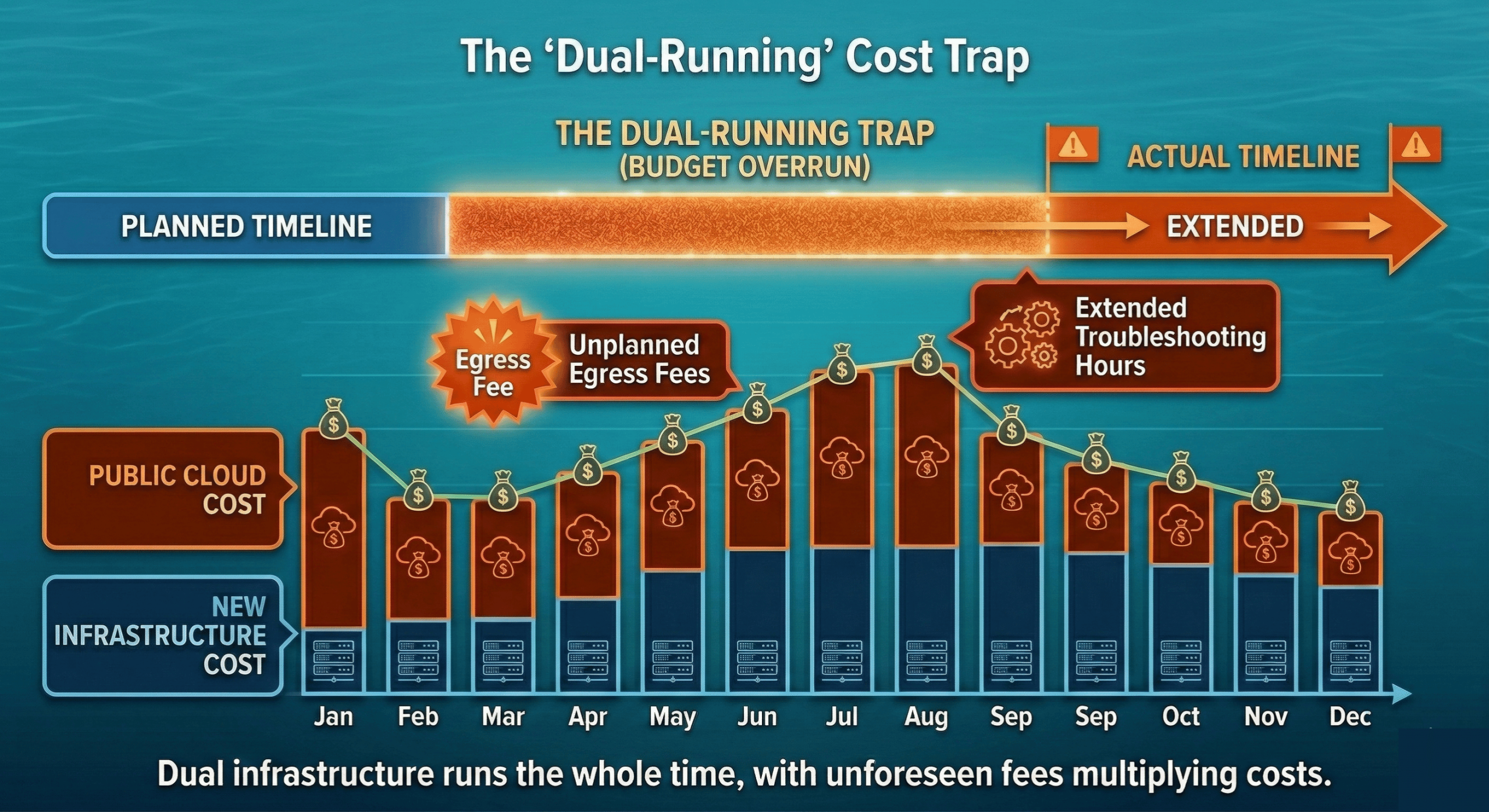
There’s also the timeline problem. Migrations rarely happen in a single weekend. If your migration takes three months, you’re paying for both environments the entire time, and your public cloud bill doesn’t automatically shrink just because you’ve started moving. You’re running dual infrastructure until the cutover is complete.
The budget usually also doesn’t include enough runway for the unexpected: extended timelines, re-migration of workloads that don’t work on the first try, and the engineering hours that get absorbed into troubleshooting instead of forward progress.
3. Your Team Wasn’t Ready for the New Platform
This one is uncomfortable to admit, but it’s one of the most common failure drivers. Your team is expert in AWS. They know IAM, they know EC2, they know how to navigate the console, read the billing, and debug issues at 2am. That expertise doesn’t automatically transfer to a new environment.
Lack of knowledge and a disconnect between finance and procurement are two of the most common problems that cause cloud migration to run into trouble. The technical side shows up as slower operations, misconfigured environments, and a steeper time-to-productivity than anyone planned for. The finance and procurement disconnect shows up as budget surprises that leadership wasn’t prepared for.
If your team hasn’t operated OpenStack, or whatever platform you’re migrating to, before, the learning curve is real. And unlike AWS, where you can Google almost any error message and find a Stack Overflow answer from 2018, newer or less common platforms have smaller communities and less hand-holding available. Our post on VMware to OpenStack: The People and Process Side addresses this, because the human element is just as important as the technical one.
4. You Chose the Wrong Migration Strategy
Not all workloads should be migrated the same way, and not all migrations should happen at the same pace. The two failure patterns here are opposite extremes.
The big bang approach, trying to move everything at once, creates a single massive risk event. If something goes wrong, everything is in-flight simultaneously. There’s no clean rollback path. Teams are stretched across dozens of concurrent workloads, which means nothing gets the attention it needs.
The endless phased approach, migrating so slowly that you never actually complete, creates its own problems. You end up in a permanent hybrid state, paying for both environments, with institutional momentum stalling out. The longer a migration drags on, the more likely it is that business priorities shift, key engineers move to other projects, and the whole initiative quietly dies.
The right strategy depends on your workloads, your team’s capacity, and your risk tolerance. A phased migration approach that starts small and builds confidence tends to outperform both extremes, but it requires discipline about actually completing each phase before declaring victory.
5. You Picked the Wrong Destination
This is the failure mode that’s hardest to recover from, because it often doesn’t become obvious until you’re already committed.
Colocation is a common choice for companies exiting public cloud. It looks attractive on paper: you get physical hardware, predictable power costs, and control over your environment. What you don’t always get is the operational support structure that makes a cloud feel like a cloud.
As OpenMetal President Todd Robinson explains in his analysis of colocation versus hosted private cloud for cloud repatriation, colocation comes with real hidden costs that don’t show up in the initial pitch. You need to source your own hardware (with all the supply chain exposure that creates), negotiate with multiple network providers if you need serious bandwidth, manage your own routers, and build the cloud-native management layer yourself, or pay someone to build it for you. Colocation also has a built-in cost escalation model of 3 to 6% per year, and to get good pricing, you typically need to commit to 10 or more cabinets upfront.
Companies that repatriated to bare colocation without a managed cloud layer often found themselves with exactly the operational overhead they were trying to escape from. They traded an AWS bill for a colocation bill plus a full-time infrastructure management burden.
What to Do Differently Next Time
Start with Dependency Mapping, Not VM Inventory
Before you touch a single workload, spend time mapping application dependencies. Understand which services communicate with each other, what latency those connections require, which cloud-managed services your applications rely on (RDS, SQS, CloudFront, etc.), and what would need to be replaced or replicated in a new environment.
This work is unglamorous, but it determines whether your migration succeeds or fails. Tools like cloud-native dependency mapping services, or even careful review of your VPC flow logs and security group rules, can surface connections your team didn’t realize existed. Our guide to solving common private cloud migration challenges covers how to approach this systematically.
Budget for Surprises — Seriously
The standard advice is to add a contingency buffer to your project budget. The honest number for cloud migrations is 30%. Not 10%. Not 15%. Thirty percent.
That buffer covers extended dual-environment run time, re-migration of workloads that don’t behave as expected, unplanned egress fees, additional engineering hours for debugging and reconfiguration, and the cost of bringing in outside help if your team hits a wall.
If you end up not needing it, great. But migrations almost always surface something unexpected. The teams that budget for that reality finish the project. The teams that don’t end up abandoning it when costs spiral past what leadership approved.
Pilot with a Non-Critical Workload First
Resist the urge to start with your most expensive workload, even though it offers the biggest cost savings. Start with something real enough to be meaningful, but low-stakes enough that a problem won’t cause a production incident.
A good pilot workload teaches your team the new platform, surfaces dependency issues in a controlled environment, gives you real performance data to validate your cost projections, and builds institutional confidence that the migration is achievable. Dev or staging environments, internal tooling, or batch processing workloads are all reasonable starting points.
Once the pilot is complete and your team has working knowledge of the new environment, you can move higher-stakes workloads with much greater confidence. This is consistent with the phased migration approach that consistently outperforms big bang migrations.
Choose a Destination That Accepts Your Workloads As-Is
The destination matters as much as the plan. One of the main reasons migrations stall is that teams arrive at their new platform and discover their workloads need to be re-architected before they’ll run properly. That’s a project within a project, and it’s often the one that kills momentum.
A managed hosted private cloud that’s purpose-built for migrations gives you several things that colocation or bare on-premises infrastructure don’t. You get a cloud-native operating model from day one, without having to build it yourself. You get fixed, predictable pricing that doesn’t escalate 4 to 6% a year. You get the ability to start small: OpenMetal clouds can start from as few as three servers and scale as your migration progresses, rather than committing to 10 cabinets before you’ve proven the concept.
Todd’s analysis makes the case plainly: for most companies, the order of fit is hosted private cloud first, then colocation, then on-premises, not the other way around. The companies that tried colocation first and struggled often find hosted private cloud much easier to land on, because they’re not also building the cloud layer from scratch at the same time they’re migrating.
For lift-and-shift migrations specifically, which is the right strategy for many repatriation projects, the destination environment needs to match the operational expectations your workloads were built against. A platform that runs OpenStack gives you the API surface and the operational model that cloud workloads expect, without the hyperscaler markup.
The Second Attempt Is Usually Easier
The companies that tried repatriation once and pulled back weren’t wrong. They were early. The planning frameworks are more mature now, the tooling is better, and the pool of people who have successfully executed migrations has grown considerably.
FinOps within cloud has become more prominent, and if you’re embarking on cloud migration now, you’re well-positioned to get it right.
If your first attempt failed, the most useful thing you can do is an honest post-mortem before you start planning the second one. Which of the five failure modes applied to you? Was it the dependency mapping? The budget? The team readiness? The destination? Understanding specifically what went wrong is the only way to avoid repeating it.
The underlying math of repatriation hasn’t changed. Steady-state workloads almost always cost less on fixed-price infrastructure. Egress fees are still punishing. Public cloud bills are still the top challenge for 84% of IT organizations. The opportunity is real. It just requires more careful execution than most teams planned for the first time around.
If you’re ready to talk through a second attempt with people who have seen these failure modes up close, reach out to the OpenMetal team.
Schedule a Consultation
Get a deeper assessment and discuss your unique requirements.
Read More on the OpenMetal Blog