



























In this article
We explain why Veeam doesn’t support OpenStack VM backups, explore the technical reasons behind this gap, compare proven alternatives, examine when bare metal servers with Veeam still make sense, and provide a decision framework for choosing the right backup approach for your private cloud infrastructure.
You’re evaluating backup solutions for your OpenStack infrastructure. Veeam Backup & Replication keeps appearing in your research. Your team has used it successfully with VMware for years. The problem? Veeam doesn’t support OpenStack.
If you’re running OpenStack private cloud for your infrastructure, Veeam’s traditional backup solution won’t help you protect your virtual machines. This isn’t a feature gap they’re planning to fill soon. According to Veeam’s own product roadmap discussions and community forums through 2025-2026, OpenStack support remains absent from their short-term plans.
Here’s what actually works for OpenStack backup, why Veeam made this decision, and how to choose the right solution for your infrastructure.
The Veeam Reality: No OpenStack VM Support
Veeam Backup & Replication, despite being an industry leader for VMware and Hyper-V environments, does not offer agentless backup for OpenStack virtual machines.
What Veeam Doesn’t Support
Veeam cannot perform agentless backups of:
- OpenStack Nova instances (traditional VMs)
- OpenStack Cinder volumes attached to VMs
- Complete OpenStack workloads with network configurations
- Multi-tenant OpenStack environments
The Agent-Based Workaround (And Why It Doesn’t Work)
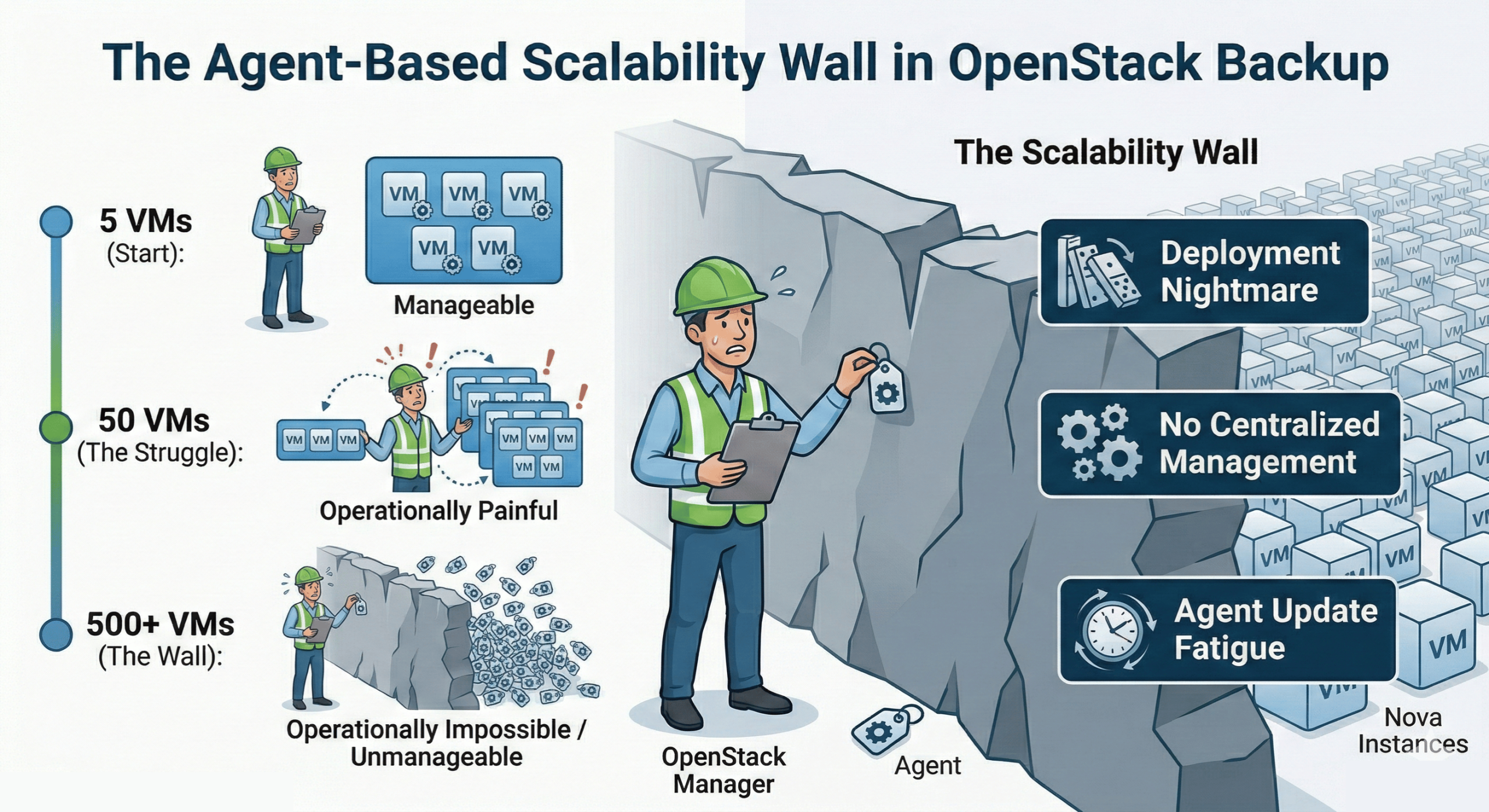
Technically, you could deploy Veeam agents on individual OpenStack VMs. This requires:
- Installing Windows or Linux agents on every single virtual machine
- Managing agent updates across hundreds or thousands of VMs
- Coordinating backup schedules without centralized OpenStack integration
- Losing the application-aware backup capabilities Veeam provides for VMware
For organizations running 50+ VMs, agent-based backup becomes operationally impractical. For environments with 500+ VMs, it’s unmanageable.
What About Veeam Kasten?
Veeam does offer Kasten K10 (now called Veeam Kasten for Kubernetes), but this solves a completely different problem. Kasten provides backup for Kubernetes workloads, including support for OpenStack Cinder when used as persistent volume storage for Kubernetes.
This is not a solution for backing up traditional OpenStack virtual machines. Kasten is designed for containerized applications running on Kubernetes, not for OpenStack Nova instances.
Why Veeam Skipped OpenStack Support
Understanding why Veeam doesn’t support OpenStack helps explain the landscape and what alternatives need to provide.
Market Prioritization
Veeam built its business around VMware vSphere and Microsoft Hyper-V. These platforms represent the vast majority of enterprise virtualization deployments. From a business perspective, adding support for additional hypervisors means:
- Engineering resources diverted from core products
- Testing and validation across multiple OpenStack distributions
- Support infrastructure for a smaller customer base
- Ongoing maintenance as OpenStack evolves
Veeam has prioritized other hypervisors like Nutanix AHV, Red Hat Virtualization (RHV), and Scale Computing HyperCore before OpenStack.
OpenStack’s Fragmentation Challenge
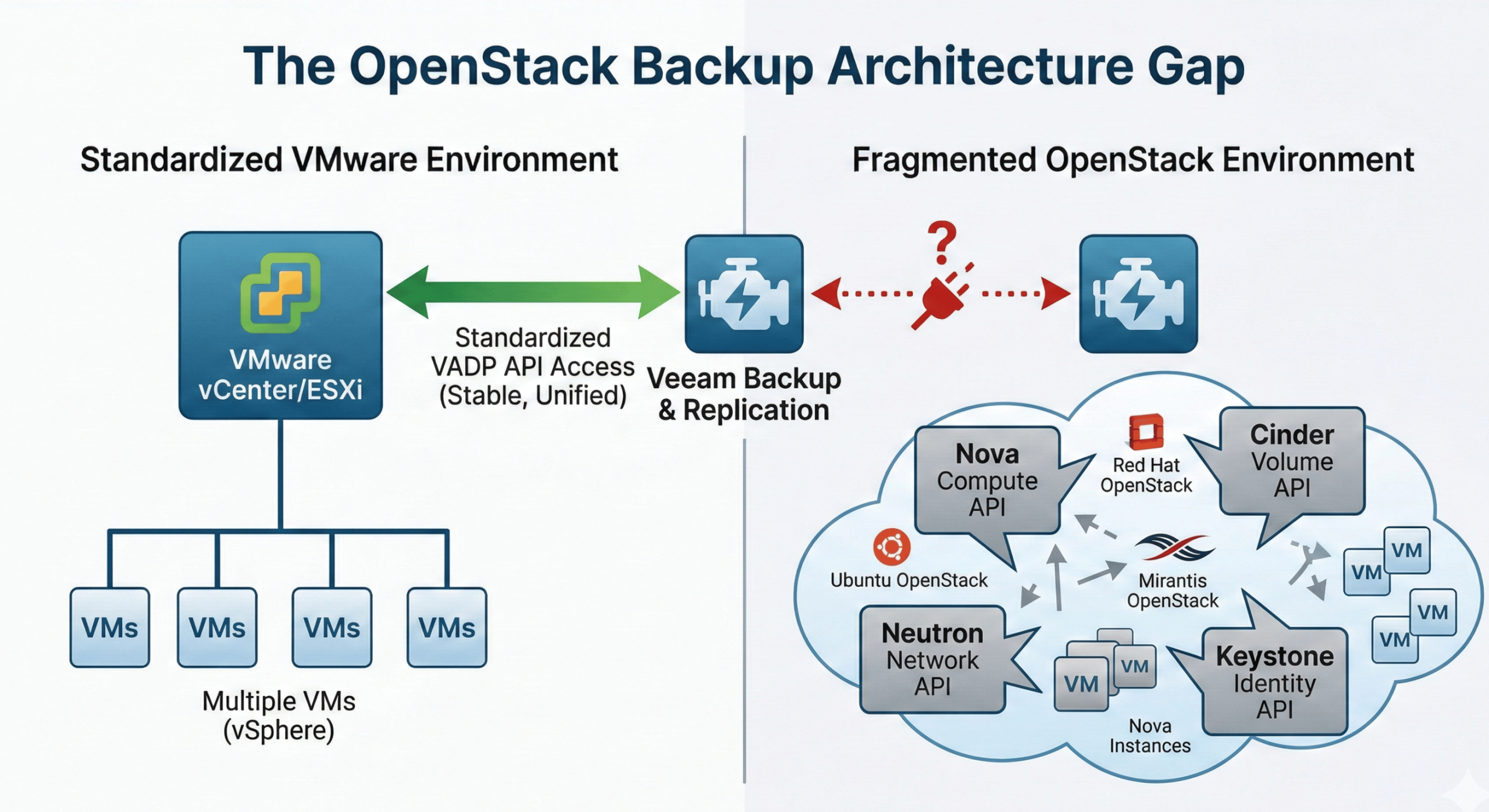
OpenStack isn’t a single product. It’s a collection of projects that different vendors package and deploy differently. Red Hat OpenStack Platform, Canonical’s Ubuntu OpenStack, Mirantis OpenStack, and upstream OpenStack all have variations in:
- Deployment methods (TripleO, Ansible, Kolla, Juju)
- Component versions and configurations
- Storage backends (Ceph, NFS, proprietary solutions)
- Network configurations (Neutron implementations)
This fragmentation makes it difficult for any backup vendor to guarantee consistent behavior across all OpenStack deployments. Veeam’s approach of deep integration with hypervisor APIs works well for VMware’s relatively standardized vCenter/ESXi combination, but becomes complex when dealing with dozens of OpenStack variations.
The Native Solution Advantage
OpenStack was designed from the ground up with APIs for every service. This makes it easier for solutions built specifically for OpenStack to integrate deeply than for solutions retrofitting OpenStack support into existing VMware-focused architectures.
Veeam likely concluded that organizations serious about OpenStack would prefer native solutions over adapted VMware backup tools.
What Actually Works: OpenStack Backup Alternatives
Several proven solutions provide the agentless, application-aware backup capabilities that OpenStack environments require.
Trilio: Native OpenStack Backup
Trilio (formerly TrilioVault) was purpose-built for OpenStack from day one. It integrates as a native OpenStack service, deploying alongside Nova, Cinder, and other core components.
Key Capabilities:
- Application-centric backups capturing entire workloads (VMs, volumes, network configs, security groups, metadata)
- Incremental-forever architecture after initial full backup
- Multi-tenant self-service through OpenStack Horizon dashboard integration
- Point-in-time recovery with one-click restoration
- Support for major OpenStack distributions (Red Hat, Canonical, Mirantis, upstream)
How It Works: Trilio integrates directly with OpenStack APIs including Nova, Cinder, Neutron, Glance, and Keystone. When you create a backup policy through Horizon or the Trilio API, it captures not just the VM disk data but the complete application context needed for recovery.
For example, backing up a three-tier application means Trilio captures:
- All VM instances and their boot/ephemeral disks
- All Cinder volumes attached to those instances
- Network topology including routers, networks, subnets, and floating IPs
- Security groups and rules
- Instance metadata and flavor information
- Glance images if needed for restore
This workload-centric approach means you can restore a complete application stack to the exact state it was in at backup time, including all networking and security configurations.
Storage Flexibility: Trilio supports multiple backup targets including:
- S3-compatible object storage
- NFS shares
- On-premises storage systems
- Cloud storage (AWS S3, Azure Blob, Google Cloud Storage)
Version 6.0, released in February 2025, added hybrid cloud backup capabilities, allowing organizations to back up OpenStack workloads to different storage tiers and locations.
Best For: Organizations running production OpenStack environments who need native integration, multi-tenant support, and application-aware backups. Trilio is certified for Red Hat OpenStack Platform and integrates seamlessly with most major OpenStack distributions, including OpenMetal.
Hystax Acura: DR-First Backup with Native OpenStack Integration
Hystax takes a disaster-recovery-first approach to OpenStack protection. Its Acura platform combines continuous data replication, cloud backup, and live migration in a single product, making it particularly strong for organizations that treat backup and DR as two sides of the same strategy rather than separate tools.
Key Capabilities:
- Agentless, non-disruptive continuous data replication with no impact on production workloads
- Automated DR plan creation based on replicated infrastructure topology
- Best-in-class RPO and RTO measured in seconds to minutes rather than hours
- Failback to production with zero data loss, completed in a planned maintenance window
- Cross-cloud DR scenarios spanning OpenStack, VMware, AWS, Azure, GCP, and KVM under a single product
- Multi-tenant MSP dashboard for managing multiple customer environments from a single console
- Deduplication ratios up to 70% on stored backup data
- Flexible storage support: object storage, NFS, and Samba, plus hardware from NetApp, Dell EMC, Cisco, and Ceph
How It Works: Hystax Acura deploys a replication agent chosen from several integration levels that runs background replication of VM data and metadata continuously. DR plans are generated automatically from the replicated infrastructure state, so there’s no manual topology mapping. When a failure occurs, failover runs immediately from the latest restore point. After the incident, Hystax handles failback to the production environment, restoring all changes from the DR site back to production in minutes without data loss.
The platform also doubles as a live migration tool. Hystax Acura supports VMware-to-OpenStack migration using the same continuous replication engine, which means organizations mid-migration can use it for both in-flight workload transfer and ongoing backup protection without switching tools.
Storage and Hardware Flexibility: Hystax supports a broad range of underlying storage and hardware vendors, including Ceph which is a natural fit for OpenMetal’s Ceph-backed hosted private cloud. Cold and hot storage tiers with flexible retention policies give operators control over long-term backup economics.
Best For: Organizations where disaster recovery is the primary concern and backup is a secondary use case of the same system. Also a strong fit for teams actively migrating from VMware to OpenStack who want a single tool to handle live migration, ongoing replication, and DR planning in one workflow.
Storware Backup & Recovery: Flexible and Open Source-Friendly
Storware takes a different approach, providing a flexible backup platform that supports OpenStack alongside VMware, Hyper-V, Red Hat Virtualization, Kubernetes, and other platforms under a single license.
Key Capabilities:
- Agentless backup using multiple strategies (libvirt, disk-attachment, Ceph RBD integration)
- Full and incremental backups with changed block tracking
- Support for OpenStack with Ceph RBD, NFS, and other storage backends
- Centralized management console for multi-hypervisor environments
- REST API for integration with automation tools (Ansible, Terraform)
- OpenStack Horizon UI plugin for in-dashboard backup management
How It Works: Storware communicates with OpenStack APIs (Nova, Glance, Cinder) to collect metadata while accessing hypervisors directly for efficient data transfer. It supports multiple backup strategies:
Libvirt Strategy: Direct hypervisor access via SSH for crash-consistent snapshots of QCOW2/RAW disk files. Best for environments where direct hypervisor access is available.
Disk Attachment Strategy: Uses Cinder API to attach volumes to a proxy VM for backup. Supports incremental backups through changed block tracking regardless of underlying storage.
Ceph RBD Integration: For OpenStack deployments using Ceph storage, Storware communicates directly with Ceph monitors for efficient RBD snapshot-based backups.
Storware announced OpenMetal support in their changelog, specifically mentioning compatibility with OpenMetal’s OpenStack-Powered On-Demand Cloud and Hosted Private Cloud services.
Storage Destinations: Storware supports diverse backup targets:
- Deduplicating appliances (Dell Data Domain, HPE StoreOnce, ExaGrid)
- S3-compatible object storage
- Tape libraries
- Local and network file systems
- Cloud storage providers
Secondary backup destinations enable backup copy jobs for additional data protection.
Best For: Organizations with mixed virtualization environments who want a single backup solution covering OpenStack, VMware, and other platforms. Particularly valuable if you’re migrating from VMware to OpenStack and want backup continuity during the transition period.
Vinchin Backup & Recovery: Agentless Multi-Platform Support
Vinchin provides agentless backup specifically designed for virtualized environments, including native OpenStack support.
Key Capabilities:
- Agentless architecture with OpenStack API integration
- Changed Block Tracking (CBT) for efficient incrementals
- Inline deduplication and compression
- Instant VM recovery from backup repository
- Cross-platform migration capabilities
- Web-based centralized management
How It Works: Vinchin connects to OpenStack APIs to discover and protect VMs without installing agents. It uses CBT to identify changed data blocks between backups, significantly reducing backup windows and storage consumption.
One standout feature is instant recovery, which allows running VMs directly from the backup repository while data restoration continues in the background. This minimizes Recovery Time Objectives during disaster recovery scenarios.
Best For: Organizations prioritizing ease of deployment, storage efficiency, and rapid recovery capabilities. Strong option for service providers managing multiple client OpenStack environments.
Bacula Enterprise: Security-First Backup with Flat Licensing
Bacula Enterprise is an enterprise-grade backup platform with a dedicated OpenStack module and an unusual pricing model: no capacity-based charges. Organizations protect as much OpenStack infrastructure as they need without costs scaling with data volume or instance count. A meaningful advantage as environments grow!
Key Capabilities:
- Dual-module architecture: proxy VM method for full instance backup (Nova, Neutron, Glance, Cinder) plus a dedicated Cinder backup driver for volume-only scenarios
- Deep integration across all core OpenStack APIs: Nova (compute), Neutron (networking), Glance (image service), Cinder (block storage)
- Complete VM restoration into any target OpenStack tenant or region, with networking and disk configurations recreated automatically
- Granular single-file recovery from within backed-up VMs without mounting or booting full images
- Full, incremental, and differential block-level backups with automatic snapshot management and cleanup
- Protection for OpenStack operational infrastructure: configuration files, MySQL/MariaDB service databases, and Barbican-managed encryption keys
- AES-256 encryption at rest and in transit, with FIPS 140 compliance for government and regulated industries
- Support for tape libraries, deduplication appliances, cloud object storage, and physical disk all under unified management
- CLI and API access for integration with existing OpenStack automation workflows
How It Works: Bacula Enterprise’s dual-module design lets operators choose their protection strategy per workload. The proxy VM module captures complete instance state — VM metadata, networking topology, attached volumes — through a dedicated proxy server that accesses virtual disks without disrupting production. The Cinder driver module provides block-level incremental backups of volumes specifically, using change detection to minimize backup windows. Both modules can run simultaneously in the same environment, letting operators apply the right method to each workload type.
Unlike some OpenStack backup solutions, Bacula also protects the operational layer underneath the VMs: service configuration files, the MySQL databases that store OpenStack service state, and encryption keys managed by Barbican. This matters for full environment recovery after a catastrophic failure, not just VM-level restoration.
Licensing and Cost Model: Bacula’s flat licensing structure diverges significantly from per-GB or per-VM models used by most backup vendors. For large or rapidly growing OpenStack environments, this often produces substantial cost savings. The model is also well-suited for MSPs offering managed backup services, where capacity-based pricing erodes margins as customer environments grow.
Best For: Organizations in regulated industries (government, defense, financial services, healthcare) where security certifications and encryption requirements are non-negotiable. Also a strong fit for large or scaling OpenStack deployments where capacity-based pricing from other vendors creates unpredictable costs, and for teams already managing heterogeneous environments who want one backup platform covering OpenStack alongside VMware, Hyper-V, KVM, Proxmox, and physical servers.
Native OpenStack Backup Tools
OpenStack includes built-in capabilities for data protection that work for certain use cases.
Cinder Backups: Cinder provides native volume backup functionality. You can create full and incremental backups of Cinder volumes to various backends:
- Swift object storage
- Ceph RBD
- NFS
- S3-compatible storage
Cinder backups are volume-centric, not application-centric. They backup individual volumes but don’t capture VM metadata, network configurations, or relationships between volumes.
Nova Snapshots and Images: Nova can create snapshots of instances which are stored as Glance images. This captures the VM’s disk state but:
- Only works for ephemeral storage (not Cinder volumes)
- Creates full copies each time (no increments)
- Doesn’t capture network or security group configurations
- Can consume significant storage for large VMs
When Native Tools Work: Native OpenStack backup capabilities are sufficient for:
- Development and test environments with simple recovery requirements
- Single-VM workloads without complex networking
- Environments where operators manage backups manually
- Basic disaster recovery testing
Limitations: Native tools lack centralized management, automated scheduling, application awareness, and the workload-centric approach needed for production environments. They work best as supplementary capabilities rather than primary backup solutions.
For comprehensive coverage, refer to our detailed guide on OpenStack backup automation tools.
The Bare Metal Option: When Veeam Still Makes Sense
If your organization is deeply invested in Veeam and wants to continue using it, there’s an alternative architecture that works: run workloads on bare metal servers instead of OpenStack VMs.
Bare Metal + Veeam Architecture
OpenMetal’s bare metal dedicated servers give you direct access to enterprise hardware without hypervisor overhead. You can:
- Install your own hypervisor (VMware ESXi, Proxmox, or run workloads directly on hardware)
- Deploy Veeam Backup & Replication as you would in any traditional environment
- Maintain your existing Veeam licensing and operational procedures
- Avoid the need to learn new backup tools
When This Makes Sense:
- Your team has deep Veeam expertise and extensive automation built around it
- You’re running specialized workloads that benefit from bare metal performance
- You need specific hypervisor features not available in OpenStack
- You want maximum control over the entire stack
The Hybrid Approach: Many organizations run a hybrid architecture:
- OpenStack private cloud for multi-tenant self-service infrastructure
- Bare metal servers for performance-critical workloads
- Veeam for backing up bare metal and any VMware still in the environment
- Trilio or Storware for OpenStack VM backups
This gives you the flexibility to use the right tool for each workload type. OpenMetal supports both private cloud and bare metal infrastructure, allowing you to architect solutions that match your specific requirements without vendor lock-in.
Cost Considerations
While bare metal with Veeam maintains tool continuity, consider total costs:
- Bare metal hardware is dedicated (no multi-tenancy density)
- Veeam licensing per socket or VM
- Additional hypervisor licensing if using commercial options
OpenStack private cloud with native backup tools often provides better economics for large-scale VM environments, but bare metal with Veeam can be cost-effective for smaller deployments or specialized workloads.
Decision Framework: Choosing Your OpenStack Backup Approach
Here’s how to evaluate which solution fits your situation.
Start With Use Case
Production OpenStack Cloud: Go with Trilio for native integration, proven track record, and comprehensive workload protection. The investment in a purpose-built tool pays off through simplified operations and reliable recovery.
Mixed Environment Migration: If you’re migrating from VMware to OpenStack over time, Storware provides unified backup across both platforms during the transition and beyond.
Small Deployments: For environments under 50 VMs with simple configurations, native OpenStack backup capabilities combined with manual procedures might suffice.
Performance-Critical Workloads: Consider bare metal servers with your existing Veeam deployment if workload performance requirements exceed what virtualization provides.
Evaluate Multi-Tenancy Needs
Self-Service Requirements: Trilio excels at multi-tenant environments where different teams or customers need self-service backup capabilities through the OpenStack dashboard.
Centralized Management: Storware’s centralized console works better if backup operations remain centralized with the infrastructure team.
DR-as-Primary-Strategy: If your organization approaches backup and disaster recovery as a unified workflow, rather than separate tools, Hystax Acura’s continuous replication model eliminates the gap between backup schedules and actual recovery points. Particularly valuable when cross-cloud or cross-region failover is a business requirement.
Cost-Sensitive Scaling: For environments where data volume or instance count is growing quickly, Bacula Enterprise’s flat licensing model provides predictable costs that capacity-based pricing from other vendors cannot match.
Regulated Workloads: Bacula’s FIPS 140 compliance and AES-256 encryption, combined with its track record in defense and government environments, make it a strong choice when compliance documentation is required.
Consider Storage Integration
Ceph-Based Storage: Both Trilio and Storware integrate well with Ceph. Storware’s RBD integration provides efficient incremental backups through Ceph’s changed block tracking.
Multiple Storage Backends: Storware supports the widest variety of backup destinations, including legacy tape libraries and deduplication appliances.
Cloud Storage: Trilio’s hybrid cloud capabilities make it straightforward to back up to public cloud storage while running workloads in private OpenStack infrastructure.
Factor in Disaster Recovery Plans
Your backup solution should align with your disaster recovery strategy:
Multi-Region DR: If you’re implementing multi-site high availability, ensure your backup solution supports replication between sites and provides orchestrated failover capabilities.
RPO/RTO Requirements: Tighter recovery objectives require more sophisticated backup features:
- RPO under 1 hour: Consider continuous data protection or frequent incremental backups
- RTO under 4 hours: Instant recovery capabilities become important
- RTO under 1 hour: You may need replicated infrastructure rather than backup-based recovery
Think About Operational Model
DevOps Integration: If your teams manage infrastructure as code, prioritize solutions with robust APIs. Both Trilio and Storware offer REST APIs for integration with automation tools.
Existing Tooling: Consider how backup integrates with monitoring, alerting, and orchestration tools already in use. Native OpenStack solutions typically integrate more smoothly with OpenStack-centric toolchains.
What If You’re Coming From VMware?
Many organizations discover the Veeam limitation while planning their VMware migration. Here’s how to approach backup during and after migration.
During Migration
Parallel Backup Systems: Run both your existing Veeam infrastructure for VMware and new OpenStack backup solution in parallel. This provides:
- Continuity for workloads still on VMware
- Proven recovery capabilities during migration
- Time to validate new backup procedures
- Rollback capability if needed
Storware’s multi-platform support can simplify this transition by providing unified backup management for both environments.
Hystax Acura is worth consideration for VMware migrations. Its live migration engine uses the same continuous replication technology as its DR product, meaning you can migrate VMware workloads to OpenStack while simultaneously establishing the replication baseline that becomes your ongoing backup and DR protection. This eliminates a common transition gap where workloads are partially migrated but fully protected by neither the old nor new backup system.
Post-Migration
Once migration completes, you can:
- Decommission Veeam infrastructure and reallocate licensing
- Consolidate to OpenStack-native backup solution
- Maintain Veeam for any remaining bare metal or VMware workloads
Migration Considerations
Backup strategy impacts migration planning:
- Test restore procedures in the target OpenStack environment before cutting over production workloads
- Ensure network connectivity between backup repositories and new infrastructure
- Account for backup solution licensing and operational training in migration budgets
- Plan for the period where you’re running backup solutions for both platforms
Our detailed VMware to OpenStack migration guides cover backup considerations alongside storage, networking, and application migration.
Making the Decision
Veeam’s absence from OpenStack support isn’t a gap that will likely close soon. The market has moved toward platform-specific solutions that integrate natively rather than retrofitted multi-platform tools.
For most organizations running production OpenStack environments, Trilio represents the gold standard. It was built for OpenStack, integrates like a native service, and provides the comprehensive workload protection modern applications require.
Storware offers great value for mixed environments, organizations with existing multi-platform backup needs, or teams managing OpenStack alongside other virtualization platforms.
Hystax Acura is the strongest fit for organizations where disaster recovery is the primary requirement, not just scheduled backup. Its continuous replication engine, automated DR planning, and native VMware-to-OpenStack migration capabilities make it particularly valuable for teams mid-migration or those with aggressive RTO and RPO targets.
Bacula Enterprise stands out for regulated industries and large-scale deployments where security certifications and predictable licensing costs matter. Its FIPS 140 compliance, AES-256 encryption, and flat pricing model make it a natural choice for government, defense, and financial services environments, and for any organization where capacity-based backup pricing has become a budget concern.
Vinchin provides a strong middle ground for organizations prioritizing ease of deployment, storage efficiency through deduplication and compression, and rapid recovery capabilities with instant VM recovery features.
Native OpenStack tools work for development, testing, and small-scale deployments but lack the enterprise features production environments demand.
And if maintaining Veeam is critical, consider whether bare metal infrastructure better serves your workload requirements than virtualized infrastructure.
The right choice depends on your specific environment, operational model, and long-term infrastructure strategy. What matters most is selecting a solution that provides reliable recovery, not attempting to force-fit a tool designed for a different platform.
Next Steps
Ready to deploy OpenStack with proper backup protection?
OpenMetal provides hosted private cloud and bare metal infrastructure designed for production workloads. Our platform supports both OpenStack-native backup solutions and traditional bare metal approaches. We have relationships with these vendors and are familiar with the OpenStack-native tools, so we’re happy to help design the best backup solution for your needs.
Explore OpenStack Infrastructure:
- Start a free trial of OpenMetal’s hosted private cloud
- Review our hardware specifications for bare metal and cloud deployments
- Schedule a consultation to discuss your specific backup requirements
Learn More About Backup and Disaster Recovery:
- Top 8 Tools for OpenStack Backup Automation
- 5 Failover Strategies for OpenStack Clouds
- Ceph RBD Mirroring for Disaster Recovery
Questions about backup for your OpenStack or mixed environment? Our team understands the challenges of protecting modern infrastructure and can help you architect a solution that actually works.
Schedule a Consultation
Get a deeper assessment and discuss your unique requirements.
Read More on the OpenMetal Blog