



























In this article
We walk through the business logic behind disaster recovery planning, covering RPO/RTO requirements and what they actually cost, a realistic DR cost comparison between OpenMetal and hyperscaler alternatives, and what compliance auditors are looking for when they review your DR posture.
When most infrastructure teams think about disaster recovery, they go straight to the tools: how to configure Ceph mirroring, which backup agent to deploy, whether to use asynchronous or synchronous replication. That’s important work. But it comes after a set of business decisions that most organizations skip entirely.
Before you configure a single replication job, your organization needs to answer three questions: How much downtime can you actually afford? How much will it cost to protect each workload at that tolerance level? And what will an auditor ask to see when they walk through your DR plan?
This article covers all three, and explains how those answers should shape the infrastructure choices you make.
Start With Business Impact, Not Infrastructure
The reason DR projects fail to get funded isn’t usually that leadership doesn’t understand risk. It’s that the conversation starts with infrastructure costs rather than business costs.
Before setting any targets, organizations should conduct a Business Impact Analysis. The key questions: what is the financial impact of an hour of downtime for each system? How does data loss affect customer trust or compliance requirements? Are there seasonal or time-sensitive workloads that are more critical?
Those answers let you classify your applications into tiers, each with different recovery requirements. Not everything needs the same protection level, and spending as if it does is one of the most common ways DR budgets get blown before they’re approved.
RPO and RTO: What the Numbers Actually Mean
Recovery Point Objective (RPO) is how much data loss your organization can survive. Recovery Time Objective (RTO) is how fast you need to be back online. RTO emphasizes how quickly systems can be brought back online to minimize downtime, while RPO deals with how far back in time you can recover data without causing significant business impact.
Common benchmarks for mission-critical applications include an RTO of 15 minutes and a near-zero RPO. For important but non-mission-critical applications, the RTO is typically four hours with a two-hour RPO. For all other systems, a typical RTO is 8 to 24 hours with a four-hour RPO.
These targets aren’t arbitrary. They’re the output of your Business Impact Analysis applied to each workload tier. A payment processing system and an internal reporting dashboard have fundamentally different business consequences if they go down, and they should have fundamentally different DR architectures reflecting that.
The practical implication: lowering RTO or RPO generally requires more resources and infrastructure investment, but the tradeoff is reduced operational risk and improved business continuity. The goal is to find the right tradeoff for each tier, not to apply the most expensive option across the board.
Matching Architecture to Tier
Once you have tiered RPO/RTO targets, the architecture options become clearer:
Backup and restore works well for tier-3 workloads where hours of downtime is acceptable. You’re trading recovery speed for cost. OpenMetal’s volume backup tooling and OpenStack database backup and restore procedures support this approach for non-critical components.
Warm standby fits tier-2 workloads. A secondary environment is partially provisioned and ready to scale up when the primary fails. Recovery takes minutes to hours rather than hours to days.
Active-active or hot standby is appropriate for tier-1 workloads where downtime is measured in seconds. This is the most expensive option and is generally reserved for revenue-critical systems. OpenMetal’s multi-site high availability architecture and Ceph RBD mirroring configuration support this tier.
Why Your DR Infrastructure Choice Matters as Much as Your DR Plan
Most DR planning conversations focus on tooling and runbooks. The infrastructure underneath rarely gets the scrutiny it deserves, even though it determines whether your RTO targets are actually achievable when something goes wrong.
There are two fundamentally different models for DR infrastructure: running a standby environment on a hyperscaler, or running it on dedicated private cloud hardware. Each has real tradeoffs that don’t show up until you need to actually fail over.
The Hyperscaler DR Problem
Public cloud providers make it easy to spin up standby capacity. What they don’t make easy is predicting what it will cost, or guaranteeing what performance you’ll get during an incident.
On a hyperscaler, your standby environment shares physical hardware with thousands of other tenants. Under normal conditions, that’s fine. During a widespread incident, when other customers are also failing over or scaling aggressively, that shared pool is under maximum pressure at exactly the moment you need reliable recovery. Noisy neighbor problems are uncommon during routine operations and common during the events that also tend to cause failures elsewhere.
The billing model compounds this. AWS Elastic Disaster Recovery prices at roughly $20 per server per month for the replication agent, plus staging area storage costs, plus on-demand compute rates for any instances you spin up during testing or actual failover. That last item matters: every DR drill you run gets billed at on-demand rates. Organizations that under-test their DR plans often do so because testing carries a real and variable cost. When you do have an actual incident, your cloud bill for that month looks nothing like your baseline.
The Egress Factor
Then there’s egress, which is where hyperscaler DR costs get quietly expensive in ways that rarely show up in initial estimates.
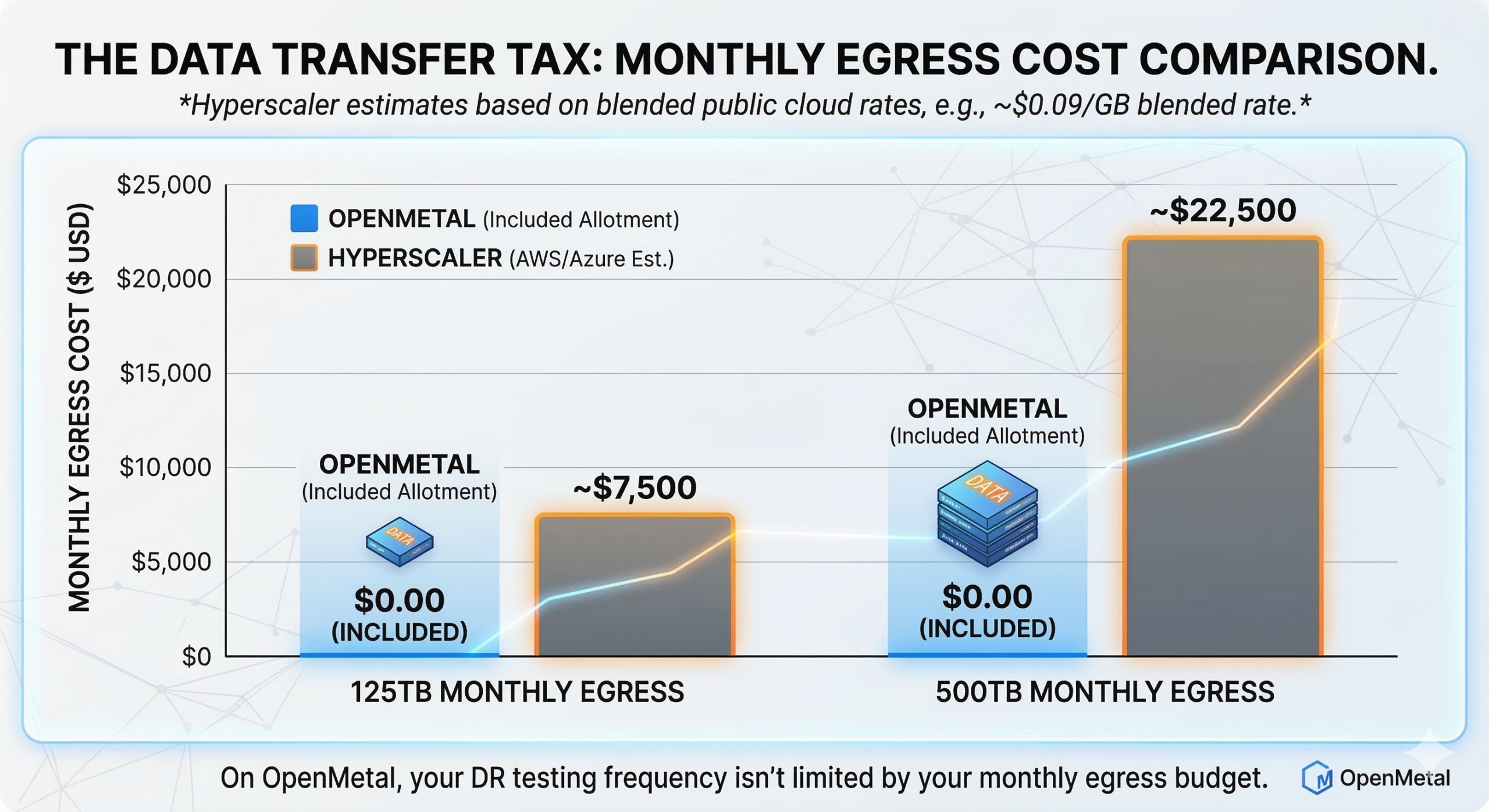
Every time you replicate data to your DR site, that data crosses the public internet and gets billed per gigabyte leaving the region. Every failover test moves data. Every restore operation moves data. AWS charges $0.09/GB for the first 10TB of outbound transfer, dropping incrementally at volume. Azure charges similarly. For environments with meaningful data volumes, this adds up fast. 125TB of monthly egress on a major hyperscaler runs approximately $7,500. 500TB runs approximately $22,500. These aren’t edge cases for organizations doing continuous replication across regions.
Azure Site Recovery follows a similar structure. Replication fees, recovery instance compute, and egress charges for data leaving the primary region all stack. For a 50-server environment, DR infrastructure commonly represents 15-30% of the base compute bill once you account for all three layers.
The OpenMetal Difference: Fixed Costs, Included Egress
OpenMetal’s on-demand private cloud runs on dedicated bare metal with a fundamentally different cost structure. Every Cloud Core comes with a substantial egress allotment built into the monthly price. A Cloud Core – Small (8 Core | 128 GB RAM | 3.2 TB NVMe) includes 1 Gbps allotment. A Cloud Core – Large v4 (32 Core | 512 GB RAM | 12.8 TB NVMe) includes 4 Gbps. Scale up to the XXL v4 (64 Core | 2048 GB RAM | 38.4 TB NVMe) and the allotment is 10 Gbps.
What that means in practice: the same 125TB of monthly egress that costs approximately $7,500 on a major hyperscaler costs $0.00 on OpenMetal within the included allotment. At 500TB, the hyperscaler bill is approximately $22,500. On OpenMetal: still $0.00. You can verify this directly on the egress pricing calculator.
For DR specifically, this changes the economics at every tier. Continuous replication generates significant data movement. Failover testing generates data movement. The replication strategy that’s technically optimal for your RPO target is often not the one organizations implement on hyperscalers, because the egress cost of running it continuously is prohibitive. On OpenMetal, that constraint disappears. You can replicate as frequently as your RPO requires without watching an egress bill accumulate in parallel. The asynchronous replication guide covers how to think through replication frequency against RPO targets specifically.
The pricing model is fixed monthly. There are no per-server replication fees layered on top, no egress charges between OpenMetal sites, and no on-demand pricing spikes when you actually use the environment. A warm standby DR environment on OpenMetal costs the same in the month you test it as in the month you don’t. That predictability has a real operational consequence: it removes the cost disincentive to testing frequently, which is one of the most common reasons DR plans fail to hold up when they’re needed.
For organizations whose primary workloads run on AWS or Azure, OpenMetal as a DR site also provides genuine infrastructure diversity. A DR environment on the same hyperscaler as your primary is cheaper to set up but doesn’t protect against platform-level incidents. Using a different infrastructure provider as your DR site reduces the chances of both your primary and backup environments being affected by the same issue, improving availability and business continuity.
For tooling, the top backup automation tools for OpenStack and the five failover strategies posts walk through specific implementation options across all three recovery tiers.
What Auditors Actually Ask About DR
If your organization is working toward SOC 2, HIPAA, or PCI-DSS compliance, your DR plan isn’t background documentation. It’s evidence.
SOC 2 Availability Criteria
The SOC 2 Availability trust service criterion requires that systems be available for operation and use as committed. In practice, auditors will ask to see:
- Documented RPO and RTO targets per system or workload tier
- Evidence that you’ve tested DR procedures against those targets
- Records of DR test results, including what failed and how it was remediated
- Monitoring and alerting configurations that would trigger a DR event
- Incident response procedures that reference DR activation
SOC 2 auditors are placing greater emphasis on detailed policies for disaster recovery and other contingencies that demonstrate business continuity won’t be impacted by breaches. A DR plan that exists as a document but has never been tested will be flagged. Having your DR environment on dedicated infrastructure you fully control makes it significantly easier to demonstrate consistent, repeatable test results, because the environment behaves the same way every time you run a drill. And when testing doesn’t carry a variable egress bill, there’s less organizational friction around running drills at the frequency your compliance posture actually requires.
HIPAA Contingency Planning Requirements
HIPAA is more prescriptive. The contingency planning standard under the Security Rule specifically requires covered entities and their business associates to:
Establish a data backup plan and demonstrate annually that backups and the disaster recovery procedure are viable, with the plan addressing HIPAA-specific requirements such as emergency mode operations, applications and data criticality analysis, contingency operations, and access to electronic protected health information in an emergency.
This means your DR plan needs to explicitly address what happens to ePHI access during an outage, not just whether your servers come back online. A dedicated private cloud DR environment has a meaningful advantage here: because you control the full stack, you can guarantee that the same access controls, encryption configuration, and audit logging present in production are replicated identically in your DR site. On a hyperscaler, maintaining that parity across dynamically provisioned recovery instances requires careful automation that’s easy to let drift.
PCI-DSS and Operational Resilience
PCI-DSS requires documented and tested incident response and DR plans for environments handling cardholder data. Auditors will specifically ask whether your DR site applies the same encryption, access control, and logging configuration as your primary environment. An environment that’s technically available but missing security controls during failover creates its own compliance exposure. The same full-stack control argument applies here: on OpenMetal’s dedicated bare metal, your DR environment’s security configuration isn’t dependent on how a hyperscaler provisions recovery instances.
What to Prepare Before an Audit
Regardless of framework, the DR documentation auditors want to see typically includes:
- An asset inventory mapping each system to a recovery tier and RPO/RTO target
- Written DR procedures with step-by-step runbooks, not just architecture diagrams
- Evidence of annual or more frequent DR testing, including test scope, results, and any gaps identified
- Change management records showing DR procedures are updated when production changes
- Third-party vendor documentation if your DR relies on managed services or external tooling
The OpenMetal operator’s manual disaster recovery section covers the technical configuration layer in detail. The documentation gap most organizations have is the layer above it: the written business procedures, test records, and evidence artifacts that auditors actually evaluate.
A DR Decision Framework
Before touching any infrastructure, work through these four steps:
1. Run a Business Impact Analysis. For each major system, document the financial and operational impact of an outage at one hour, four hours, and 24 hours. This output drives everything else.
2. Set tiered RPO/RTO targets. Map each system to a recovery tier based on your BIA findings. Not every workload needs active-active. Most organizations have only a handful of true tier-1 systems.
3. Cost the full infrastructure picture for each tier. On hyperscalers, include replication agent fees, standby compute, egress, and on-demand rates during tests and actual failover events. On OpenMetal, the fixed-cost model means your standby environment costs the same month to month, and DR testing doesn’t carry variable billing. Factor in infrastructure diversity as a risk consideration if your primary and DR environments currently live on the same platform. Use the egress pricing calculator to run a side-by-side comparison for your expected data volumes.
4. Build your audit evidence package before the audit. Runbooks, test records, and asset-to-tier mapping documentation take time to produce. If you’re 90 days out from a SOC 2 or HIPAA assessment, start on this now.
For the technical implementation layer, the asynchronous replication guide and Ceph RBD mirroring post cover OpenMetal-specific configuration in detail. If you’re evaluating whether OpenMetal fits your DR requirements, the on-demand private cloud overview is the right starting point.
Schedule a Consultation
Get a deeper assessment and discuss your unique requirements.
Read More on the OpenMetal Blog