



























In this article
If you’re planning a migration from VMware to Proxmox, your infrastructure choices determine whether the project succeeds or stalls. This guide covers the hardware requirements, network architecture, storage considerations, and deployment options that make large-scale migrations work.
Broadcom’s acquisition of VMware in 2023 triggered pricing changes that have organizations reconsidering their virtualization strategy. The shift from perpetual licensing to subscriptions, combined with controversial minimum core requirements (briefly 72 cores per purchase in April 2025, though later rolled back), pushed many teams to evaluate alternatives like Proxmox Virtual Environment.
Why Infrastructure Planning Comes First
Many migration guides focus on the mechanics of moving VMs. That’s important, but starting there skips an important step. Your infrastructure determines:
- How many VMs you can migrate simultaneously
- Whether storage performance matches or exceeds VMware
- If your network can handle cluster traffic without affecting production
- Whether you can test thoroughly before cutting over production workloads
Proxmox runs on standard x86_64 hardware, which gives you flexibility. That same flexibility means you need to make intentional choices about what hardware to use. Organizations are deploying Proxmox on dedicated bare metal to eliminate VMware licensing while maintaining enterprise features.e
Core Hardware Requirements
Proxmox VE has modest minimum requirements (2 GB RAM, single CPU core with VT-x/AMD-V), but production deployments need significantly more resources.
CPU Selection
Your processor needs Intel VT-x or AMD-V virtualization extensions. Most server processors from the last decade include these, but verify before ordering hardware.
For enterprise migrations, consider:
- Core count: Allocate at least one full core per Proxmox service (monitor, manager, OSD). A node running six Ceph OSDs should have 8+ cores reserved just for storage services.
- Base frequency: Ceph monitors and managers benefit from higher clock speeds more than additional cores
- Generation: Newer CPU generations provide better performance per watt and often include security features like Intel TDX for confidential computing
A typical three-node cluster for VMware migration might use processors with 16-32 cores per socket. This supports both VM workloads and storage services without contention.
Memory Architecture
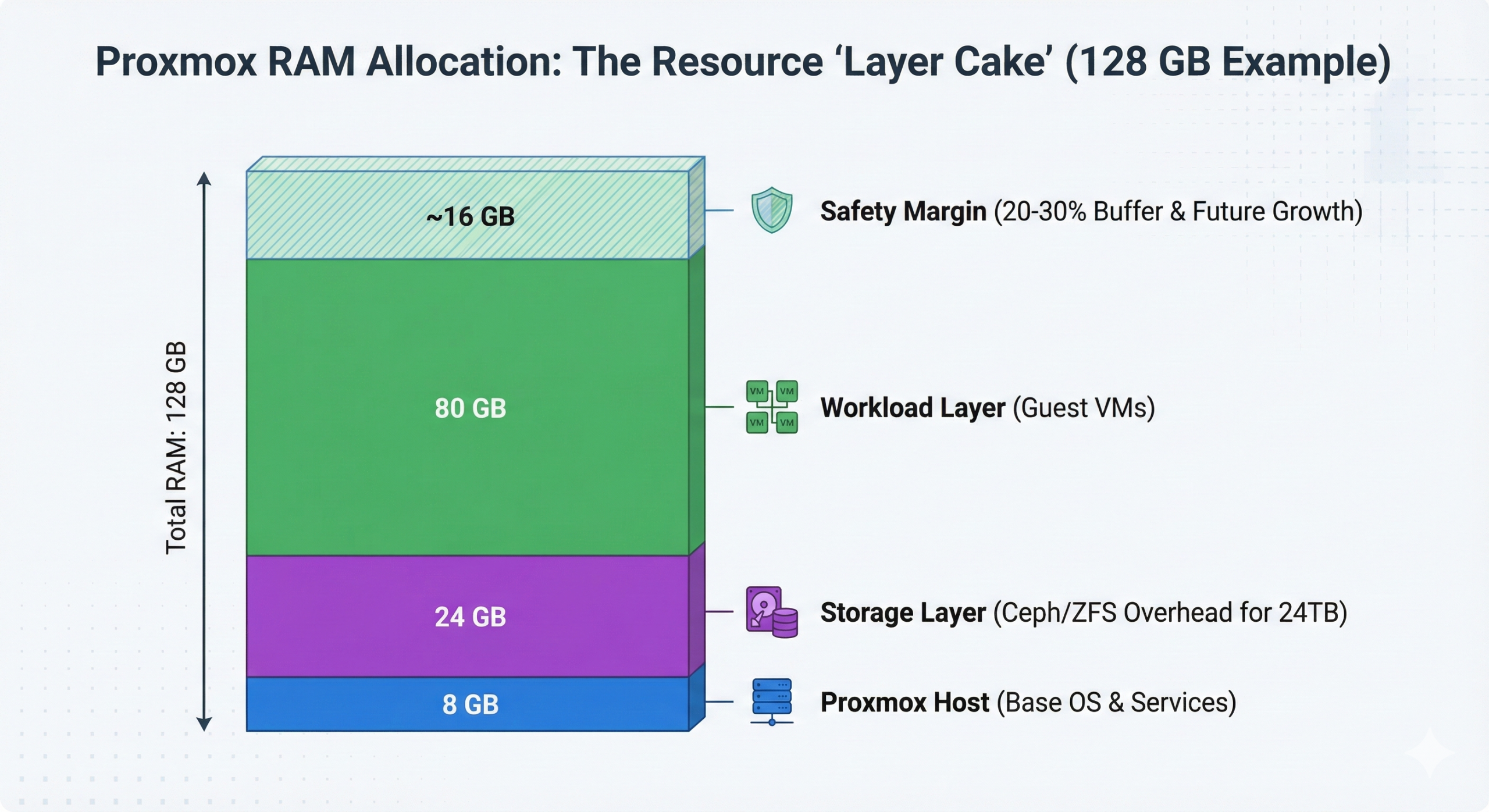
RAM requirements scale with three factors: Proxmox itself, guest VMs, and storage backend.
Base allocation:
- Proxmox host: 4-8 GB
- ZFS/Ceph storage: 1 GB per TB of storage capacity
- Guest VMs: Sum of all allocated VM memory
Example: A host with 24 TB of Ceph storage running 10 VMs (8 GB each) needs minimum 112 GB RAM (8 GB host + 24 GB storage + 80 GB VMs). Production deployments should add 20-30% overhead.
Use ECC memory for production environments. Non-ECC RAM experiencing bit errors can corrupt storage or cause silent data corruption. For compliance-driven workloads (HIPAA, PCI-DSS), ECC RAM is not optional.
Storage Configuration
Storage architecture directly impacts migration success. You have several approaches:
Local storage with hardware RAID: Traditional hardware RAID controllers with battery-backed write cache (BBU) work well for VM storage. This approach mirrors many VMware vSAN configurations. Use enterprise SSDs with power-loss protection (PLP), not consumer drives.
ZFS storage (software-defined): ZFS provides data integrity checking, snapshots, and compression without hardware RAID controllers. ZFS is not compatible with hardware RAID controllers. Requirements: 1 GB RAM per TB of storage, enterprise SSDs with PLP recommended.
Ceph distributed storage: For clusters of three or more nodes, Ceph provides distributed block storage similar to VMware vSAN. Ceph creates shared storage across nodes with automatic replication and self-healing. Requirements: Minimum three nodes, dedicated high-speed network for storage traffic, significant memory allocation.
Which to choose? If migrating from VMware vSAN, Ceph provides a comparable architecture. For standalone hosts or two-node clusters, hardware RAID or ZFS work better.
Storage Performance Considerations
Your storage must match or exceed VMware performance. Key specifications:
- IOPS capability: Modern NVMe SSDs deliver 100,000+ IOPS. A single high-performance NVMe can saturate 10 Gbps networking.
- Latency: Ceph clusters should target sub-5ms latency for storage operations
- Throughput: Plan for sustained write performance during migration (moving VMs generates heavy I/O)
For hybrid storage (mixing SSD and HDD), tier hot data on SSDs and cold data on HDDs. Ceph supports cache tiering natively.
Network Architecture for Production Clusters
Network configuration determines cluster stability, storage performance, and migration speed. Proxmox clusters require careful network separation.
Separation by Traffic Type
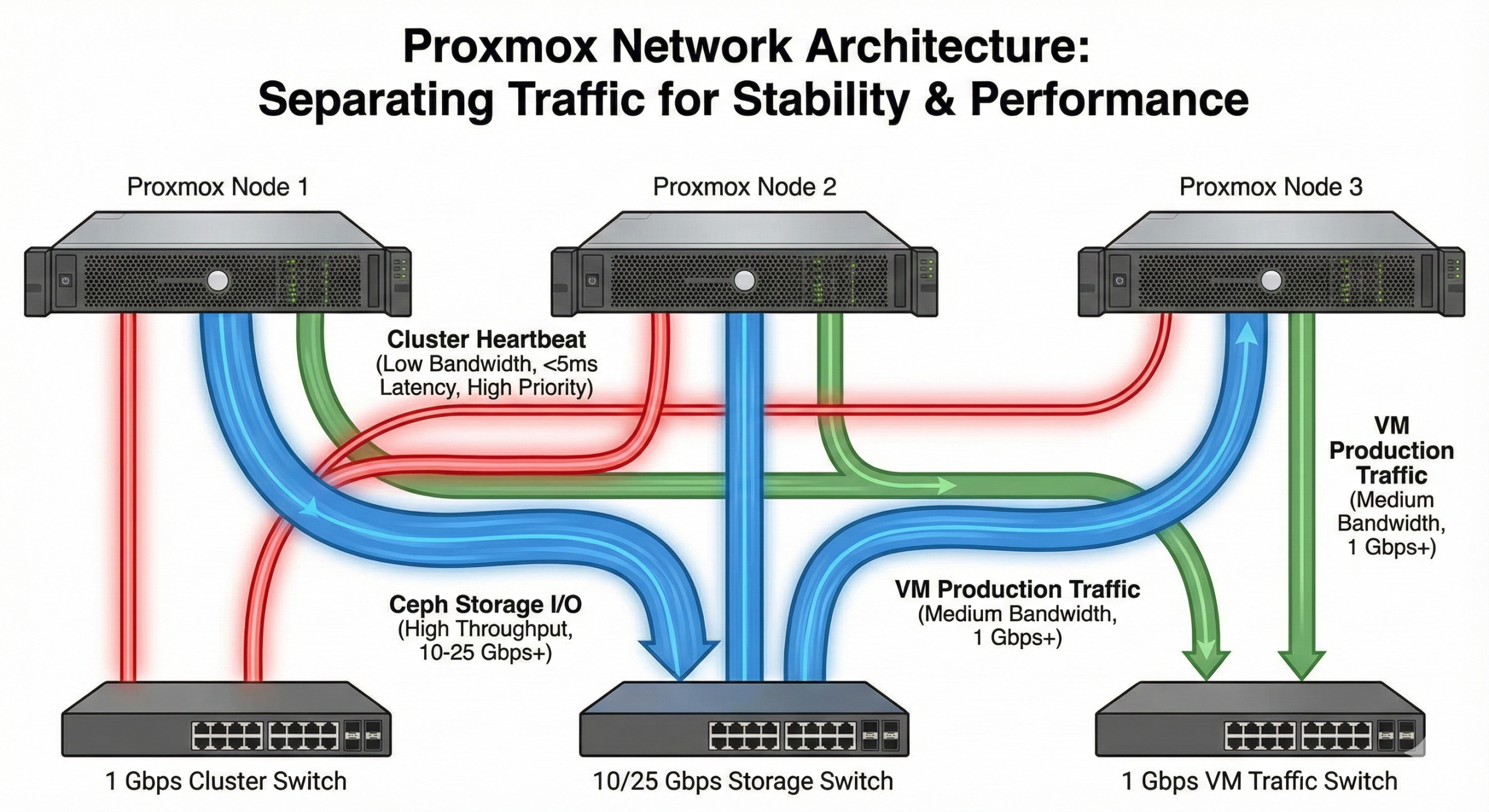
Production Proxmox clusters use physically separated networks:
Cluster network (corosync traffic) Proxmox cluster management uses corosync for maintaining cluster state. Corosync requires low latency (under 5ms) and stable connections. High latency or packet loss causes cluster instability.
Recommendation: Dedicated 1 Gbps network, not shared with other traffic. This network doesn’t need high bandwidth but must be reliable.
Ceph public network If using Ceph storage, this network carries VM-to-storage traffic. All VMs access their storage through this network.
Recommendation: 10 Gbps minimum. For NVMe-backed Ceph, consider 25 Gbps or higher. Heavy storage I/O will saturate 10 Gbps quickly.
Ceph cluster network (optional) Separate network for Ceph OSD replication and heartbeat traffic. This reduces load on the public network and improves performance in large clusters.
Recommendation: Same speed as Ceph public network. Only needed for clusters with heavy storage rebalancing or large OSD counts.
VM/management network Production traffic, management interfaces, and external connectivity.
Recommendation: 1 Gbps typically sufficient for management. VLANs can segment different VM networks.
Example Three-Node Configuration
A practical three-node cluster might use:
- 2x 1 Gbps NICs: Bonded for management and corosync (with redundancy)
- 2x 10 Gbps NICs: Bonded for Ceph public and cluster networks
- Optional: Additional NICs for VM production traffic on separate VLANs
Network redundancy matters. Bond interfaces where possible, and configure corosync with multiple rings for failover.
Migration Network Considerations
During migration, network bandwidth determines how quickly you can move VMs. A 1 TB VM migrating over 10 Gbps network takes approximately 15-20 minutes. Over 1 Gbps, the same VM takes 2-3 hours.
If your VMware environment and Proxmox cluster share network infrastructure, migration can happen over existing links. For large migrations (dozens or hundreds of VMs), dedicated migration VLANs prevent impacting production traffic.
Deployment Architecture Options
You have several options for deploying Proxmox infrastructure for a VMware migration.
Self-Managed On-Premises
Purchase and install servers in your own data center. You maintain physical control, but you’re responsible for:
- Hardware procurement and installation
- Network configuration
- Power and cooling
- Hardware replacement when failures occur
This works well if you already have data center space and staff to manage hardware.
Colocation
Place your hardware in a third-party data center. The colo provider handles power, cooling, and physical security. You maintain remote management through IPMI/iDRAC and handle OS and application layers.
Benefit: Professional data center environment without building one yourself. You still purchase and manage hardware.
Bare Metal Hosting
Lease dedicated servers from a provider. You get root access and full control over the OS, but the provider owns and maintains the physical hardware.
OpenMetal’s bare metal servers provide an option here. You deploy Proxmox on dedicated hardware with:
- Full root access via IPMI for OS installation
- Dedicated hardware (no noisy neighbors)
- Private networking between servers for cluster traffic
- Fixed monthly costs without per-VM licensing
The advantage: You avoid hardware capital expenses and data center management while maintaining full control over the Proxmox layer. If a disk or power supply fails, the provider handles replacement.
Hardware Sizing by Migration Scale
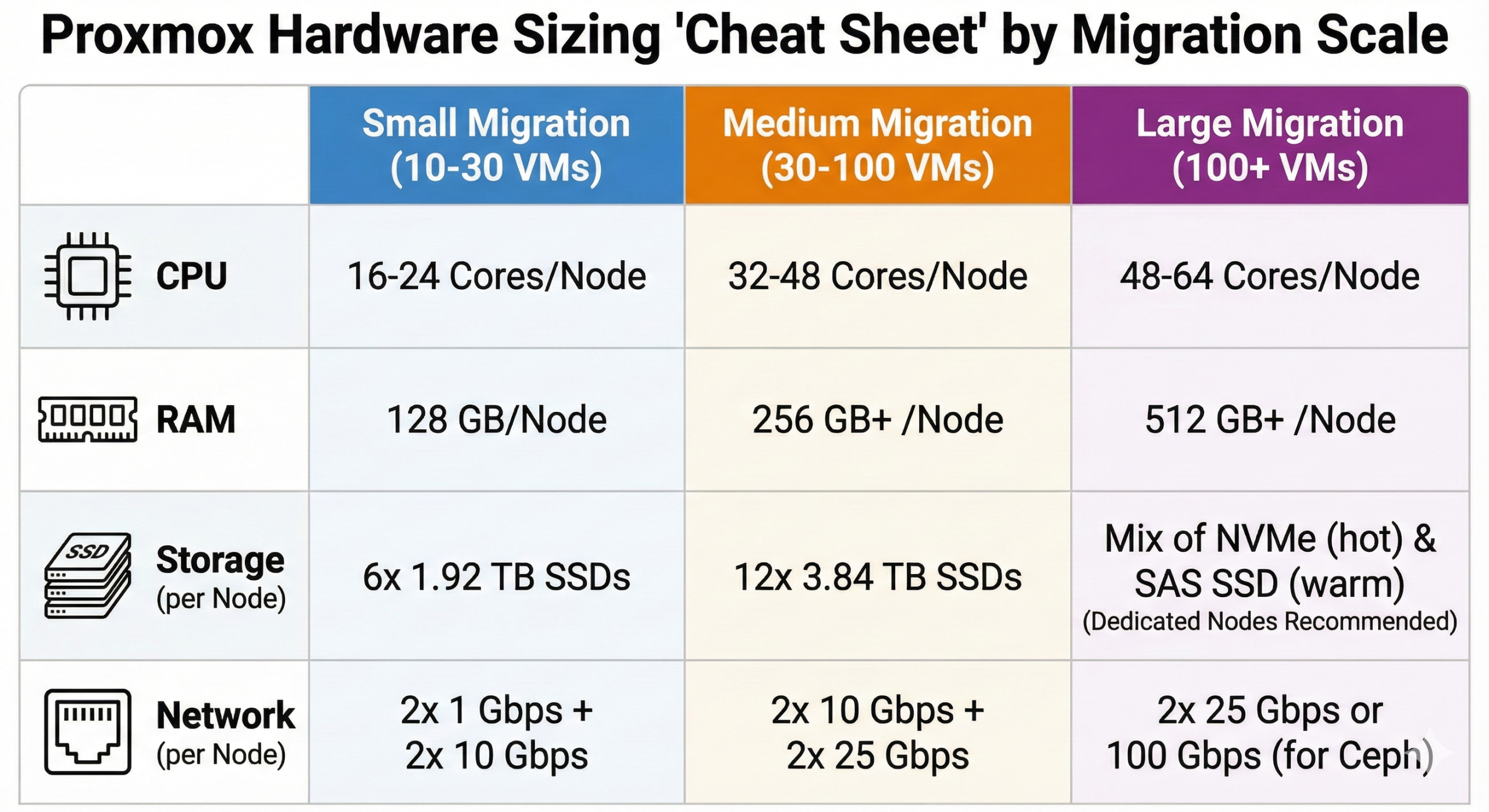
Here’s practical sizing guidance based on migration scope:
Small Migration (10-30 VMs)
Three-node cluster:
- CPU: 16-24 cores per node
- RAM: 128 GB per node
- Storage: 6x 1.92 TB SSDs per node (RAID or Ceph)
- Network: 2x 1 Gbps + 2x 10 Gbps per node
This configuration supports the VMs plus Proxmox and storage services. Ceph would provide approximately 15 TB usable capacity (accounting for 3x replication).
Medium Migration (30-100 VMs)
Three-node cluster:
- CPU: 32-48 cores per node
- RAM: 256-384 GB per node
- Storage: 12x 3.84 TB SSDs per node
- Network: 2x 10 Gbps + 2x 25 Gbps per node
Higher core count and memory support more concurrent VMs. Additional storage capacity and faster networking handle increased I/O demands.
Large Migration (100+ VMs)
Five+ node cluster:
- CPU: 48-64 cores per node
- RAM: 512 GB+ per node
- Storage: Mix of NVMe (hot data) and SAS SSD (warm data)
- Network: 2x 25 Gbps or 100 Gbps for Ceph traffic
At this scale, consider dedicated storage nodes vs hyperconverged. Dedicated storage nodes run only Ceph OSDs, while compute nodes run only VMs. This separation provides better performance tuning.
Testing Infrastructure Before Migration
Before moving production VMs, validate that your Proxmox infrastructure meets performance requirements.
Performance Benchmarking
Run pveperf on each node to get baseline metrics. Compare results across nodes to ensure consistency.
For storage, use fio or other I/O testing tools:
fio --name=random-write --ioengine=libaio --iodepth=32 --rw=randwrite --bs=4k --direct=1 --size=1G --numjobs=4 --runtime=60 --group_reportingTest both sequential and random I/O patterns. Results should match or exceed your VMware environment’s storage performance.
Cluster Stability Testing
Simulate failures to verify cluster behavior:
- Disconnect network cables to test failover
- Reboot nodes to test HA functionality
- Generate heavy network traffic to verify corosync stability
Proxmox should maintain cluster quorum and automatically restart VMs on surviving nodes during node failures.
Pilot Migration
Choose 3-5 non-critical VMs for a pilot migration. These should represent different workload types (Windows, Linux, database, application servers).
Migrate the pilot VMs using Proxmox’s import wizard or manual conversion. Monitor:
- Migration duration (network throughput)
- Post-migration performance (CPU, RAM, I/O)
- Application functionality after boot
- Guest tools and driver changes needed
Document any issues and adjust your migration plan before tackling production workloads.
Migration Tooling Requirements
Proxmox 8.2+ includes a built-in import wizard that connects to VMware ESXi and migrates VMs. Requirements:
- ESXi 6.5 – 8.0 (source environment)
- Proxmox VE 8.0+ (target environment)
- Network connectivity between VMware and Proxmox clusters
The wizard handles disk conversion (VMDK to raw or qcow2) and creates appropriate VM configurations. For VMs with special requirements (vTPM, certain storage controllers), manual migration might be needed.
Alternative approach: Export VMDKs from VMware, transfer to Proxmox storage, manually import. This works for any VMware version but requires more steps.
Storage Backend Selection
Your storage choice impacts migration complexity and post-migration performance.
Local Storage Scenarios
If each Proxmox node uses local storage (not shared), VMs are tied to specific nodes. Live migration between nodes requires copying VM storage, which takes time.
This works fine for:
- Standalone hosts
- Two-node clusters
- Workloads that don’t require frequent migration between hosts
Shared Storage Scenarios
Ceph or other shared storage allows live migration (moving running VMs between nodes without downtime). The VM’s storage remains accessible from any node.
Shared storage makes sense for:
- Clusters with 3+ nodes
- Workloads requiring high availability
- Environments needing frequent rebalancing
Shared storage adds complexity (network configuration, Ceph management) but provides VMware-like live migration capabilities.
Network Configuration Details
Each Proxmox node needs /etc/network/interfaces configured to support multiple networks. Example configuration for a three-network setup:
auto vmbr0
iface vmbr0 inet static
    address 10.0.1.10/24
    gateway 10.0.1.1
    bridge-ports eno1
    bridge-stp off
    bridge-fd 0
    # Management network

auto vmbr1
iface vmbr1 inet static
    address 10.0.10.10/24
    bridge-ports eno2
    bridge-stp off
    bridge-fd 0
    # Corosync cluster network

auto vmbr2
iface vmbr2 inet static
    address 10.0.20.10/24
    bridge-ports eno3
    bridge-stp off
    bridge-fd 0
    # Ceph public network
For bonded interfaces (redundancy), replace single NICs with bond interfaces:
auto bond0
iface bond0 inet manual
    bond-slaves eno1 eno2
    bond-mode 802.3ad
    bond-miimon 100
    bond-xmit-hash-policy layer3+4
Network configuration varies by deployment. The key principle: separate traffic types to prevent interference.
Deployment Timeline Considerations
Infrastructure deployment takes time. Budget accordingly:
- Hardware procurement: 2-4 weeks (if buying)
- Bare metal provisioning: 1-3 days (if leasing)
- Network configuration: 2-3 days
- Storage cluster setup: 1-2 days
- Testing and validation: 1 week
- Pilot migration: 1 week
- Production migration: Varies by VM count
Realistic timeline for medium migration: 6-8 weeks from hardware order to production cutover.
Using pre-provisioned bare metal infrastructure compresses the timeline by eliminating hardware procurement and physical setup.
Cost Considerations
Infrastructure costs vary by deployment model:
Self-managed on-premises:
- Capital: Server hardware ($8,000-$15,000 per node)
- Operational: Power, cooling, network, staff time
- No software licensing fees (Proxmox is open source)
Bare metal hosting:
- Operational: Fixed monthly per server ($500-$2,000+ depending on specs)
- No capital expenses
- No software licensing fees
- Provider handles hardware replacement
Comparison point: VMware vSphere with vSAN licensing can cost $3,000-$6,000 per processor per year in subscription fees. Proxmox eliminates these costs entirely.
For a three-node cluster, eliminating VMware licensing often saves $20,000-$40,000 annually. These savings offset bare metal hosting costs or pay for hardware purchases within 12-18 months.
Infrastructure Monitoring and Management
Post-migration, you need visibility into infrastructure health:
- Proxmox web UI provides cluster-wide monitoring
- Ceph dashboard shows storage cluster status
- External monitoring (Prometheus, Grafana) can track historical metrics
Set up alerts for:
- Cluster membership changes
- High storage utilization (>80%)
- Ceph health warnings
- High CPU/memory usage
Regular infrastructure maintenance includes:
- Proxmox updates (monthly)
- Ceph version upgrades (quarterly)
- Hardware firmware updates (as needed)
- Log rotation and cleanup
Getting Started
If you’re planning a VMware to Proxmox migration, start by:
- Auditing your current VMware environment (VM count, storage usage, network configuration)
- Determining performance requirements (IOPS, throughput, memory)
- Choosing deployment model (on-premises, colo, bare metal hosting)
- Sizing hardware based on workload needs
- Setting up a test environment for pilot migration
The infrastructure decisions you make now determine whether your migration succeeds. Take time to size appropriately, separate networks correctly, and test thoroughly before migrating production workloads.
OpenMetal Infrastructure Options
OpenMetal provides bare metal servers suitable for Proxmox deployments, with hardware ranging from general-purpose configurations to high-memory and storage-optimized systems. All bare metal servers include:
- Full root access via IPMI for OS installation
- Dedicated VLANs for private networking between servers
- Fixed monthly pricing with no per-VM licensing
- 95th percentile bandwidth billing
For organizations wanting to eliminate VMware licensing costs while maintaining enterprise features, Proxmox on dedicated bare metal provides a cost-effective path. You get the control of on-premises infrastructure without the data center overhead.
Ready to explore infrastructure options for your VMware migration? Learn more about OpenMetal’s bare metal offerings or schedule a consultation to discuss your specific requirements. Read more about choosing between hardware generations for your deployment.
Schedule a Consultation
Get a deeper assessment and discuss your unique requirements.
Read More on the OpenMetal Blog