



























In this article
Public cloud pricing looks straightforward until your first real bill arrives. This guide breaks down the hidden costs that most organizations don’t anticipate: data transfer and egress fees, inter-region charges, idle resource waste, free tier traps, API call fees, storage retrieval penalties, licensing add-ons, and the problem of vendor lock-in. It also explains how private cloud infrastructure with transparent, fixed-cost pricing can eliminate most of them entirely.
You signed up for a cloud service because the pricing looked reasonable. A few cents per GB here, a small hourly rate there. Then the bill arrived.
If that experience sounds familiar, you’re not alone. According to a 2025 survey by Backblaze, nearly 95% of IT leaders have encountered unexpected cloud charges that disrupted budgets, slowed projects, or restricted how their organization could operate. This isn’t a niche problem. It’s endemic to the way public cloud providers are structured. Their billing systems weren’t designed to make costs easy to understand. They were designed to report usage after the fact, often in ways that make it nearly impossible to forecast spend accurately until something goes wrong.
This guide breaks down the most common hidden costs in cloud computing, explains why they catch organizations off guard, and shows you what to look for when evaluating infrastructure options, including what a more transparent alternative actually looks like.
Why Cloud Bills Are So Hard to Predict
Public cloud providers operate on pay-as-you-go pricing, which sounds consumer-friendly in theory. In practice, it means costs are dynamic, metered at a granular level, and spread across dozens of interacting services: compute, storage, networking, managed services, monitoring, support, and more. Each of those categories has its own pricing model, its own tiers, and its own set of caveats.
The result is that an organization might budget accurately for compute and storage, then get blindsided by data transfer charges, orphaned resources, or a managed service that kept running after a project ended. The charges aren’t always errors. They’re often the intended outcome of a pricing structure that rewards complexity.
Here are the most common culprits.
1. Egress and Data Transfer Fees
This is the one that surprises organizations the most, and for good reason: it’s actively obscured in how cloud providers present their pricing.
Egress refers to data leaving a cloud provider’s network. That includes delivering content to end users, sending data to another cloud provider, syncing with an on-premises system, or moving data between regions within the same provider. Uploading data (ingress) is typically free. Getting your data out is where the meter starts running.
Egress fees can represent 10 to 15 percent of total cloud costs, and significantly more for data-heavy workloads. AWS, Azure, and Google Cloud all charge in the range of $0.08 to $0.09 per GB for internet egress after a small free tier. On its own, that sounds manageable. At scale, it isn’t. One team serving 75 TB per month found themselves paying over $6,700 per month in egress alone for just 5,000 users. Another developer posted about a $1,300 Azure bandwidth bill that appeared with no prior warning.
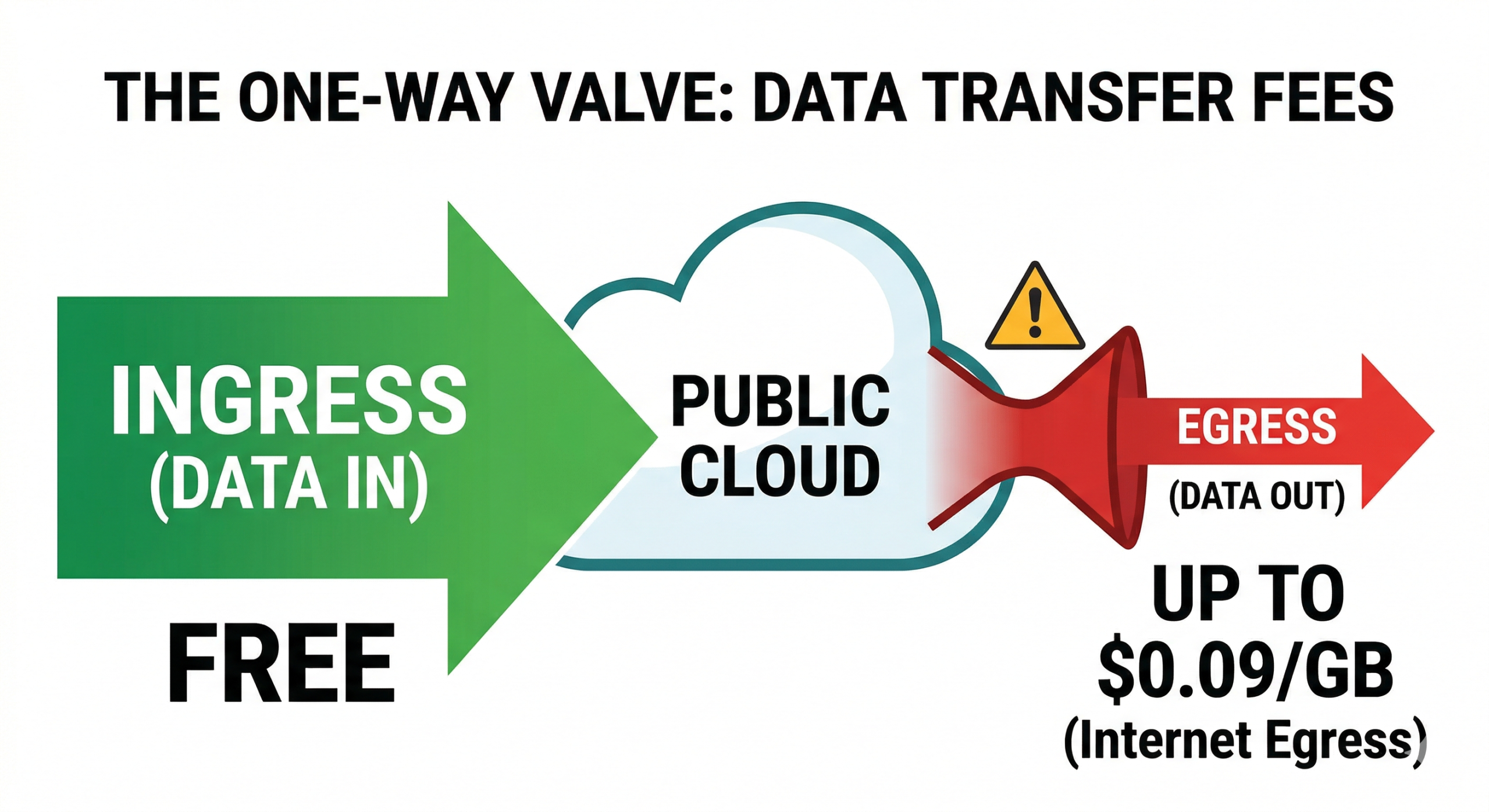
What makes egress fees especially damaging is that they also function as a lock-in mechanism. If you decide to move workloads to a different provider or repatriate infrastructure on-premises, you’ll pay egress charges on every gigabyte you transfer out. Surveys consistently show that a majority of IT leaders identify egress costs as the single largest barrier to switching cloud providers. Not technical complexity, but the financial penalty of leaving.
2. Inter-Region and Inter-Availability Zone Transfer Charges
Most people understand that moving data out to the internet costs money. What catches organizations off guard is that data movement within a single provider’s network also incurs charges.
On AWS, data transferred between Availability Zones in the same region is billed at per-GB rates in both directions. For applications designed with redundancy in mind (which means almost any production workload), data flows between zones constantly. A database in one AZ talking to an application server in another, a load balancer distributing traffic, automated backups replicating across zones: all of it generates charges.
Multi-region deployments compound this further. Architectures built for global availability or disaster recovery can easily double or triple egress volumes, since every replication event, every sync, and every cross-region API call is metered. Teams that designed their infrastructure for resilience often discover they’ve inadvertently designed for a much higher bill.
NAT Gateways on AWS are a frequently cited version of this problem. Every EC2 instance in a private subnet that needs internet access routes traffic through a NAT Gateway, and AWS charges both an hourly rate for running the gateway and a per-GB processing fee on every byte it handles. For workloads that pull updates, phone home to services, or regularly sync with external APIs, NAT Gateway charges can climb into the thousands before anyone notices.
3. Idle and Orphaned Resources
One of the structural problems with cloud infrastructure is that resources are easy to create and rarely get actively decommissioned. A developer spins up a test environment, finishes the project, and moves on. The environment keeps running. A team provisions a load balancer for a service that gets deprecated. The load balancer keeps billing hourly. An Elastic IP address gets attached to an EC2 instance, then the instance gets terminated, but the IP stays allocated and generates charges for doing nothing.
FinOps research consistently shows that between 30 and 40 percent of cloud resources in production environments are either idle or significantly overprovisioned. A 2025 VMware survey of over 1,800 global IT leaders found that nearly half believed more than 25 percent of their public cloud spending was wasted.
“Zombie workloads” are a particularly stubborn version of this problem. These are applications that continue running after the project or the person who owned them is gone. Because they’re not failing, they don’t generate alerts. They just quietly accumulate charges, often for months, until someone runs a cost audit and finds them.
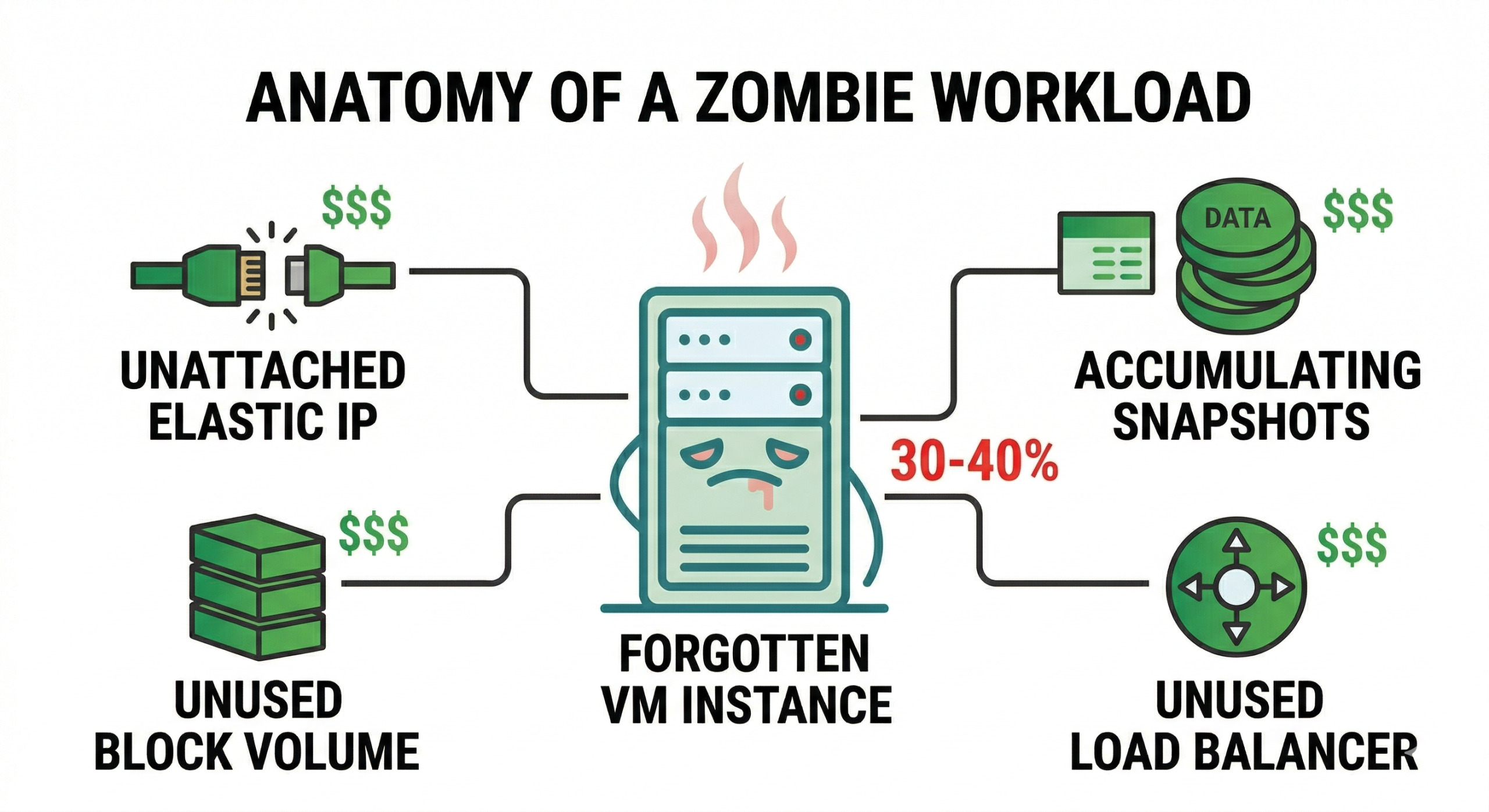
The challenge isn’t that teams are careless. It’s that cloud environments make it structurally easy for waste to accumulate, and most billing systems don’t surface it until it’s already happened.
4. Free Tier Expiration
Free tiers are how cloud providers get new users onto their platforms, and they can be genuinely useful for experimentation and development. But they come with time limits and usage caps that are easy to forget, especially when the services they cover are running quietly in the background.
AWS’s free tier provides 12 months of limited access to certain services. After that period, standard charges apply automatically. For someone running a side project or a startup’s early infrastructure, the transition from free to paid can arrive as a sudden, unexplained spike on the next billing cycle.
The free tier also covers only specific usage levels. Exceed the monthly caps on API calls, storage, or data transfer, and per-unit charges kick in mid-month. Users who assume free means unlimited often discover otherwise only when their bill arrives.
5. API Call and Request Fees
Every interaction with certain cloud services generates an API call, and those calls are billed by volume. S3, for example, charges separately for PUT, COPY, POST, and LIST requests versus GET and SELECT requests. At low volumes, these charges are negligible. For applications that interact with object storage frequently (logging pipelines, media platforms, analytics systems, microservices that pull configuration data), request fees accumulate at a rate that’s very difficult to predict from the outside.
High-frequency microservice architectures are particularly exposed. Each service call across an application generates billable requests, and in distributed systems with hundreds of services, the aggregate volume can be substantial. Teams focused on compute and storage costs often don’t budget for request fees at all, then encounter them as a significant line item once systems are in production.
6. Storage Retrieval and Archive Penalties
Cloud providers offer significant storage cost reductions through archive tiers: AWS Glacier, Azure Archive Storage, Google Coldline. These can cut per-GB storage costs by 90 percent or more compared to standard tiers. The catch is retrieval.
Retrieving data from archive tiers costs money, sometimes a great deal of it, and takes time. AWS Glacier Deep Archive charges $0.02 per GB for retrieval on top of standard transfer fees. Azure Archive imposes early deletion fees if data is removed before a minimum storage duration has passed. These terms are documented, but they’re buried in pricing pages that most teams review once during initial setup and not again.
For disaster recovery architectures, where the entire value proposition is being able to get data back quickly, archive retrieval costs can undermine the economics of the whole approach. When you actually need that data, you’ll pay premium retrieval rates on top of whatever egress charges apply. If you’re evaluating DR infrastructure options, it’s worth reading through how OpenMetal approaches cost-efficient infrastructure as a fixed-cost alternative.
7. Licensing Fees on Top of Compute
When you run workloads in the cloud, the infrastructure cost is only part of what you’re paying. Commercial operating systems and enterprise software carry licensing fees that layer on top of your compute and storage bills. Running Windows Server on AWS or Azure means paying Microsoft licensing costs in addition to the instance price. Enterprise databases like SQL Server or Oracle carry their own licensing, often calculated per vCPU, which means larger instances translate to higher license costs in ways that aren’t always obvious upfront.
These fees are real and legitimate, but they frequently catch teams off guard when migrating workloads that previously ran in an environment where licensing was already accounted for in a flat enterprise agreement. In the cloud, every instance starts a new billing relationship with the software vendor.
Open source infrastructure sidesteps a significant portion of this. OpenMetal uses open source technology throughout its platform: OpenStack for compute and orchestration, Ceph for storage. There areno per-VM or per-resource license fees, and Datadog for hardware node monitoring is included in the cloud price. That’s a meaningful cost advantage at scale, particularly for organizations running large numbers of instances.
8. Overprovisioning and the Cost of “Just to Be Safe”
Engineering teams provision cloud resources by estimating peak demand and adding a safety margin. In traditional infrastructure, that’s good practice. In the cloud, where you’re billed for every unit you provision regardless of whether it’s used, that margin costs money every hour.
Over time, overprovisioned infrastructure compounds. The instance size chosen for initial deployment never gets reviewed. New services get added without retiring old ones. Reserved instances get purchased to optimize costs, then underutilized when workloads change. Industry data suggests that the majority of organizations could reduce provisioned capacity by 40 to 50 percent without any performance impact. They’re simply paying for resources that sit at low utilization around the clock.
Rightsizing is the process of matching provisioned capacity to actual workload requirements, and it’s one of the highest-ROI activities in cloud cost management. But it requires visibility into real utilization patterns and the organizational discipline to act on them regularly.
9. Vendor Lock-In as a Hidden Long-Term Cost
Most of the hidden costs discussed above are line items on a bill. Vendor lock-in is different. It’s a structural cost that compounds over time and constrains strategic decisions without ever appearing in a monthly statement.
When your architecture is tightly coupled to a specific provider’s managed services, proprietary APIs, and region-specific infrastructure, the cost of switching becomes prohibitive. Egress fees are part of that: moving petabytes of data off a major public cloud means facing very large transfer bills. But the lock-in goes deeper. Teams build expertise around specific tools, write code integrations against proprietary APIs, and design workflows that assume a particular provider’s behavior. Over years, the switching cost grows to the point where “stay because it’s cheaper than leaving” becomes a real factor in infrastructure decisions.
This is not an accident. It’s a deliberate feature of how public cloud pricing and service design work. Organizations exploring alternatives, whether that’s repatriating to a public cloud alternative, evaluating managed private cloud options, or planning a large-scale cloud migration, should factor exit costs explicitly into any TCO analysis before committing to a multi-year architecture.
What Transparent Pricing Actually Looks Like
The issues above aren’t inevitable features of cloud infrastructure. They’re specific to how large public cloud providers have chosen to structure their billing. Private cloud infrastructure designed around predictable, fixed-cost pricing removes most of these problems by construction.
OpenMetal’s hosted private cloud operates on a fundamentally different model. Instead of metering every resource interaction and billing per-GB for data movement, OpenMetal includes substantial egress allocation with each hardware deployment. A three-server Large V4 cluster, for example, includes approximately 920 TB of egress per month at no additional charge. The egress calculator makes the difference concrete: 500 TB of outbound transfer that would cost $22,500 per month on a traditional public cloud costs $0.00 on an equivalently sized OpenMetal deployment.
For usage that exceeds included allotments, OpenMetal bills by the megabit at the 95th percentile rather than per GB. This approach smooths out bursting so that short traffic spikes don’t generate disproportionate charges, and it gives teams a more predictable cost baseline. The 95th percentile model has a practical advantage: if your month is trending over budget halfway through, you can reduce usage and bring your average down. Per-GB billing offers no such correction.
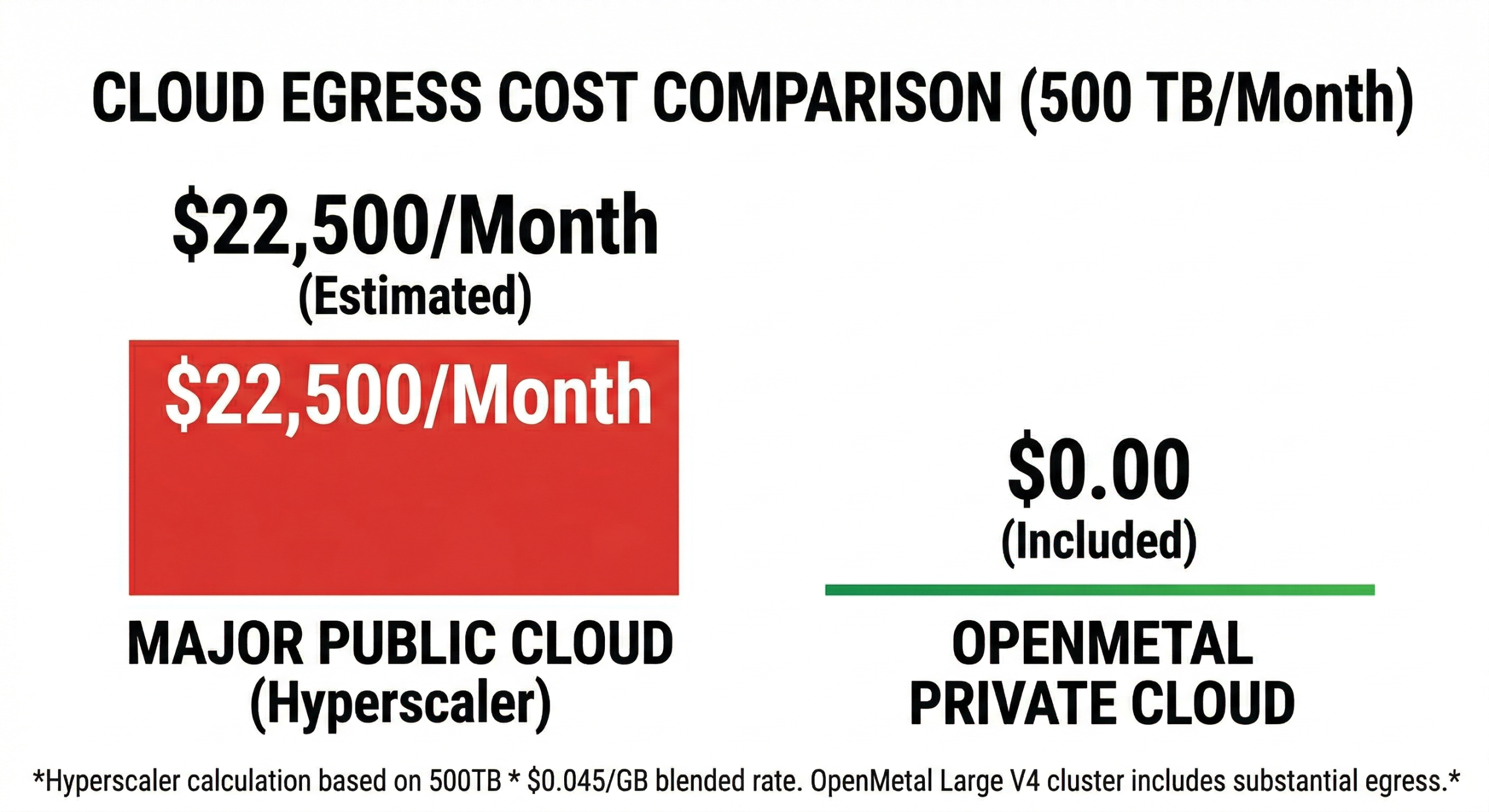
OpenMetal also uses open source technology throughout: OpenStack for compute and orchestration, Ceph for storage. That means no per-VM license fees, no per-resource software charges, and no licensing agreements that scale with your instance count. Datadog for hardware node monitoring is included in the cloud price. The pricing model is hardware-based and fixed, not consumption-metered across dozens of service categories.
Intra-cluster transfer is free. There are no inter-AZ fees, no cross-service data movement charges, and no NAT Gateway equivalents billing by the byte. The cost of moving data within your infrastructure is zero.
Budget controls are built into the platform as well. Administrators set maximum daily costs at the cloud project level, and the system enforces them before resources are provisioned, not after the bill arrives. That’s a meaningful structural difference from providers where budget alerts are advisory and overruns still get charged.
How to Evaluate Any Cloud Provider Before You Commit
Whether you’re evaluating OpenMetal or any other provider, here’s what to look at before signing on.
Ask specifically about egress pricing. Not the headline rate, but the effective cost at your actual data volumes, including inter-region and inter-AZ transfers. Ask whether intra-cluster traffic is free or metered. Find out what happens to billing if you exceed your estimates and whether there are hard caps or only soft alerts.
Ask about licensing. If you run Windows, SQL Server, Oracle, or any other commercial software, understand how licensing is structured and whether it scales with instance size.
Ask about the free tier in detail. What expires after 12 months? What are the monthly usage caps, and what happens when you exceed them?
Ask about exit costs explicitly. If you decide to leave, how much will it cost to move your data out? What are the transfer rates, and is there a migration program or ramp pricing to avoid paying for two environments simultaneously?
And ask about the pricing model itself. Fixed-cost infrastructure removes the fundamental uncertainty of pay-as-you-go billing. When your monthly invoice matches what you budgeted, not as a best-case outcome but as a structural guarantee, cloud economics become genuinely predictable. If you’re ready to see what that looks like in practice, OpenMetal’s deployment calculator lets you scope hardware and pricing before you commit to anything.
The Bottom Line
The real cost of cloud services is almost always higher than the advertised price. Egress fees, inter-zone transfer charges, idle resources, archive retrieval penalties, API call fees, licensing add-ons, and the compounding cost of vendor lock-in collectively push real-world bills significantly beyond what most organizations budget for. These aren’t edge cases. Nearly every organization running workloads at scale has encountered them.
The answer isn’t to avoid the cloud. It’s to understand exactly what you’re buying and evaluate providers against the actual cost drivers, not just the headline compute rates. Fixed-cost private cloud infrastructure designed from the ground up for pricing transparency addresses the structural source of most of these surprises. If you’re tired of being surprised by your bill, it’s worth seeing what a different model looks like.
Schedule a Consultation
Get a deeper assessment and discuss your unique requirements.
Read More on the OpenMetal Blog