



























In this article
This post breaks down what a vCPU actually is, why dedicated physical cores perform differently than the numbers on a cloud spec sheet suggest, and what that means when you’re comparing bare metal servers to AWS EC2 on price and performance.
When you’re evaluating infrastructure options, the spec sheets can look simple enough: cores, RAM, storage, price. But if you’re comparing a bare metal server to a cloud instance, you’re not looking at the same thing, even if the numbers appear similar on paper.
One of the most common questions we hear from prospective customers who are new to bare metal goes something like: “I can get 128 vCPUs on AWS for about $4,000 a month. You’re offering 64 cores for roughly the same price. Why would I choose fewer cores?”
It’s a reasonable question. The answer is that vCPUs and physical CPU cores are fundamentally different things, and understanding that difference will change how you make your infrastructure decision.
What is a vCPU, Really?
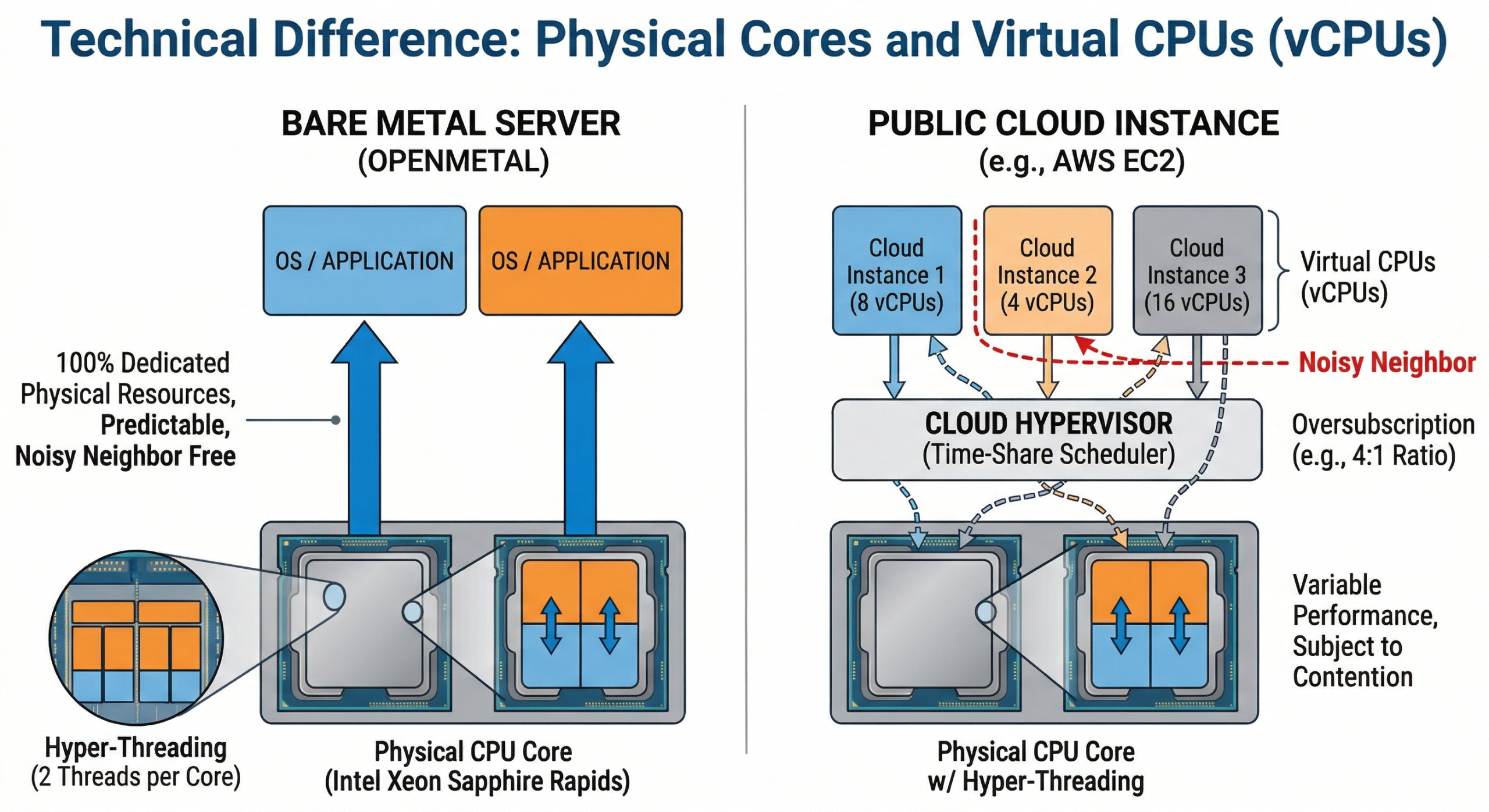
A vCPU (virtual CPU) is not a physical object. It’s a time-share on a physical CPU core, managed by a hypervisor. When a cloud provider provisions a VM with 8 vCPUs, what you’re actually getting is 8 scheduled execution slots that the hypervisor will fulfill using whatever physical cores happen to be available at that moment.
On most cloud platforms, 1 vCPU maps to 1 hyperthread of a physical core. Since modern Intel Xeon server CPUs use Hyper-Threading, which gives each physical core 2 logical threads, a 4 vCPU instance typically represents 2 physical cores. That’s a 2:1 ratio between vCPUs and real cores.
But the math gets more complicated from there. Cloud providers also oversubscribe their physical hardware. That means more vCPUs are allocated across running VMs than there are actual physical threads available. The assumption baked into this model is that not all workloads will demand full CPU resources simultaneously. For most web apps and stateless services, that assumption holds. For sustained, compute-intensive work such as databases, model inference, batch processing, and simulation, it doesn’t.
How Cloud Providers Use Oversubscription
Oversubscription is how cloud economics work. Providers sell more capacity than they physically have, relying on the fact that aggregate utilization stays well below 100%. This is fine for variable workloads, and it’s part of why cloud can be inexpensive for bursty use cases.
The problem is that when multiple tenants on the same physical host all spike CPU usage at the same time, they compete for real core time. This is the “noisy neighbor” problem. Your workload’s performance becomes partially dependent on what every other tenant on that server is doing at any given moment, and you have no visibility into or control over that.
Azure’s vCPU-to-core ratio is documented as 8:1 for many common VM sizes. That means one physical core is potentially serving 8 different vCPU allocations. AWS doesn’t publish its oversubscription ratios directly, though its Nitro hypervisor architecture is designed to minimize overhead. Even so, you’re still sharing a physical host with other tenants unless you specifically pay for dedicated tenancy, which costs significantly more.
On a bare metal server, there is no hypervisor overhead, no neighbor contention, and no oversubscription. Every core is yours.
Why More Cores on Older Hardware Can Be Misleading
This brings us to the second question we hear often: “I could get a server with more cores if I go with older hardware. Isn’t that better for highly parallel workloads?”
Raw core count is a useful number, but it tells you less than you might think. What matters more is what each core can actually do, and that’s changed substantially across CPU generations.
IPC: Instructions Per Clock Cycle
IPC (instructions per clock) is a measure of how much useful work a CPU core can complete in a single clock cycle. Intel’s 4th generation Xeon Scalable processors (Sapphire Rapids, which powers OpenMetal’s current XL High Frequency and Large v4 series) deliver roughly 15% more IPC than the previous Ice Lake generation, and significantly more compared to older Cascade Lake chips from several generations back. Across the full jump from 3rd to 4th gen Xeon, Intel measured a 43% improvement in integer performance, combining both higher core counts and better IPC.
In practice, this means a 16-core Sapphire Rapids chip can outperform a 24-core Ice Lake chip on many workloads. Fewer cores does not equal less performance when each core is substantially more capable.
Clock Speed and Memory Bandwidth Matter Too
OpenMetal’s XL v4 High Frequency servers pair dual Intel Xeon Gold 6544Y processors with a base/turbo of 3.6/4.1 GHz, the highest sustained clock speeds in the current catalog. Combined with DDR5 5200 MHz memory, these nodes deliver strong single-threaded and lightly threaded performance that older, higher-core-count hardware simply can’t match on a per-core basis.
For workloads that do need parallelism across many threads simultaneously, think MPI jobs, massive batch rendering, or certain scientific computing tasks, the XL v4 and XXL v4 configurations with dual Xeon Gold 6530 (64 physical cores, 128 threads total) give you both raw thread count and modern per-core performance.
What Actually Runs Faster: Concurrency vs. Parallelism
It’s worth drawing a distinction here that gets blurred in a lot of infrastructure conversations.
Parallelism means splitting a single task across multiple cores simultaneously. True parallel workloads scale with core count: scientific simulation, video encoding, some ML training jobs.
Concurrency means handling many independent tasks at the same time. Web servers, API gateways, and database query handling are concurrent workloads. These are often better served by faster per-core performance than by maximizing core count.
Most production workloads sit somewhere in between. Before you anchor on core count, the right question is: how does my actual application distribute work? Many applications, even ones described as “multi-threaded”, don’t saturate more than 8 to 16 cores under normal load. For those workloads, a server with 32 newer cores will consistently outperform one with 64 older cores.
What Dedicated Bare Metal CPU Actually Means
When you provision a bare metal dedicated server with OpenMetal, you’re getting exclusive access to every physical core on the machine. There’s no hypervisor consuming overhead, no neighboring tenants competing for memory bandwidth, and no scheduler deciding when your workload gets to run.
You can still run virtual machines on top of bare metal if you want to, using OpenStack, KVM, or another hypervisor of your choice. The difference is that you control the oversubscription ratio. If you want 1:1 vCPU-to-core allocation for your most demanding VMs, you can have that. If you want to oversubscribe less critical workloads to pack more VMs onto the hardware, you can do that too. The choice is yours, not the cloud provider’s.
This is a meaningful architectural advantage for workloads where predictable, sustained CPU performance matters: databases under heavy query load, real-time analytics pipelines, AI inference at scale, and any application where latency spikes directly impact user experience or business metrics.
A Real Comparison: OpenMetal Bare Metal vs. AWS EC2
Let’s put some real numbers next to each other. These are on-demand list prices as of early 2026; actual costs vary by region, commitment term, and data transfer. You can review our hardware catalog on our bare metal pricing page.
For a compute-heavy workload needing ~64 physical cores:
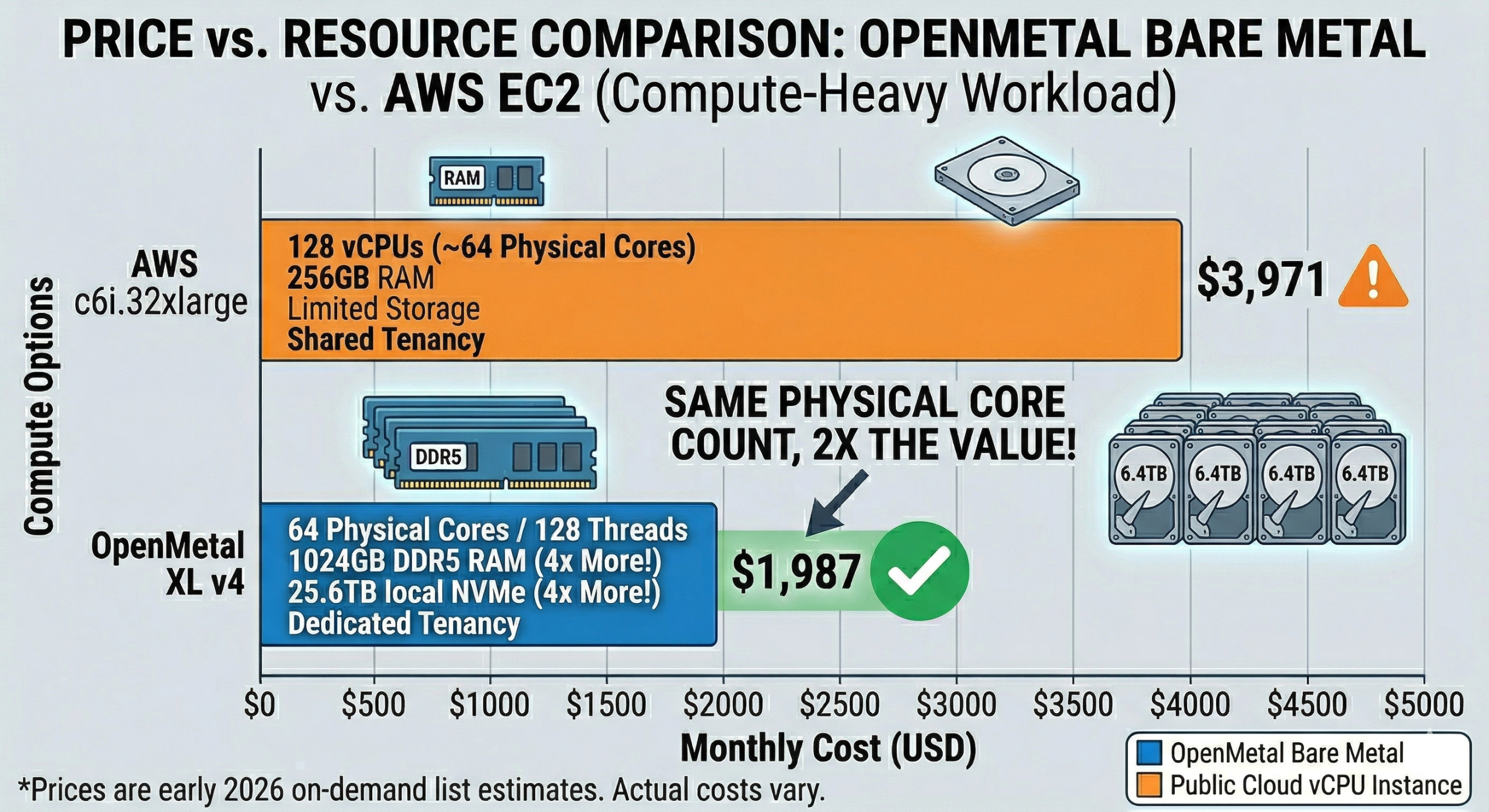
OpenMetal XL v4 (2x Intel Xeon Gold 6530, 64C/128T, 1024GB DDR5, 4x 6.4TB NVMe): $1,987/month (monthly, on-demand). These are dedicated physical cores with no oversubscription; every thread listed is yours.
AWS c6i.32xlarge (128 vCPUs, 256 GB RAM): $3,971/month (on-demand, us-east-1). Those 128 vCPUs map to 64 physical cores with Hyper-Threading, shared with other tenants. If you want dedicated tenancy to eliminate noisy neighbors, the price is higher still.
On paper, the AWS instance has “twice the vCPUs.” In practice, both options give you access to 64 physical cores worth of compute, but the OpenMetal configuration gives you those cores exclusively, on newer-generation hardware (Sapphire Rapids vs. the Ice Lake platform underlying the c6i family), at roughly half the monthly cost, and with over 4x the local NVMe storage included.
For a moderate workload needing ~24 physical cores:
OpenMetal Medium v4 (2x Intel Xeon Silver 4510, 24C/48T, 256GB DDR5, 6.4TB NVMe): $619/month. Dedicated cores, no shared tenancy, solid DDR5 memory.
AWS c6i.12xlarge (48 vCPUs / ~24 physical cores, 96 GB RAM): $1,489/month on-demand. Shared tenancy, less storage, considerably more expensive for equivalent physical compute.
One important note on the AWS comparison: AWS EC2 is a very flexible platform and it genuinely excels for variable, unpredictable, or short-lived workloads where you only need compute for hours at a time. If your usage is bursty or event-driven, the on-demand model can be cost-effective. Bare metal dedicated servers are a better fit for sustained, predictable workloads where you’re running infrastructure continuously. For a broader look at how OpenMetal stacks up against hyperscaler alternatives, see our compare OpenMetal page.
When Bare Metal Is the Right Choice (and When It Isn’t)
Bare metal dedicated CPU is a strong fit when:
- Your workloads run continuously and you can predict monthly resource consumption
- CPU performance needs to be consistent, not just on average, but consistent under sustained load
- You’re running databases, ML inference, real-time analytics, or latency-sensitive APIs
- You want to control your own virtualization layer, including oversubscription ratios, VM sizing, and resource allocation
- You need large amounts of local NVMe storage at predictable cost
- Fixed-cost infrastructure fits your budget planning model better than variable hourly billing
Public cloud vCPU instances may be a better fit when:
- Workloads are bursty, short-lived, or unpredictable in scale
- You need to spin infrastructure up and down frequently (dev/test environments, CI/CD pipelines)
- You need deep integration with provider-specific managed services (RDS, SageMaker, etc.)
- You need global footprint across dozens of regions with near-instant provisioning
Wrapping Up
When you see “128 vCPUs” on a cloud instance, you’re not looking at 128 dedicated CPU threads. You’re looking at 64 physical cores worth of compute, shared with other tenants, on hardware that may be several generations older than what’s available in a bare metal catalog, and priced at a significant premium for the flexibility that model provides.
Bare metal dedicated CPU means exactly what it says: the physical cores are yours, the performance is consistent, and you’re not bidding against your neighbors for clock cycles. It’s a straightforward advantage.
If you’d like to talk through your specific workload requirements and figure out which configuration makes sense, get in touch with our team.
Schedule a Consultation
Get a deeper assessment and discuss your unique requirements.
Read More on the OpenMetal Blog