



























In this article
If your AWS bill has crossed $20,000 a month and you’re wondering whether private cloud is worth the operational trade-off, this article gives you the technical specifics to find out. We cover how AWS services map to their OpenStack equivalents, how VPC networking translates to Neutron, what your data migration options look like, and what you’re realistically giving up when you leave AWS’s managed service ecosystem, with timeline estimates and two real customer case studies included.
There are plenty of blog posts that will tell you private cloud is cheaper than AWS. Fewer will tell you how to actually get there: which services map to what, how your VPC topology translates, what tools move your data, and what you’re giving up along the way.
This guide is for infrastructure and DevOps teams at companies spending $20,000 or more per month on AWS who are seriously evaluating whether to move some or all of their workloads to OpenMetal’s OpenStack-based private cloud. It won’t oversell the migration. But it will give you a clear picture of what the transition involves.
Why Teams Leave AWS at Scale
AWS is genuinely excellent infrastructure for early-stage companies. The on-demand model, the breadth of managed services, and the speed of provisioning are hard to beat when you’re iterating quickly and don’t know your workload patterns yet.
But the economics shift as you scale. Usage-based billing that once felt flexible starts generating unpredictable overruns. Data egress fees become a material line item. Reserved Instance commitments reduce flexibility. And at a certain point, you’re funding a platform that is itself a competitor to many of your customers, a dynamic that showed up repeatedly in the case studies we’ve seen.
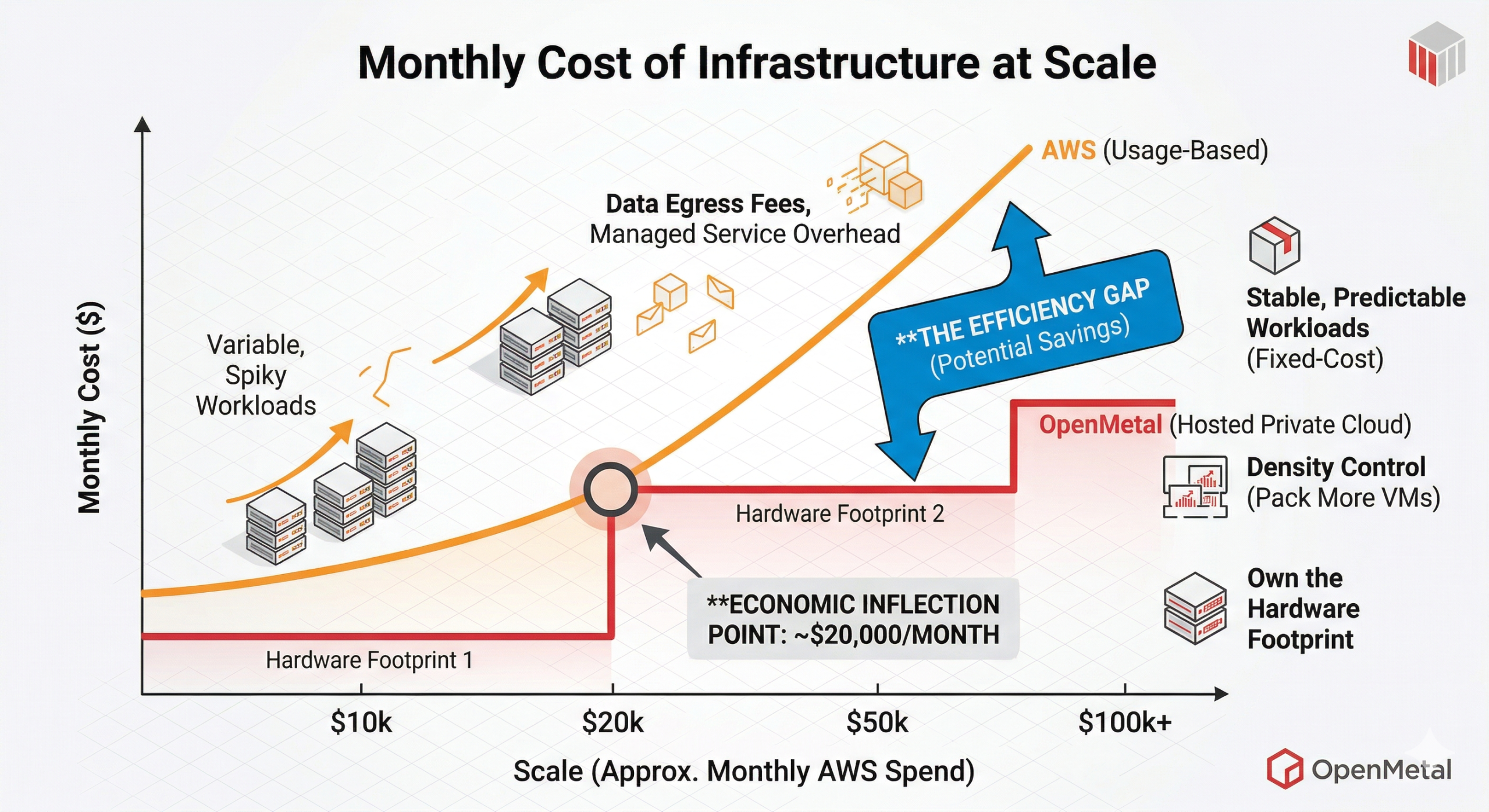
The companies that find the most value in migrating to OpenMetal’s hosted private cloud typically share a few traits: their workloads are relatively stable and predictable, they’re running containerized applications or standard VM-based services, their team has OpenStack familiarity or is willing to develop it, and their monthly AWS bill has passed the point where fixed-cost infrastructure starts to pencil out.
AWS to OpenStack Service Mapping
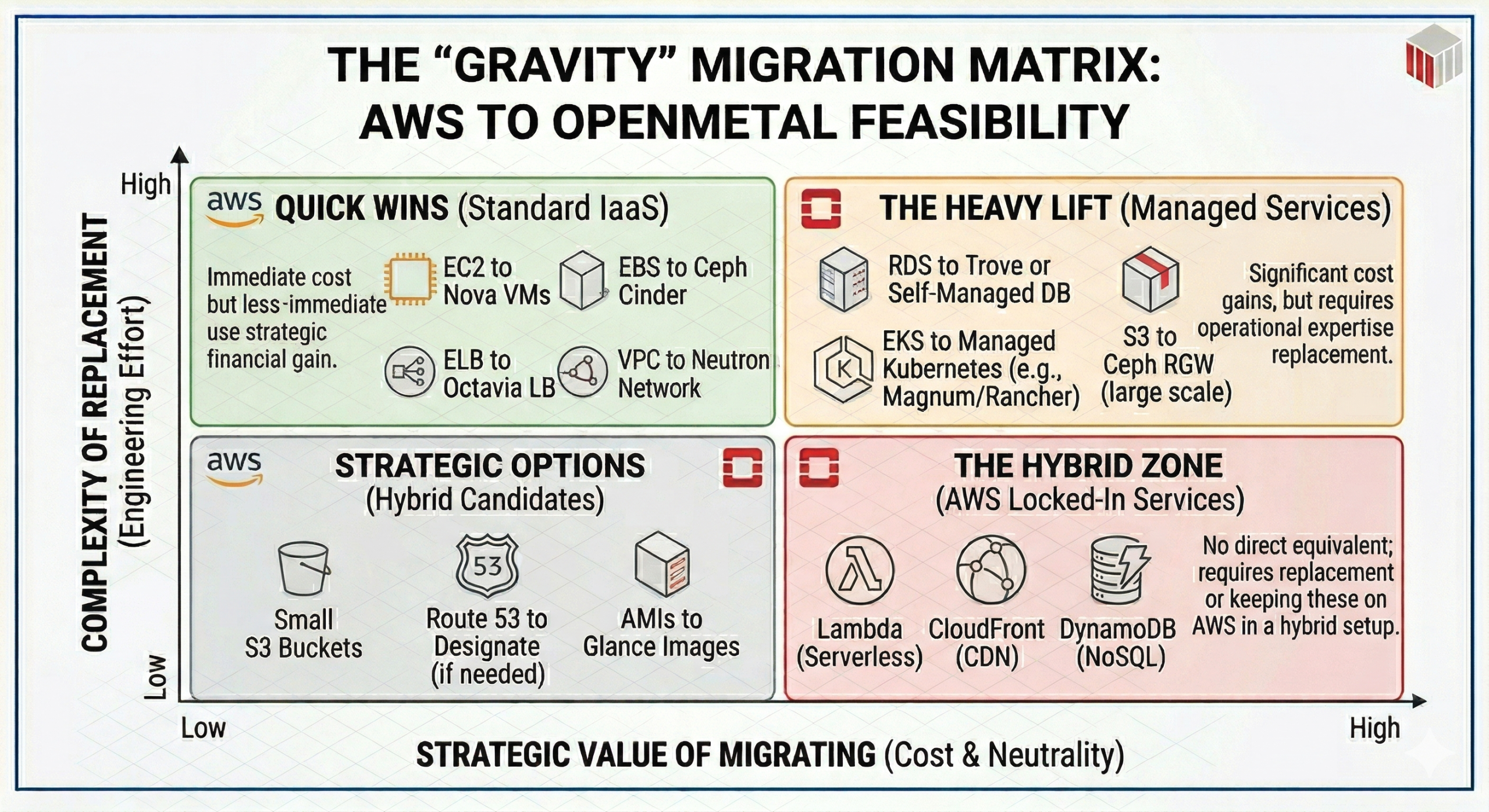
Before you can plan a migration, you need to understand what maps to what. OpenStack was designed to provide the same categories of infrastructure services that AWS commercialized. Compute, object storage, block storage, networking, identity, and orchestration all have counterparts. The caveats matter, though.
| AWS Service | OpenStack Equivalent | Notes |
|---|---|---|
| EC2 | Nova | VM compute. Custom flavors (vCPU/RAM/disk ratios) instead of fixed instance types. |
| EBS | Cinder (backed by Ceph) | Block volumes attached to instances. Ceph provides distributed, redundant storage. |
| S3 | Swift / Ceph RGW | S3-compatible object storage via Ceph RADOS Gateway. S3 API compatibility is solid for most use cases. |
| VPC | Neutron | Software-defined networking. Projects (tenants) get isolated networks with their own routing, security groups, and ingress rules. |
| Security Groups | Neutron Security Groups | Near-identical concept. Stateful firewall rules applied at the port level. |
| Elastic Load Balancing (ELB/ALB) | Octavia (LBaaS) | Layer 4/7 load balancing. Included in OpenMetal’s Private Cloud Core. |
| IAM | Keystone | Identity and access management. Projects, users, roles, and API tokens. |
| AMI | Glance | VM image registry. Upload your own images or use community images. |
| CloudFormation | Heat | Orchestration templates. HOT (Heat Orchestration Templates) are the OpenStack equivalent of CloudFormation JSON/YAML. |
| EFS (Elastic File System) | Manila | Shared file storage. Manila is the OpenStack file-share service. Less commonly deployed than Cinder. |
| Route 53 | Designate | DNS-as-a-service. Available in OpenStack but not always deployed by default. Verify with your provider. |
| AWS Management Console | Horizon | Web dashboard for managing resources. Horizon is functional but less polished than the AWS console; most experienced teams use the OpenStack CLI or API directly. |
| EKS | Kubernetes on Nova/Ceph | No managed Kubernetes service equivalent. You deploy and manage your own clusters on top of OpenStack compute and Ceph storage volumes. |
| RDS | Self-managed DB on Nova + Ceph (or partner DBaaS) | No managed database equivalent. You run your own database on OpenStack compute instances backed by Ceph block storage. OpenStack’s Trove project provides database-as-a-service capabilities for teams that want a more managed experience on top of their own infrastructure. |
Services with no direct equivalent on OpenMetal:
Some AWS services don’t have OpenStack counterparts, and this is worth being honest about. Lambda (serverless functions), CloudFront (CDN), Cognito (managed auth), SQS/SNS (managed messaging queues), and DynamoDB (managed NoSQL) are AWS-proprietary managed services. If your application is tightly coupled to any of these, you’ll need to either replace them with self-managed open-source alternatives (for example: RabbitMQ for SQS, Varnish or a CDN partner for CloudFront, PostgreSQL or MongoDB for DynamoDB) or run a hybrid architecture that keeps those specific services on AWS while migrating your compute-heavy workloads to OpenMetal.
This is the most important question to resolve during your discovery phase. Applications built primarily on EC2, EBS, ELB, and RDS are good candidates. Applications deeply integrated with Lambda event chains, Step Functions, or proprietary data services require more planning.
Network Architecture Translation
Your AWS VPC setup has a direct translation path to OpenStack Neutron, though the terminology differs. OpenMetal’s cloud networking is built on Neutron, OpenStack’s software-defined networking layer, and covers the full range of capabilities you’d expect: isolated tenant networks, floating IPs, load balancing, and security group rules.
In AWS, a VPC is a logically isolated network containing subnets, route tables, internet gateways, NAT gateways, and security groups. In OpenStack, the equivalent unit is a Project (sometimes called a tenant). Each Project gets its own private networks, routers, floating IPs for external access, and Neutron security group rules. Multiple Projects run on the same physical hardware footprint with full network isolation.
Here’s how the key concepts map:
VPC to OpenStack Project
Your VPC isolation boundary becomes a Project. Teams that used separate VPCs for dev, staging, and production on AWS typically recreate this with separate Projects in OpenStack. Because all Projects share the same physical hardware, you’re not paying per-Project the way you pay per-VPC on AWS. This alone is a meaningful cost difference for organizations running multiple environments.
Subnets to Neutron Networks and Subnets
OpenStack uses a similar model: a Network contains one or more Subnets with defined CIDR ranges. You can create multiple networks within a Project with their own routing.
Internet Gateway and Elastic IPs to External Network and Floating IPs
In OpenStack, an external network is defined by the administrator and shared across Projects. Instances get private IPs by default; a Floating IP from the external pool is assigned to give a specific instance public internet access. This maps cleanly to the Elastic IP model.
NAT Gateway to Router with SNAT
A Neutron router with source NAT enabled allows instances on private networks to reach the internet without a Floating IP, the same function as a NAT Gateway, without the per-GB data processing charge.
Security Groups to Neutron Security Groups
Functionally identical. Ingress and egress rules defined by protocol, port, and source/destination CIDR or security group. In OpenStack, security group rules are applied at the port level rather than the instance level, which gives slightly more granular control.
VPN Connections to VPNaaS or self-managed VPN
If you’re running site-to-site VPNs from AWS, OpenStack supports VPNaaS for IPSec connections. Many teams also run WireGuard or OpenVPN on dedicated instances. The AI chat SaaS customer in the case study section below uses a VPN to connect their Kubernetes clusters on OpenMetal to their existing networks.
Direct Connect to cross-connect or dedicated uplink
OpenMetal’s data centers support cross-connects for dedicated network connectivity. This is worth discussing with the OpenMetal team if you’re replacing Direct Connect.
One practical note: when designing your Neutron network topology, avoid the temptation to recreate your AWS VPC architecture 1:1. AWS networking has quirks that exist because of how AWS bills. Separate VPCs per environment largely exist to create billing and IAM boundaries. In OpenStack, Projects accomplish both without the same constraints, so it’s worth taking the redesign opportunity seriously.
Data Migration Options
This is typically the most time-consuming part of any migration, and the right approach depends on how much data you have and how much downtime you can tolerate.
Rsync/SCP for VM data
For migrating data from EC2 instances, rsync over SSH is the most straightforward approach. You snapshot the instance, mount the volume, and sync data to the target OpenStack instance. This works well for small-to-medium datasets and gives you incremental sync capability to minimize cutover downtime.
S3 sync to Ceph RGW
For S3 object storage, the Ceph RADOS Gateway exposes an S3-compatible API, which means standard S3 tools work against it. You can use aws s3 sync pointed at your Ceph RGW endpoint to transfer buckets. For large datasets, run the initial bulk sync while your application is still in production on AWS, then do a final delta sync during the cutover window.
Disk image export and Glance import
EC2 instances can be exported as raw disk images via AWS VM Import/Export. You then convert the image to QCOW2 format using qemu-img convert and upload it to Glance. This is useful for migrating complex instance configurations without rebuilding them from scratch, though it requires careful handling of cloud-init and AWS-specific agents that need to be cleaned up post-import.
Database migration
If you’re running RDS, you’ll be moving to self-managed databases on OpenStack compute instances backed by Ceph block volumes. The migration path is standard: dump and restore for smaller databases, or AWS DMS (Database Migration Service) for live migrations with minimal downtime on larger datasets. OpenStack’s Trove project provides database-as-a-service capabilities if you want a more managed experience on top of your own infrastructure, supporting engines including MySQL, PostgreSQL, and Redis. Either way, plan for the operational overhead of managing your own database infrastructure, as there is no equivalent to RDS’s fully managed model.
Cutover strategy
For most migrations, a phased approach works better than a big-bang cutover. Start by migrating non-production environments (dev, staging, QA) to validate your OpenStack configuration and identify any application-level dependencies on AWS-specific services. Run production on AWS in parallel while your new OpenStack environment stabilizes. Use DNS TTL reductions and load balancer switching for the final cutover, with a rollback plan that keeps your AWS environment warm for at least 30 days post-migration.
For Kubernetes workloads specifically, the migration path is typically straightforward. Containerized applications don’t care what the underlying IaaS is, as long as PVCs work and networking is configured correctly. The AI chat SaaS company in the case study below migrated 140 Kubernetes compute instances to OpenMetal using OpenStack APIs, moving their microservices and Kubernetes clusters directly into the new environment.
What You Gain and What You Lose
What you gain:
Predictable Billing
Fixed, predictable costs are the primary reason most teams investigate this migration. On OpenMetal, you pay for the hardware footprint you reserve, not for each VM instance, each GB of egress, or each API call. When Convesio moved from GCP, they found that a single OpenMetal build supported 6 to 12 WordPress clusters at roughly $9,500/month, versus $23,778/month or more for equivalent individual GCP clusters. An AI chat SaaS provider cut their AWS costs by more than 50% within six months. Neither result is guaranteed, and the savings scale with workload density. The more you pack onto a hardware footprint, the better your economics get.
Density control is the specific mechanism behind those savings. On AWS, you pay per virtual resource regardless of underlying hardware utilization. On OpenMetal, you own the hardware footprint and control how densely you run workloads on it. Multiple Projects, multiple Kubernetes clusters, and multiple environments all run on the same physical servers at a flat rate. This is the single biggest structural difference.
Control, Flexibility, and Vendor Neutrality
Root access and customization matter for teams that have bumped into AWS’s restrictions on instance configuration, storage performance tuning, or networking behavior. On OpenMetal, you have full access to the underlying infrastructure.
Open standards mean no proprietary lock-in at the infrastructure layer. Your OpenStack configs, Terraform/Heat templates, and Kubernetes manifests are portable. You’re not betting the business on a single vendor’s API.
Competitive neutrality is a real consideration for some SaaS companies. AWS is a direct competitor to a meaningful portion of the SaaS market. Some enterprise customers are explicitly reluctant to route workloads through AWS infrastructure. The AI chat SaaS company in the case study cited this as one of their drivers for moving off AWS.
Partnership
AWS offers tiered support contracts that many large organizations rely on. OpenMetal’s model is consultative by design: every customer gets a named team, not a ticketing queue. Whether a smaller, partner-oriented support model is an advantage or a concern depends on your organization’s requirements, but it is a different model, and worth factoring into your evaluation.
What you lose:
Managed Services
Managed services are the honest cost of this migration. AWS’s ecosystem of fully managed services (RDS, ElastiCache, SQS, Lambda, CloudFront, and dozens of others) means your engineering team doesn’t have to run those systems. On OpenMetal today, you run your own databases, your own message queues, and your own caching layers. OpenMetal currently offers assisted management that covers hardware operations and platform support, and is actively expanding its managed operations offerings in 2026, moving toward named support tiers with published SLAs for teams that want more hands-on help. But even with those options, the operational model is meaningfully different from AWS’s fully managed services. Plan for the overhead of managing your own application-layer infrastructure, and assess honestly whether your team has the platform engineering experience to handle it.
Certain Elasticity
The elasticity model is different. Within your existing OpenMetal hardware footprint, you can provision and tear down instances on demand through OpenStack APIs and the OpenMetal Central portal, similar to how you’d work in AWS. What changes is the economics and the ceiling. On AWS, spinning down instances reduces your bill immediately. On OpenMetal, your cost is tied to the hardware you’ve reserved, not the instances running on it. And if a workload needs capacity beyond your current footprint, expanding your cloud requires adding physical hardware nodes, which involves delivery and provisioning time rather than seconds.
For workloads with highly variable, spiky resource requirements, this distinction matters. If your peaks are significantly above your baseline and unpredictable, you’ll need to either size your footprint for the peak or plan for a hybrid approach: stable baseline workloads on OpenMetal at fixed cost, with true burst capacity handled by a public cloud provider. This is a common pattern for teams that have already identified which portions of their AWS spend are steady-state versus genuinely elastic.
Managed Kubernetes
The managed Kubernetes experience is less mature. EKS handles a lot of control plane complexity. On OpenMetal, you’re responsible for deploying and maintaining your own Kubernetes clusters. Tools like Rancher, K3s, or OpenStack’s Magnum project can reduce that burden, but the operational responsibility is yours.
Locations
AWS’s global presence and edge services don’t have equivalents. OpenMetal operates across four data centers in Los Angeles, Ashburn, Amsterdam, and Singapore. If your application depends on AWS’s global CDN footprint, multi-region active-active deployments across dozens of regions, or services like Route 53 geolocation routing, you’ll need supplemental services.
Realistic Migration Timelines
There is no universal answer here. Timeline depends heavily on your team’s OpenStack familiarity, the complexity of your workload dependencies, and how much parallel running your organization can sustain. These are rough averages, not guarantees.
Small migration (under 20 VMs, limited managed service dependencies): 4 to 8 weeks. Most of this time is spent on environment setup, network configuration, and validation, not the actual data movement.
Mid-size migration (20 to 100 VMs, moderate complexity): 2 to 4 months. The main variables are database migration complexity, whether you have Lambda or other serverless dependencies that need to be replaced, and how much your team can work in parallel with ongoing product development.
Large migration (100-plus VMs, multiple environments, Kubernetes clusters): 3 to 6 months for a phased migration. This assumes a proof-of-concept phase, a non-production migration phase, a parallel running period, and a production cutover. The AI chat SaaS provider running 140 Kubernetes compute instances moved their workloads using OpenStack APIs with OpenMetal’s engineering team supporting the process throughout.
Very large environments (500-plus VMs) should be scoped as a program, not a project. The technical migration itself may complete in a reasonable timeframe, but change management, application dependency mapping, and business continuity planning typically extend the overall effort.
In all cases, the 30-day free trial OpenMetal offers is a real planning tool. Building out a proof-of-concept environment with your actual workloads before committing to the migration will surface dependencies and configuration requirements that no amount of planning documents will catch.
What It Looks Like in Practice: Two Case Studies
An AI chat SaaS provider (50% cost reduction, 140 Kubernetes compute instances)
This company was using AWS as their primary cloud platform when mounting costs and billing variability pushed them to look for alternatives. Beyond cost, they faced a structural conflict: AWS was viewed as a competitor by a meaningful portion of their enterprise customer base, and some customers were explicitly concerned about their SaaS vendor’s infrastructure running on AWS.
They had already evaluated self-managing an OpenStack deployment internally, but found the operational overhead was pulling their DevOps team away from product development.
After engaging with OpenMetal, they moved their DevOps infrastructure to a private cloud built on a Private Cloud Core with three standard servers running the control plane, several Large V1 servers added as compute-and-storage nodes, and a Ceph distributed storage cluster. The environment runs Kubernetes across 140 compute instances, with multiple Kubernetes clusters load-balanced via Octavia, and Ceph volumes attached to clusters to provide distributed storage accessible by any pod on any node.
Each environment (dev, QA, production, customer demos) runs as a separate OpenStack Project with its own isolated network, ingress rules, and security configuration, all on the same hardware footprint, at a flat rate. Within six months, the company had cut their cloud costs by more than 50% compared to AWS and used those savings to reinvest in new staffing and product initiatives. Read the full case study here.
Convesio (50%+ cost reduction, WordPress hosting platform)
Convesio is a self-healing, autoscaling WordPress hosting platform that was running on AWS and GCP when they began evaluating private cloud options. Like many hosting providers, they had realized that building on the same hyperscalers as every one of their competitors made infrastructure differentiation nearly impossible.
After a proof-of-concept build on OpenMetal, they moved to a production configuration built on five bare metal servers (three XL Cloud Cores plus two additional XL compute-and-storage nodes) with full Ceph block storage. The result significantly exceeded their expectations: their original goal was to support two large clusters on the OpenMetal footprint. The actual build supported between 10 and 12 clusters with the same VM and resource capacities they’d been getting from individual GCP clusters.
Financially, they went from paying approximately $23,778/month for six GCP clusters to supporting equivalent capacity on OpenMetal for around $9,500/month, a cost reduction of more than 60%. Bandwidth costs came down an additional 50 to 80% compared to GCP. Read the full Convesio case study for the complete breakdown.
Where to Start
If you’re running AWS workloads at a scale where this migration makes financial sense, the most productive first step is a workload audit. Map your current AWS services against the OpenStack equivalents in the table above, identify any managed service dependencies that would require replacement, and estimate the engineering effort to close those gaps.
The second step is running your numbers. AWS’s pricing is public, but between Reserved Instances, Savings Plans, data transfer fees, and per-request charges across services, your actual bill is often harder to break down than it should be. Economize can help you map where your AWS spend is actually going and identify where you’re overpaying before you start planning a migration. OpenMetal’s pricing is fixed by hardware tier. If your bill is driven primarily by EC2, EBS, and data transfer rather than by a long tail of managed services, the comparison will likely be favorable.
The third step is getting your hands on the infrastructure before committing. OpenMetal’s path to cloud includes a 30-day free trial where you can deploy a real environment, test your workloads, and validate the architecture before making any commitment.
If you’d prefer to talk through your specific situation first, you can reach the OpenMetal team here. The engagement model is consultative. You get actual engineers, not a self-service ticketing queue.
Schedule a Consultation
Get a deeper assessment and discuss your unique requirements.
Read More on the OpenMetal Blog