



























In this article
Understand the fundamental architectural differences between Ceph and ZFS, evaluate hardware requirements and performance characteristics, learn when distributed storage makes sense versus when local storage wins, review real-world deployment patterns and common failures, and make an informed decision based on your actual workload requirements.
Your Proxmox cluster hardware just arrived. Three Dell PowerEdge servers, each with dual Xeon processors, 256GB RAM, and eight NVMe drives sit in your rack. Now comes the decision that determines your infrastructure’s performance, reliability, and operational complexity for the next five years: Ceph or ZFS?
Choose Ceph and you’re committing to distributed storage with all its operational overhead. Choose ZFS and you’re betting on single-node performance with replication strategies. Each decision locks you into specific architectural patterns, recovery procedures, and scaling models.
The stakes are high because changing storage architectures after deployment means downtime, data migration, and re-architecting your virtualization layer. Whether you’re deploying on your own hardware or leveraging OpenMetal’s bare metal infrastructure optimized for Proxmox, understanding these storage architectures determines whether your deployment succeeds or struggles.
How Ceph Works on Proxmox
Ceph is distributed storage software that turns server-attached drives into a unified storage cluster. Instead of one server owning storage that others access over a network, multiple servers contribute their local drives to a shared storage pool.
Ceph Architecture Components
Object Storage Daemons (OSDs): Each drive in your cluster runs an OSD process. If you have three servers with eight NVMe drives each, you’re running 24 OSDs. Each OSD manages one drive, handling reads, writes, and replication traffic.
Monitors (MONs): Monitor daemons track cluster state and maintain consensus. You need an odd number of monitors (typically three or five) to maintain quorum. Monitors don’t handle data traffic, they manage the cluster map that tells OSDs and clients where data lives.
CRUSH algorithm: Controlled Replication Under Scalable Hashing determines data placement. When you write data, CRUSH calculates which OSDs should store replicas based on cluster topology, failure domains, and configured rules. This deterministic algorithm lets any client or OSD calculate data location without centralized coordination.
Manager daemons (MGRs): Managers provide monitoring, dashboarding, and orchestration features. Proxmox’s web interface talks to MGR to display Ceph status and performance metrics.
How Data Flows in Ceph
When a virtual machine writes to a Ceph-backed disk, data moves through multiple network hops. The VM write hits the Proxmox host, which acts as a Ceph client. The client calculates (via CRUSH) which OSDs should store replicas. Data transfers over the network to the primary OSD. The primary OSD writes locally and simultaneously sends copies to replica OSDs. Only after all replicas confirm writes does Ceph acknowledge completion to the client.
This distributed write pattern creates network traffic that scales with replication factor. Three-way replication means three network transfers per write. The network becomes your storage backplane, which is why Ceph demands high-bandwidth, low-latency networking.
Ceph Performance Characteristics
Ceph performs differently than single-server storage. Multiple OSDs serving requests in parallel can deliver high aggregate throughput. Eight OSDs across three servers potentially provide 24x single-drive throughput for large sequential operations.
But this aggregate throughput comes with overhead. Every operation includes network round trips, multiple drive writes, and coordination between OSDs. Small random operations suffer more from this overhead than large sequential operations. Database workloads with 8KB random writes see this overhead acutely.
The distributed nature helps with some workloads and hurts others. Multiple clients reading different data benefit from distributed serving. A single client doing sequential reads gets limited by network bandwidth rather than achieving multi-drive throughput, because data striping across OSDs creates additional network transfers.
How ZFS Works on Proxmox
ZFS combines filesystem and volume management in a single integrated system. Where Ceph distributes storage across multiple servers, ZFS manages storage on a single server with sophisticated data integrity and snapshot capabilities.
ZFS Architecture on a Single Node
Storage pools (zpools): You create pools from physical drives using various redundancy levels. A pool might be RAIDZ2 (similar to RAID 6) across eight drives, providing two-disk fault tolerance while delivering roughly 75% usable capacity.
Datasets and ZVOLs: Pools contain datasets (filesystems) or ZVOLs (block devices). Virtual machine disks typically use ZVOLs. Each ZVOL acts like a raw disk to the VM but benefits from ZFS features like compression, snapshots, and copy-on-write.
ARC cache: ZFS uses RAM aggressively for caching. The Adaptive Replacement Cache stores frequently accessed data in memory, dramatically improving read performance for hot data. Proxmox defaults to limiting ARC to 16GB, which is insufficient for production workloads. Most deployments allocate 64GB+ for ARC on servers with 256GB RAM.
ZIL and SLOG: The ZFS Intent Log handles synchronous writes. For applications that require write confirmation before proceeding (databases, some filesystems), ZFS writes to the ZIL first. Adding a dedicated SLOG device (typically an Optane or enterprise NVMe drive) dramatically improves synchronous write performance.
L2ARC: A second-level cache extends ARC using SSDs. If your working set exceeds available RAM, L2ARC provides SSD-speed access to frequently used data that doesn’t fit in ARC. However, L2ARC only helps read performance and requires additional RAM for its metadata.
ZFS Data Flow Patterns
Virtual machine write operations on ZFS follow a different path than Ceph. The VM write hits the Proxmox host’s ZFS stack. ZFS writes to the ZIL (or SLOG if configured). Data then gets written to the main pool drives based on the RAID configuration. Copy-on-write means new data gets written to new locations rather than overwriting existing data, enabling instant snapshots and preventing write holes.
This local-first architecture eliminates network overhead for writes. A write completes when local drives acknowledge it. No waiting for network round trips to replica nodes. However, this also means a single server failure can cause data unavailability until that server recovers.
ZFS Performance Reality
ZFS on modern NVMe delivers exceptional performance for single-server workloads. Eight NVMe drives in a RAIDZ2 configuration easily saturate 10GbE networking for reads and achieve thousands of IOPS for writes. The bottleneck shifts from storage to network or CPU.
Memory significantly impacts performance. Insufficient ARC forces ZFS to read from drives more often. Database servers with frequent random reads benefit enormously from large ARC allocations. The rule of thumb (1GB RAM per 1TB storage) severely undersizes ARC for performance-critical workloads. 4GB per 1TB is more realistic for virtualization.
ZFS compression (LZ4) typically runs faster than uncompressed operations because modern CPUs compress/decompress faster than drives can transfer data. Enable compression by default unless you have specific reasons not to.
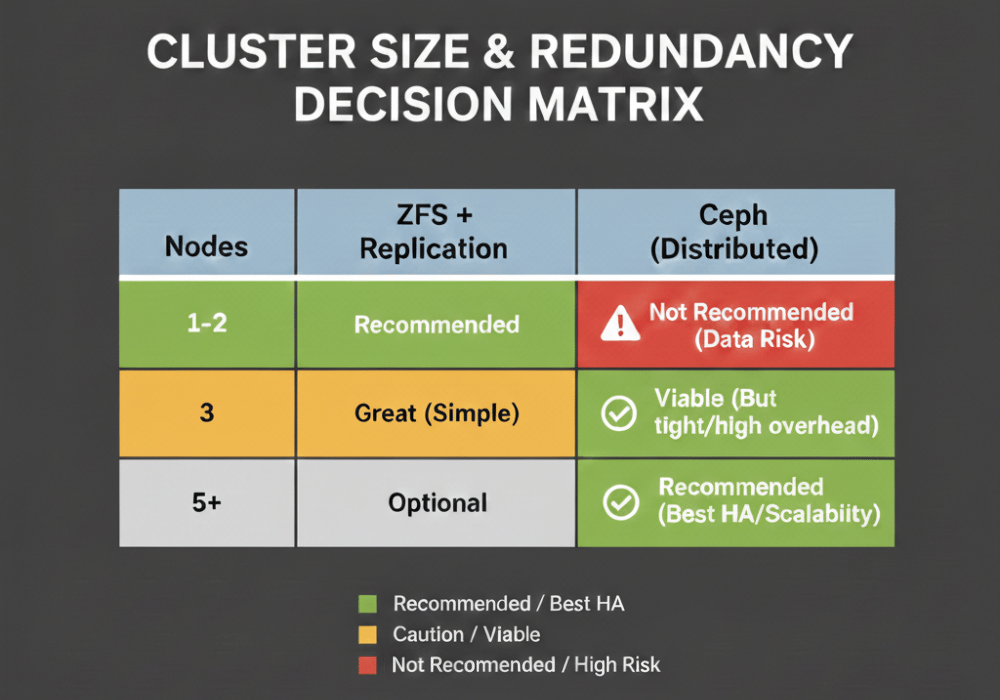
Cluster Size Determines Viability
The number of nodes in your cluster fundamentally determines whether Ceph makes sense.
Why Three Nodes is Ceph’s Minimum
Ceph requires at least three nodes for production deployment, not for performance but for fault tolerance. With three-way replication across three nodes, you can lose one node and maintain data availability. Two surviving nodes still have all data and can serve it.
Two-node Ceph creates an impossible situation. With three-way replication, some data blocks will have two replicas on one node and one on the other. Losing either node potentially causes data loss. Two-node Ceph is technically possible but operationally dangerous.
Three-node clusters face their own constraints. Losing one node drops you to degraded state. If a second node fails before recovery completes, you’re in trouble. Three nodes provides minimum viable redundancy, not comfortable redundancy.
Five or more nodes changes Ceph’s economics. The overhead that felt heavy with three nodes becomes reasonable when spread across five or seven nodes. More nodes also provide better failure recovery performance, since rebuilding distributes across more OSDs.
When ZFS Makes Sense for Small Clusters
One to three node clusters often work better with ZFS plus replication rather than Ceph. Each node runs its own ZFS pool. Proxmox VM replication copies VM disks between nodes on a schedule (hourly, daily). Live migration requires copying the full VM disk initially, then transfers only memory state.
This architecture trades distributed storage’s continuous consistency for simpler operations. Node failures don’t impact storage availability for VMs on surviving nodes. You lose the VM disk replication interval worth of data (typically hours at most) rather than having zero data loss with Ceph.
For small clusters, this tradeoff often favors ZFS. Simpler operations, better single-node performance, and lower network requirements outweigh the benefits of distributed storage when you only have three nodes.
Network Requirements Tell the Truth
Storage architecture decisions often come down to network capabilities.
Ceph’s Network Demands
Ceph needs fast, low-latency networking to perform acceptably. 10GbE is the absolute minimum for production Ceph. 25GbE is realistic for NVMe-backed OSDs. Anything less creates a situation where network becomes the bottleneck before storage does.
Latency matters as much as bandwidth. Sub-millisecond latency between nodes is essential. Each write operation includes multiple network round trips. Network latency directly impacts storage latency. Crossing data center boundaries with millisecond-range latency makes Ceph impractical.
Separate networks for cluster and public traffic is strongly recommended. Cluster traffic (OSD to OSD replication) should not compete with client traffic (Proxmox hosts accessing storage). This means dual 25GbE per server minimum: one for cluster traffic, one for public/client traffic.
OpenMetal’s private cloud infrastructure includes dedicated high-speed networking designed for storage workloads. The internal network provides consistent sub-millisecond latency between nodes within the same deployment. You’re not competing with other tenants for network bandwidth. The dedicated VLANs mean Ceph cluster traffic never crosses public networks or shared infrastructure. This architecture eliminates the network variability that causes performance problems in multi-tenant environments.
ZFS’s Simpler Network Model
ZFS storage access is purely local. A Proxmox host accessing its own ZFS pool doesn’t use the network at all. This eliminates an entire category of performance variables and bottlenecks.
VM migration between nodes requires network bandwidth. Migrating a VM with a 500GB disk over 10GbE takes substantial time. But this is an occasional operation during maintenance, not continuous like Ceph’s replication traffic.
Replication traffic for ZFS is asynchronous and scheduled. You control when replication happens and how much bandwidth it consumes. This flexibility lets you replicate during off-peak hours without impacting production traffic.
Hardware Selection Differs Dramatically
Ceph and ZFS prefer different hardware configurations.
Optimal Ceph Hardware
Ceph performs best with specific hardware characteristics:
Even drive distribution: Four drives per node performs better than a mixed configuration of two drives in one node and six in another. Ceph distributes data across OSDs. Uneven OSD distribution creates imbalanced clusters.
CPU cores for OSDs: Each OSD benefits from dedicated CPU resources. Eight OSDs per server suggests allocating eight cores minimum for OSD processes. High-frequency cores help more than massive core counts.
Abundant network bandwidth: Dual 25GbE NICs minimum for NVMe-backed clusters. Ceph’s network-centric architecture makes NICs more important than drive speed in many cases.
No RAID controllers: Ceph expects direct disk access. RAID controllers with write caching and proprietary logic interfere with Ceph’s own redundancy and caching mechanisms. HBA mode or dedicated HBA controllers only.
Matching drives: Identical drive models and sizes across all nodes simplifies operations and ensures balanced performance. Mixing drive types (some nodes with NVMe, others with SATA SSD) creates performance inconsistencies.
OpenMetal’s bare metal servers are specifically configured for Ceph deployments. Each server comes with uniform NVMe storage configurations, dedicated HBA controllers in passthrough mode, and dual 25GbE networking. This hardware consistency eliminates the configuration mismatches that plague Ceph clusters built from mixed equipment. You get predictable performance because every node contributes identical resources to the cluster.
ZFS Hardware Priorities
ZFS hardware requirements look different:
More drives per server: ZFS benefits from wider RAID sets. Eight or more drives in RAIDZ2 provides better capacity efficiency and rebuild times than fewer drives.
Maximum RAM: ZFS performance scales nearly linearly with ARC size. A server with 512GB RAM running ZFS outperforms the same server with 128GB by large margins for typical virtualization workloads. Buy more RAM before buying faster drives.
Enterprise SSDs for SLOG: Synchronous write performance improves dramatically with Optane or enterprise NVMe SLOG devices. Consumer NVMe dies quickly under ZFS SLOG workloads due to write endurance limits.
Optional L2ARC: Consider L2ARC only after maximizing ARC. L2ARC helps when working sets exceed available ARC but still fit on SSDs. Most deployments benefit more from increasing RAM than adding L2ARC.
RAID controllers acceptable: While HBA mode works fine, ZFS doesn’t actively conflict with RAID controllers the way Ceph does. You can use RAID controllers if desired, though HBA mode is still recommended.
OpenMetal’s bare metal configurations for ZFS workloads emphasize the components that matter: abundant RAM (up to 768GB per server), enterprise NVMe storage arrays, and the flexibility to add Optane SLOG devices. The fixed-cost model means you can right-size RAM for ZFS performance without worrying about per-GB pricing that makes adequate ARC allocation expensive on public cloud. When ZFS wants 256GB for ARC, you get 256GB without budget negotiations.
Performance Comparison Reality
Benchmarks tell part of the story, but operational reality tells more.
Ceph Performance Under Load
Ceph excels at aggregate throughput from many clients. Ten Proxmox hosts with twenty VMs each accessing Ceph simultaneously can achieve impressive total IOPS because load distributes across all OSDs. This distributed serving is Ceph’s core strength.
Single-VM performance tells a different story. One VM doing random 4KB writes sees all the overhead: network latency, replication overhead, OSD processing. Single-VM IOPS on Ceph typically reaches 30-50% of what the same VM achieves on local NVMe with ZFS.
Large sequential operations work better. Ceph’s striping across multiple OSDs helps with large block transfers. A single VM doing 1MB sequential writes can aggregate bandwidth from multiple OSDs, approaching aggregate drive performance minus network overhead.
Recovery operations impact performance significantly. When an OSD fails, recovery traffic floods the cluster network. Client operations compete with recovery for network bandwidth and OSD resources. Performance degradation during recovery is expected and unavoidable.
ZFS Performance Characteristics
ZFS single-VM performance matches or exceeds bare drive performance for reads (thanks to ARC) and delivers strong write performance with properly configured SLOG. A VM on ZFS-backed storage sees sub-millisecond latencies and tens of thousands of IOPS for random operations.
But ZFS is bounded by single-server limits. Total cluster IOPS equals the sum of individual server IOPS, not aggregated across shared storage. Twenty VMs on one server compete for that server’s drive resources. Ceph would distribute those VMs’ load across cluster OSDs.
ZFS CPU overhead is lower than Ceph for equivalent operations. The lack of network overhead and simpler code path means more CPU cycles available for VMs. This matters in CPU-constrained environments.
Operational Complexity Trade-offs
Day-two operations determine whether a storage architecture succeeds or fails.
Ceph Operations Require Expertise
Ceph administration involves multiple daemon types, configuration files, CRUSH map tuning, placement group management, and network configuration across multiple servers. Teams need Ceph-specific expertise that doesn’t transfer to other systems.
Troubleshooting Ceph problems requires understanding distributed systems behavior. Is slow performance a network issue, OSD problem, or workload characteristic? Diagnosing requires tools like ceph health detail, OSD performance stats, and network packet captures.
Upgrades affect multiple servers. Rolling upgrades work but require careful orchestration. Upgrade MONs first, then MGRs, then OSDs. Each step needs validation before proceeding. Mistakes can cause cluster-wide issues.
Expanding Ceph is straightforward conceptually (add OSDs) but requires understanding rebalancing behavior. Adding new OSDs triggers cluster-wide data redistribution. This creates sustained network and disk load that can impact production performance for hours or days.
ZFS Operational Simplicity
ZFS administration on a single server is well-documented and widely understood. Tools are mature. Errors generally affect only the local server. This operational isolation simplifies troubleshooting and reduces blast radius.
Expanding ZFS pools has limitations. You can add VDEVs (sets of drives) but can’t expand existing VDEVs. Planning initial pool configuration matters. Adding more drives means adding complete VDEV sets.
ZFS snapshots enable powerful workflows. Snapshot before risky operations. If something breaks, rollback. Snapshots consume minimal space initially (only changed blocks) and cost almost nothing in performance.
Replication setup between Proxmox nodes running ZFS requires configuring Proxmox VM replication. The interface is straightforward. Set replication interval, select target node, enable. Proxmox handles the zfs send/receive operations automatically.
Use Case Decision Matrix
Match storage architecture to workload requirements.
When Ceph Makes Sense
Large clusters (5+ nodes): Ceph’s overhead becomes reasonable at scale. More nodes means better recovery performance and easier capacity expansion.
Need for live migration: VMs need to migrate between hosts without downtime. Ceph provides shared storage that enables seamless migration. All nodes access the same disk image.
High availability requirements: Application uptime matters more than individual server availability. Losing one node shouldn’t cause VM downtime. Ceph continues serving data as long as enough replicas survive.
Horizontal scaling patterns: You plan to grow by adding more servers rather than bigger servers. Ceph supports this model naturally.
Distributed workloads: Many VMs across many hosts creates aggregate load that Ceph handles well through distributed serving.
When ZFS Wins
Small clusters (1-3 nodes): ZFS operational simplicity and better single-node performance outweigh distributed storage benefits. Proxmox VM replication provides acceptable redundancy.
Performance-critical single applications: Databases or applications that need maximum IOPS benefit from ZFS local performance. Eliminating network overhead and distributed storage overhead matters.
Limited network bandwidth: 1GbE networking makes Ceph impractical. ZFS works fine with standard networking since storage access is local.
Simpler operations preferred: Teams without distributed storage expertise can operate ZFS successfully. Learning curve is gentler.
Budget constraints: ZFS works with commodity hardware. Ceph’s network requirements (dual 25GbE minimum) add cost. ZFS needs less network investment.
Real-World Deployment Patterns
How organizations actually implement these storage architectures reveals practical considerations beyond theory.
Hybrid Approaches
Some deployments use both Ceph and ZFS strategically. Ceph provides shared storage for production VMs that need high availability and live migration. ZFS on each node handles backup targets, scratch space, or specialized workloads.
This hybrid model requires maintaining expertise in both systems but provides flexibility. Performance-critical databases run on local ZFS. Standard application servers run on Ceph-backed storage.
Ceph Deployment Reality
Organizations deploying Ceph on Proxmox typically start with five nodes minimum. Three-node Ceph exists but causes operational pain. The fourth and fifth nodes provide comfortable redundancy during maintenance or failures.
Network infrastructure investment is substantial. Separate 25GbE networks for cluster and public traffic, proper switching fabric, and low-latency links. This infrastructure cost must be factored into Ceph TCO.
OSD count per server typically ranges from 8-12. More OSDs per server increases density but requires careful CPU and network bandwidth allocation.
ZFS Production Patterns
Production ZFS deployments on Proxmox often use RAIDZ2 for capacity pools and mirrored NVMe for performance pools. Different workloads get placed on different pool types.
ARC sizing gets increased from Proxmox defaults. 64GB-128GB ARC allocations are common on servers with 256GB+ RAM. The performance improvement justifies memory allocation.
Optane or high-endurance NVMe SLOG devices are standard in production. The synchronous write performance improvement for database VMs pays for the device cost quickly.
Proxmox replication runs hourly or more frequently between nodes. This provides acceptable RPO (Recovery Point Objective) for most workloads. Critical VMs might use external replication to backup infrastructure.
Common Pitfalls and How to Avoid Them
Both storage architectures have failure modes that catch unprepared teams.
Ceph Mistakes
Insufficient network bandwidth: Deploying Ceph on 10GbE or less creates performance problems immediately. NVMe drives easily saturate 10GbE when accounting for replication traffic. Upgrade to 25GbE minimum before deploying Ceph with NVMe.
Single network for all traffic: Running cluster traffic and public traffic on the same network creates contention. OSD replication fights client traffic for bandwidth. Separate networks are mandatory for production.
Inadequate mon quorum planning: Three monitors on three servers seems sufficient until one server needs maintenance and another has unplanned downtime. Consider five monitors distributed across the cluster.
Ignoring placement group tuning: Default PG counts work for small clusters but larger deployments need tuning. Too few PGs creates uneven data distribution. Too many PGs wastes resources. Calculate appropriate PG counts based on OSD count.
Running production on three nodes: Three-node Ceph works but offers no room for error. One node failure puts the cluster in degraded state. A second failure before recovery completes causes data loss. Five nodes minimum for production.
ZFS Mistakes
Insufficient ARC allocation: Proxmox’s 16GB default ARC limit cripples ZFS performance. Monitor arc_summary output and increase limits to 25-50% of server RAM for virtualization workloads.
Using consumer SSDs for SLOG: Consumer NVMe drives fail quickly under SLOG workload. High write endurance is essential. Use Optane or enterprise NVMe rated for high DWPD (Drive Writes Per Day).
Neglecting volblocksize: ZFS ZVOL volblocksize defaults to 8KB. Database VMs often need 16KB or larger to avoid padding overhead. Set volblocksize to match guest filesystem block size.
Expanding pools without VDEVs: You can’t add single drives to existing VDEVs. Plan initial VDEV configuration carefully. Future expansion requires adding complete VDEV sets.
Deduplication without sufficient RAM: ZFS deduplication requires enormous RAM for dedup tables. Unless you have hundreds of GB of RAM and known duplicate data, avoid deduplication. Use compression instead.
Migration and Transition Strategies
Moving from one storage architecture to another involves planning and downtime.
Moving from ZFS to Ceph
Convert VMs from ZFS-backed storage to Ceph-backed storage through migration. Create new VM disks on Ceph storage. Migrate VM data using qemu-img convert or dd. This approach provides clean separation and validation at each step.
Alternatively, use Proxmox’s built-in migration tools. Move VM disks from local ZFS to Ceph RBD storage through the web interface. Proxmox handles data transfer. This works for live migration or offline migration depending on VM state.
The transition requires Ceph cluster already operational before migration starts. Build and validate Ceph cluster separately from production. Only migrate VMs after confirming Ceph performance meets requirements.
Moving from Ceph to ZFS
Migrating from Ceph to ZFS reverses the process but requires more planning. Each target server needs ZFS pools configured. VMs must be distributed across available nodes since storage is no longer shared.
Live migration from Ceph to ZFS isn’t supported directly. VMs need shutdown, disk migration to ZFS storage, then restart on the target host. Schedule maintenance windows accordingly.
Consider whether ZFS makes sense for all VMs. High-availability VMs that benefited from Ceph’s shared storage might not work well on local ZFS. Those VMs might stay on Ceph while other workloads move to ZFS.
Making the Decision
Your infrastructure requirements determine the right storage architecture.
Start with cluster size: One to three nodes strongly favors ZFS. Five or more nodes makes Ceph viable.
Evaluate network infrastructure: Have you deployed dual 25GbE to each server? If not, Ceph won’t perform acceptably with NVMe storage. ZFS works with standard networking.
Assess operational expertise: Does your team have distributed storage experience? Ceph requires skills that ZFS doesn’t. Consider training time and operational complexity.
Define performance requirements: Single-VM performance needs favor ZFS. Aggregate cluster performance from many VMs benefits from Ceph’s distributed architecture.
Calculate availability requirements: True high availability with seamless failover requires shared storage. Ceph provides this. ZFS requires VM replication with potential data loss equal to replication interval.
Budget for hardware appropriately: Ceph needs network infrastructure investment. ZFS needs RAM investment. Different cost profiles.
The decision comes down to matching architecture to actual requirements rather than theoretical benefits. Small clusters with performance needs choose ZFS. Large clusters with high availability requirements choose Ceph. Both work when deployed correctly for appropriate use cases.
Running Proxmox Storage on OpenMetal Bare Metal
OpenMetal’s infrastructure solves the common deployment challenges that make storage architecture decisions difficult.
Consistent Hardware Configurations
The hardware inconsistency problem disappears on OpenMetal. Every bare metal server in a deployment uses identical CPU, RAM, storage, and network configurations. When you build a Ceph cluster across five servers, all five contribute equal resources. No mixed NVMe/SATA configurations. No servers with different network speeds. This uniformity eliminates an entire category of operational problems.
For ZFS deployments, server configurations optimize for the components that matter. High RAM allocations provide ample ARC cache. Enterprise NVMe drives deliver performance without endurance concerns. You’re not fighting cloud provider limitations that restrict drive access or impose storage IOPs limits.
Network Architecture Built for Storage
OpenMetal’s network design provides what Ceph demands: low-latency, high-bandwidth connectivity between nodes. Dedicated VLANs for storage traffic mean cluster replication never competes with application traffic. The network topology ensures sub-millisecond latency within deployments.
This network architecture matters even for ZFS deployments. VM replication between nodes benefits from abundant bandwidth without competing with production traffic. Live migration operations that would saturate shared networking complete quickly on dedicated infrastructure.
Root Access for Storage Tuning
Both Ceph and ZFS require kernel-level tuning for optimal performance. Ceph needs OSD thread tuning, network buffer adjustments, and CRUSH map customization. ZFS requires ARC limit configuration, module parameter tuning, and pool optimization.
OpenMetal provides full root access to bare metal servers. You configure kernel parameters, adjust network settings, and optimize storage stacks without restrictions. This level of control is essential for production storage deployments but unavailable in managed environments that abstract infrastructure access.
Predictable Performance Without Noisy Neighbors
Storage performance on dedicated bare metal eliminates the noisy neighbor problem. Your Ceph cluster’s performance doesn’t degrade because another tenant’s workload is hammering shared infrastructure. ZFS ARC sizing calculations work as expected because RAM and CPU resources aren’t being stolen by hypervisor overhead or other tenants.
Benchmark numbers measured during testing match production performance. This consistency enables capacity planning and scaling decisions based on actual observed behavior rather than guessing how shared infrastructure will perform under load.
Fixed-Cost Model for Storage Infrastructure
Storage infrastructure costs become predictable with OpenMetal’s fixed-cost model. A Ceph cluster consuming 50TB across five servers costs the same monthly regardless of IOPs, network traffic, or number of objects. ZFS deployments with large ARC allocations don’t incur per-GB RAM charges.
This predictability enables proper resource allocation. ZFS wants 256GB RAM for ARC? Allocate it without budget impact. Ceph needs dedicated SLOG devices? Add them without triggering storage tier pricing. The infrastructure cost remains constant as you optimize for performance.secu
Deployment Flexibility
Start with ZFS on three nodes for immediate deployment. As requirements grow, expand to five or more nodes and migrate to Ceph. The bare metal infrastructure supports both architectures. Your storage decisions can evolve with actual operational experience rather than locking in based on early assumptions.
This flexibility extends to hybrid approaches. Run Ceph for shared VM storage while using ZFS for local scratch space, backup targets, or specialized workloads. The infrastructure accommodates both simultaneously.
Support for Storage Workloads
OpenMetal’s engineering team has operational experience with both Ceph and ZFS at scale. When you’re troubleshooting Ceph performance issues or optimizing ZFS pool configurations, you’re working with a team that’s deployed these technologies in production environments. The support isn’t generic cloud support; it’s infrastructure support from engineers who understand storage architecture.
Need help architecting Proxmox storage on OpenMetal’s bare metal infrastructure? Our team has deployed both Ceph and ZFS at scale. Contact us to discuss your specific requirements.
Schedule a Consultation
Get a deeper assessment and discuss your unique requirements.
Read More on the OpenMetal Blog