



























Llama 3.3 70B can run comfortably on a single H200. This is a 70-billion-parameter dense model, and the OpenMetal H200 gives you 141 GB of HBM3e on one card. That capacity is the whole game for inference: get the weights plus the KV cache to fit in GPU memory and you serve fast; miss the fit and you either quantize harder, shard across cards, or fall back to slow CPU offload. Llama 3.3 70B fits with room to spare once you serve it at FP8.
Key Takeaways
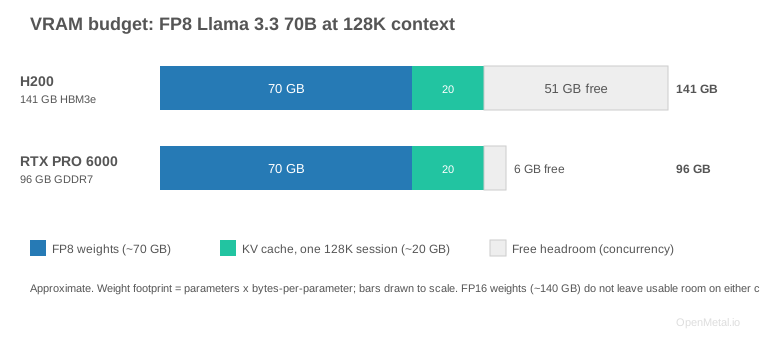
- It fits on one card at FP8. Llama 3.3 70B needs about 70 GB of the H200’s 141 GB in FP8, leaving roughly half the card for the KV cache and the full 128K context.
- FP16 is a two-card job. BF16 weights (~140 GB) fill the card, so you run FP16 across two discrete H200s with tensor parallelism, not by pooling memory into one 282 GB accelerator.
- You keep the full 128K context with room for traffic. Grouped-query attention keeps the KV cache near 0.16 MB per token, so a maximum-length session costs about 20 GB and leaves headroom for concurrency.
- Bandwidth is the speed lever. Token generation at this size is memory-bandwidth-bound, and the H200’s 4.8 TB/s HBM3e is roughly 3x the NVIDIA RTX PRO 6000’s 1.6 TB/s.
- H200 vs NVIDIA RTX PRO 6000. Both fit 70B at FP8, but the H200’s larger KV headroom and bandwidth make it the full-context, production-throughput pick; the NVIDIA RTX PRO 6000 is the value option.
1. The model at a glance
- Parameters: 70.0 B (dense transformer, not a mixture-of-experts)
- Context window: 128K tokens
- Modality: text in, text out
- Languages: English, German, French, Italian, Portuguese, Hindi, Spanish, Thai
- License: Llama 3.3 Community License (permits commercial use; review the acceptable-use terms)
- Why people deploy it: it lands near the quality of much larger frontier models on reasoning and coding while staying inside a single-GPU memory budget, which makes it the default self-hosted workhorse for chat, RAG, and code assistance.
2. Does it fit on one H200?
Everything turns on how you quantize the weights, because 141 GB is a fixed ceiling:
| Precision | Weights (approx.) | Fits on 1x H200 (141 GB)? | What is left for KV cache |
|---|---|---|---|
| FP16 / BF16 | ~140 GB | No usable room | Effectively none: the card is full before you serve a single token |
| FP8 | ~70 GB | Yes, comfortably | ~70 GB free, enough for the full 128K context and healthy concurrency |
| INT4 (AWQ / GPTQ) | ~35 GB | Yes, with large headroom | ~100 GB free, very high batch / concurrency, at some quality cost |
Numbers are approximate. Weight footprint is parameters x bytes-per-parameter; real usage adds ~1–2 GB CUDA context plus activation and framework overhead, and INT4 trades a measurable amount of quality for the smaller footprint. Treat the table as a sizing guide, not a guarantee.
The practical takeaway: serve Llama 3.3 70B at FP8 on one H200. FP8 weights use roughly half the card, leaving the rest for the KV cache. In vLLM’s published measurements the FP8 KV-cache path retains roughly 97 to 98 percent of baseline quality, so you keep the full 128K context without a meaningful accuracy tax. Drop to INT4 (AWQ or GPTQ) only when you need the extra headroom for very high concurrency and can absorb a measurable, task-dependent quality cost; validate it against your own evaluations rather than a public leaderboard.
FP16 is the case that does not fit on one card. If you have a hard requirement for BF16 weights, that is a two-card job (see below), and this is where we will be honest: in OpenMetal’s build two H200s in one server are two discrete 141 GB GPUs, not one pooled 282 GB accelerator. You serve FP16 70B across them with tensor parallelism (TP=2), not by treating their memory as a single 282 GB pool.
3. What you can actually serve
At FP8 on a single card, the ~70 GB of free memory after weights is your KV-cache budget, and that budget is what sets how much context and concurrency you get. Llama 3.3 70B uses grouped-query attention with 8 key/value heads across 80 layers, which keeps the per-token cache small. The worked math:
KV cache per token = 2 (K and V) x layers x kv_heads x head_dim x bytes
                   = 2 x 80 x 8 x 128 x 1 byte (FP8)
                   ~= 0.16 MB per token

Full 128K-token sequence  ~= 128K x 0.16 MB  ~= 20 GB (FP8)
                          (~40 GB if you run the KV cache at FP16)
So one maximum-length 128K session costs ~20 GB of your ~70 GB free budget at FP8, leaving room for the full context window plus meaningful concurrent traffic. In practice you either serve a few very-long-context sessions or many shorter ones from the same card. Exact requests-in-flight at a given latency target depends on your prompt lengths, output lengths, and serving stack, so size concurrency by benchmarking against your own traffic.
4. Serving stack on the H200
vLLM is the straightforward path: single-GPU, FP8 weights, FP8 KV-cache, full 128K context, no tensor parallelism needed. An illustrative launch (confirm the exact flags against the vLLM release you deploy):
vllm serve meta-llama/Llama-3.3-70B-Instruct \
  --quantization fp8 \
  --kv-cache-dtype fp8 \
  --max-model-len 131072 \
  --gpu-memory-utilization 0.92
--gpu-memory-utilization 0.92 tells vLLM to claim most of the 141 GB card for weights plus KV cache while leaving headroom for CUDA context and activations. Because the model fits on one GPU at FP8, you skip --tensor-parallel-size entirely and avoid all cross-GPU communication overhead.
Other options:
- SGLang and NVIDIA TensorRT-LLM are strong alternatives; TensorRT-LLM with speculative decoding has shown substantial throughput gains for this model in NVIDIA’s published H200-class results.
- NVIDIA AI Enterprise (NVAIE) is available on OpenMetal H200 builds; contact OpenMetal for licensing specifics. (CUDA itself is unlicensed and included.)
A few operational notes:
- Model load is fast. Weights stream off the included local NVMe (Micron 7500 MAX, about 7 GB/s sequential reads). The raw read floor for ~70 GB of FP8 weights is roughly ten seconds; real wall-clock adds host-to-device transfer and format parsing, so expect tens of seconds, not minutes. That matters for restarts and autoscaling, not just first boot.
- Two-card FP16. If you require BF16 weights, add
--tensor-parallel-size 2to shard across the two discrete cards. Expect some cross-GPU communication overhead, which is exactly why a single-card FP8 deployment is faster whenever the model fits. - Know when you are bandwidth-bound. Decode at this size is memory-bandwidth-bound, not compute-bound: as you raise batch size, watch for tokens per second plateauing while SM utilization stays below saturation. That signature is why the H200’s 4.8 TB/s HBM3e drives throughput more than its raw FLOPS, and it is the number to size against.
5. Is the H200 the right box for Llama 3.3 70B?
For Llama 3.3 70B specifically, the H200 is arguably the sweet-spot card: the model fits FP8 on one GPU, so you avoid multi-GPU communication overhead entirely, and the 4.8 TB/s HBM3e bandwidth keeps token generation fast (inference at this size is memory-bandwidth-bound, not compute-bound).
H200 vs. the NVIDIA RTX PRO 6000 Blackwell for this model. Both are available on OpenMetal, and 70B at FP8 (~70 GB weights) technically fits on the RTX PRO 6000’s 96 GB too. But two things separate them for a 128K-context 70B:
- KV-cache headroom. After FP8 weights, the H200 leaves ~70 GB for the KV cache; the RTX PRO 6000 leaves ~26 GB. A single 128K session already wants ~20 GB, so the H200 has far more room for long context and concurrency.
- Memory bandwidth. The H200’s 4.8 TB/s HBM3e is roughly 3x the RTX PRO 6000’s ~1.6 TB/s GDDR7. For memory-bound token generation, that bandwidth gap is the single biggest lever on tokens-per-second.
So the RTX PRO 6000 is the value pick for smaller models and lighter concurrency; the H200 is the right call when you want a 70B served at full context with production throughput. You reach for two discrete H200s only if you need FP16 weights or want to co-locate a second large model, and multi-server over the private network only for frontier models beyond a two-card budget (Llama 405B, large MoE reasoning models), not for 70B.
Two adjacent questions engineers ask:
- Training vs inference. This guide sizes inference. Full fine-tuning of 70B is a different budget, because optimizer states, gradients, and activations stack on top of the weights (several times the inference footprint), which makes it a multi-card or multi-node job. Parameter-efficient methods (LoRA, QLoRA) fit comfortably on one H200.
- Partitioning. The H200 supports MIG if you want to carve one card into isolated instances for smaller co-located models. A single 70B fills too much of the card to bother, but it is worth knowing the option exists.
6. Running it on OpenMetal
OpenMetal delivers the H200 as dedicated bare metal: the whole card is yours on a single-tenant server with no oversubscription and no per-GPU-hour meter running whether the model is busy or idle. You get root-level control of the box, so you run your own OS image, GPU driver, CUDA, and serving stack rather than a provider’s fixed runtime. For a self-hosted 70B that you keep warm for production traffic, that fixed-cost model is the point: you size the box once and run it flat out.
The build ships as a single- or dual-GPU server with 141 GB HBM3e per card and local NVMe sized for a real model library. The included 6.4 TB NVMe holds dozens of 70B checkpoints on-box (a 70B FP8 model is about 70 GB), so you serve from local disk instead of re-pulling weights from object storage on every scale-out, and open drive bays let you expand that library. When one box is not enough, a private network (20 Gbps standard, upgradeable to 40 Gbps) carries multi-node scale-out through pipeline and data parallelism.
Base H200 build vs maxed-out build
It is the same server whether you run one model or push it to its limits. What changes as you scale the box:
| Component | Base | Maxed out (in-stock) |
|---|---|---|
| GPUs | 1x H200 (141 GB HBM3e) | 2x H200 (two discrete 141 GB cards) |
| System RAM | 1 TB DDR5-6400 | 2 TB DDR5-5200 |
| Data NVMe | 1x 6.4 TB (7 bays open) | up to 8 NVMe data bays |
| Boot | 2x 960 GB M.2 | 2x 960 GB M.2 |
| Private network | 20 Gbps | 40 Gbps |
For a single Llama 3.3 70B the base build already serves it at FP8 with full context, so maxing out is not about making one 70B faster (that is fixed by one card’s 4.8 TB/s bandwidth). It buys room for more: the second discrete card runs FP16 70B with tensor parallelism or hosts a second large model, 2 TB of RAM (which runs at DDR5-5200 when both slots per channel are populated) widens host-side staging and page cache, the extra NVMe bays turn the box into a larger on-disk model library, and 40 Gbps speeds multi-node scale-out. The two cards stay discrete GPUs, not a pooled 282 GB accelerator.
Size your Llama 3.3 70B deployment
Tell us your target context length, request volume, and latency goals, and we will size single-card or multi-card H200 capacity against your workload. Proof-of-concept access is available so you can validate throughput on your own traffic before you commit.
You can also email us at sales@openmetal.io