



























In this article
We walk through a real worked example for sizing a private cloud cluster before committing to a contract, covering how to translate your VM count into node count, why redundancy and replication overhead eat into your raw numbers, and where network bandwidth becomes the limiting factor as a cluster grows.
You know roughly how many VMs you need to run. What you don’t know yet is how many physical servers that actually requires, and every vendor conversation so far has either dodged the question or thrown a sales engineer at it before you’ve even worked out your own numbers.
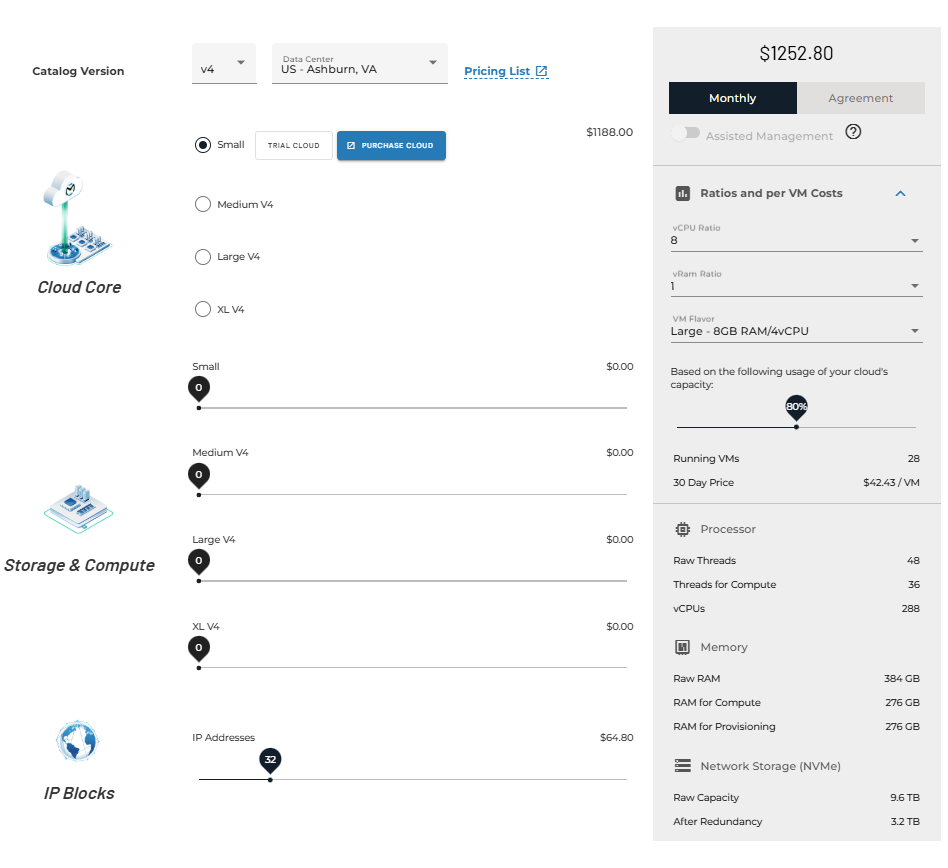
That’s backwards. You should be able to get most of the way to a real answer yourself, with a calculator and a few defensible assumptions, before anyone tries to sell you anything. OpenMetal’s own cloud deployment pricing calculator will do this precisely for your real numbers, including modeling realistic vCPU oversubscription ratios. What follows is the manual version, useful for understanding what’s actually driving the number before you start moving sliders.
Start With Your Real Workload, Not a Guess
Say you’re migrating 300 VMs off an existing platform. Before sizing anything, you need your actual average VM footprint, not a guess. A commonly used starting assumption for general-purpose enterprise VMs is around 4 vCPU and 16GB RAM each, but this varies enormously by workload, and your own numbers should replace this the moment you have them. For this example, 300 VMs at that average works out to 1,200 vCPU and 4,800GB of RAM as your raw resource requirement.
That raw number is the floor, not the answer. Three things eat into it before you get to a real node count.
Redundancy: Plan for a Node Failing, Not Just Running
A cluster sized exactly to your raw workload has no room to absorb a node failure. If one physical server goes down, its VMs need somewhere to migrate to, and if the rest of the cluster is already running at full capacity, that migration either fails or degrades everything else running alongside it.
Standard practice is N+1 redundancy at minimum, sizing the cluster so it can lose one node and still run the full workload without oversubscription. For larger, more critical deployments, N+2 is common. Practically, this means adding one or two nodes’ worth of capacity on top of your raw requirement, not distributing your existing calculation across one fewer server than you actually need.
Storage Overhead Is Real and Depends on Your Replication Scheme
If your VMs’ storage lives on a distributed system like Ceph rather than local disks, the raw capacity you need is higher than the usable capacity you’ll actually get, because durability requires redundancy. Triple replication, storing three copies of every piece of data, is straightforward but carries a real 200% overhead: to get 100TB usable, you need roughly 300TB raw.
Erasure coding is more storage-efficient; a common configuration splitting data into 17 chunks plus 3 parity chunks tolerates up to three simultaneous drive or node failures while adding only around 17.6% overhead rather than 200%, which is a meaningfully different capacity planning outcome at scale.
Which scheme fits depends on your performance requirements and cluster size, but skipping this step entirely is how storage-heavy deployments end up needing a second procurement round sooner than planned.
Network Bandwidth Becomes the Real Constraint as You Scale
Compute and storage capacity get most of the attention in early sizing conversations, but network bandwidth is what actually limits how large a cluster can grow smoothly. Smaller node classes built for entry-level deployments often carry a fraction of the physical network throughput that larger, standard nodes do, commonly around 2Gbps versus 20Gbps in practice, and that gap matters more as node count climbs, since storage replication and VM traffic both compete for the same network path.
There’s also a real, specific threshold worth planning around: as a hyper-converged cluster grows past roughly 40 nodes, the control plane itself typically needs to expand, adding dedicated control plane nodes so networking and routing can be distributed rather than concentrated on the original handful of servers. If your 300-VM migration is a first phase of a larger rollout, it’s worth sizing your initial network architecture with that threshold in mind rather than treating it as a problem for a future phase to solve alone.
Putting the Numbers Together
Running the math against real hardware makes the tier choice concrete rather than abstract. At 1,200 vCPU and 4,800GB RAM raw, using a straight 1-vCPU-per-thread allocation with no oversubscription:
- On a higher core-count tier like XL v4 (64 cores/128 threads, 1TB RAM per node), the workload is CPU-bound at roughly 9.4 nodes raw, rounding up to 10, plus one node for N+1 redundancy: 11 nodes total.
- On a mid-tier server like Large v4 (32 cores/64 threads, 512GB RAM per node), the same workload needs roughly 19 nodes raw, plus redundancy: 20 nodes total.
- On a smaller tier like Medium v4 (24 cores/48 threads, 256GB RAM per node), the same workload needs roughly 25 nodes raw, plus redundancy: 26 nodes total.
That’s not a small difference, and it’s the reason hardware tier selection isn’t a minor detail in a sizing exercise. Fewer, larger nodes typically mean lower total node count and less network and control-plane complexity to manage, while more, smaller nodes can mean better fault isolation and a lower entry cost per node. Both a 20-node and an 11-node cluster sit comfortably below the roughly 40-node control-plane threshold, but if this is phase one of a larger rollout, it’s worth sizing your network architecture for where the deployment is headed, not just where it starts.
Note that this example assumes no CPU oversubscription, which is a conservative, defensible starting point for capacity planning by hand. OpenMetal’s own cloud deployment calculator models this more precisely and, by default, factors in realistic vCPU oversubscription ratios (commonly 8:1 for general-purpose VM workloads), which will typically produce a meaningfully lower node count than the conservative, no-oversubscription math above. The right ratio for your workload depends on how sensitive it is to CPU contention, and the calculator lets you adjust that ratio directly rather than assuming one.
The exact node count shifts with OpenMetal depending on which hardware generation and tier you choose. Our guide to choosing between OpenMetal’s hardware generations walks through that tradeoff directly.
A Sizing Checklist Before You Talk to Anyone
- Get your real average VM footprint (vCPU, RAM, storage) from your current environment rather than estimating
- Multiply by your actual VM count to get raw resource requirements
- Add N+1 or N+2 redundancy headroom on top of the raw number
- If using distributed storage, calculate raw versus usable capacity based on your replication or erasure coding scheme
- Check where your node count sits relative to network bandwidth tiers and the control-plane scaling threshold
- Treat this manual walkthrough as a way to understand the logic, then run your real numbers through the cloud deployment calculator for a precise figure, including realistic oversubscription for your workload
Getting Started
The cloud deployment calculator turns the walkthrough above into an actual tool: set your VM flavor, vCPU and vRAM ratios, and target utilization, and it calculates running VM capacity, monthly price, and hardware requirements directly, including current pricing for multi-year term agreements.
For the deeper technical detail behind erasure coding and storage tier tradeoffs, see our enterprise storage tier architecture guide. For the general principles behind OpenStack capacity planning, including what to monitor once you’re running, see our capacity planning for OpenStack clouds overview.
FAQ
How many physical servers do I need for 300 VMs?
It depends heavily on your average VM size, hardware tier, and whether you factor in CPU oversubscription. As a conservative, no-oversubscription illustration using a 4 vCPU/16GB RAM average VM footprint with N+1 redundancy: roughly 11 nodes on a higher core-count tier like XL v4, versus roughly 20 to 26 nodes on smaller tiers like Large v4 or Medium v4 for the same workload. Real-world deployments commonly use vCPU oversubscription, which lowers these numbers; OpenMetal’s cloud deployment calculator accounts for this and gives a precise figure for your actual workload and hardware choice.
Does OpenMetal have a tool to calculate this automatically?
Yes. The cloud deployment calculator lets you set your VM flavor, vCPU and vRAM oversubscription ratios, target cluster utilization, hardware generation, and data center, and it calculates running VM capacity, monthly pricing, and underlying hardware requirements directly, including current multi-year agreement pricing.
What’s the difference between raw and usable storage capacity?
Raw capacity is the total physical storage across all drives. Usable capacity is what’s actually available for data after accounting for redundancy overhead. Triple replication has roughly 200% overhead (300TB raw for 100TB usable), while erasure coding schemes like 17+3 typically add only around 17.6% overhead for similar failure tolerance.
When does a cluster need additional control plane nodes?
As a hyper-converged cluster grows past roughly 40 nodes, network demands typically require additional control plane nodes so routing and networking can be distributed rather than concentrated on the original control plane servers.
Should I size for N+1 or N+2 redundancy?
N+1, tolerating a single node failure without service degradation, is standard practice for most deployments. N+2 is common for larger or more critical workloads where losing two nodes simultaneously, or one node failing during planned maintenance on another, needs to be survivable without impact.
Schedule a Consultation
Get a deeper assessment and discuss your unique requirements.
Read More on the OpenMetal Blog