



























In this article
A practical guide to joining bare metal servers and a hosted private cloud on one private network: why teams do it, how OpenMetal’s VLANs make it possible, how to set it up in OpenMetal Central, and how to plan addressing and security so the combined network stays clean.
Bare metal and virtual machines are good at different things. Dedicated servers give a database or storage system every core, every gigabyte of RAM, and every NVMe drive with no hypervisor in between. VMs give an application tier fast provisioning and easy scaling. Many architectures want both, and the hard part has usually been the network in between. On OpenMetal, bare metal servers and hosted private cloud VMs can share the same customer-dedicated VLAN, so they talk to each other privately, directly, and without metered traffic charges.
Here’s the problem this solves. A team runs its application in VMs and wants its database on dedicated hardware for consistent I/O. If the bare metal and the cloud come from separate products on separate networks, the two sides end up talking over public IPs or a VPN. That adds latency, exposes traffic that should be internal, and can put every query result on a metered bill.
When both sit on the same private network, the database is just another host on the application’s subnet. Traffic stays on the private fabric, and there’s nothing extra to route, encrypt, or pay for.
Why Put Bare Metal and Private Cloud on the Same Network
Most workloads that combine the two follow one idea: run the parts that need dedicated hardware on bare metal, and run everything else in VMs.
- Databases on bare metal, applications in VMs. The database gets dedicated CPUs and local NVMe. The application tier scales up and down in the private cloud.
- High-performance workloads on bare metal, management in VMs. Monitoring, logging, and management tools run as VMs while the heavy work runs on dedicated servers.
- Proxmox VE alongside OpenStack. Teams running Proxmox on bare metal can connect those hosts to an OpenMetal private cloud on a shared network. Our article on running Proxmox VE on OpenMetal bare metal covers that setup.
- Kubernetes across both. Worker nodes that need full hardware can run on bare metal while other cluster components run in VMs, with pod and service traffic on the shared private network.
- Storage and backup servers. Dedicated storage or backup hosts sit on the same network as the VMs they serve.
In each case, the shared network is what makes the split practical. Without it, every interaction between the two sides crosses a boundary.
How It Works on OpenMetal
OpenMetal assigns dedicated VLANs to each customer at the infrastructure level, for both bare metal and private cloud deployments. Those VLANs aren’t shared with other customers, so traffic on them is isolated by the physical network fabric.
Every switchport connected to a bare metal server is configured as a trunk port, so additional VLANs can be layered on top of the server’s bonded network interface without physical changes. Only VLANs assigned to your cluster pass through. Our infrastructure guide explains the bare metal side in detail.
When you assign the same private VLAN to a bare metal cluster and a hosted private cloud, both sit on the same Layer 2 segment. A few properties follow from that:
- Direct communication. Bare metal servers and VMs reach each other without routing through the public internet or adding extra network hops.
- Unmetered traffic. Private traffic between your servers doesn’t count toward egress billing, whatever the volume.
- Bandwidth. Each server has 20 Gbps of private bandwidth by default, through two 10 Gbps interfaces bonded with LACP.
- Overlays on top. VXLAN overlay networks managed through OpenStack can still be layered on top of your VLANs for additional segmentation inside the private cloud.
Setting It Up in OpenMetal Central
Self-service VLAN and IP block management has been part of Central since our advanced networking release. The full walkthrough with screenshots is in our guide to creating a private network between multiple clusters. Here’s the flow.
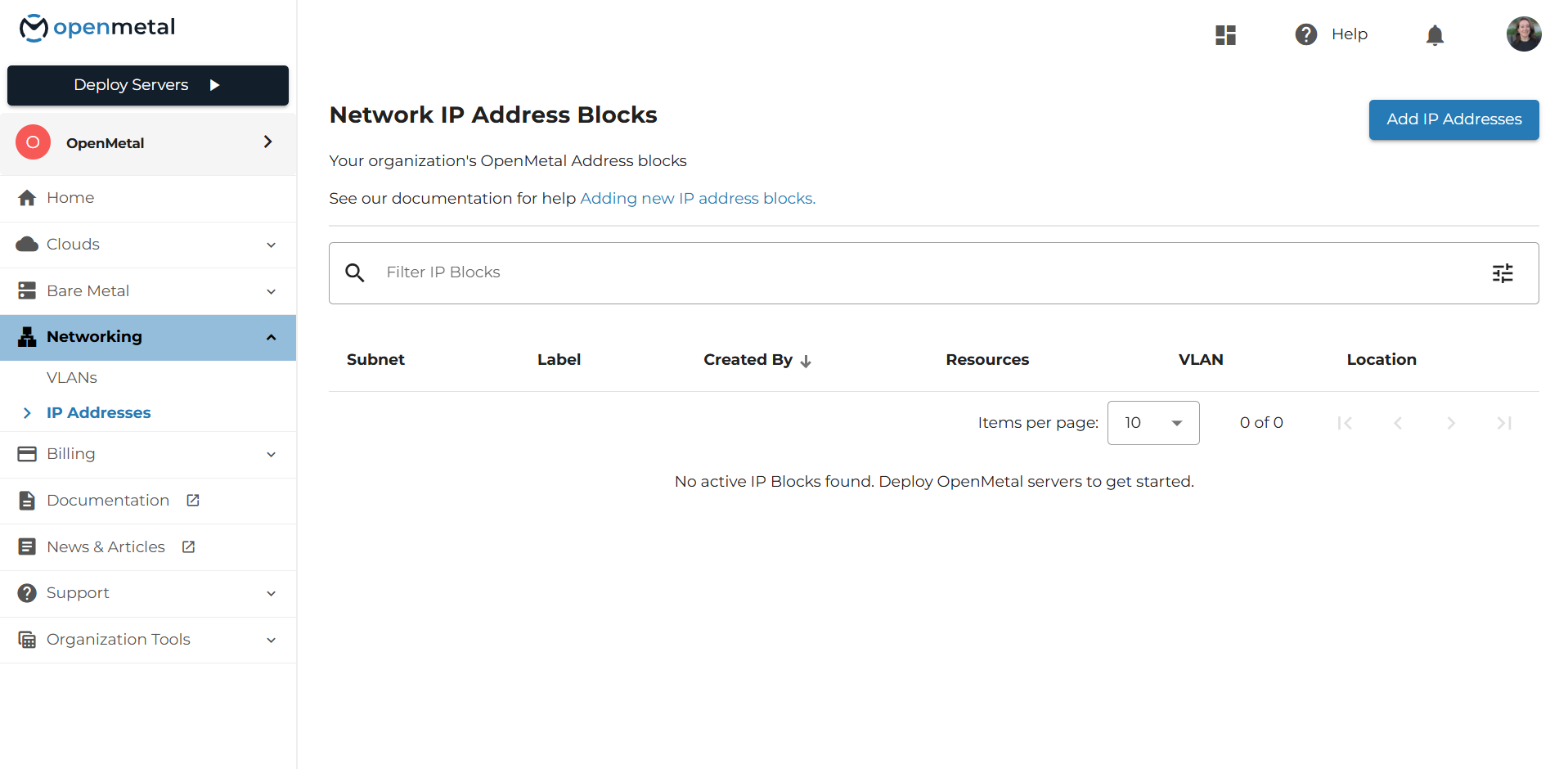
Step 1: Create a Private IP Block
In Central, open the IP Addresses page from the Networking menu and select Add IP Addresses. Choose the datacenter location, select the private network type, and enter a network address from the standard private ranges (10.0.0.0/8, 172.16.0.0/12, or 192.168.0.0/16). Block sizes range from /21, with 2,048 addresses, down to /32.
Blocks created in Central have managed addressing turned off by default, so addresses aren’t automatically assigned to your hosts. You decide which host gets which address.
Step 2: Create a Private VLAN
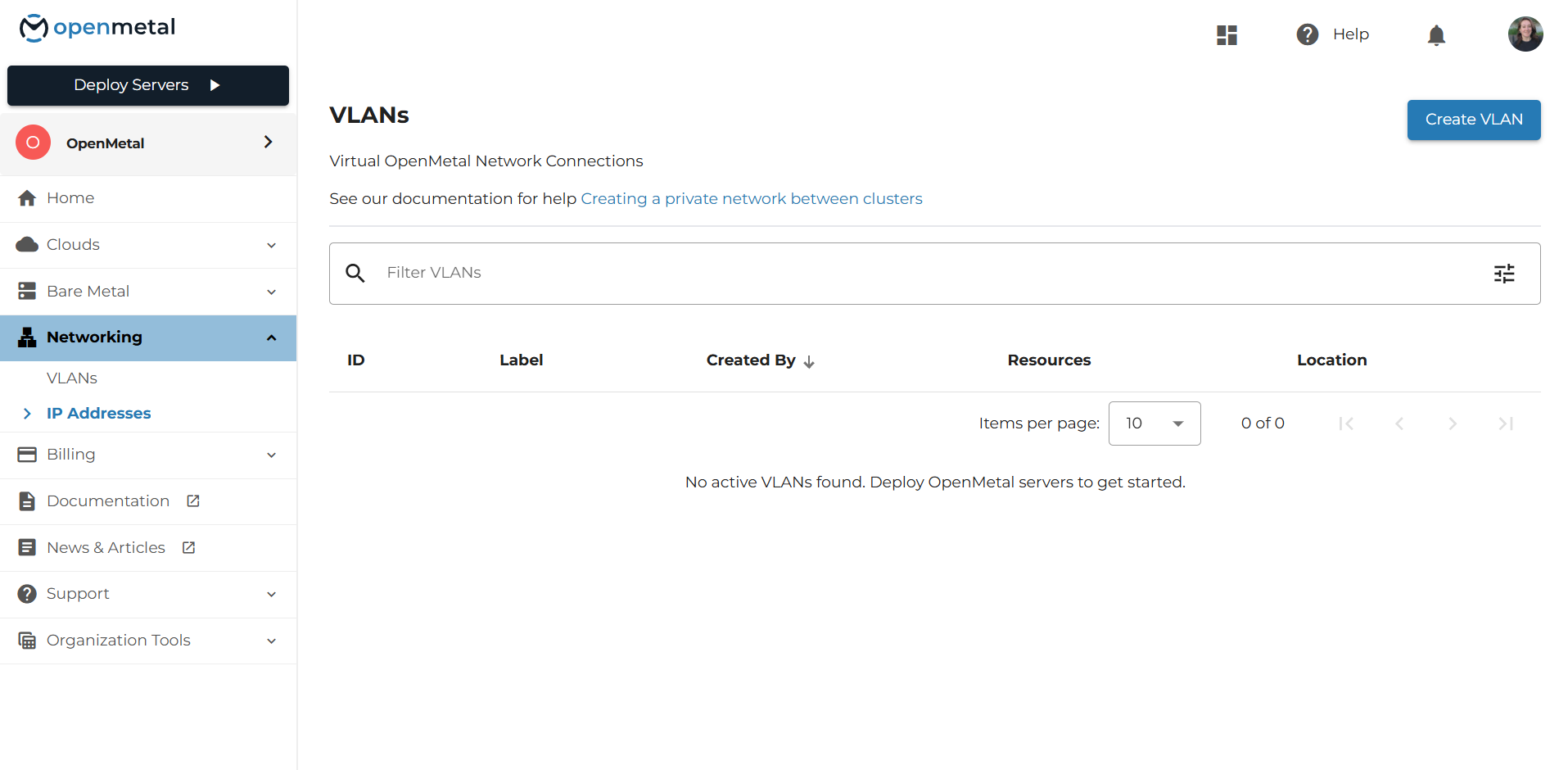
On the VLANs page, select Create VLAN. Give it a label, choose the same location as your IP block, select the private network type, attach the IP block you just created, and choose the first cluster to connect it to.
Step 3: Assign the VLAN to Your Second Cluster
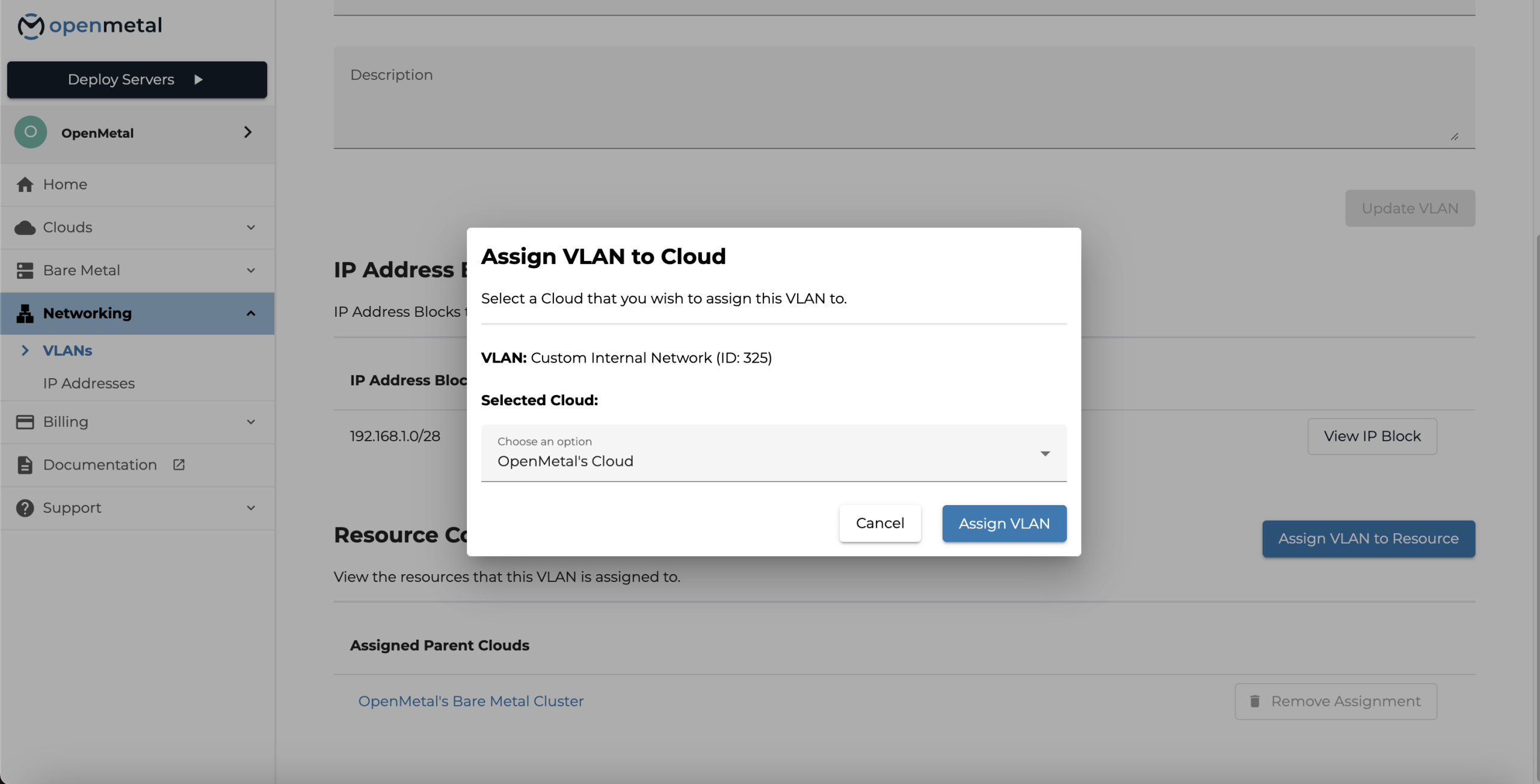
From the VLAN’s page, select Assign VLAN to Resource and choose the other cluster. If you started with your bare metal cluster, now add your Hosted Private Cloud, or the other way around. Both clusters must be in the same location as the VLAN.
Step 4: Confirm the Assignment
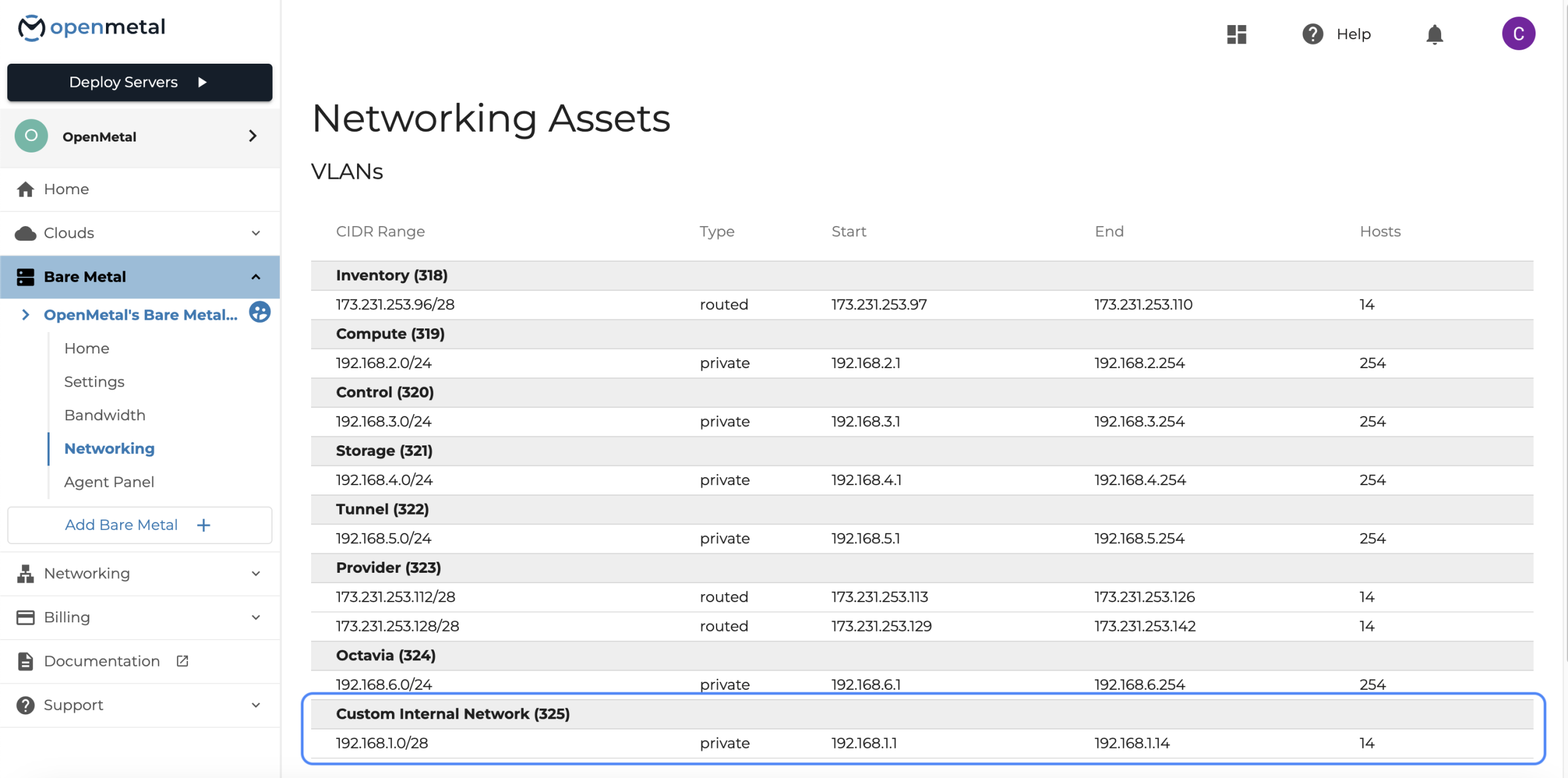
Check each side. Your bare metal cluster’s Networking page and your private cloud’s Networking Assets page both list every VLAN assigned to them, along with their IP blocks.
Step 5: Configure the Bare Metal Servers
On each bare metal server, create a subinterface on the bonded interface for the new VLAN. With standard Linux tools:
ip link add link bond0 name bond0.1993 type vlan id 1993
ip addr add 192.168.10.5/24 dev bond0.1993
ip link set bond0.1993 up
Use your own VLAN ID and an address from your block. Those commands don’t survive a reboot, so make the change permanent through whatever your servers use for network configuration. Our infrastructure guide includes NetworkManager and Netplan examples.
Step 6: Attach Your VMs
On the private cloud side, newly created, unrouted VLANs can be used as private networks by your OpenStack projects, which is what allows direct communication between cloud and bare metal resources. Attach VMs to that network when you launch them, or add a port on it to an existing VM.
If you’d rather automate all of this, the same steps are available through the OpenMetal API. Our article on managing bare metal VLANs and IP blocks as code walks through the API version.
Planning Your Addressing
A shared network works best when both sides agree on who uses which addresses.
Split the Block Between Bare Metal and VMs
Reserve a clear range for bare metal servers and a separate range for VMs. For example, in a /24, you might give bare metal servers .10 through .49 and leave .100 through .250 for VMs. Write the plan down before anyone assigns an address, so a VM never picks up an address a server already uses.
Avoid Overlaps With Your Other Networks
If your private cloud already runs VPC networks, or you connect to another environment over a VPN, choose a shared range that doesn’t overlap any of them. Overlapping ranges make routing between networks difficult to untangle later.
Leave Room to Grow
Pick a block size that covers the servers and VMs you expect to add, not just today’s count. A /24 is a comfortable starting point for many shared networks, and private blocks go up to a /21 if you need more.
Know the Limits
A cloud can have up to 10 assigned VLANs. If you plan to create a separate shared VLAN for each purpose, keep that limit in mind. Inside the private cloud, VXLAN-based VPC networks give you more segmentation without using infrastructure VLANs.
Securing the Shared Network
A shared VLAN is a flat network between the hosts on it, so plan access control on both sides.
- On the VM side, OpenStack security groups control traffic to and from each VM. Only allow the ports the bare metal servers actually need to reach, and the reverse.
- On the bare metal side, there are no OpenStack security groups. Use a host firewall on each server to limit which addresses and ports it accepts on the shared interface.
- Separate by purpose. If different systems don’t need to talk, don’t put them on the same shared VLAN. A database network and a management network are usually better as two VLANs than one.
Our article on building zero-trust network security on OpenStack with microsegmentation goes deeper on designing security groups.
A Closer Look at Two Patterns
A Database on Bare Metal Serving a Private Cloud Application
A team runs its web application and API servers as VMs in a hosted private cloud and moves its primary database to a bare metal server with local NVMe. Both sit on a shared VLAN. The application connects to the database’s private address, and query traffic stays on the private fabric with no egress charges. The database gets dedicated hardware, and the application keeps the elasticity of VMs.
Proxmox Hosts Alongside OpenStack
A team runs some workloads on Proxmox VE on bare metal, because they’re already standardized on it, and others in an OpenStack private cloud. A shared VLAN lets VMs on both platforms reach each other directly, so services can live wherever they fit best without a gateway between the two.
Who This Fits
This setup fits teams that:
- Want dedicated hardware for databases, storage, or performance-sensitive workloads alongside VMs
- Run Proxmox VE on bare metal and OpenStack in a private cloud side by side
- Need private, unmetered traffic between bare metal and VMs
- Want both environments managed from one place
It may not fit if you:
- Need bare metal and private cloud in different locations; VLANs and the clusters they connect must be in the same location
- Want the two environments strictly isolated from each other; keep them on separate VLANs
- Need per-port access control enforced by OpenStack on the bare metal side; use host firewalls there
The Short Version
Bare metal and private cloud don’t have to be separate islands. On OpenMetal, one private VLAN joins them into a single network with direct, unmetered traffic, so each workload can run on the hardware that suits it.
To try the setup with your own workloads, apply for a proof of concept. You can also compare options on our bare metal pricing page or talk with our team about your network design.
Frequently Asked Questions
Can OpenMetal bare metal servers and private cloud VMs share a network?
Yes. OpenMetal bare metal servers and hosted private cloud deployments can share the same customer-dedicated VLAN, so bare metal servers and VMs communicate directly over the private network.
Is traffic between bare metal and private cloud billed?
No. Private traffic between your servers doesn’t count toward egress billing, regardless of volume.
How much bandwidth is available between bare metal and private cloud?
Each server has 20 Gbps of private bandwidth by default, through two 10 Gbps interfaces bonded with LACP. 40 Gbps is an optional paid upgrade.
Do the bare metal servers and private cloud need to be in the same location?
Yes. A VLAN is created in a specific datacenter location, and the clusters it connects must be in that same location.
How do I set up a shared network?
Create a private IP block and a private VLAN in OpenMetal Central, assign the VLAN to both your bare metal cluster and your private cloud, configure a VLAN subinterface on each bare metal server, and attach your VMs to the network. You can also do it through the OpenMetal API.
How do I control access between bare metal and VMs on a shared network?
Use OpenStack security groups for the VMs and a host firewall on each bare metal server. If two systems don’t need to talk, put them on separate VLANs.
Schedule a Consultation
Get a deeper assessment and discuss your unique requirements.
Read More on the OpenMetal Blog