



























In this article
Private cloud migrations fail less often from technical complexity than from planning gaps that surface mid-project. This guide covers the failure modes that consistently derail these projects and what to do about each one.
Most private cloud migrations that stall do not fail because the technology is wrong. The infrastructure usually works. What derails projects is the work that does not happen before the first server is provisioned: workload inventories that are incomplete, network designs that get rushed, cutover plans built on optimistic timelines, and Day 2 operations that nobody formally owns until something breaks.
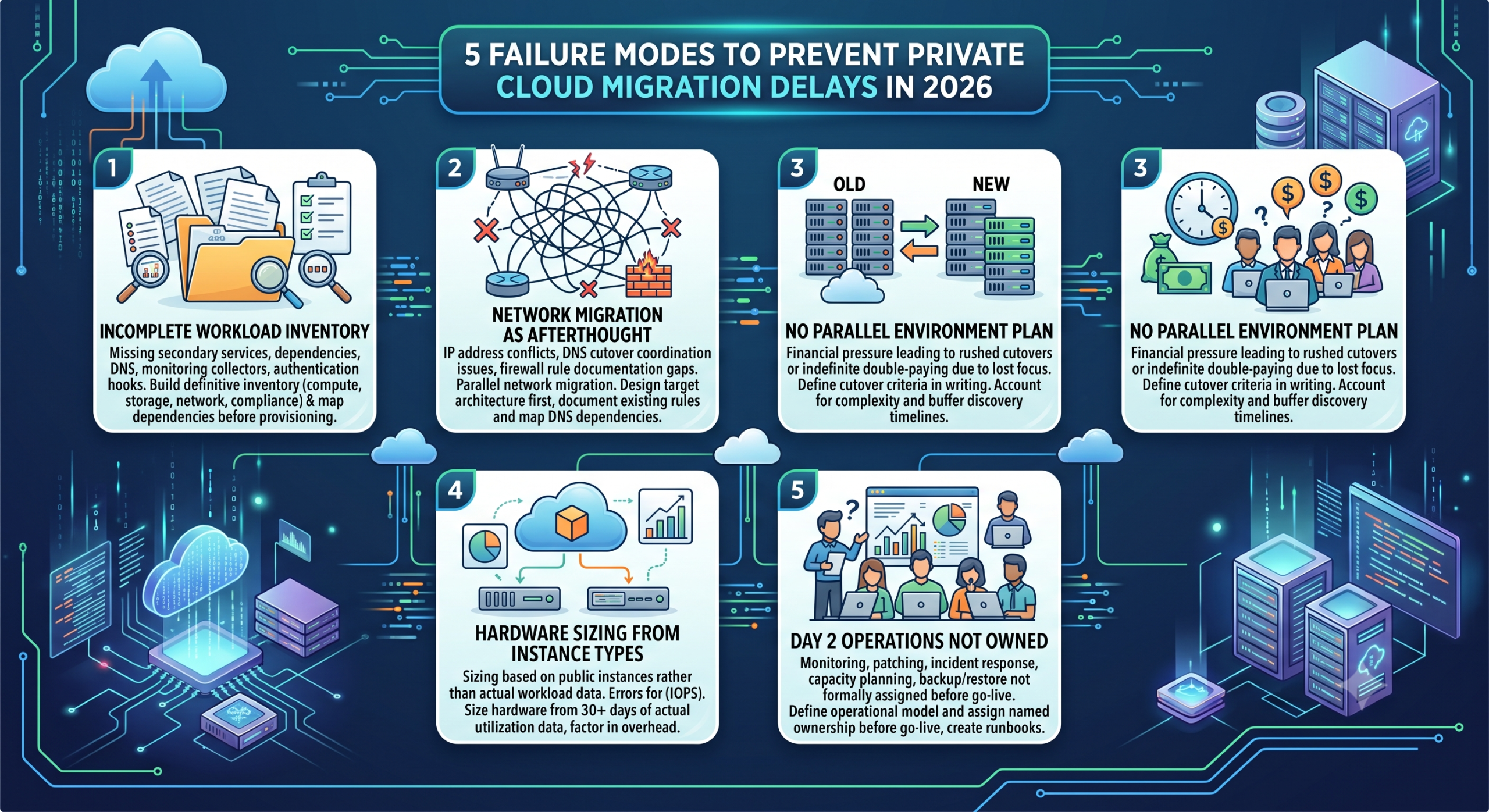
These problems are predictable because they show up repeatedly across migration projects of all sizes. This guide covers the five failure modes that cause most of the delays, what triggers each one, and how to prevent it.
Why do private cloud infrastructure projects stall?
Most project delays fall into one of two buckets: preparation failures and execution failures. Preparation failures happen before migration starts and stem from missing or inaccurate information about what you are moving and what it needs. Execution failures happen mid-project when the reality of the cutover differs from the plan.
The practical distinction matters because the remedies are different. Preparation failures are solved by doing more work upfront. Execution failures are usually solved by giving the project more time and buffer, which is much easier to do if the project plan anticipated it.
Both types are avoidable. What follows is a breakdown of where projects go wrong, roughly in the order they surface.
Failure mode 1: An incomplete workload inventory before migration starts
The most consistent cause of private cloud projects running over schedule is that nobody fully mapped the workload landscape before the project started. Teams know their primary applications, the ones the business depends on daily. What they miss are the secondary services those primary applications depend on: internal DNS resolvers, NTP sources, license servers, logging pipelines, backup agents, authentication hooks, and monitoring collectors.
These secondary dependencies are almost never formally documented because they were never formally planned. They were added incrementally over years. They get discovered during migration when something that should be working is not, and diagnosing the cause takes time that was not budgeted.
What to do about it
Build the workload inventory before signing any infrastructure contract. For each workload, document: compute requirements (cores, RAM, peak and average utilization), storage requirements (capacity, IOPS profile, replication needs), network dependencies (what it talks to, what needs to reach it), and compliance requirements (data residency, encryption at rest, access logging). Run actual utilization data from your current environment for at least 30 days before sizing hardware. Peak numbers recalled from memory are almost always wrong in one direction or another.
The dependency mapping exercise is the part teams skip under time pressure, and it is the part that comes back to bite them. Treat it as a pre-condition to starting, not an optional step.
Failure mode 2: Network migration treated as an afterthought
Network design is the area where fixable problems get deferred most often. Teams spend time on compute and storage planning, then discover mid-migration that the network topology they roughed out does not match what the workloads actually need, or that early IP address space decisions conflict with routing requirements that surfaced later.
The specific failure modes are consistent: IP addressing conflicts with existing on-premises ranges that were not fully inventoried, DNS cutover not coordinated with application teams so they schedule it as an afterthought, firewall rule sets from the old environment that were never formally documented (leaving the new environment either too open or with unexplained connectivity gaps), and VLAN design that does not reflect actual traffic isolation requirements.
None of these are technically difficult to resolve. They take time to diagnose and correct, and that time tends to be spent under cutover pressure when the cost of delay is highest.
What to do about it
Treat network migration as a parallel workstream, not a task that gets handled during cutover. Design the target network architecture before any workload moves. Document existing firewall rules from the source environment explicitly rather than assuming they can be inferred from application behavior. Map DNS dependencies per application, not just per server. Plan your IP address space with the full picture of on-premises and cloud ranges to avoid collisions.
On OpenMetal, each customer gets dedicated VLANs for both bare metal and private cloud deployments. Private bandwidth between servers runs at 20 Gbps aggregate per server, isolated to the customer’s environment. The network is not shared with other tenants, which means you are designing a network topology for your workloads rather than negotiating one within a shared multi-tenant fabric. OpenStack’s networking layer handles VPC creation, security groups, virtual routers, and VPN-as-a-Service, which gives you the tools to replicate complex existing network topologies without custom workarounds.
Failure mode 3: No clear plan for running both environments in parallel
Every private cloud migration requires a period where the old environment and the new environment are running simultaneously. How long that window lasts and who pays for it is a planning question that gets deferred more often than not.
The failure modes here are at opposite ends: moving too fast (cutting over before the new environment is validated, which creates production incidents that cost more to fix than a longer parallel running period would have) and moving too slow (double-paying for two full environments indefinitely because the migration got more complex than expected and nobody forced the issue).
Rushed cutovers happen when financial pressure from running two environments makes the team feel they need to move even though the validation checklist is not complete. Indefinitely extended parallel running happens when the migration lost its forcing function and there is no defined cutover criterion.
What to do about it
Define the cutover criteria in writing before the project starts. What specifically needs to be validated before the old environment is decommissioned? Lock that list down. Build a migration timeline that accounts for the actual complexity of the workload inventory, not the optimistic version, and include a buffer for the dependency discovery work that surfaces mid-project.
OpenMetal offers ramp pricing for migrations, which directly addresses the financial pressure that pushes teams into rushed cutovers. Rather than paying full price for two environments from day one, ramp pricing structures the transition cost to match the pace of migration. The migration planning process covers this explicitly, including how agreements are structured to give teams the time to validate without choosing between rushed execution and indefinite double-paying.
Failure mode 4: Hardware sized from instance types rather than workload data
Getting the hardware tier wrong is a recoverable mistake, but it is still a delay and sometimes a difficult conversation. Undersized servers create performance problems that require either reconfiguration or capacity additions before workloads are stable. Oversized configurations waste budget.
The more common mistake is undersizing on RAM. Teams used to cloud instances tend to underestimate how much RAM a collection of workloads needs when they all run on dedicated hardware simultaneously. Cloud instances are usually overprovisioned in fixed increments, and the instance size is not a reliable guide to what dedicated hardware actually needs.
The second common mistake is storage tier selection. NVMe and spinning disk are not interchangeable for IOPS-sensitive workloads. Database workloads moved from cloud-attached NVMe to an equivalent or worse IOPS configuration discover the problem under load rather than in testing, which is a bad time to find out.
For virtualized workloads specifically, the hypervisor and management layer consume a share of available resources that needs to be factored into sizing. OpenStack on smaller configurations absorbs roughly 25-30% of available capacity for control plane overhead; that number shrinks on larger configurations but it needs to be in the calculation.
What to do about it
Size hardware from 30 days of actual utilization data, not from cloud instance specifications. Factor in overhead for hypervisor, control plane, and growth headroom. For storage, document the IOPS requirements of each workload explicitly. Do not rely on anecdote. If compliance requirements apply to any workload, confirm which hardware configurations meet those requirements before provisioning.
OpenMetal’s hardware lineup runs from 24-core / 256GB configurations to 64-core / 2TB bare metal servers. The pricing calculator lets you map compute and storage requirements to specific configurations before committing. If a workload outgrows its initial configuration, new servers can be added to an existing cluster in approximately 20 minutes, which reduces the cost of getting the initial sizing slightly wrong.
Failure mode 5: Day 2 operations not owned before go-live
Day 2 operations is the ongoing work of running a private cloud after the migration is complete: monitoring, patching, incident response, capacity planning, backup and restore validation, and security review. It is distinct from the migration project and it does not end when migration does.
The failure mode is treating Day 2 as a problem to solve after go-live. Teams that do this arrive at their first production incident without clear answers to basic operational questions: who gets paged when the cluster runs low on storage capacity? Who owns the patch schedule? What is the recovery procedure for a lost node, and has anyone tested it? What does the capacity planning cycle look like for adding workloads?
Private cloud infrastructure does not have managed services that paper over these gaps the way public cloud does. Auto-scaling does not compensate for a missing capacity planning process. Managed services do not exist to absorb the monitoring and patching work. If nobody owns these processes explicitly, they do not happen.
This failure mode also surfaces in compliance contexts. For healthcare, financial services, or any regulated workload, the documentation of operational procedures is part of the compliance posture, not an optional nice-to-have. Arriving at an audit without runbooks for your incident response and backup procedures is a harder conversation than writing them before go-live.
What to do about it
Define the operational model before go-live, not after. Assign named ownership for monitoring, patching, incident response, and capacity planning. Document recovery procedures and test them before you decommission the old environment. Build runbooks for the failure scenarios you can predict. Plan the application-layer monitoring before the migration completes. Knowing what normal looks like from day one is much easier than establishing a baseline after the fact.
OpenMetal includes engineer-to-engineer support with dedicated Slack channels for each customer. During onboarding, OpenMetal engineers work alongside the customer’s team to configure the environment and document operational procedures. Datadog hardware node monitoring is included in the base deployment, covering infrastructure visibility. Application-layer monitoring is the customer’s responsibility, which is worth planning for explicitly before go-live. For teams that want more coverage, assisted management services are available for ongoing Day 2 support.
How OpenMetal’s deployment model reduces the surface area for these failures
The failure modes above are not unique to any particular provider. They show up across hosted private cloud projects generally. What differs between providers is how much the platform and support model reduce the likelihood of each one.
A few things about OpenMetal’s approach that are relevant to each failure mode in this guide:
On planning and dependency discovery, the workload sizing conversation happens before provisioning. You are not buying hardware and then figuring out whether it fits the workload. OpenMetal’s pre-sales process is structured around understanding the actual workload requirements first.
On timing risk, ramp pricing for migrations reduces the financial pressure that forces rushed cutovers. The commercial model is designed to accommodate the reality that migrations take longer than originally planned rather than penalizing teams for it.
On deployment risk, a new private cloud deploys in approximately 45 seconds. The time-consuming part of a private cloud project is not the infrastructure provisioning. It is the planning and network design work that has to happen first. That is useful framing, because it means the things that take time are the things worth spending time on.
On hardware sizing, adding an available server to an existing cluster takes approximately 20 minutes. Getting the initial configuration close enough and scaling from there is a defensible strategy for most workload profiles.
On Day 2, engineer-to-engineer support and dedicated Slack channels mean the customer’s team has direct access to people who know the specific environment. The support model is not a generic ticket queue.
For teams managing complex or large-scale migrations, the large deployments and cloud migrations page covers how OpenMetal approaches these projects specifically.
None of this eliminates the planning work. The workload inventory, network design, cutover criteria, hardware sizing, and Day 2 ownership model all still require effort from the customer’s team. But the infrastructure side of the project is not the variable that adds time.
Where to go next
If your team is evaluating a private cloud migration and wants to test the workload fit before committing, OpenMetal’s proof-of-concept program lets you run a specific workload on dedicated infrastructure and get real performance and cost data before you sign anything: OpenMetal PoC program.
If you are further along and want to build a concrete TCO comparison, the full cost of ownership analysis walks through how to construct the comparison with real numbers, including egress, storage, and support costs alongside compute.
Frequently Asked Questions
What causes hosted private cloud infrastructure projects to stall or fail?
The most common causes are an incomplete workload inventory that surfaces hidden dependencies mid-migration, network design treated as a cutover task rather than a pre-migration workstream, lack of a defined parallel running strategy leading to either rushed cutovers or indefinite double-paying, hardware sized from cloud instance types rather than actual utilization data, and no assigned ownership for Day 2 operations before go-live. Most of these are preventable with planning that happens before the first server is provisioned.
How long does a hosted private cloud migration take?
It depends on the complexity of the workload inventory and how complete the pre-migration planning is. Simple migrations with well-documented workloads can complete a cutover in weeks. Complex environments with many interdependencies, compliance requirements, or large data volumes typically take three to six months from project start to full decommission of the old environment. The planning phase is where most of the elapsed time goes, not the actual migration.
What is Day 2 operations in private cloud?
Day 2 operations refers to the ongoing work of running a private cloud after initial deployment: monitoring, patching, incident response, capacity planning, backup and restore, and security review. It is distinct from the migration project and does not end when migration does. Unlike public cloud, private cloud infrastructure does not have managed services that absorb these responsibilities automatically. Day 2 ownership needs to be explicitly assigned before go-live.
What is ramp pricing for cloud migrations?
Ramp pricing is a billing structure where the cost of new infrastructure scales up over time as workloads are migrated to it, rather than billing at full rate from day one. It is designed to reduce the financial pressure of running two environments in parallel during a migration, which is a common cause of rushed cutovers. OpenMetal offers ramp pricing structured around the customer’s actual migration timeline.
How do you prevent scope creep in a private cloud migration?
The most effective prevention is a complete workload inventory before the project starts, with explicit dependency mapping for each application. Most scope creep comes from secondary dependencies discovered mid-project rather than from the primary workloads. A formal dependency mapping exercise at the start surfaces most of these before they affect the timeline. Locking down the cutover criteria in writing at the project start also prevents indefinite scope extension during the parallel running period.
How do you size hardware for a private cloud migration?
Use 30 days of actual utilization data from your current environment rather than cloud instance specifications. Cloud instances are often overprovisioned in fixed increments and are not a reliable guide to dedicated hardware requirements. Factor in hypervisor and control plane overhead (OpenStack uses roughly 25-30% of capacity on smaller configurations, less on larger ones), storage IOPS requirements per workload, and a growth buffer. If any workloads have compliance requirements, confirm which hardware configurations satisfy them before provisioning.
Schedule a Consultation
Get a deeper assessment and discuss your unique requirements.
Read More on the OpenMetal Blog