



























In this article
- Hardware Generation Evolution: From V1 to V4
- Generation 1 (V1): Foundation Infrastructure
- Generation 2 (V2): Enhanced Performance
- Generation 2.1 (V2.1): Optimized Mid-Range
- Generations 3 and 4 (V3 & V4): Latest Enterprise-Grade Hardware
- Storage Technology: Understanding the Performance Tiers
- Matching Hardware to Use Cases
- Deployment Models: Hosted Private Cloud vs. Bare Metal
- Cost Considerations and Scaling Strategies
- Technical Considerations for Production Deployments
- Making Your Decision
OpenMetal offers five distinct hardware generations across our hosted private cloud and bare metal solutions, each optimized for different performance requirements and use cases. Think of it like choosing between different car models: each generation offers more power, better features, and improved efficiency. This guide will help you understand what sets each generation apart and which one makes the most sense for your workload.
Hardware Generation Evolution: From V1 to V4
As data center technology has improved over the years, so has OpenMetal’s hardware. Each new generation brings faster processors, better storage, and improved networking. Let’s break down what each generation offers.
Generation 1 (V1): Foundation Infrastructure
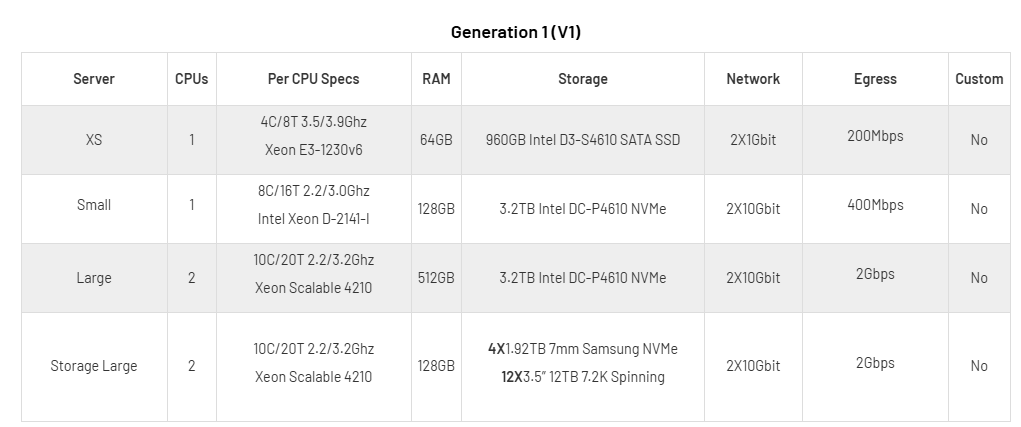
Hardware specifications: V1 is where it all started. You’ll find XS, Small, Large, and Storage Large configurations here, running on Intel Xeon E3 and Xeon Scalable 4210 processors (4-20 cores). Storage ranges from 960GB SATA SSDs to 3.2TB Intel DC-P4610 NVMe drives. The Storage Large variant is interesting because it combines NVMe with 12×3.5″ 12TB spinning drives for hybrid storage.
Network connectivity: XS configurations get 2x1Gbit networking, while larger tiers jump to 2x10Gbit. Included egress ranges from 500Mbps to 4Gbps (recently updated from the above chart).
Best suited for: Development environments, testing workflows, learning OpenStack, and small-scale production deployments where cutting-edge performance isn’t critical. If you’re just getting started with OpenStack or need a proof-of-concept environment, XS and Small tiers are perfect.
Generation 2 (V2): Enhanced Performance
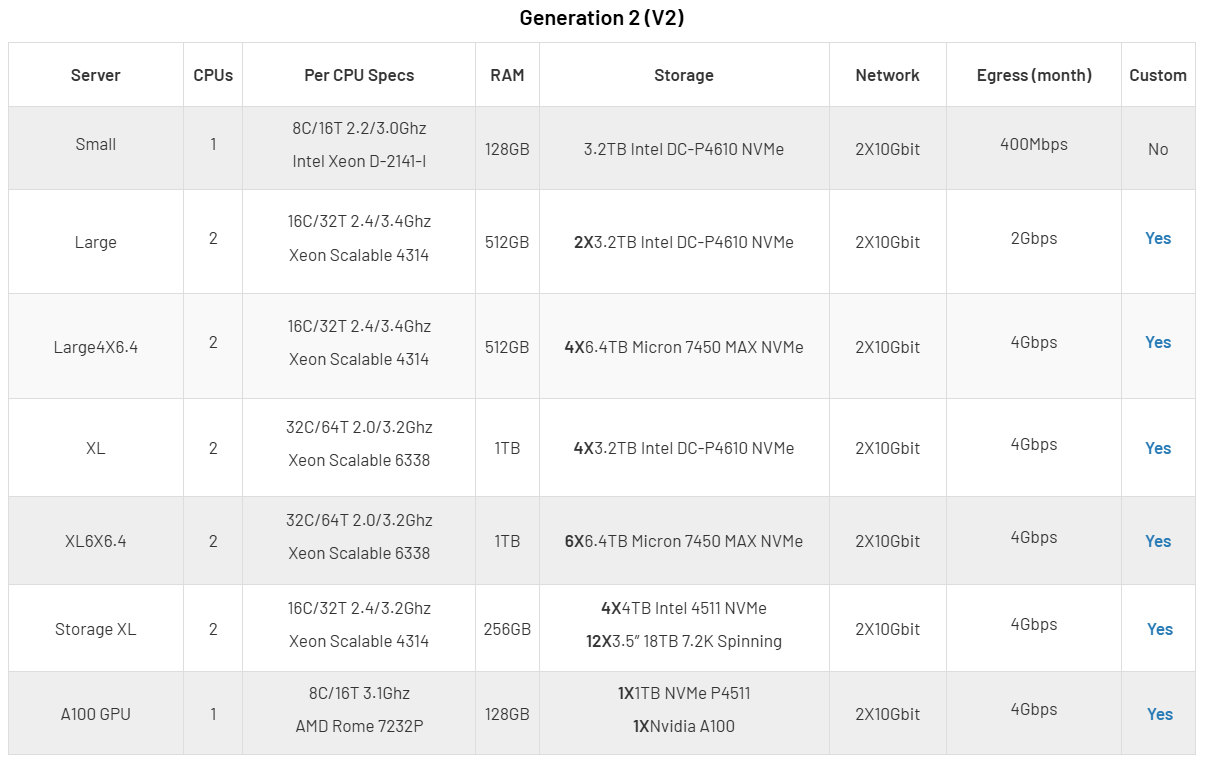
Hardware specifications: V2 steps things up with more powerful Intel Xeon D-2141-I and Xeon Scalable 4314 processors (8-32 cores per server). Dual-processor configurations become standard for larger deployments. Storage gets a nice upgrade too—you’ll see 3.2TB Intel DC-P4610 NVMe drives and even beefier Micron 7450 MAX NVMe options with up to 6.4TB per drive.
Key improvements: This is where NVMe really takes center stage. Every configuration runs on NVMe, which means much faster read/write speeds compared to V1. The Large4X6.4 and XL6X6.4 configurations give you massive storage capacity without sacrificing performance. You’ll also find specialized options here like the Storage XL with hybrid storage and even an A100 GPU configuration for AI/ML work.
Network connectivity: Everything runs on 2x10Gbit networking with 1bps to 6Gbps of included egress (recently updated from the above chart).
Best suited for: Medium to large production deployments that need solid, reliable performance. V2 covers a lot of ground—Small works great for development, Large/XL handles production databases and high-storage workloads, and the GPU option is there if you need it.
Generation 2.1 (V2.1): Optimized Mid-Range
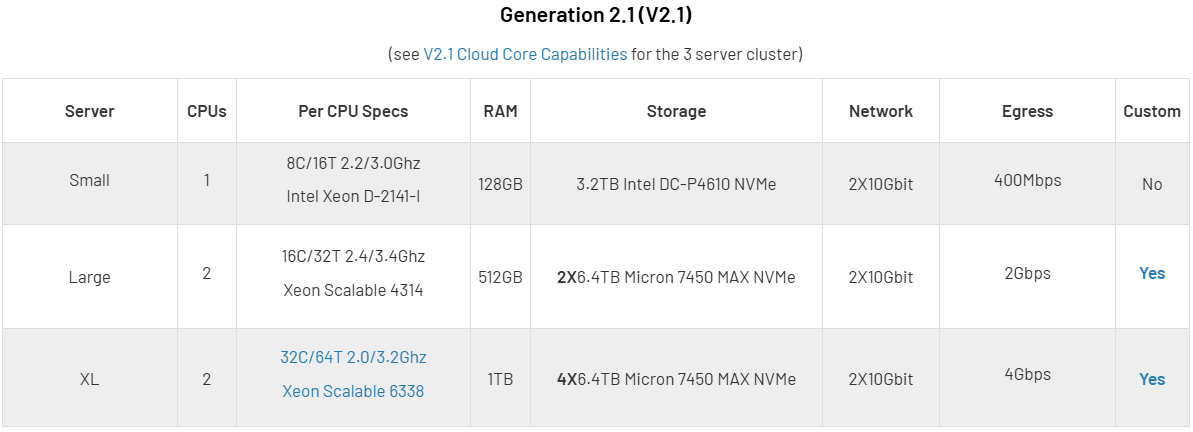
Hardware specifications: V2.1 takes V2 and refines it. You get updated processors: Intel Xeon D-2141-I for Small, Xeon Scalable 4314 for Large, and Xeon Scalable 6338 (32C/64T) for XL. The big change? Every single configuration uses Micron 7450 MAX NVMe storage. No mixing and matching, just 2-4 of these high-performance drives per server depending on your tier.
Key improvements: The best thing about V2.1 is consistency. Since every tier uses the same type of storage, you know exactly what performance to expect. Planning capacity becomes simpler. The XL configuration is a beast with those 32C/64T processors. You get serious compute power for demanding workloads.
Network connectivity: Same as V2, 2x10Gbit networking with 1Gbps to 6Gbps egress (recently increased from the above chart).
Best suited for: Organizations that want a good balance between cost and performance. The Large configuration is ideal if you’re growing and need production-grade infrastructure. The XL tier is great when you need high thread counts and lots of fast NVMe storage.
Generations 3 and 4 (V3 & V4): Latest Enterprise-Grade Hardware
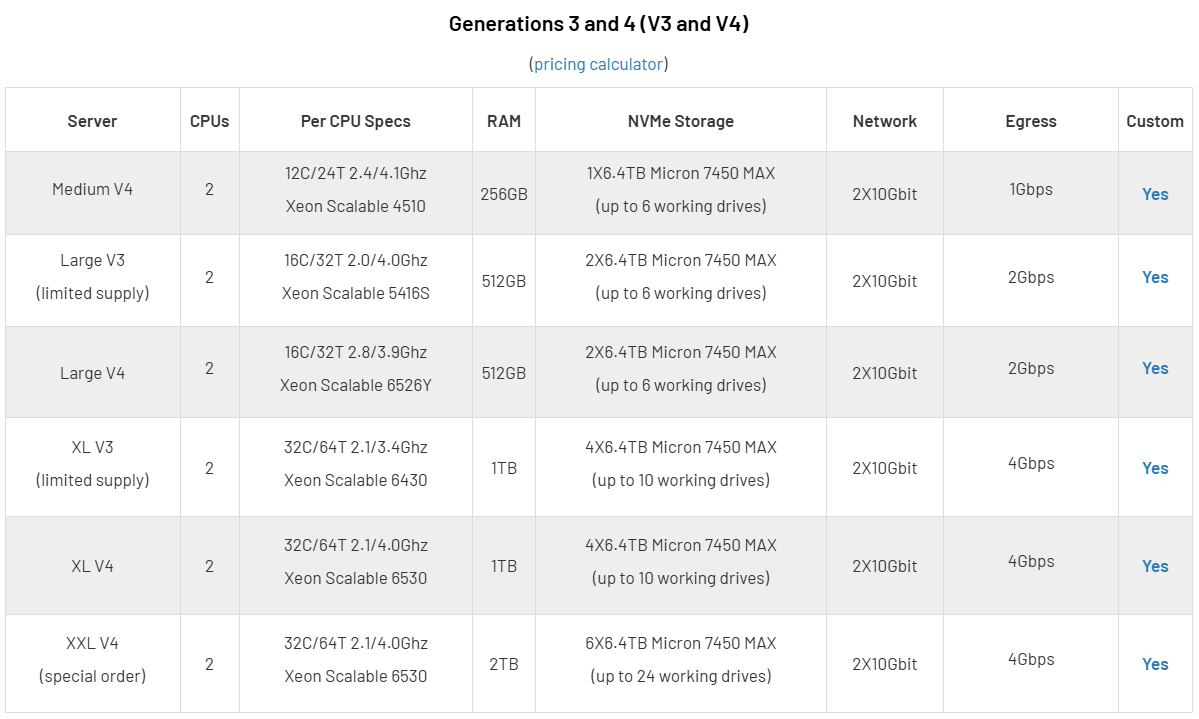
Hardware specifications: V3 and V4 are OpenMetal’s newest offerings, running 5th generation Intel Xeon Scalable processors (models 4510, 5416S, 6526Y, 6430, and 6530). You’ll find configurations from Medium V4 with 24 cores all the way up to XXL V4 with 128 cores total. RAM ranges from 256GB to 2TB per server. Storage? All Micron 7450 or 7500 MAX NVMe drives, from 6.4TB on Medium to a whopping 38.4TB raw on XXL per server.
Key improvements: The jump here is significant. More cores, faster clock speeds, and massive storage capacity. V4 uses the newest Xeon processors with higher speeds compared to V3 (which has limited supply available). Both support up to 10 working drives per server, so you can build out serious storage with the flexibility to choose your replication levels.
Network connectivity: Same 2x10Gbit setup, with egress from 2Gbps (Medium) to 10Gbps (XXL) (recently increased from the above chart). The XXL’s bigger bandwidth allocation makes sense given its power.
Best suited for: Large-scale production, high-performance computing, big data analytics, and mission-critical applications. Medium V4 is a good entry point if you want the latest hardware without going all-in. Large and XL are perfect for virtualization and containerized workloads. XXL (special order) is for when you need maximum everything, it’s OpenMetal’s most powerful option.
Storage Technology: Understanding the Performance Tiers
As OpenMetal’s hardware has evolved, so has its storage. The journey from SATA SSDs in V1 through mixed NVMe in V2 to exclusively Micron 7450/7500 MAX NVMe in V2.1 and beyond shows how storage technology has matured and gotten much faster.
Storage Performance Comparison
Intel S4610 SATA SSD (V1): Delivers 96,000 IOPS random read and 51,000 IOPS random write. These are solid, reliable data center drives that work well for development and testing where you don’t need absolute maximum speed.
Intel P4610 NVMe SSD (V2): Performance jumps to 638,000 IOPS random read and 222,000 IOPS random write. Moving to NVMe gives you roughly 6-7x better read performance and 4x better write performance compared to SATA. That’s a huge difference.
Micron 7450 MAX NVMe SSD (V2.1, V3, V4): These industry-leading Gen 4 drives hit 1,000,000 IOPS random read and 400,000 IOPS random write. Compared to SATA, you’re looking at 10x improvement in reads and nearly 8x in writes. Using these drives across all V2.1+ generations means you get consistent, predictable performance no matter which tier you choose.
Micron 7500 MAX NVMe SSD (Upgrade Option for V2.1, V3, V4): Want even more performance? The 7500 MAX drives take things up another notch with 1,400,000 IOPS random read and 550,000 IOPS random write. That’s a 40% boost in read performance and 37% improvement in write performance over the already-impressive 7450 drives. These enterprise-grade drives are available as an upgrade, giving you the flexibility to add extra performance where your workload demands it most.
Important consideration: In hosted private cloud deployments, OpenStack’s Ceph storage makes copies of your data across multiple servers. With a three-server cluster using 3x replication, 1GB of your data actually uses 3GB of raw storage. This overhead is your insurance policy. If one server fails, your data stays accessible from the other copies. You’re trading storage efficiency for reliability, which is an important factor when sizing your deployment.
Matching Hardware to Use Cases
Development, Testing, and Learning (XS and Small Tiers)
XS and Small configurations are your go-to for non-production work. They give you enough resources to run realistic test environments without breaking the bank. Development teams can validate application performance, test deployment automation, and train their staff on OpenStack operations all without committing to expensive production hardware.
OpenMetal’s free trial and proof-of-concept programs make these tiers especially attractive. Want to try out private cloud infrastructure? Deploy a Small cloud, test your applications, and make sure OpenStack fits your needs before spending money on production hardware.
Production Workloads (Medium and Above)
When you move to Medium and larger configurations, you’re getting hardware built for production. The jump from Small to Medium/Large brings increases in compute power, memory, and storage. Exactly what you need when running multiple production applications with room to grow.
Medium V4: With 24 cores and 256GB RAM per server, a three-server Medium V4 cluster provides 72 cores, 768GB total RAM, and 19.2TB usable storage (with 3x replication). This configuration supports 20-50 production virtual machines depending on application requirements.
Large V4: Doubling the Medium’s capabilities with 32 cores and 512GB RAM per server, the Large configuration excels at running medium to large virtualization environments, containerized applications with Kubernetes, or database servers requiring substantial memory. A three-server cluster delivers 96 cores, 1.5TB RAM, and 38.4TB usable storage.
XL V4: The 64-core, 1TB RAM XL servers are designed for demanding enterprise applications. With 192 cores and 3TB RAM across three servers, plus 76.8TB usable storage, this configuration supports large-scale deployments, big data processing, or high-density virtual machine environments requiring 100+ VMs.
XXL V4: Available as special order, the XXL configuration with 64 cores and 2TB RAM per server represents OpenMetal’s maximum density offering. The ability to support up to 24 working drives per server enables truly massive storage deployments while maintaining high performance.
Deployment Models: Hosted Private Cloud vs. Bare Metal
OpenMetal gives you two ways to deploy infrastructure. With hosted private cloud, you get a ready-to-go OpenStack and Ceph environment running on three servers, perfect for spinning up virtual machines, managing storage, and configuring networks through a dashboard or API.
With bare metal, you get direct access to the physical hardware itself via IPMI, where you install your own OS and run workloads without any virtualization layer.
Think of hosted private cloud as a turnkey virtualization platform, and bare metal as raw server power for workloads that need maximum performance or specific configurations. You can use either one independently, or combine them in the same deployment, an integration advantage that sets OpenMetal apart.
Hosted Private Cloud
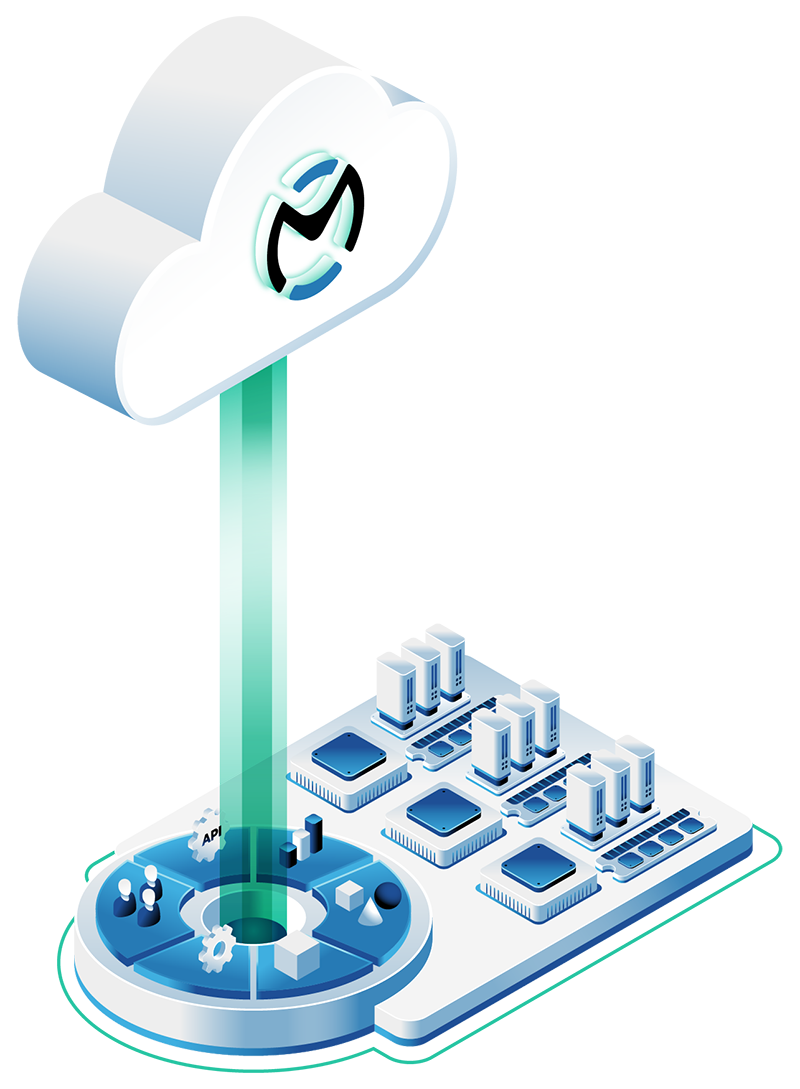 Hosted private clouds start with a three-server Cloud Core running OpenStack and Ceph. It’s a turnkey platform with compute, block storage, object storage, and software-defined networking all ready to go out of the box. You can literally have a production-ready environment deployed in 45 seconds.
Key capabilities: You can create and manage virtual machines through the OpenStack dashboard or API, deploy highly available storage using Ceph’s replication, set up complex networks with routers, load balancers, and VPNs, and tap into OpenStack’s huge ecosystem including Kubernetes integrations. Because you’re on dedicated hardware with optimized resource management, you get up to 3.5x more efficiency compared to public cloud.
Best suited for: Organizations running multiple applications that benefit from virtualization’s flexibility, teams migrating from VMware or public cloud providers, and deployments that need elastic scalability with predictable costs. Hosted private clouds shine when you need to spin up resources on the fly while keeping full control over your infrastructure.
Cost model: Fixed monthly pricing based on your hardware tier, no per-VM licensing fees. Bandwidth includes generous egress with fair pricing if you need more. The best part? No surprise bills. You know exactly what you’re paying each month, no matter what your traffic or resource usage looks like.
Bare Metal Dedicated Servers
 Bare metal means you get direct access to physical hardware with IPMI remote management. You install whatever operating system you want, configure the servers exactly how you need them, and run workloads directly on the hardware, no virtualization layer slowing things down.
Key capabilities: Maximum performance with zero virtualization overhead, complete control over hardware configuration and tuning, the ability to run workloads that don’t play nice with virtualization, and flexibility to use any operating system or hypervisor you want. IPMI gives you full remote management: BIOS configuration, OS installation, system recovery, all of it.
Best suited for: High-performance computing clusters where you need predictable, consistent performance; big data platforms like Hadoop, Spark, or ClickHouse where data locality and raw compute power matter; database servers that need maximum I/O performance; and specialized applications requiring specific hardware configurations or kernel access. If you’re running Ceph storage clusters, Kubernetes (without OpenStack), or custom hypervisors, bare metal gives you the flexibility you need.
Cost model: Same concept as hosted private cloud with fixed monthly pricing per server. Each server includes bandwidth, IPMI access, and hardware support. If you’re deploying a lot of servers, you can get ramp pricing that aligns hardware delivery with your growth schedule.
Integrated Deployments: Combining Both Models
Here’s one of OpenMetal’s coolest features: you can integrate hosted private cloud and bare metal in the same deployment. Your servers share VLANs, so they can talk to each other at full speed on private networks while staying separate where you need them to be.
Hybrid architecture example: Say you deploy a Medium or Large hosted private cloud for your web applications, APIs, and internal tools. Then you add bare metal servers for your database cluster (PostgreSQL, MySQL, whatever you’re running) where consistent performance really matters. Connect everything via private VLANs and your cloud VMs can hit those databases at 10Gbps speeds without ever touching the public internet. You get cloud flexibility for most things and bare metal performance where it counts.
Shared infrastructure benefits: Both deployment types use the same data center facilities, network infrastructure, and support team. Your hosted private cloud can use Ceph object storage that includes bare metal servers as extra storage nodes. Bare metal servers can join private networks you created in your OpenStack cloud. This level of integration is really hard (or impossible) to pull off with providers who only offer one model or the other.
Cost Considerations and Scaling Strategies
Understanding Total Cost of Ownership
OpenMetal’s pricing works differently than public cloud. Instead of paying per VM, per GB of storage, and per GB of transfer, you lease dedicated hardware with fixed monthly costs. This gives you predictability and usually saves you 25-50% once you hit the right scale.
The tipping point: For most organizations, private cloud becomes more cost-effective when you’re spending $10,000-20,000+ per month on public cloud. Below that, public cloud’s pay-as-you-go model often makes more sense. Above it, fixed costs of dedicated hardware give you better economics, especially for stable workloads with consistent resource usage.
What’s included: Your hardware pricing covers the servers, network connectivity, data center space and power, hardware support and replacement, and baseline technical support. For hosted private clouds, you also get OpenStack and Ceph software with zero licensing fees. Additional options include Assisted Management support and egress beyond included allocations.
Resource efficiency: Since you control the entire hardware stack, you can optimize vCPU ratios, storage replication levels, and network configurations to match what you actually need. This flexibility helps you squeeze maximum value from your hardware investment.
Scaling Your Deployment
OpenMetal clouds scale both up and out. Understanding your growth options helps you start with the right hardware and expand smoothly when you need to.
Vertical scaling: Start small and upgrade to bigger servers as you grow. For example, begin with Small V2.1 for development, move to Medium V4 for initial production, then expand to Large V4 as your applications multiply. This minimizes upfront costs while giving you a clear upgrade path.
Horizontal scaling: Add more servers to your existing cluster for extra capacity. You can add matching compute nodes (more VM capacity), converged servers (compute and storage together), storage-focused servers (Ceph-only nodes), or bare metal servers (for specific workloads). Everything integrates into your existing setup through OpenMetal Central’s management interface.
Multi-region expansion: Deploy additional cloud cores in different locations through OpenMetal’s data center locations in Virginia Beach, Phoenix, Singapore, and Amsterdam. Multi-region deployments give you disaster recovery, geographic load distribution, and help with compliance requirements for data sovereignty.
Technical Considerations for Production Deployments
Sizing Your Initial Deployment
Properly sizing your initial hardware deployment sets the foundation for a successful private cloud implementation. Several factors influence the appropriate tier selection.
Current resource utilization: Analyze your existing VM footprint, storage consumption, and network traffic patterns. If you’re migrating from public cloud, export resource metrics for the past 90 days to understand both average and peak utilization. This data helps determine the appropriate hardware tier and number of servers needed.
Growth projections: Factor in anticipated growth over the next 12-24 months. Starting with hardware that provides 30-40% headroom gives you time to evaluate performance before needing to scale. The ability to add servers means you don’t need to over-provision dramatically, but some buffer prevents immediate capacity constraints.
Workload characteristics: CPU-intensive applications like video encoding or computational workloads benefit from higher core counts (Large or XL configurations). Memory-intensive applications like databases, caching layers, or big data processing require configurations with larger RAM allocations. Storage-intensive workloads need sufficient NVMe capacity with appropriate replication levels for your data protection requirements.
High Availability and Redundancy
Hosted private clouds using OpenStack and Ceph provide built-in high availability through data replication and distributed architecture. Understanding how this works helps you make informed decisions about redundancy levels.
Storage replication: Ceph replicates data across multiple servers. Three-replica configuration (the default) tolerates one server failure while maintaining data availability and can survive two failures without data loss (though with degraded performance). Two-replica configuration reduces storage overhead from 3x to 2x but can only tolerate one failure. The choice depends on your recovery time objectives and storage efficiency requirements.
Compute redundancy: VMs run on individual servers but can be configured with anti-affinity rules to ensure related VMs run on different physical hosts. If a server fails, VMs can be restarted on surviving hosts (though this requires capacity headroom). For true high availability, implement application-level clustering across multiple VMs rather than relying solely on infrastructure redundancy.
Network redundancy: Each server includes redundant 2x10Gbit network connections in a LAG configuration, providing both bandwidth aggregation and failover capability. The data center network infrastructure itself includes redundant paths and equipment.
Support and Management Options
OpenMetal offers tiered support to match your team’s capabilities and preferences.
Base support (included): All deployments include hardware management, provisioning of known-good OpenStack/Ceph software, and onboarding support. OpenMetal handles hardware failures, provides software updates, and offers engineering support during your initial deployment.
Assisted Management (recommended): This popular option adds a dedicated account engineer, proactive monitoring, assistance with cloud health issues, and help with software upgrades. Teams who prefer to focus on their applications rather than infrastructure operations find Assisted Management provides the right balance of control and support.
Custom managed services: For organizations wanting a fully managed private cloud, OpenMetal can provide customized support levels including multi-region management, custom integrations, and comprehensive operational support. This approach works well for organizations transitioning from public cloud who want private cloud benefits without building in-house OpenStack expertise.
Migration Strategies and Ramp Pricing
Moving workloads to OpenMetal infrastructure requires planning, especially for large deployments. OpenMetal’s flexible approach accommodates various migration strategies.
Phased migrations: Start with a smaller hosted private cloud deployment for testing and initial workloads. Migrate applications in phases, perhaps development environments first, then non-critical production workloads, and finally your most critical systems. Add hardware incrementally as migration progresses, using ramp pricing to align costs with your actual transition timeline.
Parallel operation: Run both your existing infrastructure and OpenMetal side-by-side during migration. This approach reduces risk by maintaining fallback options and gives teams time to optimize configurations. The overlap period can be structured with ramp pricing to manage the temporary dual infrastructure costs.
Scheduled delivery: For large deployments requiring many servers, work with your OpenMetal account manager to schedule hardware delivery. Immediate needs can typically be met from on-hand inventory, while future deployments are scheduled from OpenMetal’s supply chain. This coordination ensures hardware arrives when your team is ready to configure it, avoiding idle capacity charges.
Making Your Decision
Choosing the right OpenMetal hardware generation and deployment model comes down to your specific requirements, team capabilities, and growth plans. Here’s a quick framework:
For development and testing: Start with Small V2 or V2.1. You get enough resources to run realistic test environments without spending a fortune. OpenMetal’s trial programs let you validate everything before committing to production hardware.
For initial production deployments: Medium or Large V4 offers the best balance of capability and cost. You get production-grade performance with room to grow, and you’re running on the latest generation hardware so you won’t feel constrained.
For large-scale or demanding workloads: XL V4 or XXL V4 gives you the compute density and storage capacity enterprise applications need. Consider mixing hosted private cloud with bare metal servers for workloads that demand consistent performance.
For hybrid architectures: Use hosted private cloud for your general computing needs and add bare metal for databases, big data platforms, or other performance-sensitive stuff. The integrated networking makes this seamless.
The most important thing is understanding your workload requirements and where you’re headed. OpenMetal’s transparent pricing, flexible scaling options, and supportive team make it possible to start with what makes sense and expand as you grow. Whether you go with hosted private cloud, bare metal, or both, you’re building on enterprise-grade hardware with the freedom to customize and control your infrastructure.
To figure out which configuration fits your needs, check out OpenMetal’s pricing calculator, talk with the technical team about your specific requirements, or start with a free proof-of-concept deployment to test your applications. The goal is finding the right infrastructure foundation that works for where you are now and where you’re going.
Schedule a Consultation
Get a deeper assessment and discuss your unique requirements.
Read More on the OpenMetal Blog