



























In this article
This guide walks through calculating TCO for hosted private clouds step by step, using real OpenMetal pricing data to demonstrate actual costs versus theoretical estimates. You’ll learn which costs matter, which get overlooked, and how to build a defensible financial analysis that accounts for both obvious expenses and hidden operational realities.
Your CFO just asked for a complete cost analysis of moving to private cloud. You know the monthly subscription looks attractive compared to your current AWS bill, but what about migration costs? Training? The infrastructure you already own? Hidden operational expenses that only surface six months into deployment?
Total Cost of Ownership (TCO) calculations separate real infrastructure value from marketing promises. A proper TCO analysis accounts for every dollar spent over 3-5 years, including costs that don’t appear on invoices like staff time, downtime, and the operational complexity of managing infrastructure.
Why TCO Matters More Than Monthly Pricing
Monthly subscription costs tell part of the infrastructure story. OpenMetal’s Large V4 Cloud Core costs $4,298/month and supports approximately 142 VMs. That’s $30/month per VM at full utilization. Compare that to AWS EC2 instances at $140-$180/month for similar specifications, and the subscription savings look compelling.
But that comparison misses critical factors that impact long-term costs.
Migration isn’t free. Moving workloads between infrastructure providers requires time, expertise, and usually some parallel running of old and new systems. Your team needs training on new platforms. Applications might need reconfiguration. These transition costs can equal months of subscription fees.
Operational costs vary dramatically between platforms. Public cloud promises simplicity but delivers complexity through dozens of services, each with its own pricing model and operational requirements. Private cloud requires infrastructure expertise but eliminates the ongoing cost of managing service sprawl and unpredictable bills.
The flexibility to change providers or bring infrastructure in-house has financial value. Lock-in creates vendor leverage on pricing. Portable infrastructure built on OpenStack provides negotiating power and migration options that proprietary platforms don’t.
TCO analysis forces these factors into a single comparable number. Do it right and you can defend infrastructure decisions to finance teams and executives. Skip it and you’re making expensive bets based on incomplete information.
Understanding Direct vs Indirect Costs
Infrastructure costs split into two categories: direct costs that appear on invoices, and indirect costs buried in other budget lines.
Direct costs include everything you write checks for: server subscriptions, bandwidth fees, software licenses, support contracts, and IP address leases. These costs are straightforward to track because they show up as line items on bills.
Indirect costs hide in IT budgets, downtime reports, and productivity losses. Staff time managing infrastructure represents the biggest indirect cost. An infrastructure engineer spending 50% of their time on cloud management means half their salary gets allocated to infrastructure TCO. Downtime costs money in lost productivity and potentially lost revenue. Performance degradation reduces employee efficiency even when systems stay online.
Most organizations underestimate indirect costs by 20-30% because these expenses don’t appear on infrastructure invoices. Include them in your TCO calculation or your analysis will understate true costs significantly.
Step 1: Calculate Your Current Infrastructure Costs
Start TCO analysis by documenting what you’re spending today. Create a complete baseline of current expenses before evaluating alternatives. This baseline provides the comparison point for any infrastructure change.
Direct Costs You’re Already Paying
Hardware expenses for on-premises infrastructure include servers, storage arrays, networking equipment, racks, and cabling. If you purchased servers three years ago, calculate their remaining depreciated value rather than original purchase price. Most organizations use five-year depreciation schedules for infrastructure hardware.
Software and licensing fees cover virtualization platforms, operating systems, databases, security tools, backup solutions, and disaster recovery software. Track both perpetual licenses you’ve already purchased and subscription-based tools with recurring fees.
VMware vSphere licensing for a three-server cluster runs approximately $15,000-$25,000 annually depending on edition and support level. Microsoft Windows Server licensing adds another $6,000-$12,000 annually for a similar deployment. These recurring fees continue year after year.
In contrast, OpenStack and Ceph are open source with no licensing fees. OpenMetal’s hosted private cloud includes both platforms at no additional software cost beyond the infrastructure subscription.
Data center costs include electricity, cooling, facility management, physical security, and rack space leasing if you use colocation. These expenses scale with infrastructure size. A single rack drawing 5kW continuously costs $3,500-$8,800 annually in electricity alone depending on regional power rates. Add cooling costs that roughly equal power consumption.
Colocation providers typically charge $1,000-$2,000 monthly per rack for power and space. Multiple racks multiply these costs accordingly. OpenMetal bundles all data center costs into monthly subscription fees, eliminating these separate line items.
Maintenance and support contracts provide access to vendor assistance, hardware warranties, and software updates. These recurring fees often represent 15-20% of original hardware purchase prices annually.
Connectivity expenses cover internet bandwidth, network links between locations, and data transfer fees. Public cloud environments typically charge per-GB egress fees ranging from $0.06-$0.12 per GB. On-premises infrastructure has bandwidth costs but usually lower transfer charges.
Indirect Costs That Hide in Other Budgets
Staff time represents your biggest indirect cost. Calculate total compensation including salary, benefits, taxes, and overhead for each IT team member involved in infrastructure management. A systems administrator earning $120,000 in salary actually costs your organization closer to $160,000 with benefits and overhead.
Estimate what percentage of each person’s time goes to infrastructure tasks versus application work or strategic projects. If that administrator spends 60% of their time managing infrastructure, allocate $96,000 of their cost to infrastructure TCO.
Downtime costs multiply quickly. Calculate your average annual downtime in hours, multiply by the number of affected employees and their hourly wages, then add revenue impact for customer-facing services.
A four-hour outage affecting 100 employees with average fully loaded costs of $80/hour represents $32,000 in productivity loss. Add direct revenue impact if the outage affects customer transactions. An e-commerce site generating $8,000/hour in revenue loses $32,000 in sales during that same four-hour window.
Performance degradation creates costs similar to downtime but harder to quantify. Slow infrastructure reduces employee productivity through delays waiting for systems to respond, reports to generate, or builds to complete. Survey users about time spent waiting for infrastructure and calculate the productivity cost of those delays.
Administrative overhead includes governance, compliance activities, security management, and coordination required to keep infrastructure running properly. Organizations pursuing PCI-DSS, HIPAA, SOC 2, or industry-specific compliance spend substantial staff time on these activities. Document these hours and include them in TCO.
Step 2: Understanding Hosted Private Cloud Pricing
Real TCO calculations require understanding actual hosted private cloud costs. Let’s examine OpenMetal’s v4 Cloud Core pricing to demonstrate what you’ll pay for production-grade infrastructure if you were to move to our platform.
OpenMetal v4 Cloud Core Configurations
Medium V4: $2,976/month
- 1,008 vCPUs (8:1 oversubscription ratio from 144 physical CPU threads)
- Supports approximately 66 VMs at 80% capacity utilization
- Per-VM cost: $36/month at recommended utilization
- Included egress: Approximately 1,898TB (6Gbps total: 2Gbps per server × 3 servers)
- Best for: Small to medium production deployments, development environments, testing infrastructure
Large V4: $4,298/month
- 1,296 vCPUs (8:1 oversubscription ratio from 192 physical CPU threads)
- Supports approximately 142 VMs at 80% capacity utilization
- Per-VM cost: $30/month at recommended utilization
- Included egress: Approximately 3,797TB (12Gbps total: 4Gbps per server × 3 servers)
- Best for: Medium production environments, multi-tenant platforms, departmental infrastructure
XL V4: $7,150/month
- 2,736 vCPUs (8:1 oversubscription ratio from 384 physical CPU threads)
- Supports approximately 293 VMs at 80% capacity utilization
- Per-VM cost: $24/month at recommended utilization
- Included egress: Approximately 5,695TB (18Gbps total: 6Gbps per server × 3 servers)
- Best for: Large production deployments, high-density consolidation, enterprise workloads
XXL V4: $10,238/month
- 2,784 vCPUs (8:1 oversubscription ratio from 384 physical CPU threads)
- Supports approximately 557 VMs at 80% capacity utilization
- Per-VM cost: $18/month at recommended utilization
- Included egress: Approximately 9,491TB (30Gbps total: 10Gbps per server × 3 servers)
- Best for: Maximum consolidation density, very large deployments, service provider infrastructure
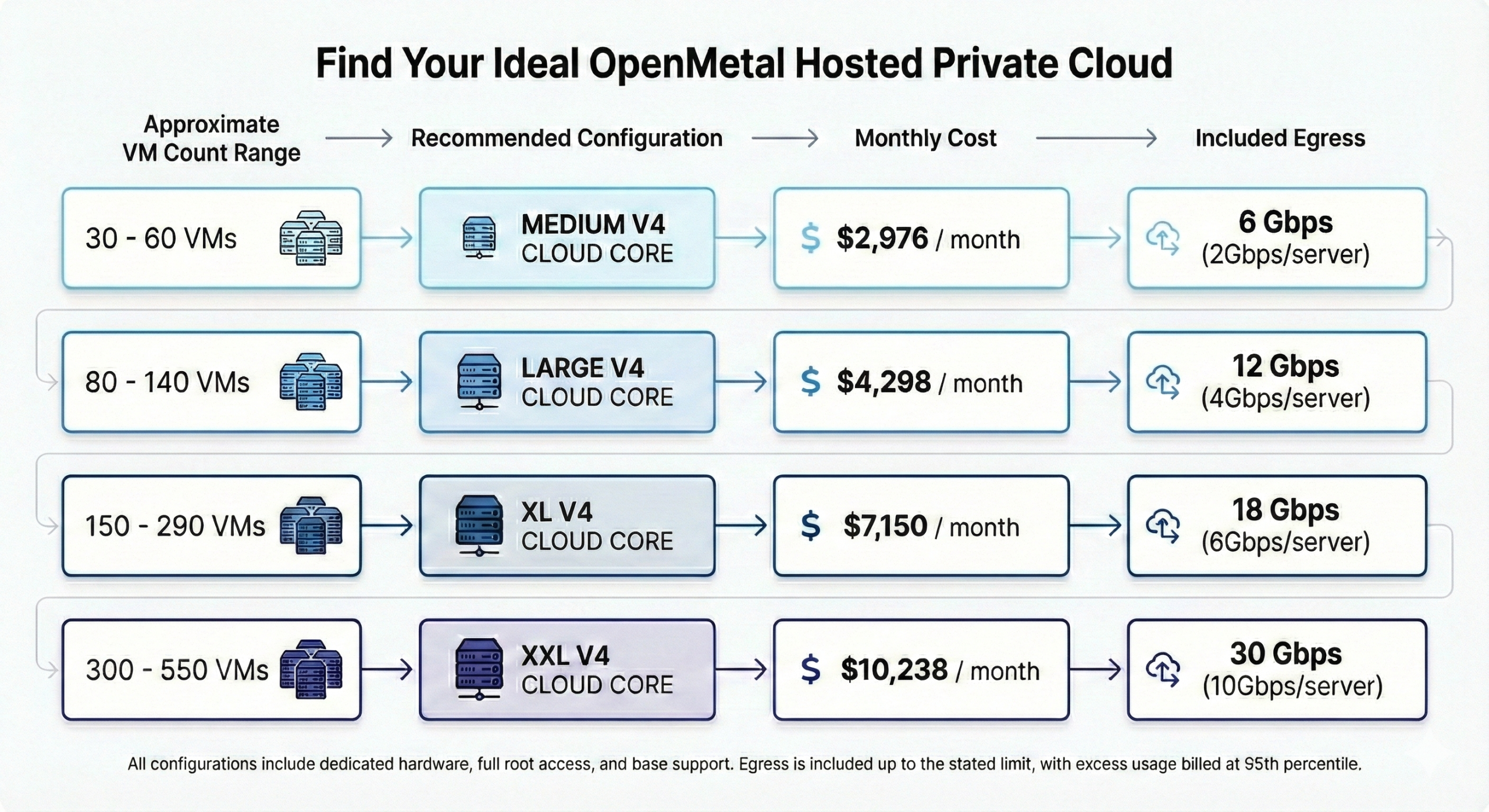
All configurations provide dedicated bare metal hardware with no noisy neighbors, full root access to configure systems exactly as needed, and infrastructure deployment in 45 seconds. The VM counts assume Large flavor instances (8GB RAM, 4vCPUs per VM) running at 80% average capacity.
What’s Included in Base Pricing
Base subscription fees cover comprehensive infrastructure and operational costs that would be separate line items with other providers:
Physical infrastructure including enterprise-grade servers powered by 5th generation Intel Xeon processors and Micron 7450 MAX NVMe drives. All hardware is dedicated to your deployment with no resource sharing.
Data center operations including power, cooling, physical security, and facility management. Your servers run in Tier III data centers holding certifications including SOC 1, SOC 2, SOC 3, PCI-DSS, NIST 800-53/FISMA, HIPAA, ISO 27001, ISO 22301, ISO 50001, and LEED Gold.
Complete OpenStack and Ceph deployment configured and ready for production workloads. Both platforms are open source with no licensing fees. You get full API access for automation with Terraform, Ansible, and other infrastructure-as-code tools.
Hardware monitoring using Datadog for infrastructure health tracking. This included monitoring covers server hardware, network connectivity, and storage systems.
Generous egress allotment included in base pricing, with bandwidth capacity scaling by configuration. Each server provides dedicated bandwidth (2Gbps, 4Gbps, 6Gbps, or 10Gbps depending on configuration), and with three servers per Cloud Core, total capacity is substantial: 6Gbps for Medium V4, 12Gbps for Large V4, 18Gbps for XL V4, and 30Gbps for XXL V4. Most deployments stay well within these limits. For the Large V4 configuration, this represents approximately 3,797TB of included monthly data transfer.
Network uptime backed by strong performance history. OpenMetal’s actual network uptime for 2022-2025 exceeded 99.99%, and 2026 is currently tracking above 99.99%. The base SLA guarantees 99.96% uptime.
DDoS protection included up to 10Gbps per IP address, providing security against common network attacks without additional charges.
IPv6 addressing at no charge. IPv4 addresses incur leasing fees due to address scarcity, but you can bring your own IP allocations in /24 or larger blocks to avoid these costs.
Base support covering hardware management, infrastructure monitoring, and assistance with cloud health issues. This includes hardware replacement, troubleshooting platform problems, and guidance on OpenStack and Ceph operations.
Additional Costs to Consider
IPv4 addressing incurs leasing fees if you need public IPv4 addresses beyond what’s included. IPv6 is free and recommended where possible, but some applications still require IPv4 connectivity. You can also use an IP converter for IPv4 and IPv6 subnets if needed.
Excess egress beyond included amounts uses 95th percentile billing rather than per-GB charges. This measurement method samples bandwidth usage every five minutes throughout the billing period, discards the top 5% of measurements, and bills based on the 95th percentile value.
For most workloads, this costs 60-80% less than public cloud per-GB egress fees. The Large V4’s 3,797TB included egress would cost approximately $228,000-$342,000 monthly at AWS rates ($0.06-$0.09/GB). OpenMetal includes this capacity at no additional charge.
Assisted Management provides enhanced support including proactive health monitoring, dedicated account engineers, and faster response times. This optional service suits organizations needing additional engineering assistance beyond base support.
Third-party tools for application-level monitoring, backup, security, and operational management add recurring costs. Budget for these tools based on actual operational requirements rather than vendor recommendations.
Pricing Flexibility and Promotions
OpenMetal offers multiple ways to reduce costs and minimize financial risk:
50% discount on first two months for new deployments reduces initial expenses during migration and testing phases. This promotion lowers the cost of parallel running old and new infrastructure during cutover.
30-day money-back guarantee eliminates financial risk for trying the platform. If the infrastructure doesn’t meet your requirements, request a full refund within the first month.
Free proof-of-concept trials up to 30 days let you test infrastructure with real workloads before committing to production. Validate performance, test migration procedures, and verify operational requirements without financial commitment.
Agreement term discounts reduce monthly costs for annual, multi-year, or five-year commitments. Longer terms provide better pricing for organizations confident in their infrastructure requirements and looking to lock in costs.
Step 3: Calculate Initial Deployment Costs
Transitioning to hosted private cloud involves upfront costs before you see operational benefits. Account for these properly to avoid budget surprises during migration.
Planning and Setup Costs
Professional services might include consulting for architecture design, implementation assistance, or specialized expertise your team lacks. OpenMetal assigns a dedicated team including Account Manager, Account Engineer, and Executive Sponsor to guide deployments. This support is included in standard pricing, eliminating the need for expensive external consultants during migration.
Third-party consultants typically charge $150-$250/hour and can easily reach $20,000-$50,000 for mid-sized migrations. OpenMetal’s included onboarding support provides similar guidance without these consulting fees.
Migration planning requires engineering time to assess current workloads, plan the transition, configure new infrastructure, and validate functionality before cutover. Estimate hours required based on workload complexity and team experience.
Simple virtualized workloads with documented configurations migrate faster than complex legacy applications. Virtual machines generally migrate more easily than physical servers. Stateless applications move more simply than stateful databases with replication requirements.
Budget 200-400 hours of internal engineering time for a typical mid-sized migration covering 50-150 VMs. Complex environments with custom applications, tight integration requirements, or minimal documentation can require 600-1,000 hours.
Proof of concept testing validates performance and functionality before committing to full production deployment. OpenMetal’s free 30-day trial eliminates the financial cost of PoC testing, though you’ll still invest staff time configuring and evaluating the platform.
Data transfer during migration can be substantial if you’re moving large datasets. Calculate total data volume, available bandwidth, and transfer time required. OpenMetal offers direct connection options to accelerate migration and avoid internet bandwidth costs for large-scale data movement.
A typical migration moving 10TB of data over 1Gbps internet connectivity takes approximately 24 hours of transfer time. Factor in bandwidth availability, compression, and parallelization when estimating actual transfer duration.
Integration and Training Costs
Staff training prepares your team to manage OpenStack-based infrastructure effectively. A skilled Linux administrator typically needs 40 hours to become proficient with OpenStack fundamentals including instance management, networking configuration, and storage administration. Junior administrators might need 120 hours to reach similar proficiency.
Compare this to proprietary platform training costs. VMware certifications in the US cost approximately $4,500 per person including exam fees and required training courses. OpenStack training uses free documentation and community resources, reducing certification expenses substantially. Training time still represents a cost through staff hours invested in learning.
OpenMetal provides comprehensive documentation through their OpenStack Operator’s Manual and User’s Manual, enabling self-paced learning without expensive training programs.
Application integration ensures existing software, databases, and tools work properly on new infrastructure. This might require configuring software-defined networking with VLANs or VXLANs, updating deployment scripts with Terraform or Ansible, and testing application connectivity.
Budget 80-200 hours for application integration depending on the complexity of your application stack and degree of automation in your current deployment process.
Testing and validation before cutover requires running parallel environments, performing load testing, and verifying application behavior. Budget for this parallel running period when you’re paying for both old and new infrastructure simultaneously.
Most organizations run parallel for 30-90 days to validate functionality and build confidence before fully cutting over to new infrastructure. With OpenMetal’s 50% discount on the first two months, this parallel running costs less than with other providers.
Step 4: Calculate Ongoing Operational Costs
After initial deployment, recurring operational costs determine your long-term TCO. These ongoing expenses shape monthly infrastructure spending and total costs over your analysis period.
Subscription Costs
Infrastructure subscription fees represent your primary recurring expense. OpenMetal’s pricing model provides cost predictability that simplifies budgeting compared to usage-based public cloud billing.
For a deployment supporting 142 VMs, the Large V4 configuration costs $4,298/month. Run your servers at 20% utilization or 90% utilization and the bill stays exactly the same. This predictability eliminates budget uncertainty from unexpected traffic spikes or misconfigured auto-scaling policies.
The key consideration is right-sizing your deployment. Overprovisioning wastes money on unused capacity. Underprovisioning creates performance problems and requires expensive emergency scaling. Plan for 60-80% average utilization to balance efficiency with headroom for growth and workload spikes.
OpenMetal’s 45-second deployment speed means you can add capacity exactly when needed rather than overprovisioning months in advance. Need additional servers for a new application launch? Deploy them the same day rather than ordering hardware weeks ahead of actual requirements.
Bandwidth and Egress Costs
Network costs vary based on data transfer patterns, but OpenMetal’s included egress and 95th percentile billing dramatically reduce expenses compared to public cloud.
Included egress with the Large V4 configuration provides approximately 3,797TB monthly at no additional charge. This included capacity represents 12Gbps of total sustained bandwidth (4Gbps per server × 3 servers).
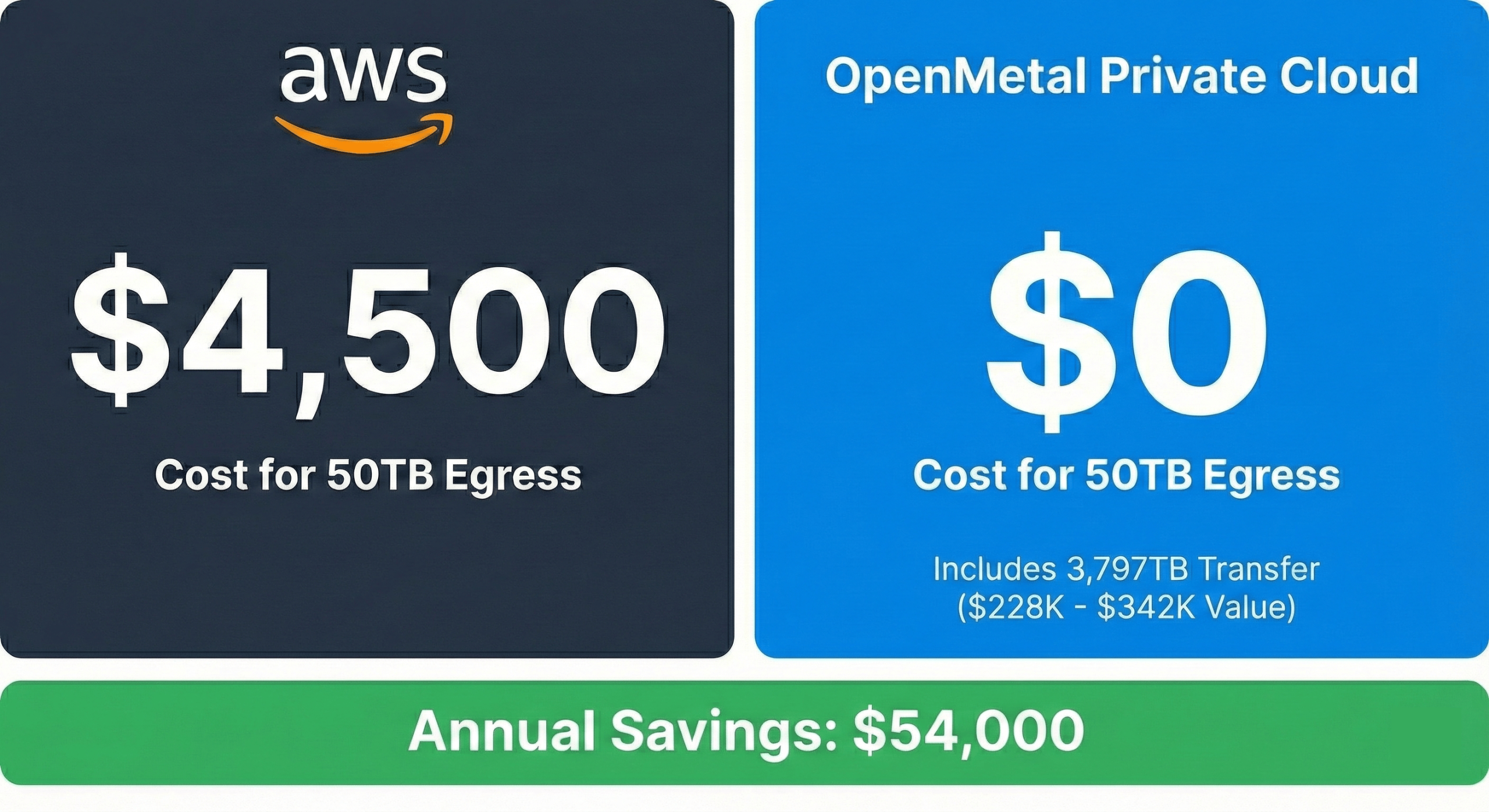
To put this in perspective, 3,797TB of egress on AWS costs approximately $228,000-$342,000 monthly at typical rates of $0.06-$0.09 per GB. OpenMetal includes this capacity in the $4,298 monthly subscription, creating extraordinary savings for bandwidth-intensive workloads.
Excess egress beyond included amounts uses 95th percentile billing. This measurement method samples bandwidth usage every five minutes throughout the month, sorts all measurements, discards the top 5%, and bills based on the 95th percentile value.
This approach provides fairness for usage patterns with occasional spikes. Your bill reflects sustained usage patterns rather than penalizing you for temporary traffic increases. For workloads that burst occasionally but maintain reasonable average bandwidth, 95th percentile billing typically costs 60-80% less than per-GB charges.
Staff Time for Ongoing Management
Internal labor represents a significant operational cost. Small deployments supporting 30-50 VMs typically require 10-20 hours monthly for routine maintenance, monitoring, and user support. Medium environments with 100-200 VMs might need 30-50 hours monthly. Large deployments with 500+ VMs can require 60-100 hours monthly depending on workload complexity and automation level.
Calculate fully loaded labor costs including benefits and overhead when estimating these expenses. An administrator spending 40 hours monthly on infrastructure management at $100/hour fully loaded represents $4,000 in monthly labor costs allocated to infrastructure TCO.
Your team’s existing expertise impacts time requirements substantially. Teams experienced with Linux and virtualization adapt to OpenStack more quickly than teams dependent on GUI management tools or proprietary platforms.
OpenMetal’s “Day 2 ready” infrastructure means your deployment arrives pre-configured and production-ready, reducing the initial setup and tuning work required. This approach saves substantial time compared to building infrastructure from scratch.
Support and Enhanced Services
Base support is included in OpenMetal’s subscription pricing, covering infrastructure monitoring, hardware maintenance, and platform troubleshooting. This support level works well for teams with infrastructure expertise who need vendor assistance for hardware issues or platform problems.
Assisted Management provides enhanced support for organizations requiring additional engineering help. This optional service includes:
- Named Account Engineer dedicated to your deployment
- Engineer-to-engineer support for infrastructure questions
- Joint cloud monitoring with 24/7 team watching health indicators
- Proactive monthly health checks and recommendations
- Assistance with cloud software upgrades
- Faster response times for critical issues
Evaluate your internal expertise when deciding on support tiers. Teams comfortable managing infrastructure might operate effectively with base support. Organizations with limited OpenStack experience or those prioritizing rapid issue resolution benefit from enhanced support tiers.
Third-Party Tools
Additional operational tools add recurring costs. Basic infrastructure monitoring is included with hosted private cloud subscriptions through Datadog for hardware monitoring. Application-level monitoring, comprehensive backup solutions, and advanced security tools require separate subscriptions.
Common tool costs include:
- Application performance monitoring: $50-$200/month per server depending on feature set
- Backup and disaster recovery: $100-$500/month depending on data volumes
- Security and compliance tools: $100-$300/month per server for advanced capabilities
- Log aggregation and analysis: $50-$150/month per server
Budget for these tools based on actual operational requirements. Start with essential capabilities and add features as needs emerge rather than paying for unused functionality.
Step 5: Apply the TCO Formula
Calculate TCO by combining capital expenditures (CapEx) and operational expenditures (OpEx) over your analysis period:
TCO = CapEx + (OpEx × Time Period)
For hosted private cloud, CapEx includes migration costs, professional services, initial setup, and any upfront infrastructure investments. OpEx covers monthly subscriptions, bandwidth, staff time, third-party tools, and all recurring costs.
Choosing Your Analysis Period
Use a 3-5 year analysis period for infrastructure TCO calculations. Shorter periods don’t capture full operational costs and favor solutions with low initial costs but high operational expenses. Longer periods introduce too many variables and assumptions about future requirements that reduce analysis accuracy.
Five years aligns with typical hardware depreciation schedules and contract commitment terms. This timeframe provides realistic cost comparison while remaining short enough that technology assumptions stay reasonable.
Including Growth Projections
Include growth projections in your OpEx calculations. If you expect 20% annual user growth, infrastructure costs should increase proportionally. Plan for scaling from OpenMetal’s Large V4 ($4,298/month supporting 142 VMs) to XL V4 ($7,150/month supporting 293 VMs) as workloads expand.
Infrastructure rarely scales perfectly linearly with users, but accounting for growth prevents unrealistic TCO estimates that ignore expansion costs. Model different growth scenarios to understand TCO sensitivity. Calculate costs assuming 10% annual growth, 20% growth, and 30% growth to see how different rates impact total spending.
Common Calculation Mistakes to Avoid
Running TCO analysis too early after migration captures one-time setup costs that don’t represent ongoing operations. The first 2-3 months include configuration, tuning, and stabilization work that exceeds normal operational requirements. Wait until operations stabilize before making long-term cost projections.
Forgetting indirect costs entirely causes TCO underestimation by 20-30%. Staff time, downtime costs, and administrative overhead don’t appear on infrastructure invoices but represent real expenses. Include these costs or your analysis will favor solutions with hidden operational complexity.
Applying public cloud cost logic to private cloud creates incorrect assumptions. With hosted private cloud, costs stay fixed regardless of utilization. OpenMetal’s Large V4 costs $4,298/month whether you’re running 50 VMs or 140 VMs. The risk isn’t escalating bills but running out of capacity. Monitor resource usage and plan capacity expansion before hitting limits.
Ignoring the value of flexibility understates the benefit of portable infrastructure. Vendor independence and the ability to change providers or bring infrastructure in-house have value even if you never exercise those options. Lock-in creates vendor leverage on pricing and limits cost optimization over time.
Overlooking egress fee differences misses major cost factors for bandwidth-intensive workloads. Public cloud per-GB charges scale linearly with data transfer. OpenMetal includes substantial egress (3,797TB for Large V4) at no additional charge, with 95th percentile billing for excess usage costing 60-80% less than per-GB rates.
For applications moving 50TB monthly, this difference alone can represent $36,000-$60,000 in annual savings. For high-bandwidth applications approaching 1,000TB monthly, the savings exceed $500,000 annually.
Step 6: Account for Depreciation and Sunk Costs
Existing infrastructure investments affect migration decisions even though those costs are already spent. Understanding depreciation and sunk costs provides realistic financial analysis of infrastructure transitions.
Understanding Sunk Costs
Sunk costs are past investments you can’t recover. Servers purchased three years ago, data center buildouts, or software licenses that become irrelevant after migration all represent sunk costs. These costs shouldn’t prevent migration to better infrastructure, but they do impact financial analysis.
Calculate the remaining value of existing infrastructure based on depreciation schedules and actual resale value. Decommissioned servers typically sell for 10-20% of original purchase price depending on age and condition. Factor in disposal costs for retiring equipment including data sanitization and transportation.
Avoid the sunk cost fallacy where you continue using inferior infrastructure simply because you’ve already paid for it. Make migration decisions based on future costs and benefits rather than past investments. The question isn’t “How much did we spend on this infrastructure?” but rather “What’s the best choice moving forward given our current situation?”
Calculating Asset Depreciation
Asset depreciation measures how infrastructure value decreases over time. Most organizations use five-year depreciation schedules for infrastructure hardware. This timeframe aligns with realistic hardware lifecycles before performance and reliability concerns emerge.
Calculate remaining depreciation period for existing infrastructure. Servers purchased three years ago have two years of depreciation remaining. At that point, their book value reaches zero even if they continue functioning.
Align migrations with hardware refresh cycles when possible to minimize write-offs. If major servers need replacement in 18 months, time your hosted private cloud migration to coincide with that refresh rather than migrating immediately and writing off remaining depreciation.
Contract Timing Considerations
Existing contracts significantly impact migration costs and timing. Review commitments for virtualization software licenses, hardware leases, support agreements, and reserved instance contracts.
VMware licenses, Microsoft Enterprise Agreements, and other software subscriptions typically involve multi-year commitments. Understand termination clauses and whether licenses can be transferred, suspended, or partially refunded.
Plan migrations to start when major contracts expire. This timing prevents paying for both old and new infrastructure simultaneously while maintaining service continuity. If critical VMware licenses expire in six months and cost $20,000 annually, use that time for migration planning and execute the cutover when commitments end to avoid double-paying.
Real TCO Comparison: AWS vs OpenMetal
Let’s calculate actual TCO for a real-world scenario: an organization running 142 virtual machines currently on AWS, evaluating migration to OpenMetal’s hosted private cloud.
Current AWS Costs (142 VMs)
Compute instances:
- 142 × t3.xlarge instances (4 vCPUs, 16GB RAM)
- On-demand pricing: $0.1664/hour = $119.81/month per instance
- Monthly cost: $17,013
- Annual cost: $204,156
Storage:
- 40TB EBS SSD (gp3) @ $0.08/GB/month
- Monthly cost: $3,200
- Annual cost: $38,400
Data transfer:
- 50TB outbound monthly @ $0.09/GB (blended rate)
- Monthly cost: $4,500
- Annual cost: $54,000
Total AWS direct costs:
- Monthly: $24,713
- Annual: $296,556
Indirect costs:
- Staff time (1.5 FTE @ $150K fully loaded): $225,000/year
- Cost management and monitoring tools: $18,000/year
- Estimated downtime (6 hours annually): $60,000/year
- Total indirect: $303,000/year
Current total annual cost: $599,556
OpenMetal Alternative (Large V4)
Direct costs:
- Infrastructure subscription: $4,298/month
- Egress: $0/month (50TB well within 3,797TB included)
- Monthly total: $4,298
- Annual total: $51,576
Initial migration costs:
- Internal engineering time (350 hours @ $125/hour): $43,750
- Data transfer acceleration (dedicated connection): $5,000
- Parallel running (2 months at 50% discount): $4,298
- Total migration: $53,048
Ongoing indirect costs:
- Staff time (1.0 FTE @ $150K fully loaded): $150,000/year
- Monitoring tools (reduced scope): $8,000/year
- Estimated downtime (2 hours annually): $20,000/year
- Total indirect: $178,000/year
Year 1 total cost: $282,624 (including migration)
Years 2-5 annual cost: $229,576
Five-Year Comparison
AWS five-year projection (assuming 15% annual cost increase):
- Year 1: $599,556
- Year 2: $689,489
- Year 3: $792,912
- Year 4: $911,849
- Year 5: $1,048,627
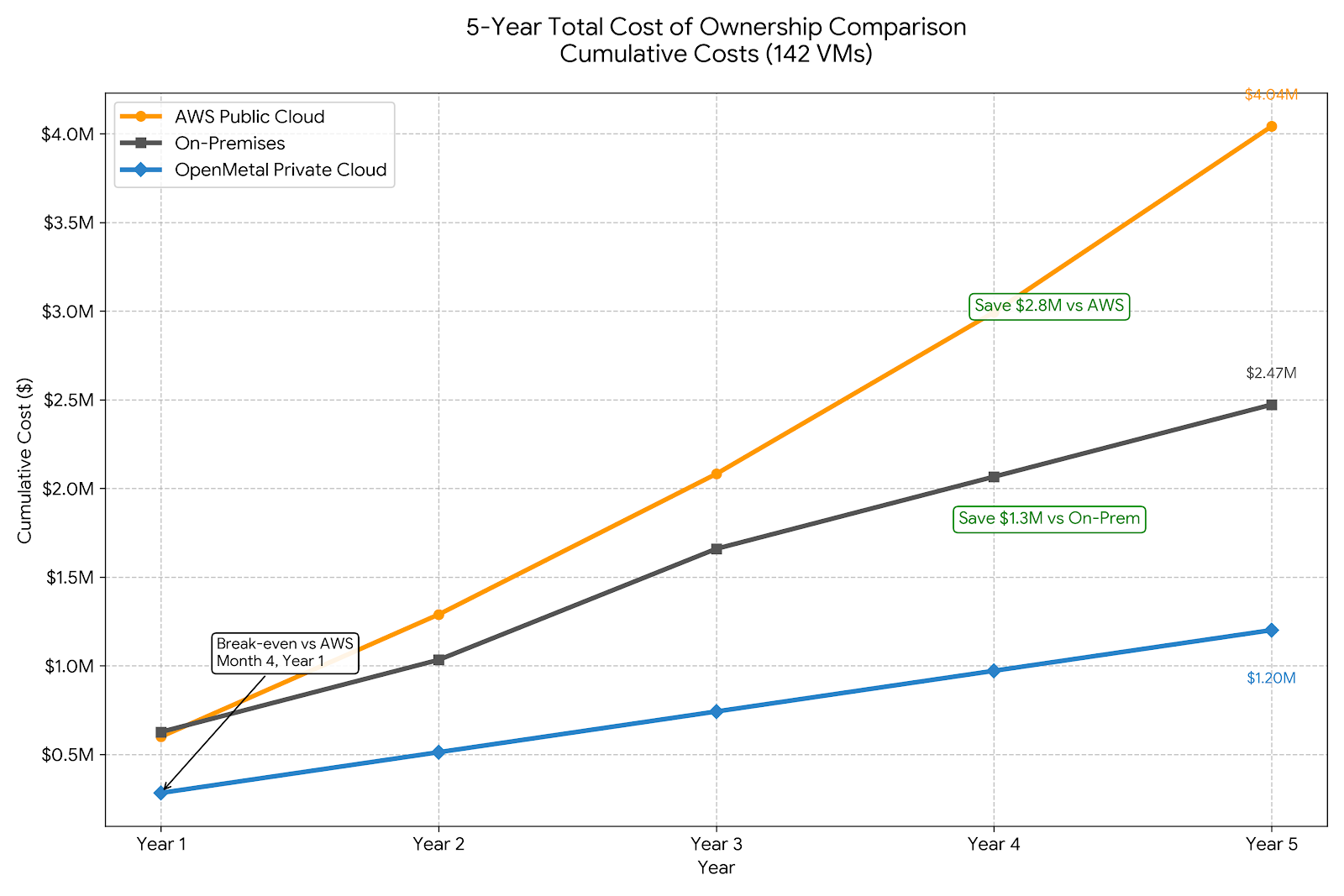
- Five-year total: $4,042,433
OpenMetal five-year total:
- Year 1: $282,624
- Years 2-5: $918,304 (4 × $229,576)
- Five-year total: $1,200,928
Five-year savings: $2,841,505 (70% reduction)
The break-even point occurs in Month 4 of Year 1 when cumulative OpenMetal costs fall below cumulative AWS costs even after accounting for migration expenses. All subsequent months provide pure savings.
Where Savings Come From
Infrastructure subscription: OpenMetal’s $4,298/month for dedicated hardware supporting 142 VMs costs 75% less than AWS compute charges of $17,013/month for equivalent instances.
Egress fees: 50TB monthly transfer is completely free with OpenMetal (included within 3,797TB limit), versus AWS charges of $4,500/month. This single factor saves $54,000 annually.
No licensing fees: OpenStack and Ceph are open source with zero licensing costs, while comparable VMware environments would require $15,000-$25,000 annually in software licenses.
Operational simplicity: Reduced infrastructure complexity lets one staff member manage OpenMetal deployment versus 1.5 FTE required for AWS environment, saving $75,000 annually in labor costs.
Improved reliability: Better uptime (>99.99% actual vs AWS SLA of 99.99%) reduces annual downtime costs from $60,000 to $20,000, saving $40,000 annually through improved productivity and revenue protection.
Eliminated tooling complexity: Simpler infrastructure reduces cost management and optimization tool expenses from $18,000 to $8,000 annually, saving $10,000/year.
Hosted Private Cloud vs On-Premises Comparison
Let’s also compare the same 142 VM deployment on-premises versus OpenMetal to understand how hosted private cloud economics compare to self-managed infrastructure.
On-Premises Costs (142 VMs)
Capital expenditures (Year 0):
- Servers (4 × high-density servers): $120,000
- Storage arrays (40TB usable): $60,000
- Networking equipment: $25,000
- Racks, cabling, installation: $15,000
- Total CapEx: $220,000
Annual operational costs:
- Software licensing (VMware vSphere): $22,000/year
- Power and cooling (10kW average @ $0.12/kWh): $10,512/year
- Colocation or data center costs: $24,000/year
- Hardware maintenance contracts: $30,000/year
- Staff time (2 FTE @ $150K fully loaded): $300,000/year
- Backup and DR solutions: $12,000/year
- Monitoring and management tools: $8,000/year
- Annual OpEx total: $406,512
Five-year total cost:
- Initial CapEx: $220,000
- Five years OpEx: $2,032,560
- Hardware refresh (Year 3): $220,000
- Five-year total: $2,472,560
OpenMetal vs On-Premises
OpenMetal five-year cost: $1,200,928
On-premises five-year cost: $2,472,560
Five-year savings with OpenMetal: $1,271,632 (51% reduction)
On-premises infrastructure requires substantial upfront capital ($220,000) and higher operational costs ($406,512/year vs $229,576/year for OpenMetal). The higher OpEx comes primarily from:
More staff required: 2 FTE vs 1 FTE ($150,000/year savings) for hardware management and data center operations
Ongoing software licensing: $22,000/year for VMware vs $0 for open source OpenStack
Power, cooling, and facility costs: $34,512/year bundled into OpenMetal subscription
Hardware maintenance contracts: $30,000/year included in OpenMetal pricing
Even without considering the capital investment, OpenMetal’s annual operational cost of $229,576 beats on-premises OpEx of $406,512 by $176,936 annually (44% lower).
Why OpenMetal Delivers Superior TCO
OpenMetal’s architecture creates TCO advantages through specific design choices that reduce both direct and indirect costs.
Fixed, Transparent Pricing Eliminates Budget Uncertainty
Predictable costs regardless of utilization patterns simplify budgeting and eliminate surprise bills. The Large V4 costs $4,298/month whether you’re running at 40% utilization or 95% utilization. This predictability contrasts sharply with public cloud where usage spikes can double monthly bills.
Finance teams can budget infrastructure costs accurately without contingency padding for unexpected usage. This certainty enables better financial planning and eliminates the ongoing cost of monitoring and optimizing spend to prevent bill shock.
Day 2 Ready Infrastructure Reduces Deployment Time
OpenMetal’s “Day 2 ready” infrastructure means your deployment arrives pre-configured and production-ready. Infrastructure deploys in 45 seconds from request to fully operational OpenStack cloud with Ceph storage.
This rapid deployment saves substantial engineering time compared to building infrastructure from scratch. No weeks spent installing hardware, configuring networks, deploying storage systems, or tuning performance. Your team can focus on migrating applications rather than building infrastructure.
No Proprietary Licensing Fees Reduce Software Costs
OpenStack and Ceph are open source platforms with no vendor licensing fees. You’re not paying proprietary premiums that can reach $20,000+ annually for equivalent VMware or other commercial virtualization platforms.
The money saved on licensing can be invested in more infrastructure capacity, redirected to application development, or dropped to the bottom line as pure savings.
Included Egress Eliminates Major Cost Driver
Generous included egress dramatically reduces costs for bandwidth-intensive workloads. The Large V4 includes approximately 3,797TB monthly (12Gbps total: 4Gbps per server × 3 servers), representing $228,000-$342,000 in value at public cloud rates.
This included capacity means virtually all deployments pay zero egress fees. Only excess usage beyond included amounts incurs charges, and those charges use 95th percentile billing that costs 60-80% less than per-GB rates.
For applications with significant data transfer requirements, this single factor can justify private cloud migration on its own. Organizations moving terabytes of data daily can save hundreds of thousands of dollars annually on egress fees alone.
Full Root Access Enables Performance Optimization
Complete control over dedicated hardware lets you configure systems exactly for your workload requirements. Tune kernel parameters, optimize storage stacks, adjust network settings, or install specialized monitoring tools without vendor restrictions.
This optimization capability directly impacts TCO by improving application performance, which can reduce the number of servers required for workload. Better performance per dollar spent means lower total infrastructure costs.
Dedicated Hardware Provides Consistent Performance
No noisy neighbors means consistent, predictable performance that enables accurate capacity planning. Benchmark numbers match production performance, unlike shared public cloud infrastructure where other tenants impact your applications unpredictably.
Consistent performance reduces the overhead of troubleshooting performance problems and eliminates the need for overprovisioning to compensate for variable resource availability. This predictability translates directly into better resource utilization and lower total costs.
Engineering Support Included Reduces Consulting Costs
Base support includes infrastructure monitoring, hardware maintenance, and platform troubleshooting. This included expertise reduces dependency on expensive external consultants for infrastructure management.
OpenMetal’s team has operational experience with OpenStack and Ceph at scale, providing guidance that accelerates deployment, reduces operational risks, and helps teams avoid common mistakes that create costs through downtime or inefficiency.
Your account includes access to Account Manager, Account Engineer, and Executive Sponsor from OpenMetal’s team. This partnership approach provides direct access to technical and business expertise without consulting fees.
Network Performance Backs SLA with Results
OpenMetal’s network performance history demonstrates reliability that reduces downtime costs:
- 2022-2024 actual performance: >99.99% uptime
- 2025 current performance: >99.99% uptime
- Base SLA guarantee: 99.96% uptime
This reliability record translates directly into lower TCO through reduced productivity losses and revenue impact from outages.
Next Steps for Your TCO Analysis
Build your own TCO analysis using these practical steps:
1. Document Current Costs Completely
Create a comprehensive baseline of existing spending. Include all infrastructure invoices, staff time allocated to infrastructure management, tool subscriptions, estimated downtime costs, and administrative overhead.
Don’t limit analysis to infrastructure line items. Include indirect costs from IT budgets, productivity losses, and compliance activities. A complete baseline requires looking beyond obvious expenses to capture total cost.
Use the AWS vs OpenMetal comparison as a template. List your actual instance counts, sizes, storage volumes, and data transfer amounts. Calculate both direct costs from your cloud provider bills and indirect costs from staff time and operational overhead.
2. Estimate Migration Costs Realistically
Calculate transition expenses based on workload complexity, team expertise, and available time. For a typical 100-150 VM migration, budget:
- 200-400 hours internal engineering time
- Data transfer costs (potentially reduced with direct connections)
- 2-3 months parallel running with 50% discount on OpenMetal for the first two months
- Total migration cost: $40,000-$75,000 depending on complexity
OpenMetal’s included onboarding support from dedicated Account Engineers reduces these costs by eliminating external consulting expenses and providing expert guidance throughout migration.
3. Calculate Your Specific OpenMetal Configuration
Determine which v4 Cloud Core configuration matches your VM count:
- 30-60 VMs → Medium V4 ($2,976/month, ~1,898TB included egress)
- 80-140 VMs → Large V4 ($4,298/month, ~3,797TB included egress)
- 150-290 VMs → XL V4 ($7,150/month, ~5,695TB included egress)
- 300-550 VMs → XXL V4 ($10,238/month, ~9,491TB included egress)
Check if your data transfer falls within included egress. Most deployments stay well within these generous limits, paying zero additional charges for bandwidth.
4. Model Different Growth Scenarios
Infrastructure requirements change over time. Model TCO under different growth assumptions:
- Conservative: 10% annual growth requiring configuration upgrade every 3-4 years
- Moderate: 20% annual growth requiring upgrade every 2 years
- Aggressive: 30% annual growth requiring annual capacity expansion
Understanding how growth impacts costs helps you plan capacity and budget appropriately. OpenMetal’s 45-second deployment and flexible configurations make it easy to scale as needs evolve.
5. Run Sensitivity Analysis
Test how TCO changes when you vary key assumptions:
- Staff time (0.75 FTE vs 1.0 FTE vs 1.25 FTE for infrastructure management)
- Bandwidth usage (conservative vs actual vs aggressive estimates)
- Support tier (base support vs Assisted Management)
- Growth rate (10% vs 20% vs 30% annually)
Understanding which factors most impact your TCO helps prioritize optimization efforts and identifies where estimation uncertainty matters most to your decision.
6. Test With Proof of Concept
Validate performance, test migration procedures, and verify cost assumptions before committing to full production deployment. OpenMetal offers:
- Free 30-day trial to test infrastructure with real workloads
- 50% discount on first two months for production deployments
- 30-day money-back guarantee eliminating financial risk
Use PoC testing to benchmark application performance, measure actual resource requirements, validate that your team can manage OpenStack effectively, and confirm that cost projections match reality. This testing reduces migration risk and provides data to refine TCO analysis.
7. Get Expert TCO Analysis
OpenMetal’s team can help build detailed TCO analysis specific to your infrastructure requirements. This includes:
- Detailed configuration recommendations based on your VM counts and workload characteristics
- Accurate egress cost estimates based on your data transfer patterns
- Migration planning and timeline development
- Cost comparison against your current infrastructure or public cloud spending
Ready to calculate your specific hosted private cloud TCO? Contact OpenMetal for detailed cost analysis and proof-of-concept testing that validates your calculations with real-world performance data.
Use OpenMetal’s cloud deployment calculator to explore configurations and pricing, or schedule a consultation to discuss your specific requirements with OpenMetal’s team.
Pricing current as of January 2026. OpenMetal offers transparent pricing with no hidden fees. Contact OpenMetal for the most current pricing and configuration options specific to your deployment needs.
Schedule a Consultation
Get a deeper assessment and discuss your unique requirements.
Read More on the OpenMetal Blog