



























In this article
A practical method for turning a fixed monthly infrastructure bill into the numbers a finance team asks for: usable capacity, cost per VM at your actual fill rate, cost per customer, and how idle capacity and hardware additions change the picture over time.
Sooner or later, finance asks a simple question: what does it cost us to run each VM, and what does it cost to serve each customer? On usage-billed public cloud, the answer comes from tagging resources and reading the bill. On fixed-cost infrastructure like a hosted private cloud, the bill is a flat monthly charge per server, and the answer depends on something the bill doesn’t show: how much of that capacity you’re actually using.
That difference trips teams up in both directions. Some divide the monthly cost by the maximum number of VMs the hardware could hold and report a per-VM cost that looks great but doesn’t match reality. Others divide by today’s VM count during a ramp-up and report a number that makes private infrastructure look expensive.
Neither is wrong as arithmetic. They just answer different questions. This article walks through a method that gives finance numbers they can trust and use for pricing, planning, and comparing against public cloud.
Why Unit Costs Behave Differently on Fixed-Cost Infrastructure
On usage-billed infrastructure, cost follows consumption. Run twice as many VMs, pay roughly twice as much. Cost per VM stays fairly flat.
On fixed-cost infrastructure, it’s the reverse. OpenMetal bills hosted private cloud hardware at a fixed monthly price per server, with no per-VM licensing. The monthly cost stays the same whether you run 50 VMs or 150. So cost per VM falls as you fill the hardware, then steps up when you add a server and starts falling again as the new capacity fills.
That pattern has two consequences:
- Utilization is the main lever. On fixed-cost infrastructure, the biggest unit cost improvement usually comes from running the hardware you already pay for at a healthy fill rate, not from trimming individual resources.
- Idle capacity is a real cost. Every unused core and gigabyte of RAM is paid for. Someone has to decide how that cost gets reported.
Step 1: Total Your Fixed Monthly Cost
Start with everything you pay each month for the environment:
- Cloud Core and expansion servers
- Storage clusters, if you run them separately
- Add-ons such as additional IP blocks
- Egress above your included allocation, if any
- Any managed services or support you pay for
Keep your own team’s time separate. It’s a real cost, but mixing it into the infrastructure number makes it harder to compare against a public cloud bill, which doesn’t include your team either. Report it as its own line.
Call this total C.
Step 2: Work Out Usable Capacity
Raw hardware specs overstate what you can actually sell or assign. Usable capacity is what’s left after a few deductions.
Platform Overhead
The OpenStack control plane runs on your Cloud Core servers and uses a small share of their resources. Expansion nodes don’t carry the control plane, so they give you more of their raw capacity.
Failure Headroom
If one server fails, its VMs need somewhere to restart. To stay resilient, keep enough free capacity to absorb the loss of your largest node. That headroom is part of running reliably, so count it as reserved, not available.
Storage Replication
Ceph stores multiple copies of your data across nodes, so usable storage is raw capacity divided by your replication factor. With three-way replication, usable capacity is about a third of raw.
Overcommit Ratios
OpenStack Nova lets you allocate more virtual CPUs than physical ones. The upstream Nova defaults for new compute nodes are a 4.0 CPU allocation ratio and a 1.0 RAM allocation ratio, meaning up to four vCPUs per physical CPU thread and no RAM overcommit. Check the ratios configured on your own cloud, since they set how many VMs fit. You have admin access to see and change them.
Find the Resource That Runs Out First
After those deductions, compare usable vCPU, RAM, and storage against the VMs you run. Whichever runs out first sets your real capacity. With CPU overcommit on and RAM overcommit off, RAM can easily be the first limit you hit, but check your own workload mix rather than assuming.
Step 3: Define a Standard VM Unit
Your VMs probably come in several sizes. To compare them, pick one standard unit, such as 4 vCPU and 16 GB of RAM, and express every flavor as a multiple of it based on the resource that runs out first. If RAM is your constraint, a 32 GB VM counts as two units and an 8 GB VM counts as half.
Call your usable capacity in these units U, and the number of units you’re actually running R.
Step 4: Calculate Cost Per VM at Your Real Fill Rate
Now there are two numbers worth reporting:
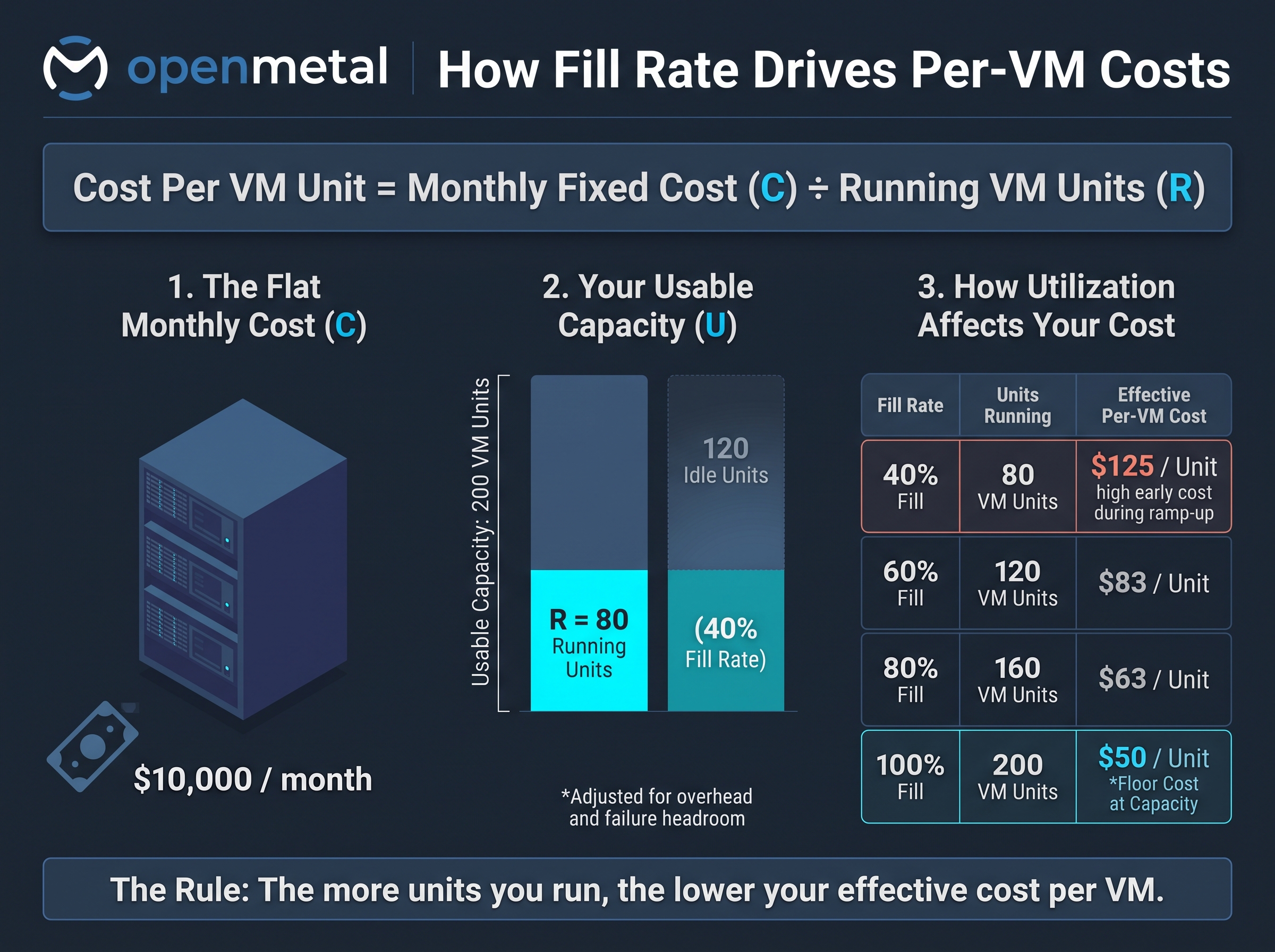
- Cost per VM unit at capacity = C ÷ U. This is your floor, what each unit costs if the hardware is fully used.
- Effective cost per VM unit = C ÷ R. This is what each running unit actually costs today.
Your fill rate is R ÷ U. The gap between the two numbers is the cost of idle capacity.
A Worked Example
The numbers below are illustrative, not OpenMetal pricing. Plug in your own.
Suppose an environment costs $10,000 a month and has usable capacity for 200 VM units after overhead and failure headroom.
| Fill rate | VM units running | Effective cost per VM unit |
|---|---|---|
| 40% | 80 | $125 |
| 60% | 120 | $83 |
| 80% | 160 | $63 |
| 100% | 200 | $50 |
At 40% fill, each running VM unit costs two and a half times what it would at full capacity. Same hardware, same bill. The only change is how much of it you use.
That’s why ramp-up periods matter. A new environment is usually underfilled at first, and its early per-VM cost will look high. Report the fill rate alongside the unit cost so finance can see where the number is heading.
Step 5: Allocate Cost to Customers
Once you know the cost of a VM unit, cost per customer comes down to attribution: which VMs belong to which customer, and how shared costs get split.
Use Projects to Separate Customers
OpenStack projects are a natural boundary. If each customer’s resources live in their own project, attribution is straightforward. The openstack usage list command reports resource usage per project over a date range you choose, and openstack usage show does the same for a single project.
openstack usage list --start 2026-09-01 --end 2026-10-01
Project quotas also give you a clean way to reserve capacity for a customer, which helps when contracts guarantee a certain amount of resources.
Pick an Allocation Method
There are three common approaches, and the right one depends on how you sell:
- By reservation. Charge each customer for the capacity set aside for them, whether or not they use it. This fits contracts that guarantee resources.
- By actual usage. Charge each customer for the VM units they consumed over the period. This fits customers who scale up and down.
- Hybrid. Charge a reserved baseline plus usage above it.
Decide Who Carries Idle Capacity
This is the decision teams most often skip. Idle capacity has to go somewhere in the numbers. You can:
- Spread it across customers in proportion to their usage, so cost per customer reflects the full bill
- Report it separately as a growth reserve, so per-customer costs reflect only what they use
- Assign it to the customer it was bought for, if you added hardware specifically for a new contract
Reporting idle capacity separately usually gives finance the clearest picture, because it shows exactly how much unused capacity is costing and how quickly it’s being filled.
Allocate Shared Services
Some resources serve every customer: monitoring, shared databases, bastion hosts, internal tooling. Allocate these in proportion to each customer’s share of VM units, or report them as a shared platform line.
Step 6: Plan for the Step When You Add Hardware
Unit costs on fixed-cost infrastructure don’t decline forever. When a new customer needs more capacity than you have free, you add a server, C goes up, and your effective cost per VM unit jumps until the new capacity fills.
Plan for that step instead of being surprised by it:
- Know your trigger point. Decide in advance what fill rate prompts you to add hardware, leaving room for your failure headroom.
- Price new contracts against the step. If a new customer will push you over the trigger point, factor the added server’s cost into what that contract needs to cover.
- Track the fill-up time. How quickly new capacity reaches your target fill rate tells you whether you’re adding hardware at the right pace.
Our article on what happens when you add a node to a Private Cloud Core v4 covers how expansion works in practice.
Comparing Your Unit Costs to Public Cloud
When you compare private and public cloud per-VM costs, use your effective cost at a realistic fill rate, not your cost at 100%. A fair comparison puts your expected steady-state fill rate on the private side against what the same VMs cost on public cloud, including the discounts and commitments you’d actually use there.
For a broader cost model, our guide to calculating total cost of ownership for hosted private clouds covers the other inputs.
If you’re working out which workloads would cost less on private infrastructure, OpenMetal Labs analyzes your actual public cloud spend to identify where the move makes sense and where it doesn’t.
Who This Is For
This method fits teams that:
- Need to report cost per VM or cost per customer to finance
- Sell infrastructure-backed services and need to price contracts
- Are comparing private infrastructure against their current public cloud spend
- Add capacity in steps as they sign new customers
It needs adjusting if you:
- Run highly variable workloads where fill rate swings widely within a month; report a time-weighted average instead of a single snapshot
- Mix very different VM shapes, such as GPU and general-purpose; calculate unit costs for each pool separately
- Share infrastructure across business units with different budgets; agree on the allocation method before reporting numbers
The Short Version
On fixed-cost infrastructure, cost per VM is a function of how full you run it. Report the cost at capacity, the effective cost at your real fill rate, and the idle capacity in between, and finance will have numbers they can plan around.
If you want help modeling unit costs for your own environment, talk with our team or size a deployment with our private cloud pricing calculator.
Frequently Asked Questions
How do I calculate cost per VM on a private cloud?
Total your fixed monthly infrastructure cost, then divide it by the number of standard VM units you’re actually running. Dividing by your usable capacity instead gives your cost at full utilization, which is your floor.
Why is my cost per VM so high right after deployment?
On fixed-cost infrastructure, the monthly bill doesn’t change with usage. Early on, when few VMs are running, the same cost is spread across fewer VMs. Cost per VM falls as you fill the hardware.
What fill rate should I plan for?
Leave enough free capacity to absorb the loss of your largest server, then aim to run the rest at a healthy fill rate. The right target depends on your growth rate and how quickly you can add capacity.
How do I calculate cost per customer?
Put each customer’s resources in their own OpenStack project, measure their VM units with openstack usage list or openstack usage show, and multiply by your cost per VM unit. Then decide how to allocate shared services and idle capacity.
Should idle capacity be charged to customers?
That’s a business decision. Reporting idle capacity as a separate line usually gives finance the clearest view, because it shows what unused capacity costs and how quickly it’s being filled.
Does adding a server increase my cost per VM?
Temporarily. Adding a server raises your fixed monthly cost, so effective cost per VM rises until the new capacity fills, then falls again.
Schedule a Consultation
Get a deeper assessment and discuss your unique requirements.
Read More on the OpenMetal Blog