



























Operating a bare metal H200 trades a managed runtime for something an SRE often values more: deterministic control of the stack and a blast radius that stops at your own node.
Running a GPU workload on a managed cloud instance and running it on a bare metal H200 are different Day-2 jobs, and the difference is not simply more work. On bare metal you own the CUDA and driver stack, which is a responsibility, but in exchange you get two things a managed runtime cannot give you: deterministic control over exactly what runs on the node, and a blast radius that is bounded to the node itself. For an SRE, those are not consolation prizes. Determinism is what makes incidents reproducible, and a bounded blast radius is what keeps one failure from becoming several.
The trade is only worth it if you operate the node the way its hardware wants to be operated. This is an ordered playbook for doing that, and each step is anchored to a specific property of the H200 server rather than to generic advice. Provision with the access the hardware gives you, pin the software stack you now own, use the storage isolation the server is built with, understand the blast radius single-tenancy draws for you, and observe the node through both in-band and out-of-band paths. Done in that order, the ownership that looks like overhead becomes the source of the control.
Key Takeaways
- Full root and IPMI give you in-band and out-of-band control. Every H200 ships with complete root access and IPMI, so you provision, recover, and manage the node without depending on a provider’s console of last resort.
- You own the CUDA and driver stack, and it does not gate boot. Standard CUDA runs unlicensed, so the node comes up and runs your framework stack without waiting on a license; NVIDIA AI Enterprise is available separately if you want its supported stack.
- Boot and data isolation scope your storage faults. The OS and drivers live on a separate RAID-1 boot pool, so a data or checkpoint volume problem is recoverable without risking the boot environment.
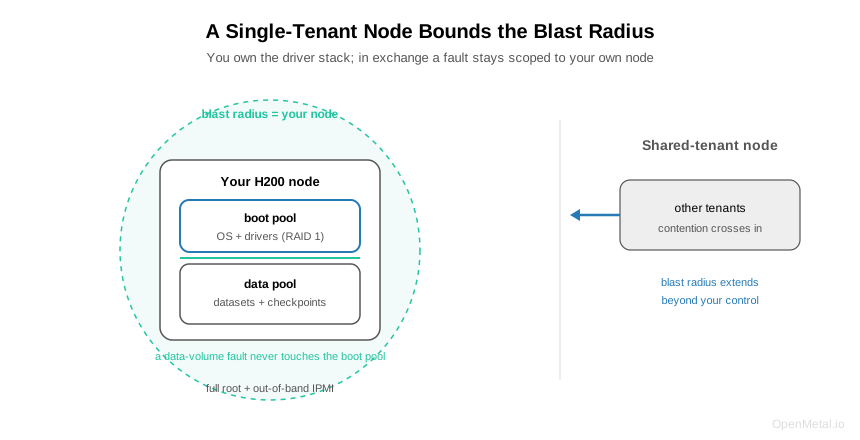
- Single-tenancy bounds the blast radius to your node. With no other tenants on the hardware, a fault is contained to your own server rather than propagating across shared infrastructure or arriving from a neighbor.
- Observe through both in-band tooling and IPMI. Full root lets you install and run standard NVIDIA tooling (nvidia-smi, DCGM) for in-band GPU telemetry, while IPMI gives out-of-band hardware management, so you can see the node even when the OS is unhealthy.
Step 1: Provision With the Access You Actually Have
Start from what the hardware gives you: full root access and IPMI on every H200 server. Root access means the node is yours to configure from the operating system up, with no managed layer deciding what you may install or change. IPMI means you have out-of-band management independent of the running OS, so you can power-cycle, reach the console, and recover the node even when it is not booting cleanly. For an SRE this is the foundational property, because it means there is no situation where you are locked out waiting on a provider to intervene. Provision the base OS, network, and access controls first, and confirm IPMI reachability before you layer anything on top, because it is the path you will want during every later incident.
Step 2: Pin the CUDA and Driver Stack You Now Own
Owning the software stack is the part that reads as overhead, so treat it as a deliberate step rather than an accident. Standard CUDA, and the frameworks built on it such as PyTorch, vLLM, and TensorRT-LLM, run unlicensed, which means the node boots and runs your stack without a license check gating startup. Pin specific, tested versions of the driver, CUDA, and your framework, and treat that combination as a known-good set you promote deliberately rather than drifting into. NVIDIA AI Enterprise is available if you want NVIDIA’s supported enterprise stack and its NGC components; its inclusion, terms, and pricing are a conversation with OpenMetal rather than an assumed default, so contact OpenMetal for current options rather than treating it as bundled. The operational win of owning the stack is that a reproduced incident is reproducible because you control every version in it, which is exactly what a managed runtime takes away.
Step 3: Use the Storage Isolation the Server Is Built With
The H200 server boots from two 960 GB NVMe drives in RAID 1, kept separate from the data tier where datasets and checkpoints live. Operate along that seam. Keep the OS, drivers, and configuration on the boot pool, and keep churny, high-volume data, training shards, checkpoints, and logs, on the data tier. The payoff is that a data-volume event, a full checkpoint disk, a corrupted dataset mount, or a failed data drive, stays scoped to the data tier and does not take the boot environment or the driver stack down with it. Recovery is then a data-tier operation rather than a rebuild of the whole node. The RAID-1 boot pool also gives the OS its own redundancy, so a single boot-drive failure does not strand the node. Design your runbooks around this isolation: a data-tier incident and a boot-tier incident are different severities with different recovery paths.
Step 4: Know the Blast Radius Single-Tenancy Draws
On a single-tenant bare metal H200 there are no other tenants on the hardware, and that fact defines your blast radius precisely: it is your own node. A fault does not arrive from a neighbor you cannot see, and a problem on your node does not propagate to someone else’s workload across shared infrastructure. This is a sharp contrast with shared-tenancy GPU, where contention and, in the worst case, correlated failure can cross tenant boundaries you have no visibility into. For incident response, a bounded and known blast radius is worth a great deal: when something breaks, the set of things that can be affected is enumerable, which makes triage faster and post-incident reasoning cleaner. Write your severity model around a node-scoped blast radius, because that is what the hardware actually gives you.
Step 5: Observe Through Two Independent Paths
Instrument the node on both the in-band and out-of-band paths, because they fail independently and you want at least one of them available in any incident. In-band, because you have full root, you install and run the standard NVIDIA tooling: nvidia-smi for GPU telemetry such as utilization, memory, temperature, ECC events, and throttling, and DCGM for health and field metrics where supported, fed into whatever monitoring you run. Out-of-band, use IPMI for hardware health, power, and console access that does not depend on the OS being up. The combination is what lets you distinguish a GPU-level problem from a host-level one, and it means an unhealthy OS does not blind you to the node, because IPMI is still reachable. Alert on both the GPU telemetry that predicts workload trouble and the hardware telemetry that predicts node trouble.
What the Decisions Add Up To
The bare metal H200 asks you to own the stack, and in return it gives an SRE the two properties that make operations tractable: determinism and a bounded blast radius. Full root and IPMI mean you are never locked out; owning CUDA and the drivers means incidents are reproducible; boot-and-data isolation means storage faults stay scoped; single-tenancy means the blast radius stops at your node; and dual observability means you can always see the node. None of these is a feature you bolt on. They are consequences of how the server is built and delivered, and operating along their grain is what turns the responsibility of ownership into control.
Talk to us
The fastest way to plan Day-2 for an H200 deployment is to work from the operational specifics: provisioning, IPMI access, driver and CUDA setup, and monitoring integration. Our team can walk through an operations model matched to your stack and your incident-response practices.