



























A practical guide to matching NVIDIA’s H100, H200, B200, and B300 to your model, your latency target, and your budget, starting from the workload instead of the spec sheet.
Key Takeaways
- Start from the workload, not the GPU. Training, fine-tuning, interactive inference, and batch inference stress a server differently, and all four of these GPUs can do all of them. No chip belongs to one job.
- Two memory numbers decide most purchases: capacity (does the model plus its KV cache fit) and bandwidth (how fast tokens come out). A model that loads is not automatically a model that serves at your latency target.
- H100 and H200 share Hopper compute. H200’s larger, faster HBM3e is the upgrade that matters when memory, not math, is your bottleneck: bigger models, longer context, or bandwidth-limited latency.
- Blackwell (B200, B300) adds capacity, bandwidth, and native FP4. That is what makes it compelling for demanding training, large-model serving, and long-output reasoning, not a default for every workload.
- Compare cost per useful result at your required quality, latency, and throughput. A newer GPU is not automatically the better buy, and a lower hourly rate is not automatically cheaper inference.
Buyers usually start this comparison by asking which GPU is fastest. That is the wrong first question. The right server is the least expensive one that hits your quality, latency, and throughput targets at your model size, and the newest chip is often not that server. All four of these GPUs can train and serve modern models. What separates them is how much memory they hold, how fast that memory moves, and what low-precision math they run natively. Get those three things right for your workload and the choice makes itself.
This guide translates the specifications into buying decisions. It is vendor-neutral on the silicon; where it matters, it notes where the current OpenMetal GPU catalog fits.
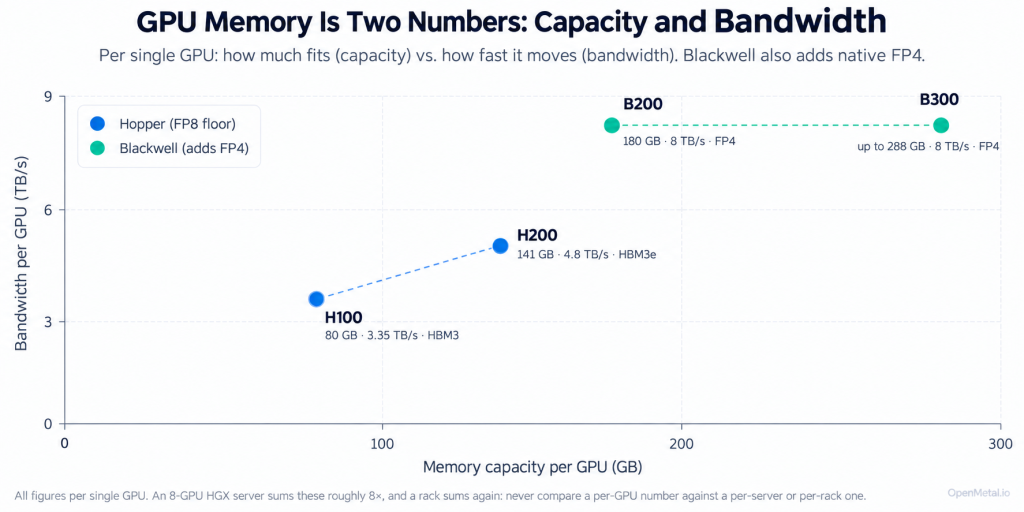
What it shows: the four GPUs plotted by per-GPU memory capacity (how much fits) against bandwidth (how fast it moves), with Hopper (H100, H200) and Blackwell (B200, B300) separated and FP4 marked as Blackwell’s generational addition. The caption is the rule that prevents the most common spec-sheet error: never compare a per-GPU number against a per-server or per-rack one.
Memory: capacity is “does it fit,” bandwidth is “how fast it answers”
Two different memory numbers decide most GPU purchases, and they can be easy to confuse.
- Capacity is how much fits on the GPU at once. Your model weights have to sit in memory alongside working memory: the KV cache that holds the running context for every active request, plus activations and overhead. A rough rule for weights alone is parameters multiplied by bytes per parameter (about 2 bytes at FP16, about 1 byte at FP8), and that is only the floor. Context length and concurrency inflate the rest: longer prompts and more simultaneous users both grow the KV cache, sometimes past the size of the weights themselves.
- Bandwidth is how quickly the GPU can move that memory. In token-by-token inference the GPU reads a large share of the model’s weights for every token it generates, so memory bandwidth, more than compute, tends to set how many tokens per second a user sees.
The trap is assuming that loading a model means serving it well. A model can fit in capacity and still deliver unacceptable latency because bandwidth, concurrency, or context length was the real constraint. “It loads” and “it serves at your latency target under your real load” are different tests, and only the second one matters in production. Any tokens-per-second expectation should come from a benchmark on the actual configuration, not from a spec sheet.
The four GPUs, and where each earns its place
All figures below are per single GPU and were verified against NVIDIA’s product pages on 2026-09-15 (see Sources). We kept per-GPU numbers separate from whole-server numbers; the next section explains why.
| Per-GPU spec | H100 | H200 | B200 | B300 (Blackwell Ultra) |
|---|---|---|---|---|
| Architecture | Hopper | Hopper | Blackwell | Blackwell Ultra |
| GPU memory | 80 GB HBM3 (SXM); 94 GB HBM3 (NVL card) | 141 GB HBM3e | 180 GB HBM3e (as shipped in 8-GPU systems) | up to 288 GB HBM3e |
| Memory bandwidth | 3.35 TB/s (SXM); 3.9 TB/s (NVL) | 4.8 TB/s | 8 TB/s | 8 TB/s |
| Lowest native precision | FP8 | FP8 | FP4 | FP4 (NVFP4) |
| Typical server packaging | SXM on an HGX baseboard, or NVL PCIe cards | SXM on HGX, or NVL PCIe | SXM on an HGX baseboard, or Grace-Blackwell superchip | SXM on an HGX baseboard, or Grace-Blackwell Ultra superchip |
A few honest caveats on that table. B200’s silicon is rated up to 192 GB, but the eight-GPU systems it ships in populate 180 GB per GPU, which is the number that matters for a real server. NVIDIA rates B300’s die at up to 288 GB per GPU and publishes 2.1 TB across an eight-GPU B300 baseboard; it does not print an exact as-shipped per-GPU figure, so treat 288 GB as the ceiling, not a guarantee. H100 also ships in an 80 GB and a 94 GB variant, so always confirm which one a quote refers to.
- H100 is the established, widely available Hopper part. If your model fits comfortably in 80 GB, your context lengths are moderate, and you can source it economically, it may meet the requirement without paying for anything newer. Plenty of production inference runs perfectly well here.
- H200 is the same Hopper compute as H100 with substantially more and faster memory (141 GB of HBM3e at 4.8 TB/s). That is exactly the upgrade that matters when memory capacity or bandwidth is your bottleneck: a model that spills out of 80 GB, a context window that needs a bigger KV cache, or interactive latency that bandwidth was throttling. You are buying memory headroom and token throughput, not more raw math.
- B200 is the Blackwell generation’s step change. More memory again (180 GB), roughly a further jump in bandwidth (8 TB/s), and, importantly, native FP4. Lower-precision formats let a model of a given size occupy less memory and move fewer bytes per token, which is why Blackwell is compelling for demanding training, large-model serving, and reasoning-style inference that generates long outputs. Evaluate it when H200-class memory or throughput is genuinely the wall you are hitting, not by default.
- B300 (Blackwell Ultra) pushes memory capacity furthest (up to 288 GB per GPU) and adds compute headroom over B200. It is the option to weigh for the largest models, the longest contexts, and the heaviest reasoning workloads, where even B200’s memory becomes the constraint. It is also the newest of the four, so availability is still ramping.
The pattern across the four is straightforward: compute rises, but memory capacity and bandwidth rise faster, and Blackwell adds a lower-precision format. Most buyers are choosing on memory and bandwidth, not on peak FLOPS.
Where this fits at OpenMetal
OpenMetal builds single-tenant GPU servers to the workload, and today the inventory focus of this comparison is the H200, delivered as dedicated bare metal you control end to end, on fixed monthly pricing rather than a per-GPU-hour meter. Nodes ship with one GPU as the standard configuration, with a second orderable; when two are installed they are two discrete GPUs, each with its own memory, not a single pooled accelerator. OpenMetal’s broader single-tenant catalog also includes the NVIDIA RTX PRO 6000 Blackwell Server Edition for workloads suited to it. For the largest reasoning and training workloads, whose working set outgrows a single card, OpenMetal’s roadmap includes an 8x NVIDIA HGX B300 (Blackwell Ultra) node. Unlike the discrete PCIe cards above, its eight GPUs are joined by fifth-generation NVLink and NVSwitch into aggregate HBM reachable across the node and placed by the serving software. It is a build-to-requirement engagement scoped with the OpenMetal Engineering team as a proof of concept, not a self-serve order: tell us the model and the targets and we will size it.
The OpenMetal GPU catalog is actively expanding, and it is built to a requirement rather than picked from a fixed menu. If your workload points to a different accelerator, higher GPU density per node, or a different interconnect topology than what is listed, that is a design conversation worth having. We evaluate the build against the workload rather than the other way around.
Read the whole server, not just the chip
A GPU spec sheet describes a chip. You buy a server. The packaging around the GPU changes what you actually get, and a few terms are worth knowing:
- SXM is NVIDIA’s module that bolts directly onto a server baseboard. It runs the highest power and the fastest GPU-to-GPU links, and it is what goes into HGX and DGX systems.
- PCIe is a standard add-in card in a normal expansion slot: easier to fit into mainstream servers, lower power, and lower interconnect bandwidth than SXM.
- NVL is an NVLink-bridged PCIe variant, where individual dual-slot cards are paired over NVLink. It is a packaging label, not a bigger single GPU: an H200 NVL still holds 141 GB per GPU.
- HGX is an eight-GPU (sometimes four-GPU) baseboard inside one server, with the GPUs wired together by NVLink and NVSwitch. When you see “1.4 TB of memory” for an HGX B200, that is the sum across eight GPUs, not one.
- NVLink is the high-speed GPU-to-GPU interconnect, far faster than PCIe, that lets GPUs exchange data directly. NVSwitch is the switch chip that connects every GPU to every other GPU on the board at full NVLink speed at once.
This leads to the single most common spec-sheet mistake: mixing per-GPU, whole-server, and rack figures. An eight-GPU HGX B200 board holds 1.4 TB total, which is 180 GB per GPU. A rack-scale Grace-Blackwell system quotes memory in tens of terabytes across dozens of GPUs. Those are three different scales, and comparing a rack aggregate against a single card’s 141 GB tells you nothing useful. Always confirm whether a number is per GPU, per server, or per rack before you compare it.
It also changes what “several GPUs” means. Several GPUs each serving independent requests (data-parallel replicas) is a throughput play: you can often do it over ordinary networking, and each GPU only needs to hold one copy of the model. Several GPUs cooperating on one model that is too big for a single card (tensor or pipeline parallelism) is a different design: those GPUs exchange data constantly, so NVLink-class interconnect stops being a nice-to-have. Knowing which pattern your workload needs is often more decisive than which GPU generation you pick.
Three GPU buyers, three different answers
An enterprise deploying a private assistant.
A known user population, one or two models, and a hard latency target. The job is to fit the model plus enough KV cache for your real context length and concurrency, then hold steady latency. This buyer is usually solving a memory-and-bandwidth problem, not a peak-compute one, which is why an H200-class server on dedicated hardware is frequently the sweet spot: the model fits with headroom, latency is predictable because nobody else shares the box, and a single GPU often does the work.
An inference provider serving many simultaneous users.
Throughput per dollar rules. This buyer lives and dies on batching efficiency and utilization: how many concurrent requests can the server absorb before latency degrades. Higher bandwidth and, on Blackwell, FP4 both raise that ceiling, and multiple GPUs serving independent replicas scale it out. The right answer depends on the model size and the latency contract, and can land anywhere from a fleet of H200s to Blackwell-class servers.
A team training or adapting large models.
Aggregate memory, interconnect, and compute all matter here, and the model may not fit on one GPU at all. Fine-tuning a mid-size model can be surprisingly modest. Training or adapting the largest models pushes toward Blackwell-class compute and fast multi-GPU interconnect. This is where B200 and B300 earn evaluation, and where the interconnect discussion above becomes the deciding factor.
None of these buyers should pick a GPU because the workload has a familiar name. “We do inference” spans a single-user assistant and a million-request-a-day API, and those want different servers. Let the requirement (model, precision, context, concurrency, latency) choose.
Economics: cost per useful result, not price per hour
The number that matters is cost per useful result at your required quality, latency, and throughput, and it rarely tracks the headline price of the GPU.
Two traps catch buyers.
- The first: a newer GPU is not automatically the better purchase. If your model and load are served well by an H100 or H200, paying for Blackwell buys headroom you do not use, and idle silicon is the most expensive silicon there is.
- The second: a lower hourly price is not automatically cheaper inference. A cheaper GPU that runs at half the throughput, or sits underutilized, can cost more per result than a pricier one that stays busy. Utilization and total deployment cost, not the sticker, decide the economics.
This is also where the ownership model matters. Metered GPU-hour pricing means you pay a premium for flexibility and keep paying whether the silicon is busy or idle. Dedicated single-tenant hardware on fixed monthly pricing turns a variable, utilization-sensitive bill into a known cost, which favors any workload with steady, predictable demand. The right structure depends on your utilization: bursty and unpredictable rewards renting; steady and sustained rewards owning the box.
A short buyer checklist
Before you choose a GPU server, pin down six things. They map directly onto the decisions above:
- Model. Which model or models, and how large? This sets the memory floor.
- Precision. FP16, FP8, or FP4? Lower precision shrinks memory and moves fewer bytes per token, and only Blackwell runs FP4 natively.
- Context length. How long are your prompts and outputs? Long context inflates the KV cache, sometimes past the weights.
- Concurrency. How many simultaneous requests at peak? Concurrency multiplies working memory and decides your batching story.
- Response-time targets. What is your latency contract? This is usually a bandwidth question before it is a compute one.
- Training requirements. Are you only serving, or also fine-tuning or training? Multi-GPU training pulls interconnect and aggregate memory into the decision.
Answer those and the shortlist narrows itself, often to fewer and less exotic GPUs than the starting assumption. If you would rather work through them against a real deployment than against a spec sheet, bring your requirements to the OpenMetal team and we will size the server to the workload.
Sources
Specifications verified live on 2026-09-15 from NVIDIA’s official product documentation:
- NVIDIA H100 Tensor Core GPU (memory capacity/bandwidth, form factors, precision): https://www.nvidia.com/en-us/data-center/h100/
- NVIDIA H200 Tensor Core GPU (141 GB HBM3e, 4.8 TB/s, SXM and NVL): https://www.nvidia.com/en-us/data-center/h200/
- NVIDIA HGX platform (eight-GPU B200/B300 baseboard aggregates, NVLink/NVSwitch): https://www.nvidia.com/en-us/data-center/hgx/
- NVIDIA DGX B200 (per-server 1,440 GB total, 180 GB per GPU): https://www.nvidia.com/en-us/data-center/dgx-b200/
- NVIDIA DGX B300 (per-server 2.1 TB total): https://www.nvidia.com/en-us/data-center/dgx-b300/
- NVIDIA Blackwell Ultra technical blog (B300 up to 288 GB per GPU, 8 TB/s, NVFP4): https://developer.nvidia.com/blog/inside-nvidia-blackwell-ultra-the-chip-powering-the-ai-factory-era/