



























In this article
The H100 has been hard to get and expensive when you can find it. The RTX PRO 6000 Blackwell offers 96GB VRAM, newer Blackwell architecture, and strong single-GPU inference performance. This post breaks down where each GPU fits, and where each one falls short.
If you’ve been trying to get your hands on H100 capacity this year, you already know how that’s gone. Demand has outpaced supply for months, and when you can find H100 access, the pricing reflects it. That scarcity is one reason a newer GPU is worth your attention: the NVIDIA RTX PRO 6000 Blackwell, which launched in April 2025 and has started showing up across cloud and bare metal providers.
This post lays out how the two GPUs compare for AI inference workloads, where the RTX PRO 6000 holds a genuine edge, and where it doesn’t.
The Hardware at a Glance
The H100 is NVIDIA’s previous-generation datacenter GPU, built on the Hopper architecture. It ships with 80GB of HBM3 memory, a memory bandwidth of up to 3.35 TB/s on the SXM variant, and NVLink for high-bandwidth multi-GPU communication. It was designed specifically for large-scale AI training and inference in datacenter environments.
The RTX PRO 6000 Blackwell is a professional workstation and server GPU built on NVIDIA’s newer Blackwell architecture. It ships with 96GB of GDDR7 ECC memory and is currently the only GPU under $10,000 capable of running 70B parameter language models on a single card without quantizing below Q4. Its fifth-generation Tensor Cores add native FP4 support alongside FP8, FF16, BF16, and TF32, with FP4 inference delivering roughly 2x higher throughput than FP8 for compatible workloads.
Where the RTX PRO 6000 has a Clear Advantage
Single-GPU inference on large models
The 96GB VRAM is the most practically significant difference for inference workloads. At 70B FP8, the model fits with roughly 26GB remaining for KV cache, which is sufficient for moderate batch sizes and standard context lengths. The H100 PCIe at 80GB fits 70B FP8 with less headroom and requires a multi-GPU setup for 70B FP16 regardless.
For teams serving a single large model, whether a 30B, 32B, or 70B parameter LLM, the RTX PRO 6000 handles the full workload on one card with room to spare. If you’re unsure how model size maps to VRAM requirements, our post on AI model performance and tokens per second covers the fundamentals.
Single-GPU throughput
On single-GPU inference benchmarks, the RTX PRO 6000 holds up well against the H100 PCIe. CloudRift’s published benchmark analysis of a quantized 30B model showed the RTX PRO 6000 producing 3,140 tokens per second against the H100 PCIe’s 2,987, a measurable advantage without any multi-GPU complexity. On cost per token, the same analysis found a 28% advantage for the RTX PRO 6000 at comparable hourly rates.
Testing by HOSTKEY found the RTX PRO 6000 to be a competitive replacement for the H100 in server inference workloads, noting that GDDR7 bandwidth outperforms HBM3 in certain data transfer scenarios.
Architecture generation
The RTX PRO 6000 is Blackwell, the H100 is Hopper. That matters for framework compatibility going forward and for workloads that can take advantage of FP4 precision, which the H100 does not support.
Where the H100 Holds the Advantage
Multi-GPU tensor parallelism
This is the clearest limitation of the RTX PRO 6000 at scale. The H100 SXM uses NVLink, delivering around 900 GB/s of GPU-to-GPU bandwidth. The RTX PRO 6000 communicates over PCIe Gen 5 x16, which provides around 128 GB/s bidirectional. For data parallelism, meaning running separate model copies on each GPU for more concurrent requests, this is largely irrelevant. For tensor parallelism, where a single large model is split across four or more GPUs, the PCIe bottleneck becomes significant. Benchmarks have shown an 8x RTX PRO 6000 configuration reaching roughly one-third the throughput of an equivalent 8x H100 SXM system on models requiring that level of tensor parallelism.
If your architecture depends on splitting one very large model across many GPUs simultaneously, the H100 SXM’s interconnect is purpose-built for that workload. This is also worth considering in the context of bare metal vs. virtualized GPU deployments, where interconnect consistency matters even more.
Large-scale distributed training
For model training and fine-tuning at scale, the H100 has an advantage due to its Transformer Engine support and its ability to fully leverage memory bandwidth when models are loaded into memory. The RTX PRO 6000 is capable of LoRA and QLoRA fine-tuning on models up to 30-40B parameters, but for large-scale distributed training across a cluster, datacenter-class GPUs with NVLink are the more appropriate choice.
Power draw at density
The RTX PRO 6000 Workstation Edition draws up to 600W. The H100 PCIe is rated at 350W. For dense multi-GPU deployments where power and cooling are primary constraints, that difference matters in rack planning.
Matching GPU to Use Case
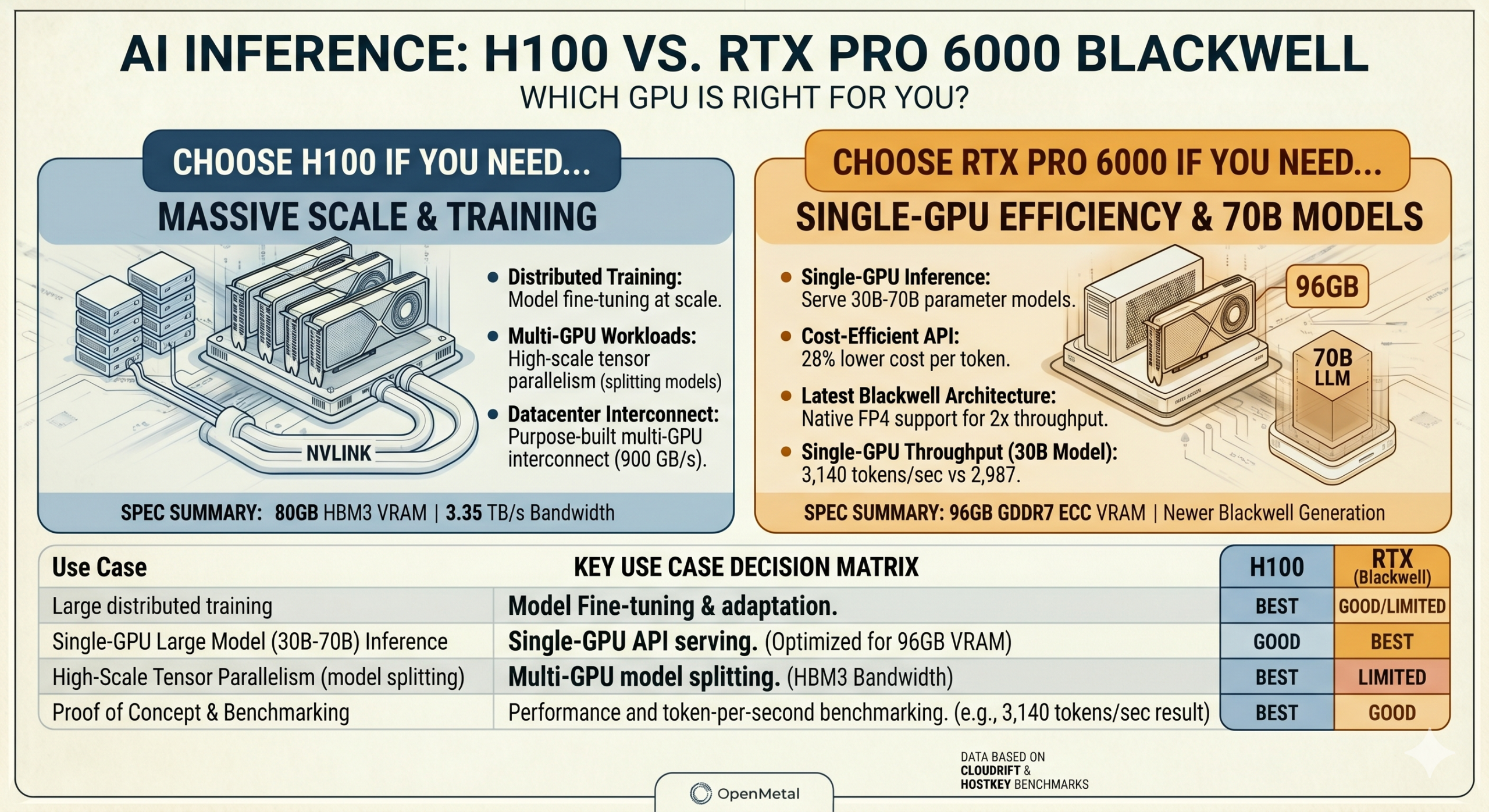
The RTX PRO 6000 Blackwell is the right fit for single-GPU or low-count multi-GPU inference on models up to 70B parameters, serving LLM API endpoints, building and testing agentic pipelines, and fine-tuning at the LoRA/QLoRA scale. It’s also well-suited to proof of concept work, where validating a model or benchmarking production latency before committing infrastructure is the priority.
The H100 SXM remains the stronger choice for large-scale distributed training, inference architectures that require splitting a single model across many GPUs via tensor parallelism, or environments already built around NVLink interconnects.
For many production inference workloads, particularly in the 30B to 70B range, the RTX PRO 6000 covers the requirements with a newer architecture and more headroom per card. You can see how OpenMetal approaches dedicated GPU infrastructure for production AI workloads if you want to dig into the deployment side.
OpenMetal is adding RTX PRO 6000 Blackwell capacity to our GPU catalog and exploring short-term rental options for teams that want to validate a workload before committing. If you’d like to know when that capacity is available, feel free to reach out to us!
Schedule a Consultation
Get a deeper assessment and discuss your unique requirements.
Read More on the OpenMetal Blog