



























In this article
Nutanix dominates the hyperconverged infrastructure market with its integrated hardware-software platform, but proprietary licensing and vendor lock-in create long-term costs and constraints. This guide compares Nutanix’s approach to OpenMetal’s alternatives examining deployment speed, pricing models, feature sets, and total cost of ownership to help you choose the right infrastructure for your needs.
When you’re evaluating infrastructure solutions for your business, the choice often comes down to finding the right balance between features, control, cost, and operational complexity. Nutanix has established itself as a major player in the hyperconverged infrastructure space, but it’s not the only game in town. OpenMetal offers alternatives built entirely on open source technologies. Let’s break down how these options stack up.
Understanding the Players
Nutanix is a hyperconverged infrastructure platform that bundles compute, storage, and networking into integrated appliances. It’s designed to simplify datacenter operations with a proprietary software stack that runs on certified hardware. The company started in 2009 and has grown into a substantial enterprise infrastructure vendor, serving thousands of customers worldwide. Their approach centers on delivering a turnkey solution where all the pieces work together out of the box, managed through a single pane of glass.
Nutanix offers their software platform in multiple editions under the Nutanix Cloud Infrastructure (NCI) and Nutanix Cloud Manager (NCM) product lines, from entry-level Starter configurations to Ultimate editions with advanced features. Their hypervisor options include their own AHV (Acropolis Hypervisor), VMware vSphere, and Microsoft Hyper-V, giving organizations some flexibility in how they run workloads.
OpenMetal takes a different approach. Our core offering is an on-demand private cloud built on OpenStack, a mature and feature-rich cloud infrastructure platform. These hosted private clouds deploy in about 45 seconds on dedicated bare metal hardware, which is pretty impressive when you consider that traditional private cloud deployments used to take weeks or months.
We also provide bare metal servers that you can use to run whatever you want. Many customers use these to build their own infrastructure using platforms like Proxmox. Since you have full control over bare metal, you’re not limited to a specific stack.
Deployment Speed and Flexibility
Nutanix deployments follow a traditional infrastructure model, though streamlined compared to legacy approaches. You start by selecting your hardware configuration from Nutanix’s approved vendor list (Dell, HPE, Lenovo, and others), then wait for procurement and shipping. Once the hardware arrives, you’ll need to rack and stack the nodes, cable them appropriately, and run through the initial cluster configuration.
The Nutanix Foundation tool helps automate the initial setup, but you’re still looking at several days minimum for a small cluster, and potentially weeks for larger deployments when you factor in procurement timelines, shipping, datacenter scheduling, and configuration. If you need to scale quickly or spin up separate environments for testing, you’re constrained by hardware availability and procurement cycles.
One advantage Nutanix does offer is a fairly straightforward expansion process once the initial cluster is running. Adding nodes to an existing cluster is well-documented and relatively smooth, though you’re still dealing with physical hardware lead times.
OpenMetal’s deployment model is different. For our hosted OpenStack private clouds, your environment spins up in roughly 45 seconds. That’s not a typo. You go from “we need infrastructure” to “here’s your working cloud” in less than a minute. This includes a fully configured three-node cluster with OpenStack services running, Ceph storage configured, and networking ready to go.
If you’re using OpenMetal bare metal to run your own platform (like Proxmox), deployment time depends on your setup process, but you still benefit from rapid hardware provisioning and the ability to automate your infrastructure however you want.
The speed difference becomes particularly relevant when you need to:
- Spin up separate environments for development, staging, and production
- Test disaster recovery scenarios
- Create isolated environments for different projects or customers
- Rapidly scale in response to demand
With Nutanix, you’re committed to specific hardware that takes time to provision. With OpenMetal, you can deploy new environments on demand and tear them down just as quickly.
There’s also the question of vendor lock-in with Nutanix. Once you’ve committed to their ecosystem, switching costs can be substantial. Your workloads are tied to their hypervisor and management stack, and moving to a different platform means significant migration work.
With OpenMetal, you’re working with open standards from day one. Whether you use our hosted OpenStack or build your own solution on bare metal, you’re not locked into proprietary platforms. If you decide to move your workloads elsewhere or bring the infrastructure in-house, you’re using technologies that can run anywhere.
Cost Structure: Proprietary vs. Open Source
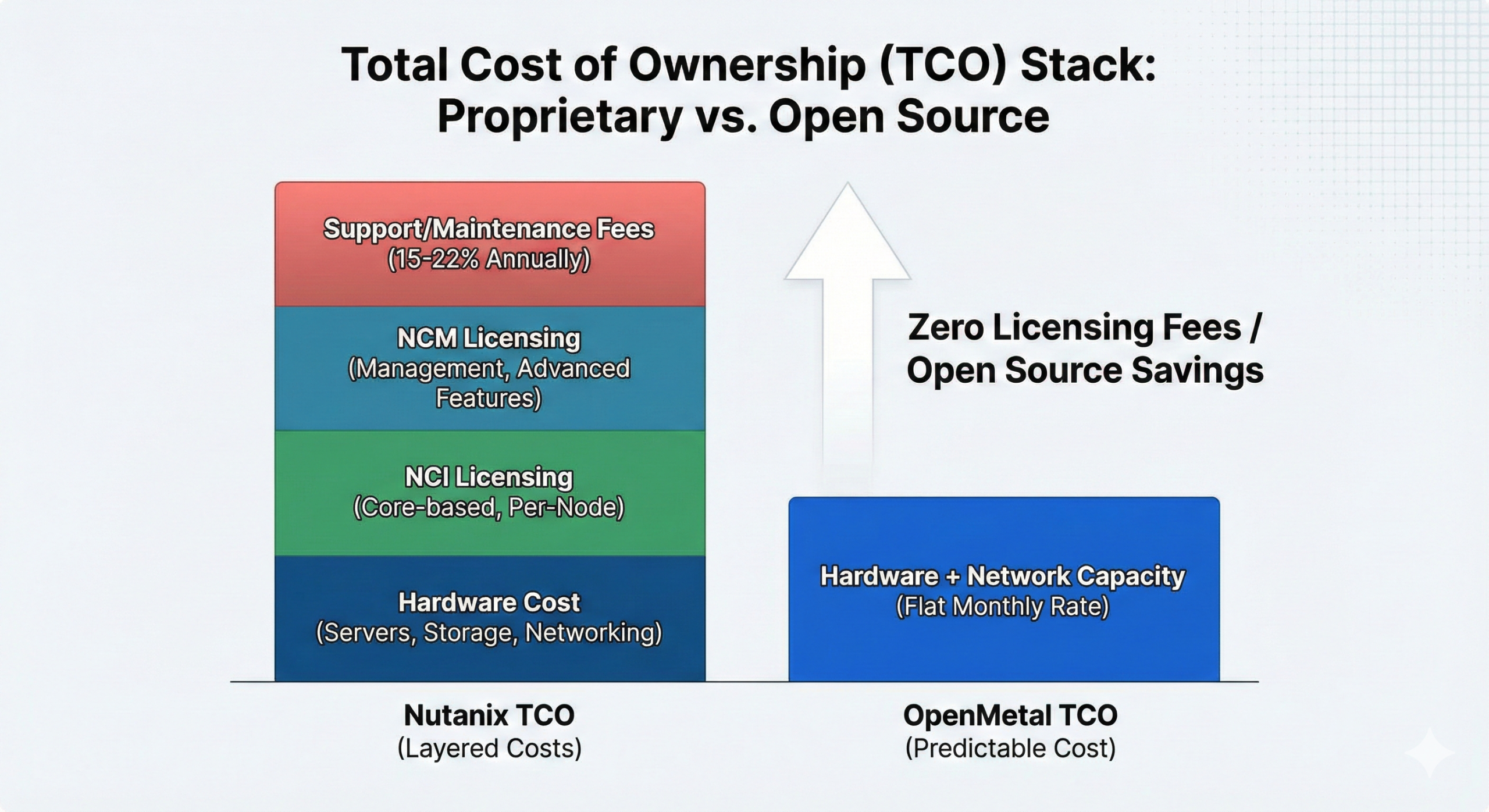
Nutanix pricing can be complex and varies significantly based on your configuration and requirements. The costs typically break down into several components:
Hardware options: Nutanix offers flexibility in hardware acquisition. You can purchase integrated Nutanix NX appliances, OEM platforms from Dell/HPE/Lenovo/Cisco/Fujitsu, or deploy Nutanix software on qualified third-party servers that meet Hardware Compatibility List (HCL) requirements. All components (servers, storage controllers, SSDs, network adapters) must be HCL-certified. Hardware costs vary based on CPU, memory, and storage configurations you select.
Software licensing: Nutanix offers multiple licensing models to fit different deployment scenarios:
- Core-based licensing (NCI): Licensed by physical CPU cores, portable across hardware platforms, available in 1-5 year terms
- Appliance-based licensing: Tied to the underlying hardware and device lifetime, non-transferable
- VDI per-user licensing: For virtual desktop infrastructure, priced per concurrent user regardless of underlying hardware
- Edge per-VM licensing (NCI-Edge): For edge/ROBO deployments, priced per VM with a maximum of 25 concurrently powered-on VMs per cluster
Each licensing model is available in multiple tiers:
- Starter: Entry-level edition for small-scale deployments with limited workloads. Supports up to 12 nodes per cluster, RF2 redundancy, basic compression and deduplication, async replication (1 hour or greater RPO), and lifecycle management. Available for on-premises deployments only.
- Pro: Designed for larger deployments requiring richer data services and higher resilience. Supports more than 12 nodes per cluster, RF3 redundancy, erasure coding, VM Flash Mode, multiple site replication, GPU passthrough, and includes 50GB of Nutanix Files per user for VDI deployments. Can be deployed on-premises or in public clouds.
- Ultimate: The complete suite including all Pro features plus advanced replication (metro availability, sync/near-sync replication with RPO as low as 0-15 minutes, cross-cluster live migration), data-at-rest encryption (software-based and SED support), native KMS, Flow microsegmentation for network security, and advanced orchestration with runbook automation. Includes 100GB of Nutanix Files per user for VDI deployments.
Many organizations find that the features they need for production deployments require Pro or Ultimate editions. For example, if you need erasure coding for storage efficiency, multiple site disaster recovery, advanced replication with low RPO, encryption, or microsegmentation, you’ll need to budget for higher-tier licensing. The initial sales conversation might showcase Ultimate features, but the final cost depends on which capabilities your deployment actually requires.
It’s worth noting that certain add-ons are available for Pro editions, such as Advanced Replication (for metro availability, sync/near-sync replication, and advanced orchestration) and Security features (for encryption and native KMS), which can provide a middle ground between Pro and Ultimate licensing costs.
Licensing can be perpetual (large upfront cost with annual support fees) or subscription-based (annual or multi-year terms). Most organizations find subscription licensing more manageable for budgeting, but it means ongoing annual costs that can increase over time.
Support and maintenance: Annual support contracts typically run 15-22% of your license value. This is not optional if you want to receive software updates, patches, and technical support.
Scaling costs: Every time you add nodes to expand capacity, you’re purchasing both hardware and additional software licenses. This means your costs grow linearly (or sometimes more than linearly if you need to upgrade editions to access new features).
A realistic example: A small three-node Nutanix cluster with Pro licensing might run $150,000-$200,000 in year one (including hardware, software, and support), with ongoing annual costs of $25,000-$35,000 for support and maintenance. Larger deployments can easily reach millions in capital expenditure.
OpenMetal’s pricing works differently. You pay a fixed monthly rate for the dedicated hardware capacity you need. There are no licensing fees for the virtualization layer because OpenStack is open source. You’re not paying per VM, per core, or per feature unlock.
Let’s look at some options from our catalog:
- Small servers: Start your private cloud environment for testing and smaller workloads
- Medium servers: The typical building block for production deployments
- Large servers: Offer over double the RAM and more storage than Medium, with higher-spec CPUs
- XL servers: Double the RAM and storage of Large, designed for demanding workloads
Each server type includes a certain amount of egress bandwidth (ranging from 1-4 GB depending on the server). If you exceed that amount, overage billing uses 95th percentile bandwidth measurement at $375 per Gbps (approximately 180TB), which helps smooth out temporary traffic spikes without penalty.
The key differences in our pricing model:
- No software licensing fees: OpenStack and Ceph are open source
- No per-VM fees: Spin up 10 VMs or 1,000 VMs on the same hardware
- No feature tiers: All OpenStack features are available by default
- Predictable monthly costs: No surprise licensing true-ups or audit fees
- No capital expenditure: Pure OpEx model if you prefer
For a comparable deployment, many organizations find they can save 10-60% compared to public cloud alternatives or proprietary private cloud solutions. The savings become more pronounced as you scale, because you’re not paying incremental licensing fees for every additional workload. Read more about how we compare to AWS and other public cloud providers.
Feature Comparison: What You Get Out of the Box
Nutanix Strengths
Nutanix offers a comprehensive platform with tight integration across components. Their approach is to provide an all-in-one solution where everything works together seamlessly:
Prism management interface: Nutanix’s Prism Central provides a unified management console for your entire infrastructure. It’s genuinely polished and well-designed, offering dashboards, capacity planning, and operational insights. For administrators who want a clean GUI experience, Prism is one of the better interfaces in the enterprise infrastructure space.
Advanced data services: Nutanix includes features like inline compression, deduplication, and erasure coding for storage efficiency. These work automatically in the background to reduce your storage footprint. Their data locality feature tries to keep data close to the compute that uses it, which can improve performance.
Disaster recovery and replication: With appropriate licensing, Nutanix offers built-in DR capabilities including automated failover, replication between sites, and recovery orchestration. This is tightly integrated with the platform, which can simplify DR planning.
Multi-hypervisor support: While Nutanix pushes their AHV hypervisor, they do support VMware vSphere and Microsoft Hyper-V. This can ease migration for organizations with existing VMware investments, though you’ll pay VMware licensing separately.
Integrated analytics: Higher-tier Nutanix licenses include X-Play for automation and X-Fit for capacity planning and forecasting. These can help optimize resource allocation and predict when you’ll need to expand capacity.
Life Cycle Management: Nutanix includes tools for updating firmware, hypervisor versions, and Nutanix software with minimal downtime. The one-click upgrade capability works fairly well in practice.
The downside? Many of these features come with additional licensing costs or require specific editions of the software. The initial sales pitch might show all these capabilities, but when you start configuring, you’ll find that many require Premium or Ultimate editions, or are sold as add-on modules. This can lead to sticker shock when you realize the features you actually need push you into higher-priced tiers.
OpenMetal Hosted OpenStack-Powered Cloud
OpenStack is the second most active open source project in the world (after Linux itself). It’s used by thousands of organizations, from small businesses to massive cloud providers. When you deploy our hosted OpenStack-based private cloud, you get:
- Full API compatibility with common cloud management tools (Terraform, Ansible, etc.)
- Comprehensive services including:
OpenStack excels at providing a true cloud operating model. You can create isolated projects with their own networking, set quotas, and allow self-service provisioning. It’s the platform of choice if you want feature parity with public clouds but with complete control over your infrastructure.
The learning curve is real, though. OpenStack is powerful but complex. We address this with our Cloud Operator’s Training Manual (designed to take experienced sysadmins 30-60 hours to complete) and offer both break-fix support and fully managed options if you need them.
OpenMetal Bare Metal with Proxmox (or Other Platforms)
If you prefer to build your own infrastructure, our bare metal servers give you complete freedom. Proxmox VE is a popular choice among our customers and provides:
- Straightforward VM management through a clean web interface
- Container support alongside traditional VMs
- Integrated backup and snapshot capabilities
- High availability clustering
- Live migration of workloads
Proxmox is excellent for organizations that want to move beyond VMware but don’t need the complexity of a full cloud platform. It’s more approachable than OpenStack while still being significantly more capable than basic virtualization solutions.
But you’re not limited to Proxmox. Our bare metal can run VMware, custom Linux setups, Kubernetes clusters, or anything else you want to deploy. You have root access and complete control.
You can read more about the differences between Proxmox and OpenStack on OpenMetal if you’re trying to decide between options.
Storage Architecture
Nutanix storage is one of their core differentiators and where they’ve invested heavily. Their Distributed Storage Fabric (DSF) is the foundation of the platform.
Data locality: Nutanix tries to keep data on the same node as the VM using it, reducing network traffic and improving performance. When a VM is running on a particular node, its data ideally lives on that node’s local storage.
Automatic tiering: DSF includes automated data tiering that can move hot data to faster storage (like NVMe) and cold data to slower storage (like HDDs) based on access patterns. This happens transparently without administrator intervention.
Compression and deduplication: Nutanix offers both inline and post-process compression and deduplication. Compression is inline by default, while dedup can be configured as inline or scheduled. In practice, compression ratios of 2:1 to 3:1 are common for typical workloads, with dedup providing additional savings for specific datasets like VDI environments.
Erasure coding: For workloads that don’t need the lowest latency, Nutanix supports erasure coding (they call it EC-X) which provides better storage efficiency than replication. However, this typically requires specific licensing and has performance trade-offs.
Replication factor: The default is RF2 (two copies of data), with RF3 (three copies) available for higher durability requirements. This is similar to RAID 1 or RAID 10 in concept, but distributed across the cluster.
Limitations: Nutanix storage is tied to the nodes in your cluster. If you need to expand storage capacity, you typically add entire nodes (compute + storage together), even if you only need more storage. Some configurations allow storage-only nodes, but this requires specific planning and isn’t the default model. Performance can also be challenging to predict since it depends on the number of nodes, network congestion, and how data locality is working.
OpenMetal storage uses Ceph for our hosted OpenStack deployments. Ceph is a mature, production-proven distributed storage system that provides object, block, and file storage. All our servers ship with high-performance Micron 7450 or 7500 MAX NVMe drives, which means you’re getting enterprise-grade flash storage as the baseline.
Storage redundancy is configurable. The minimum recommendation is 2x replication (similar to RAID 1), but you can use 3x replication for additional protection or erasure coding for more efficient capacity usage at scale. For example, erasure coding can reduce overhead from 66% (with 3x replication) to as little as 12% in larger clusters.
Here’s something worth noting: our storage architecture gives you flexibility in how you use it. You can use high-availability Ceph storage for most workloads, but for applications that need maximum performance and already handle replication themselves (like certain databases), you can attach local NVMe drives directly to VMs. This can deliver 3-4x better performance than networked storage.
For bare metal deployments, you configure storage however you want. RAID, ZFS, LVM, or direct drive access – it’s your choice.
Networking Capabilities
Nutanix networking has evolved significantly over the years. Their approach includes several components:
Acropolis Hypervisor networking: The base AHV includes standard virtual networking capabilities – virtual switches, VLANs, port groups, and basic traffic shaping. This is comparable to what you’d get with VMware vSphere Standard.
Flow (Microsegmentation): Nutanix’s microsegmentation and network security capabilities are included in the Ultimate edition and require separate annual subscription licensing on a per-node basis for all nodes in the cluster where microsegmentation will be used. Flow provides:
- Application-centric security policies
- Visualization of traffic flows between workloads
- Microsegmentation to isolate workloads without VLAN complexity
- Threat detection and response
Flow requires a Nutanix cluster managed by Prism Central and using the AHV hypervisor. Without Flow (on Starter or Pro editions), your networking capabilities are more traditional – you can segment with VLANs and create virtual switches, but you don’t get the advanced security features, traffic visualization, or application-aware microsegmentation.
Flow Virtual Networking: This is different from Flow (confusing naming, we know). Flow Virtual Networking is their software-defined networking overlay that provides logical networks, routers, and load balancers similar to what you’d find in VMware NSX. This also requires specific licensing.
Physical network dependencies: Nutanix works best with specific network configurations – typically redundant 10GbE or faster links. You’ll need to provide the physical network infrastructure (switches, routers) yourself, and Nutanix integrates with it but doesn’t replace it.
The challenge with Nutanix networking is that the more sophisticated features come at additional cost. The base platform is fairly traditional from a networking perspective, and getting cloud-like networking capabilities means stepping up to higher licensing tiers.
OpenMetal networking includes comprehensive capabilities by default:
- Dual 10 Gbps uplinks per server (20 Gbps total)
- Private networking using VXLAN for isolated virtual networks (in hosted OpenStack)
- On-demand network creation: Routers, switches, and subnets can be created instantly through the interface
- Public IP allocation: Starting with a /28 block, with the ability to bring your own IP blocks (/24 or larger)
- DDoS protection included up to 10 Gbps per IP
In our OpenStack deployments, each project can have its own isolated virtual network with custom IP ranges, firewall rules, and VPN connectivity. You’re not sharing network segments with other workloads or paying extra for network isolation. For bare metal, you get the same network infrastructure but configure it according to your needs.
Scaling Your Infrastructure
Nutanix scaling follows their hyperconverged model. When you need more capacity, you add nodes to your cluster:
Adding nodes: The process is fairly straightforward – order new nodes with matching or compatible configurations, rack and cable them, run Foundation to image them, and join them to the existing cluster. Nutanix handles the data rebalancing automatically. In practice, this takes anywhere from a few hours to a full day depending on the size of existing data that needs to rebalance.
Minimum increments: Since Nutanix nodes include both compute and storage, you’re adding both every time you expand, even if you only need one or the other. For example, if you’re running out of storage but have plenty of compute headroom, you’re still adding compute capacity when you add nodes for storage.
License considerations: Every node you add requires licensing. If you’ve purchased per-node licensing, this is straightforward (though expensive). If you’re on capacity-based licensing, you need to ensure you’re not exceeding your licensed capacity when you expand.
Hardware constraints: You can mix different node types within a cluster (with some limitations), but Nutanix recommends keeping nodes within a cluster relatively homogeneous for predictable performance. This can limit your flexibility to adjust the compute-to-storage ratio as your needs evolve.
Cross-cluster management: If you’re running multiple Nutanix clusters, Prism Central can manage them all from one interface. However, workloads don’t move between clusters easily – each cluster is essentially a separate island of infrastructure.
OpenMetal scaling offers more flexibility:
- Add converged nodes that match your existing Private Cloud Core, expanding both compute and storage simultaneously
- Add compute-only nodes with various CPU configurations and local NVMe storage (useful when you need processing power but not additional distributed storage)
- Add specialized storage when you hit the tipping point where dedicated storage hardware makes economic sense (three-server minimum for redundancy)
The key difference is flexibility. Since it’s trivial to spin up new clouds on OpenMetal, you might decide that adding a separate cloud makes more sense than growing an existing one. This is particularly useful when you want to:
- Isolate workloads with different security requirements
- Separate production from staging environments
- Deploy infrastructure in different geographic regions
- Implement different storage performance characteristics
Management and Control
Nutanix management centers around their Prism interface, which comes in two flavors:
Prism Element: This is the cluster-level management interface. Each Nutanix cluster runs its own Prism Element, which handles:
- VM lifecycle management (create, clone, delete VMs)
- Storage configuration and monitoring
- Health monitoring and alerts for that specific cluster
- Performance metrics and dashboards
- Update and lifecycle management for the cluster
Prism Element is comprehensive for managing a single cluster, and the interface is genuinely well-designed compared to many enterprise tools.
Prism Central: This is the multi-cluster management interface that delivers Nutanix Cloud Manager (NCM) capabilities. NCM Starter tier provides basic multi-cluster management, monitoring, and planning, while NCM Pro and Ultimate tiers (requiring additional licensing) provide comprehensive features like advanced automation, cost governance, and security compliance. Prism Central provides:
- Centralized management across multiple Nutanix clusters
- Role-based access control across your environment
- Capacity planning and forecasting
- Self-service portal for end users
- Integration with third-party tools
Prism Central is where Nutanix’s management really shines, but it’s only available with higher-tier licensing. If you’re on Starter edition, you’re limited to Prism Element on each cluster.
APIs and automation: Nutanix does provide REST APIs (v2 and v3) for automation, and they work with tools like Terraform, Ansible, and PowerShell. However, the API coverage isn’t as comprehensive as what you get with platforms like OpenStack or public clouds. Some operations still require using the GUI.
Customization limitations: Prism gives you a polished experience, but you’re limited to what Nutanix has implemented. You can’t significantly customize the interface, add third-party integrations deeply, or modify how the platform works under the hood. You get what Nutanix provides, which is often good, but not infinitely flexible.
OpenMetal management gives you multiple layers:
OpenMetal Central is your top-level control panel where you:
- Create and delete clouds
- Add or remove hardware
- Set spending limits per cloud
- Manage cloud administrators
- Access billing history and support
Within each hosted OpenStack-based cloud, you have:
- Horizon (OpenStack’s web UI) for most common operations
- Full API access for automation
- CLI tools for administrators who prefer terminals
- Root access to the underlying hardware if you need it
This level of access is unusual for a hosted solution. You truly own your environment. If you want to customize OpenStack configurations, install additional software on the hardware, or integrate third-party tools, you can do it.
For bare metal deployments, you manage everything yourself using whatever tools you prefer.
Support Options
Nutanix support is structured through their Global Support Services program:
Support tiers: Nutanix offers two primary support levels:
- Production Support: Next Business Day hardware replacement, 1-hour SLA for Priority 1 (production down) cases, 24/7 phone and portal access. This is the standard support level included with most deployments.
- Mission Critical Support: 4-hour hardware part replacement, 30-minute SLA for Priority 1 cases with direct routing to senior-level engineers, proactive monitoring, and dedicated resources for critical incidents. This tier provides the fastest response times and highest level of engineering engagement.
Support is tied to your software licensing and is typically 15-22% of your license value annually. This is not optional – if you stop paying support fees, you stop receiving software updates, security patches, and technical assistance.
Response times: SLA response times vary by severity and support tier. For Severity 1 (production down) issues, you typically get a response within 1-4 hours depending on your support level. Lower severity issues have longer response windows.
Quality: Nutanix support quality is generally considered good in the industry. They have knowledgeable engineers and comprehensive documentation. However, complex issues can sometimes require escalation through multiple support tiers, which extends resolution time.
Professional services: For migration projects, optimization, or custom integrations, Nutanix offers professional services at additional cost. These can be valuable for large deployments but add to your total investment.
OpenMetal support offers flexible levels:
Hardware-Level Break/Fix (included with all deployments):
- Standard response tickets and emergency tickets with appropriate SLAs
- Direct access to subject matter experts via shared Slack channel
- Migration planning and execution assistance
- Ideal for teams that manage clouds themselves or plan to
Managed Private Cloud (starting at $800/month plus per-server fees):
- Includes hardware and software break/fix
- Dedicated lead IT professional for your organization
- Team training services
- Ongoing OpenStack and Ceph management
You can start with basic support and upgrade to managed services as needed. Or begin with managed support during a migration and transition to self-management once your team is trained. Learn more about our support options.
Vendor Lock-in and Exit Strategy
Leaving Nutanix is challenging because you’re invested in proprietary software that doesn’t run outside Nutanix hardware:
Workload migration: Your VMs run on AHV (or VMware/Hyper-V if you’ve licensed those). Moving to a different platform means exporting VMs, converting formats if necessary, and recreating them on the new platform. For large environments, this is a significant project.
Lost features: Many Nutanix features don’t have direct equivalents elsewhere. If you’ve built automation using Nutanix-specific APIs, integrated with Prism for management, or rely on features like data locality, you’ll need to redesign your infrastructure approach when migrating away.
Data migration: Getting data off Nutanix DSF and onto a different storage platform is time-consuming. There’s no direct migration path – you’re essentially copying data out through VMs or using backup/restore methods.
Cost of switching: Organizations that leave Nutanix report that the migration project can cost 30-50% of what they originally spent on the Nutanix implementation, factoring in consulting, engineering time, downtime, and risk mitigation.
No hybrid model: You can’t easily run some workloads on Nutanix and others on a different platform with seamless integration. It’s all-in or all-out.
The reality is that Nutanix knows lock-in is strong, and their pricing reflects this. Initial sales may be discounted to get you in, but renewal and expansion pricing increases over time because they know migration is painful.
OpenMetal and open source platforms are platform-agnostic:
If you start with our hosted OpenStack and later decide to bring infrastructure in-house or move to another provider, you’re using the same software. Your Terraform scripts still work. Your API integrations don’t break. Your team’s knowledge transfers directly.
This isn’t theoretical. We specifically support hybrid scenarios where you might:
- Run on-premises OpenStack that connects to our hosted OpenStack
- Use on-premises Ceph that mirrors to our Ceph clusters
- Move workloads between your datacenter and OpenMetal without reconfiguration
For bare metal deployments, you’re already building with portability in mind since you control the entire stack.
Skills and Training Requirements
Nutanix skills are specific to their platform:
Training program: Nutanix offers comprehensive training through Nutanix University, including:
- Nutanix Hybrid Cloud Infrastructure Professional (NCP)
- Nutanix Certified Advanced Professional (NCAP)
- Specialized courses for specific products
These certifications are valuable within Nutanix environments but have limited applicability outside. An NCP certification doesn’t help you if your next employer runs VMware, OpenStack, or Azure Stack.
Learning curve: Nutanix is relatively approachable compared to building infrastructure from scratch. New administrators can become productive with Prism fairly quickly. However, understanding how DSF works, troubleshooting performance issues, and optimizing configurations still requires significant learning.
Vendor dependency: Because Nutanix is proprietary, your knowledge comes primarily from Nutanix’s documentation, training, and community forums. You’re dependent on what Nutanix chooses to document and teach.
OpenStack skills are in high demand across the industry:
OpenStack is the infrastructure platform powering many of the world’s largest clouds. Learning OpenStack on our platform means you’re building skills that apply broadly – at other companies running OpenStack, at cloud service providers, and even at organizations like NASA and CERN that use OpenStack for research infrastructure.
Proxmox skills are more approachable and have a gentler learning curve while still being production-capable.
We provide training resources for OpenStack. Our documentation shows that experienced system administrators typically need 30-60 hours with our training manual to become proficient in cloud operations. That’s significantly faster than traditional on-premises OpenStack deployments because you’re starting with working infrastructure rather than building from scratch.
Use Case Fit
Choose Nutanix if:
- You want an all-in-one solution with a single vendor relationship
- Your organization values a polished, unified management experience above all else
- You have budget for licensing and are comfortable with vendor lock-in
- You need very specific Nutanix features that aren’t available in open source alternatives
- You’re replacing aging VMware infrastructure and want a similar hyperconverged approach
- You have minimal internal IT expertise and need a turnkey solution
- You’re in an industry where Nutanix has strong compliance certifications that matter to you
Choose OpenMetal Hosted OpenStack if:
- You want true cloud capabilities with API compatibility to public clouds
- You need to support multiple isolated projects/tenants on shared infrastructure
- You’re building infrastructure for developers who need self-service provisioning
- You value open standards and want to avoid vendor lock-in
- You need advanced networking with project isolation
- You want the option to run the same platform on-premises and in hosted environments
- You want rapid deployment without managing the underlying infrastructure
- Your workloads scale dynamically and you want to avoid overpaying for unused capacity
Choose OpenMetal Bare Metal (with Proxmox or other platforms) if:
- You need complete control over your infrastructure stack
- You’re migrating from VMware and want to maintain familiar management approaches
- Your use case requires specific software configurations or custom setups
- You have the expertise to manage your own virtualization layer
- You want maximum flexibility in how you architect your environment
- You’re building infrastructure for compliance scenarios where you need documented control over every layer
- You want to minimize costs by managing more yourself
Real-World Economics
Let’s talk about actual costs for a moment, using our pricing as a reference.
A three-server Medium v4 Private Cloud Core gives you production-ready infrastructure with:
- Dual Intel Xeon processors per server
- 256 GB RAM per server (768 GB total)
- 6.4TB NVMe storage per server (19.2TB raw, approximately 9.6TB usable with 2x replication)
- Full OpenStack management
- 20 Gbps networking per server
- 3 GB included egress
This will run you between around $2440-1610.93 depending on which options you choose and whether you pay monthly or go with a five year contract. For a comparable Nutanix deployment with similar resources, you’d typically pay significantly more when factoring in hardware, software licensing, and support contracts. The gap widens as you scale because our pricing is hardware-based rather than feature-based.
Our pricing calculator can help you model specific scenarios, and your account manager can provide detailed comparisons based on your actual requirements.
Getting Started
Nutanix evaluation typically follows a traditional enterprise sales process:
- Contact Nutanix or a reseller
- Discuss requirements and get a quote
- Negotiate pricing and terms
- Wait for hardware procurement (4-8 weeks typical)
- Schedule installation and configuration
- Begin testing with your workloads
Total time from initial contact to working infrastructure: 6-12 weeks minimum.
OpenMetal evaluation is much faster:
The barrier to entry with OpenMetal is low. We offer up to 30 day PoCs, which is enough to spin up a test environment and put the platform through its paces. You can have a working private cloud in under a minute and start experimenting with workloads immediately.
This is different from traditional infrastructure procurement, where you might spend weeks or months in vendor conversations, proof-of-concept planning, and procurement processes before you can actually test anything.
Wrapping Up
Nutanix is a solid platform that works well for organizations that value integration and are comfortable with proprietary solutions. They’ve built a mature, feature-rich product with strong enterprise support. For organizations with budget for licensing and a preference for vendor-managed solutions, Nutanix can be a good fit.
But it’s not the only option, and for many use cases, it’s not the best option.
OpenMetal’s approach offers several advantages:
- Fast deployment for available hardware (45 seconds for hosted OpenStack)
- Open source platforms that avoid vendor lock-in
- Fixed pricing without licensing fees
- Full control and customization options
- Flexibility to scale and grow in multiple dimensions
- Skills that transfer across the industry
The choice between our hosted OpenStack and bare metal options comes down to your specific needs. If you want full cloud capabilities with advanced features and rapid deployment, our hosted OpenStack delivers that. If you need complete control to build your own infrastructure with Proxmox, VMware, or custom solutions, our bare metal gives you that flexibility.
Either way, you’re working with mature, production-proven technology that’s deployed at massive scale around the world. You’re not making a compromise or accepting a “good enough” alternative. You’re choosing platforms that, in many ways, offer capabilities that proprietary solutions can’t match.
If you’re evaluating infrastructure options, it’s worth spending time with both our hosted OpenStack and bare metal offerings to see how they compare to what you’re currently using or considering. The deployment speed alone means you can have real hands-on experience in less time than it takes to sit through most vendor demos.
Schedule a Consultation
Get a deeper assessment and discuss your unique requirements.
Read More on the OpenMetal Blog