



























In this article
We break down the true total cost of ownership when comparing AWS Reserved Instances to bare metal infrastructure, including hidden egress fees, support costs, and management overhead. We examine real server configurations with concrete pricing examples and explain when each approach makes economic sense.
You’re about to commit to a 1-year or 3-year Reserved Instance contract to save 30-40% on your AWS bill. But before you lock yourself in, have you actually compared that to bare metal economics?
Most companies evaluate Reserved Instances against AWS on-demand pricing. That’s the wrong comparison. The real question is whether prepaying for sliced-up virtual capacity beats owning dedicated physical infrastructure at a fixed monthly cost.
Let’s do the math with real servers and actual pricing.
Understanding Reserved Instance Economics
AWS Reserved Instances work by trading flexibility for a discount. You commit to using a specific instance type in a specific region for either one year or three years, and in exchange, AWS reduces your hourly rate by 30-40% compared to on-demand pricing.
A standard m5.2xlarge instance (8 vCPU, 32GB RAM) costs $0.384 per hour on-demand, or about $280 per month. With a 1-year Reserved Instance, you pay $0.242 per hour (roughly $177/month). A 3-year commitment drops it to $0.166 per hour (about $121/month).
These discounts look compelling on the surface. You’re “saving” $100-160 per month per instance just by committing to keep using it. Multiply that across dozens or hundreds of instances, and the annual savings appear significant.
But this framing ignores three critical facts:
First, you’re prepaying for capacity you might not need. Business requirements change. Technologies evolve. What if your application architecture shifts six months into a 3-year commitment? You’re stuck paying for instances you can’t use.
Second, the discount only applies to compute. Everything else still costs the same: storage, bandwidth, load balancers, data transfer, and all the other AWS services your application depends on. The 30-40% savings only touch one line item on your bill.
Third, modification flexibility is limited. You can sometimes change instance families or sizes, but there are constraints. Need to move regions? That requires a new reservation. Want to shift from standard to memory-optimized instances? Depends on availability in the convertible RI marketplace.
The commitment isn’t just financial. It’s architectural.
The Hidden Costs AWS Doesn’t Show You in the Calculator
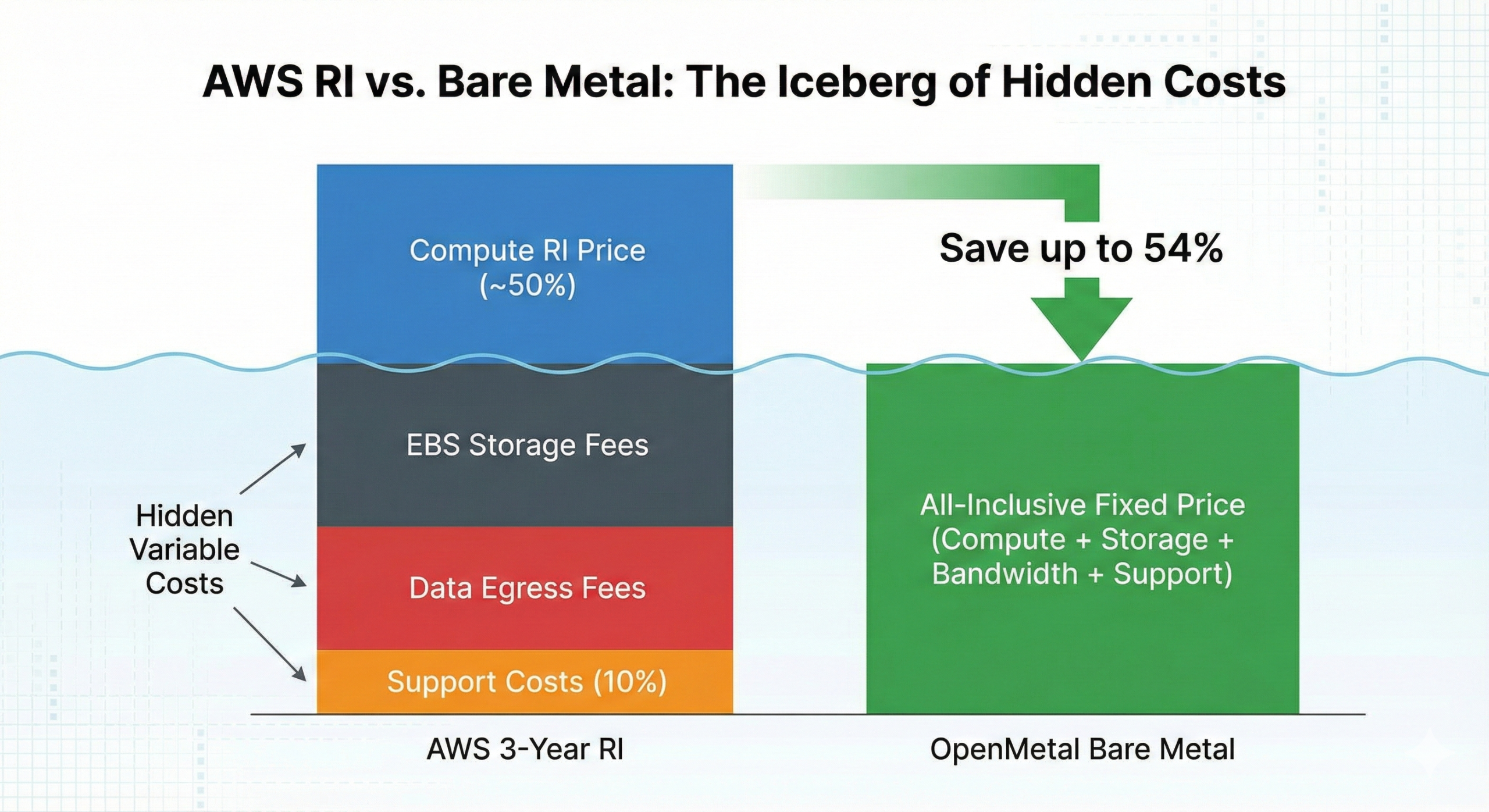
When AWS presents Reserved Instance pricing, they show you the compute discount. What they don’t show is everything else you’ll pay for, which often represents 40-60% of your actual monthly cloud bill.
Data Transfer and Egress Fees
AWS charges for data moving out of their network at $0.09 per GB for the first 10TB per month, dropping to $0.085 per GB for the next 40TB, then $0.07 per GB for the next 100TB. These fees apply regardless of whether you’re using on-demand or Reserved Instances.
Let’s say your application serves 5TB of data per month to users. That’s $450 in egress charges. If you’re running a content-heavy application, API service, or any workload that moves substantial data to end users, these costs accumulate quickly and never benefit from RI discounts.
Cross-region data transfer adds another layer. Moving data between AWS regions costs $0.02 per GB in each direction. If you’re running multi-region infrastructure for redundancy or performance, you’re paying this tax on all inter-region communication.
Even transfers between Availability Zones within the same region cost $0.01 per GB for both ingress and egress. That seemingly small fee compounds across microservices architectures where services constantly communicate with databases, caches, and each other.
Storage Costs Run Separately
EBS storage isn’t included in compute Reserved Instances. A typical application server might need 500GB of SSD storage (gp3 volumes), costing around $40 per month. Scale that across multiple instances and you’re adding hundreds of dollars monthly that Reserved Instances don’t discount.
Support Plans Aren’t Discounted
AWS charges for support as a percentage of your total monthly bill. Business Support costs 10% of your AWS usage (minimum $100/month), while Enterprise Support costs 10% for the first $150K, then scales down. These percentages apply to your entire bill, including all those undiscounted egress and storage costs.
The Complexity Tax
Beyond direct costs, there’s the engineering time spent managing Reserved Instance portfolios. You need to analyze utilization, purchase the right instance types and quantities, monitor for changes in usage patterns, and periodically re-evaluate commitments. This ongoing optimization work costs engineering hours that could be spent on product development.
Bare Metal Economics: Fixed Costs, Predictable Budgets
OpenMetal’s bare metal model works differently. You pay a fixed monthly price for an entire physical server, and you carve it up however makes sense for your workloads. No per-VM charges, no complex pricing tiers, no surprise egress fees.
Let’s look at real configurations. All pricing was gathered in January 2026 from OpenMetal’s public catalog. Check current pricing when making your own comparisons, as these numbers may change.
Medium v4 Server
Specs: 24 cores (48 threads), 256GB DDR5 RAM, 6.4TB NVMe storage, 2Gbps public bandwidth, 20Gbps private bandwidth
Price: $619/month
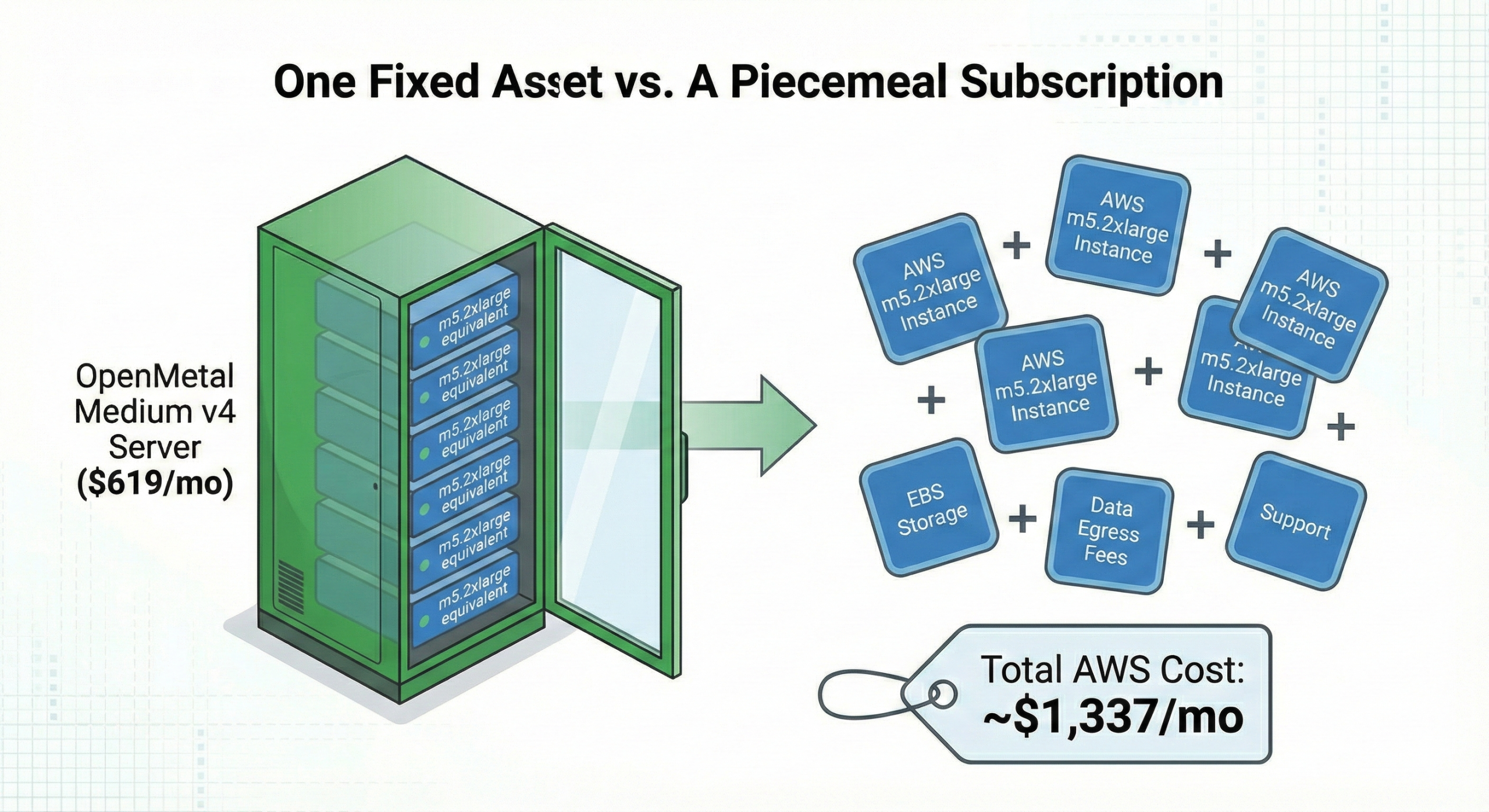
In AWS terms, this server has enough resources to run multiple m5.2xlarge instances (8 vCPU, 32GB RAM each). You could comfortably run 5-6 full instances worth of capacity on this single server.
AWS equivalent (Reserved Instance, 3-year):
- 5x m5.2xlarge instances: ~$605/month (compute only)
- 2TB EBS storage (gp3): ~$160/month
- 5TB monthly egress: ~$450/month
- Business Support (10% of ~$1,215): ~$122/month
- Total: ~$1,337/month
OpenMetal Medium v4:
- All compute capacity: $619/month
- 6.4TB NVMe storage: Included
- 2Gbps public bandwidth (~500TB/month capacity): Included
- Hardware support: Included
- Total: $619/month
The bare metal server costs 54% less than the Reserved Instance equivalent, and that’s comparing against the deepest AWS discount (3-year commitment). Against 1-year RIs or on-demand pricing, the gap widens dramatically.
Large v4 Server
Specs: 32 cores (64 threads), 512GB DDR5 RAM, 2x 6.4TB NVMe storage, 4Gbps public bandwidth, 20Gbps private bandwidth
Price: $1,173.60/month
This configuration supports substantial workloads. You could run 8-10 m5.2xlarge equivalent VMs, or mix instance types based on actual application needs.
AWS equivalent (Reserved Instance, 3-year):
- 8x m5.2xlarge instances: ~$968/month
- 3TB EBS storage: ~$240/month
- 8TB monthly egress: ~$720/month
- Business Support (10%): ~$193/month
- Total: ~$2,121/month
OpenMetal Large v4:
- All compute capacity: $1,173.60/month
- 12.8TB NVMe storage: Included
- 4Gbps public bandwidth (~1PB/month capacity): Included
- Hardware support: Included
- Total: $1,173.60/month
The savings here are dramatic: 45% less than the AWS Reserved Instance approach, while providing significantly more storage and bandwidth capacity.
XL v4 Server
Specs: 64 cores (128 threads), 1TB DDR5 RAM, 4x 6.4TB NVMe storage, 6Gbps public bandwidth, 20Gbps private bandwidth
Price: $1,987.20/month
For companies running substantial infrastructure, this server provides massive capacity at a fixed cost.
AWS equivalent (Reserved Instance, 3-year):
- 15x m5.2xlarge instances: ~$1,815/month
- 6TB EBS storage: ~$480/month
- 15TB monthly egress: ~$1,350/month
- Business Support (10%): ~$365/month
- Total: ~$4,010/month
OpenMetal XL v4:
- All compute capacity: $1,987.20/month
- 25.6TB NVMe storage: Included
- 6Gbps public bandwidth (~1.5PB/month capacity): Included
- Hardware support: Included
- Total: $1,987.20/month
The bare metal approach costs 50% less while providing vastly more storage and bandwidth than you’d get with AWS.
Cost Comparison Table
Here’s a side-by-side comparison to make the economics clear. Note that pricing was gathered in January 2026 from public sources; verify current rates when making your own decisions.
| Configuration | OpenMetal Bare Metal | AWS 3-Year Reserved Instance | Monthly Savings | % Savings |
|---|---|---|---|---|
| Small Setup (5x m5.2xlarge equivalent) | $619/month | $1,337/month | $718/month | 54% |
| Medium Setup (8x m5.2xlarge equivalent) | $1,173.60/month | $2,121/month | $947/month | 45% |
| Large Setup (15x m5.2xlarge equivalent) | $1,987.20/month | $4,010/month | $2,023/month | 50% |
These comparisons include compute, storage, typical egress costs, and AWS Business Support. Your actual costs will vary based on your specific usage patterns, but the fundamental economics hold: fixed-cost bare metal eliminates the cumulative fees that make public cloud expensive at scale.
The TCO Reality: 3-Year Comparison
Let’s examine what these cost differences mean over a typical 3-year Reserved Instance commitment period.
Scenario: Mid-Sized Application Infrastructure
Requirements:
- Moderate compute needs (equivalent to 8 m5.2xlarge instances)
- Standard storage requirements
- 8TB monthly data egress to serve users
- Need for business-grade support
AWS Reserved Instance Approach (3-year commitment):
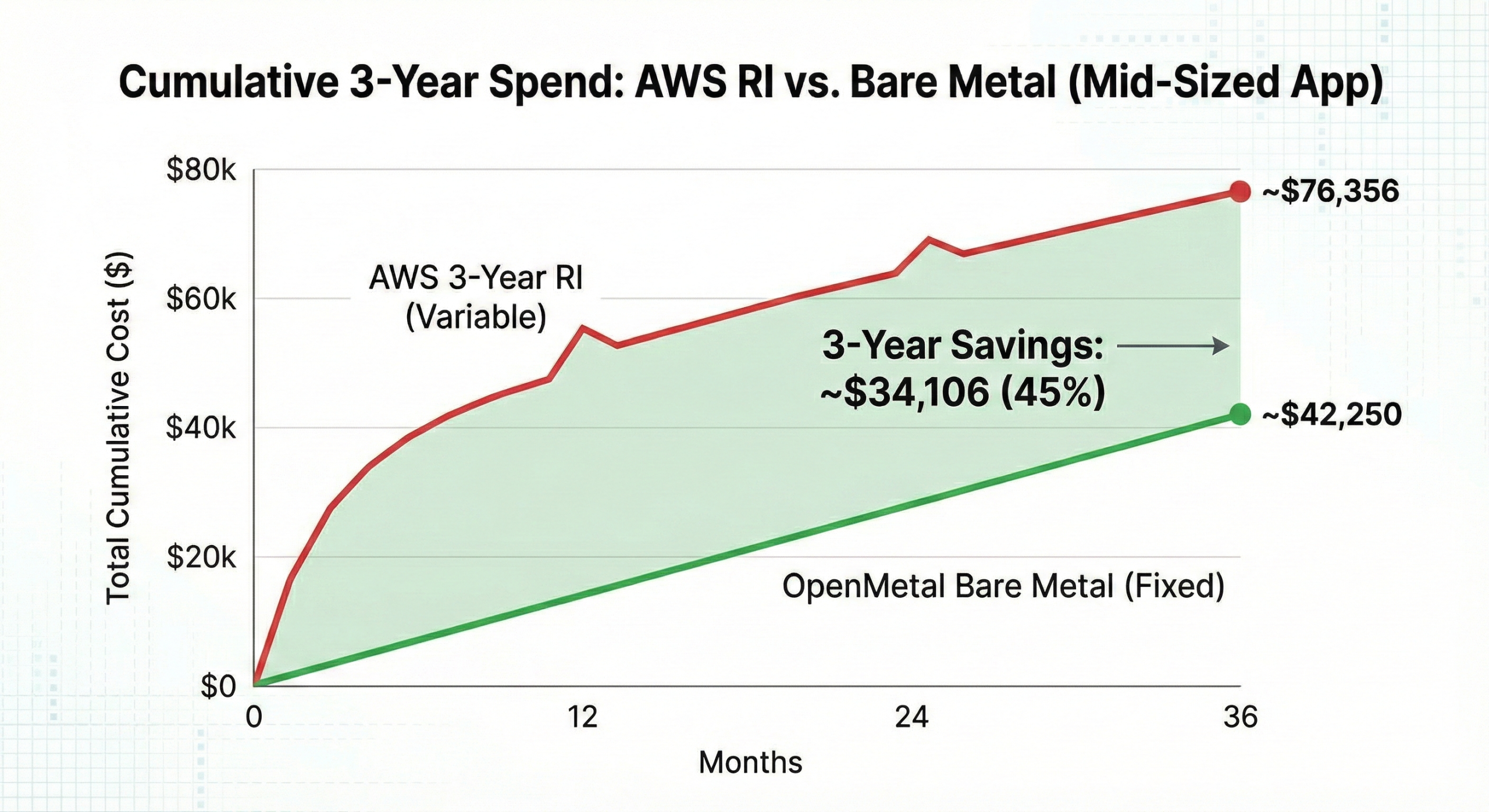
- Upfront or monthly RI payments: ~$2,121/month
- Total 36-month cost: ~$76,356
- Commitment flexibility: Low (locked into specific instance types)
- Cost predictability: Moderate (egress varies with usage)
OpenMetal Bare Metal Approach:
- OpenMetal Large v4: $1,173.60/month
- Total 36-month cost: $42,250
- Flexibility: High (reconfigure VMs as needed)
- Cost predictability: High (fixed monthly cost)
Total savings over 3 years: $34,106 (45% less than AWS)
The bare metal approach saves over $34,000 over three years while providing more flexibility. And unlike Reserved Instances, you’re not committed to specific configurations. If your needs change in year two, you can adjust your VM layout without financial penalty.
The Flexibility Cost
Here’s where the comparison becomes even more interesting. What happens when your needs change?
With Reserved Instances, you’re locked in. If you committed to m5.2xlarge instances but now need c5.4xlarge (compute-optimized) instances, you either pay to convert in the RI marketplace (if capacity is available) or you run the new instances at on-demand pricing while continuing to pay for unused reservations.
With bare metal, you’re paying for the physical hardware. How you divide that hardware into VMs is entirely up to you. Need to shift from 6 larger VMs to 12 smaller ones? No problem. Want to test a new architecture that requires different memory-to-CPU ratios? Just reconfigure your VMs. Need to run a mix of production workloads and development environments? It’s all the same cost.
This flexibility has real monetary value, but it’s difficult to quantify in a spreadsheet because it depends on how your business and technical requirements evolve.
Real-World Cost Examples
Let’s look at some specific use cases to see how the economics play out:
Content Delivery Platform
Scenario: You’re serving video content or large files to end users
AWS challenges:
- Egress costs dominate your bill
- 20TB monthly bandwidth = $1,800+ in transfer fees alone
- Reserved Instances don’t help with egress costs
- Need to carefully architect around bandwidth expenses
Bare metal advantages:
- OpenMetal XL v4 includes 6Gbps bandwidth (~1.5PB monthly capacity)
- Easily handle 20TB/month within included bandwidth
- Fixed $1,987.20/month regardless of actual transfer volume
- Can run CDN infrastructure, origin servers, and encoding workloads on same hardware
SaaS Application with Multi-Region Presence
Scenario: You run application infrastructure in 2-3 regions for performance and redundancy
AWS challenges:
- Inter-region data transfer costs $0.02/GB each direction
- Database replication, cache synchronization, and service communication all incur charges
- Multi-AZ deployments add costs even within regions
- Reserved Instances in each region required for discount
Bare metal advantages:
- Deploy servers in multiple OpenMetal locations
- Inter-region private networking available
- Fixed monthly costs per location
- No per-GB charges for replication traffic
API-Heavy Microservices Architecture
Scenario: Dozens of services communicating constantly with databases and each other
AWS challenges:
- Cross-AZ traffic charges compound across service meshes
- Load balancer costs add up quickly
- Database cross-AZ replication charged separately
- Every API call between services potentially incurs data transfer fees
Bare metal advantages:
- All internal communication at 20Gbps with no per-GB charges
- Run entire service mesh on dedicated infrastructure
- Predictable monthly costs regardless of inter-service communication volume
When Reserved Instances Still Make Sense
We’re not arguing that bare metal is always the right choice. There are legitimate scenarios where AWS Reserved Instances or other public cloud commitments make economic sense:
Small-scale workloads: If you’re running 1-2 small instances and minimal data transfer, the cost difference might not justify managing dedicated infrastructure. For these situations, Economize.cloud can help optimize your AWS spending and show you exactly where your money is going.
Highly variable workloads: Some applications genuinely need elastic scaling that goes from near-zero to substantial capacity based on unpredictable demand patterns. True bursting workloads benefit from public cloud’s pay-per-hour model.
Geographic distribution requirements: If you need presence in 15+ regions worldwide and your workload in each region is small, the overhead of managing bare metal in that many locations might not make sense.
Compliance or integration requirements: Some industries or use cases require specific public cloud certifications or deep integration with cloud-native services that don’t have equivalents elsewhere.
Development and testing environments: Ephemeral environments that spin up for hours or days and then disappear are well-suited to on-demand public cloud infrastructure.
But if you’re running substantial, relatively stable workloads with consistent bandwidth needs, and you’re currently considering Reserved Instances to control costs, you should compare against bare metal economics before committing.
Support Costs: What’s Actually Included
AWS support pricing can be confusing because it’s a percentage of your total bill. Their Business Support plan (10% of monthly usage, $100 minimum) includes:
- 24/7 access to cloud support engineers
- Response times: < 1 hour for urgent issues
- Infrastructure event management for additional fee
- Access to AWS Trusted Advisor
OpenMetal’s included support covers:
- Hardware troubleshooting and replacement
- Network connectivity issues
- Platform-level support for OpenStack infrastructure
- Response times based on severity
For true assisted management (where engineers help manage your cloud infrastructure, applications, and optimization), both AWS and OpenMetal offer this as an upcharge service. If you need hands-on infrastructure management, evaluate providers based on your specific requirements rather than assuming one includes it by default.
The key difference: OpenMetal’s base price includes hardware support, while AWS charges separately for any level of support beyond basic documentation access.
The Break-Even Analysis
At what point does bare metal become more economical than Reserved Instances?
For most workloads, the tipping point is lower than you might think. If you’re spending $10,000-15,000 per month on AWS (as discussed in our article on cost tipping points), you’re likely past the point where bare metal makes economic sense.
The calculation isn’t just about compute costs. Factor in:
- Your actual monthly data egress
- Storage requirements
- Support costs
- Engineering time spent on RI management
- The value of flexibility
When you account for all these factors, bare metal often provides 40-60% savings compared to Reserved Instance pricing, even with 3-year commitments.
Making the Move: Practical Considerations
If the economics favor bare metal for your workloads, what does transition actually look like?
Migration complexity: Moving from AWS to dedicated infrastructure isn’t trivial, but it’s also not as complex as many teams assume. Most applications can migrate with minimal architectural changes. We’ve covered this in our guide to public cloud exit strategies.
Hybrid approaches: You don’t need to move everything at once. Many companies migrate stable workloads to private cloud while keeping variable or region-specific workloads in public cloud. This hybrid approach captures savings on substantial workloads while maintaining cloud flexibility where it matters.
Risk mitigation: The biggest risk isn’t technical. It’s committing to 1-3 year Reserved Instance contracts before understanding whether bare metal could serve your needs at lower cost. Run the numbers before you commit.
Stop Prepaying for Limitations
Reserved Instances frame the choice as “pay more for flexibility” or “pay less but commit”. That’s a false dichotomy created by the hyperscale cloud pricing model.
Bare metal infrastructure offers a different equation: pay less AND maintain flexibility. Fixed monthly costs that include compute, storage, and bandwidth. No egress surprises. No complex optimization required. No commitment penalties when your needs evolve.
The question isn’t whether you can save 30-40% with Reserved Instances versus AWS on-demand pricing. The question is whether you should be paying AWS-level costs at all.
Before you sign that Reserved Instance commitment, run the real comparison. Factor in the egress fees, the support costs, the engineering overhead, and the flexibility limitations. Then compare against bare metal infrastructure with included bandwidth and predictable monthly pricing.
For companies ready to explore fixed-cost infrastructure, understanding how private cloud provides advantages beyond just cost savings can help inform the decision. Or if you want to understand more about controlling public cloud waste through alternative approaches, we’ve documented the patterns.
You can spend the next three years paying Reserved Instance rates, or you can change the economics entirely. The physical servers are ready when you are.
Ready to compare bare metal costs for your specific workload? Check out our available hardware and pricing, or contact our team to discuss your infrastructure requirements and run detailed cost comparisons.
Schedule a Consultation
Get a deeper assessment and discuss your unique requirements.
Read More on the OpenMetal Blog