



























In this article
We talk about why full rearchitecture isn’t realistic for most companies, which workloads benefit most from TDX protection, how to add TDX bare metal alongside existing OpenMetal infrastructure, how to integrate OpenMetal TDX with AWS/Azure/GCP environments, hybrid architecture patterns that work, cost analysis of incremental adoption, and practical implementation strategies that minimize disruption.
So, your company needs confidential computing! Enterprise customers may be asking about it in RFPs. Compliance teams likely want hardware-level data protection. Maybe security auditors are pushing for encrypted processing. But you can’t just shut down your existing infrastructure and rebuild everything from scratch.
You have production workloads running. Customers depend on your service. Your team is already stretched managing current infrastructure. The idea of a massive migration project that takes months and risks downtime is a non-starter.
Here’s the reality most companies face: you need to add Intel TDX capabilities without disrupting what’s already working. This means incremental adoption, hybrid architecture, and strategic workload placement rather than wholesale replacement.
This guide shows you how to add confidential computing to existing infrastructure gradually, which workloads to move first, how to integrate TDX bare metal with your current setup, and how to deliver security improvements without operational chaos.
Why Full Rearchitecture Isn’t Realistic
Before diving into incremental approaches, let’s acknowledge why companies can’t often just rebuild everything for confidential computing.
Existing Infrastructure Investments
You’ve already invested in infrastructure that works. Whether you’re running on OpenMetal Cloud Cores, AWS, Azure, or other platforms, you have:
Sunk costs: Servers, licenses, configurations, and tooling you’ve already paid for. Abandoning these immediately wastes that investment.
Working systems: Your current infrastructure handles production traffic successfully. It may not have confidential computing, but it keeps your business running.
Institutional knowledge: Your team knows how current systems work. They’ve built monitoring, deployment pipelines, and operational procedures around existing infrastructure.
Customer dependencies: Your customers depend on current service levels. Major infrastructure changes risk service disruptions that damage customer relationships.
Operational Constraints
Real-world operations limit how aggressively you can change infrastructure:
Team bandwidth: Your engineering team has product roadmap commitments, bug fixes, and feature development. They can’t drop everything for a 6-month infrastructure migration.
Risk tolerance: Companies can’t risk extended downtime or service degradation. Incremental changes are safer than big-bang migrations.
Budget cycles: Infrastructure budgets are planned quarterly or annually. You can add capacity incrementally but can’t always fund complete replacement immediately.
Testing requirements: New infrastructure needs thorough testing before handling production traffic. This takes time and resources.
Business Continuity Requirements
Your business can’t pause while you rebuild infrastructure:
Revenue dependencies: Every hour of downtime costs money. You can’t afford extended outages during migration.
Contractual obligations: Customer contracts specify uptime SLAs. You’re legally obligated to maintain service levels.
Competitive pressure: Competitors aren’t waiting while you rebuild infrastructure. You need to keep shipping features and serving customers.
Seasonal considerations: Many businesses have peak seasons where infrastructure changes are too risky.
Which Workloads Need TDX Protection
Not everything needs confidential computing. Strategic workload selection lets you get security benefits without moving everything immediately.
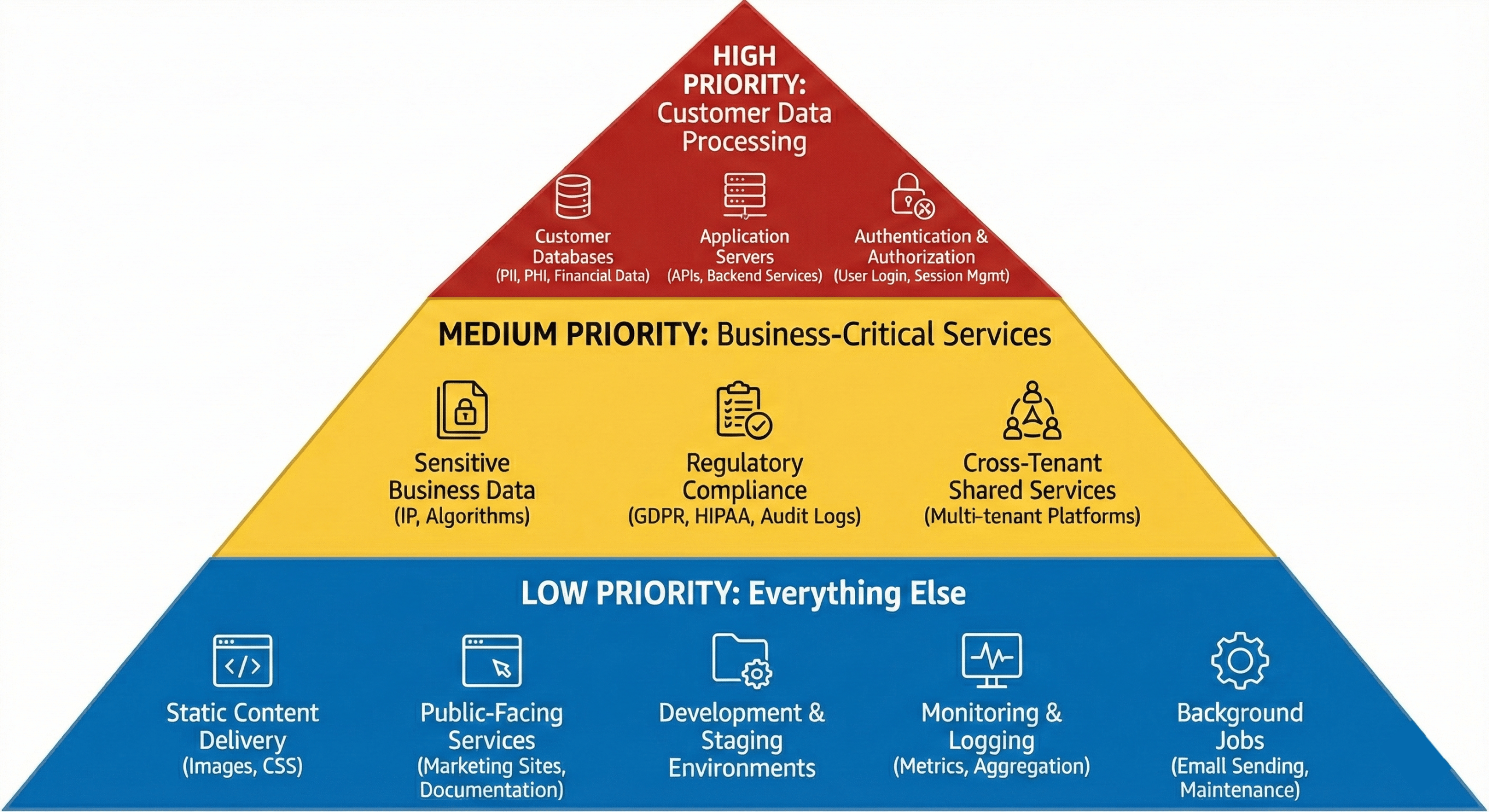
High Priority: Customer Data Processing
Move these workloads to TDX first:
Customer databases:
- Personal information (names, emails, addresses)
- Financial data (payment methods, transaction history)
- Health information (medical records, PHI)
- Why: This data creates the most liability if breached
Application servers processing customer data:
- APIs handling customer requests
- Backend services that access customer databases
- Data transformation and processing pipelines
- Why: These services have customer data in memory during processing
Authentication and authorization services:
- User login systems
- Session management
- Token generation and validation
- Why: Compromised authentication exposes everything
Medium Priority: Business-Critical Services
Consider these next:
Sensitive business data:
- Proprietary algorithms or IP
- Financial reporting and analytics
- Strategic planning data
- Why: Protects competitive advantage
Regulatory compliance workloads:
- Systems handling data subject to GDPR, HIPAA, PCI-DSS
- Audit logging and compliance reporting
- Why: Reduces compliance risk and audit complexity
Cross-tenant shared services:
- Multi-tenant platforms where customer isolation matters
- Shared databases or services processing multiple customers’ data
- Why: Hardware isolation prevents cross-tenant data leaks
Low Priority: Everything Else
These can stay on standard infrastructure:
Static content delivery:
- Images, CSS, JavaScript files
- Marketing website content
- Why: No sensitive data, latency-sensitive
Public-facing services:
- Marketing sites
- Documentation
- Public APIs with no authentication
- Why: No sensitive data processing
Development and staging:
- Testing environments
- CI/CD pipelines
- Developer sandboxes
- Why: Not production data (usually)
Monitoring and logging:
- Metrics collection
- Log aggregation
- Why: These services should be separate from production data anyway
Background jobs:
- Email sending
- Report generation (unless reports contain sensitive data)
- Scheduled maintenance tasks
- Why: Often don’t process sensitive data in memory
Prioritization Framework
Use this framework to decide what moves to TDX:
Ask these questions:
- Does this workload process customer PII, PHI, or financial data?
- Would a breach of this workload create regulatory liability?
- Do customers or auditors specifically ask about this data’s protection?
- Would competitors benefit from accessing this data?
- Does this workload handle cross-tenant data that needs isolation?
If 3+ answers are yes: High priority for TDX
If 1-2 answers are yes: Medium priority
If 0 answers are yes: Can stay on standard infrastructure
Adding TDX to Existing OpenMetal Infrastructure
If you’re already running on OpenMetal, adding TDX capabilities means deploying TDX-ready bare metal alongside your current infrastructure.
Current State: OpenMetal Cloud Cores or Bare Metal
You might have:
OpenStack Cloud Cores:
- Running production workloads in VMs
- Using Ceph for storage
- Leveraging OpenStack APIs for management
- Note: Full TDX integration with OpenStack is under development
Standard Bare Metal:
- Running applications directly on dedicated servers
- May be using containers or direct deployment
- Full control but no TDX hardware yet
Adding TDX Bare Metal Servers
The incremental approach:
Step 1: Deploy TDX-ready bare metal
Choose from TDX-ready configurations:
XL V4 Bare Metal (TDX-ready):
- Monthly cost: $1,987.20 (US locations)
- Hardware: 64C/128T CPU, 1024GB RAM, 4× 6.4TB NVMe
- Why: Good capacity for sensitive workload consolidation
XXL V4 Bare Metal (TDX-ready):
- Monthly cost: $2,779.20 (US locations)
- Hardware: 64C/128T CPU, 2048GB RAM, 6× 6.4TB NVMe
- Why: Maximum capacity for large-scale sensitive data processing
Start with one or two servers for sensitive workloads. You’re not replacing everything, just adding TDX capacity.
Step 2: Configure TDX protection
Follow OpenMetal’s TDX deployment guide to:
- Enable TDX in BIOS
- Configure KVM with TDX support
- Create Trust Domains for sensitive workloads
- Set up remote attestation
Step 3: Network integration
Connect TDX bare metal to existing infrastructure:
If you have Cloud Cores:
- Use private networking between Cloud Core VMs and TDX bare metal
- Configure security groups to control access
- TDX servers can access databases or services running in Cloud Cores
- Cloud Core services can call TDX-protected APIs
If you have existing bare metal:
- Network TDX servers into existing VLAN
- Configure routing between TDX and non-TDX servers
- Use firewall rules to control which services communicate
Architecture pattern:
[Cloud Cores - Standard Workloads]
          |
    Private Network
          |
[TDX Bare Metal - Sensitive Workloads]
Step 4: Migrate sensitive workloads
Move high-priority workloads to TDX infrastructure:
Databases with customer data:
- Set up database on TDX bare metal
- Configure replication from current database
- Switch applications to read from TDX database
- Decommission old database once validated
APIs processing sensitive data:
- Deploy API servers in Trust Domains on TDX bare metal
- Configure load balancer to route traffic
- Run both old and new in parallel during testing
- Shift traffic gradually
Authentication services:
- Deploy auth services on TDX bare metal
- Update applications to use new auth endpoints
- Monitor for issues
- Decommission old auth services
Hybrid Architecture Example
Real-world setup for a SaaS company:
OpenStack Cloud Cores (existing):
- Web servers and load balancers
- Application cache (Redis)
- Background job workers
- Internal admin tools
- Monitoring and logging
TDX Bare Metal (new):
- Customer database (PostgreSQL in Trust Domain)
- API servers handling customer data
- Authentication and session management
- Payment processing services
Why this works:
- Sensitive data stays in TDX protection
- High-traffic, latency-sensitive services stay in Cloud Cores
- No need to move everything
- Can migrate more workloads to TDX over time
Operational impact:
- Minimal – same OpenMetal infrastructure, same support team
- Monitoring spans both environments
- Deployment pipelines updated to handle both targets
- Team uses familiar tools and processes
When OpenStack TDX Integration Arrives
Full TDX integration with OpenStack is under development. When available:
Future capability:
- Launch TDX-protected VMs through OpenStack
- Manage Trust Domains via standard OpenStack APIs
- Integrate TDX into existing Cloud Core deployments
- Simpler operational model
Until then:
- Use TDX bare metal alongside Cloud Cores
- Manage TDX servers directly
- Still get security benefits, just with separate management
Adding OpenMetal TDX to AWS/Azure/GCP Environments
If you’re running on hyperscalers, adding confidential computing means integrating OpenMetal TDX bare metal into your existing cloud environment.
Why Hybrid Makes Sense
You might wonder why not use AWS Nitro Enclaves, Azure Confidential Computing, or GCP Confidential VMs:
Cost considerations:
- Hyperscaler confidential computing costs more than standard instances
- OpenMetal bare metal has fixed monthly costs vs variable hyperscaler pricing
- Egress fees from hyperscalers add up quickly
Control and verification:
- Bare metal TDX gives you control of the entire stack
- No shared hardware with other tenants
- Full visibility into configuration
Specific requirements:
- Some compliance frameworks prefer dedicated hardware
- Enterprise customers may require non-hyperscaler options
- Bare metal provides stronger isolation than virtualized alternatives
Hybrid Architecture Patterns
Pattern 1: Sensitive data on OpenMetal, everything else on cloud
Keep your existing AWS/Azure/GCP setup:
- Web servers, load balancers, CDN
- Caching layers (Redis, Memcached)
- Message queues (SQS, Pub/Sub, Service Bus)
- Managed services you depend on
Add OpenMetal TDX for:
- Databases containing customer data
- Services processing PII, PHI, or financial data
- Authentication systems
- Any workload requiring hardware-level protection
Connection approach:
- VPN between OpenMetal and your cloud provider
- Private connectivity via dedicated circuits if volume justifies
- API gateway pattern where cloud services call TDX-protected APIs
Pattern 2: Primary workloads on OpenMetal, managed services on cloud
Move core application to OpenMetal:
- Application servers on TDX bare metal
- Databases on TDX bare metal
- Primary business logic protected by TDX
Keep specific managed services on cloud:
- S3/Blob Storage for object storage
- CloudFront/Azure CDN for content delivery
- Lambda/Functions for event processing
- Managed AI/ML services if needed
Connection approach:
- OpenMetal infrastructure as primary
- Cloud services as auxiliaries
- Applications on OpenMetal call cloud APIs as needed
Implementation Example: SaaS Company on AWS
Current state:
- Web tier: EC2 instances behind ALB
- Application tier: ECS containers
- Database: RDS PostgreSQL with customer data
- Storage: S3 for uploaded files
- Cache: ElastiCache Redis
Concerns:
- RDS costs increasing with data growth
- Enterprise customers asking about data protection during processing
- Egress fees for data downloads adding up
Incremental addition of TDX:
Month 1: Deploy OpenMetal TDX
- Order XL V4 bare metal TDX-ready server
- Set up VPN between AWS VPC and OpenMetal
- Configure monitoring and management
Month 2: Migrate database
- Deploy PostgreSQL in Trust Domain on TDX bare metal
- Set up replication from RDS to TDX PostgreSQL
- Test application connectivity
- Cost: Add $1,987.20/month, save $1,500+/month on RDS
Month 3: Migrate sensitive APIs
- Deploy API servers handling customer data on TDX bare metal
- Update load balancer to route customer data requests to TDX APIs
- Keep other APIs on AWS ECS
- Validate performance and reliability
Month 4+: Optimize
- Monitor traffic patterns
- Consider moving more workloads based on ROI
- Reduce AWS infrastructure footprint as workloads move
Result:
- Customer data now has hardware-level TDX protection
- Can market confidential computing to enterprise customers
- Reduced AWS data processing costs
- Maintained operational continuity throughout
Networking Considerations
Connecting OpenMetal to cloud providers:
VPN approach (simple, lower cost):
- Set up VPN gateway in cloud (AWS VPN, Azure VPN Gateway)
- Configure VPN on OpenMetal bare metal
- Route private traffic through VPN tunnel
- Good for: Moderate traffic, testing, initial deployment
Direct connectivity (higher performance):
- AWS Direct Connect
- Azure ExpressRoute
- Dedicated circuit to OpenMetal
- Good for: High traffic volumes, latency-sensitive applications
Security:
- Encrypt traffic between environments
- Use private IPs for inter-environment communication
- Implement network segmentation
- Monitor cross-environment traffic
Hybrid Architecture Design Principles
Whether adding TDX to existing OpenMetal or integrating with cloud providers, follow these principles:
Principle 1: Isolate Sensitive Data
Design systems so sensitive data stays in TDX protection:
Data flow:
- User request → Standard infrastructure (web/app tier)
- Application needs customer data → Calls TDX-protected service
- TDX service processes data → Returns only necessary info
- Response → User
Never:
- Copy sensitive data from TDX to non-TDX systems
- Log sensitive data outside TDX environment
- Cache sensitive data in non-TDX caches
Principle 2: Minimize Cross-Environment Traffic
Each boundary crossing adds latency and complexity:
Good architecture:
- Complete operations within one environment when possible
- Batch requests to reduce round trips
- Cache non-sensitive derived data outside TDX
Avoid:
- Chatty protocols requiring many round trips
- Real-time updates across environments for non-critical data
- Tight coupling that requires synchronous cross-environment calls
Principle 3: Plan for Failure
Both environments need to handle the other being unavailable:
Graceful degradation:
- If TDX services unavailable, queue requests or show limited functionality
- If standard infrastructure down, TDX services continue protecting data
- No cascading failures
Monitoring:
- Monitor both environments separately
- Alert on cross-environment connectivity issues
- Track performance across boundaries
Principle 4: Keep Operations Manageable
Don’t create operational nightmares:
Deployment:
- Unified deployment pipelines that can target both environments
- Consistent tooling (don’t require different tools for each environment)
- Automated testing covering cross-environment scenarios
Monitoring:
- Single pane of glass for monitoring both environments
- Unified logging solution
- Correlation IDs tracking requests across environments
Documentation:
- Clear documentation of which services run where
- Network diagrams showing data flows
- Runbooks covering both environments
Cost Analysis: Incremental Addition vs Full Replacement
Let’s examine the economics of adding TDX incrementally versus replacing everything.
Scenario: Mid-Market SaaS on AWS
Current state:
- $15,000/month AWS spend
- Primarily: EC2, RDS, S3, data transfer
- 200,000 users, growing
- Need confidential computing for enterprise sales
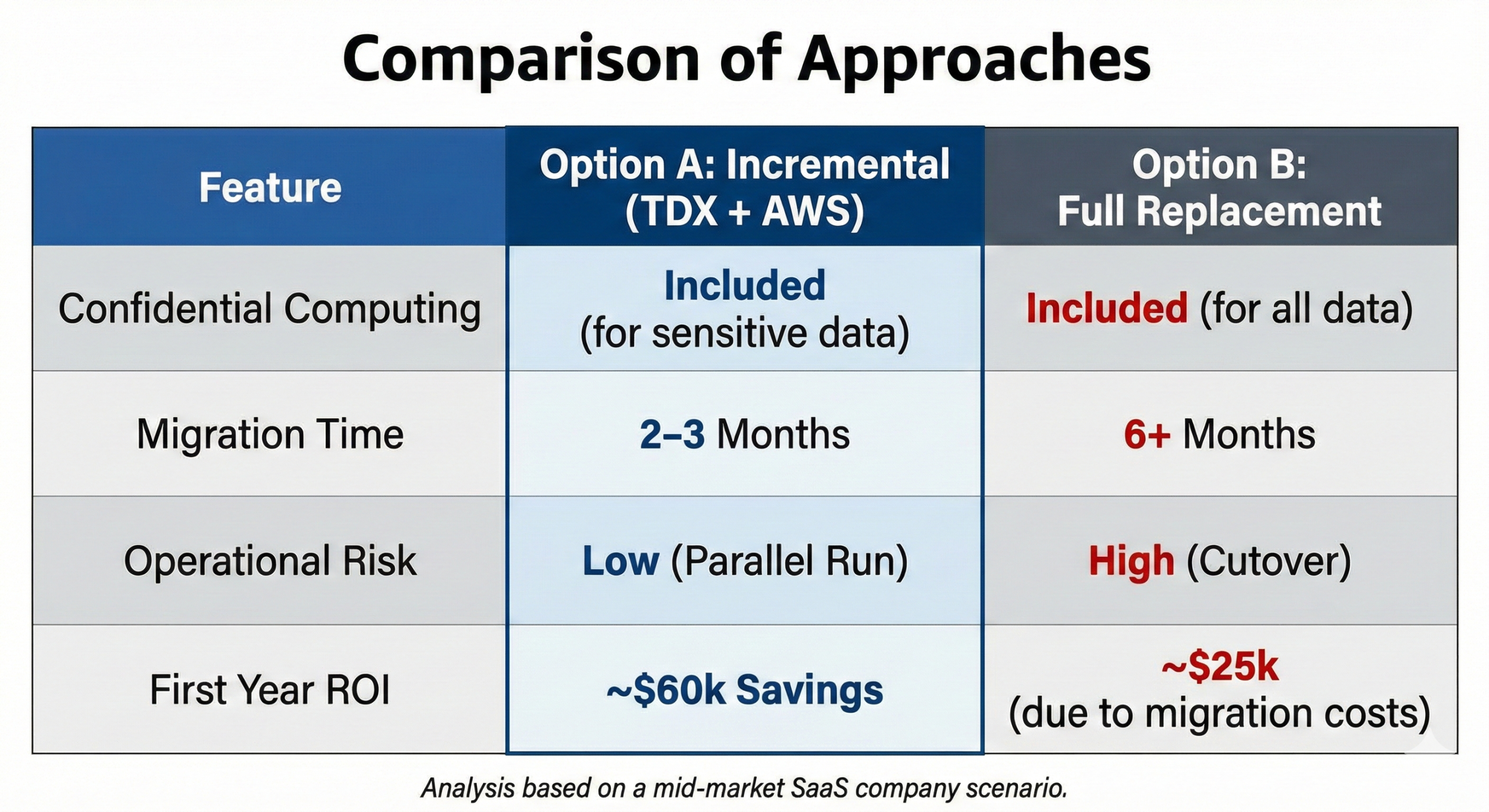
Option A: Add OpenMetal TDX Incrementally
Keep on AWS:
- Web servers, load balancers: $3,000/month
- Caching, queues, managed services: $2,000/month
- S3 storage: $1,000/month
- Subtotal: $6,000/month
Add OpenMetal TDX:
- XL V4 bare metal (2 for redundancy): $3,974.40/month
- Database and sensitive API processing
- Customer data protection with TDX
Total monthly cost: $9,974.40
Annual cost: $119,693
vs current $15,000/month ($180,000/year)
Savings: $60,307 annually
Benefits:
- Get confidential computing for enterprise sales
- Reduce AWS costs by moving expensive workloads
- Minimal disruption to current operations
- Can implement in 2-3 months
Option B: Replace Everything with OpenMetal
Full OpenMetal deployment:
- Large V4 Cloud Core: $4,298.40/month
- XL V4 TDX bare metal (2): $3,974.40/month
- Object storage needs (estimate): $500/month
- Total: $8,772.80/month
Annual cost: $105,274
Savings vs current: $74,726 annually
But consider:
- Need to migrate all workloads
- Replace managed services with self-managed
- Rebuild deployment pipelines
- Higher engineering cost (estimate $50,000+)
- 6+ month timeline
- Higher operational risk
Net first-year benefit: Option A: $60,307 savings, lower risk, faster implementation
Option B: $74,726 savings minus $50,000 migration cost = $24,726, higher risk
Incremental approach wins for first year and reduces risk.
When Full Replacement Makes Sense
Consider full replacement if:
Scale justifies it:
- AWS bill exceeds $30,000/month
- Data transfer costs are massive
- You’re spending enough that migration ROI is clear
You’re already rebuilding:
- Planning major application rewrite
- Moving to new architecture anyway
- Can combine infrastructure and application migration
Operational complexity is already high:
- Managing multiple cloud providers already
- Have team bandwidth for infrastructure work
- Hybrid architecture wouldn’t increase complexity much
You have specific requirements:
- Need full control of entire stack
- Compliance requires dedicated infrastructure
- Can’t use shared cloud infrastructure
Implementation Strategy: Minimal Disruption
Here’s how to actually execute incremental TDX adoption:
Phase 1: Planning and Preparation (2-4 weeks)
Identify sensitive workloads:
- List all services processing customer data
- Identify databases with sensitive data
- Map data flows to understand dependencies
Design target architecture:
- Decide which workloads move to TDX
- Plan network connectivity
- Document data flows and APIs
Order infrastructure:
- Deploy TDX-ready bare metal
- Set up networking
- Configure monitoring
Phase 2: Pilot Migration (2-4 weeks)
Choose pilot workload:
- Pick non-critical but representative service
- Should process sensitive data (to validate TDX)
- But not mission-critical (to limit risk)
Migrate pilot:
- Deploy service on TDX bare metal
- Configure in Trust Domain
- Test thoroughly
- Run in parallel with existing service
Validate:
- Verify TDX protection working (attestation)
- Check performance acceptable
- Confirm operational procedures work
- Gather team feedback
Phase 3: Production Migration (4-8 weeks)
Migrate high-priority workloads:
- Customer databases
- Authentication services
- API services handling sensitive data
For each workload:
- Deploy on TDX infrastructure
- Test in parallel with current
- Gradually shift traffic
- Monitor closely
- Complete cutover
- Decommission old infrastructure
Maintain service continuity:
- Keep both old and new running during transition
- Use feature flags for gradual rollout
- Easy rollback if issues arise
Phase 4: Optimization (Ongoing)
Monitor and improve:
- Track performance across environments
- Optimize data flows
- Identify additional workloads that should move
Documentation:
- Update architecture docs
- Document operational procedures
- Train team on TDX management
Cost management:
- Decommission replaced infrastructure
- Realize cost savings
- Plan next workloads to migrate
Technical Considerations
Some technical details that matter for successful hybrid architecture:
Data Synchronization
If you’re running databases in multiple environments:
Replication approaches:
- PostgreSQL streaming replication
- MySQL replication
- Application-level sync for NoSQL
Considerations:
- Replication lag impacts data consistency
- Network reliability between environments matters
- Monitoring replication health is critical
Authentication and Authorization
Unified auth across environments:
Centralized approach:
- Auth service on TDX bare metal
- All environments validate against TDX auth
- Single source of truth for user identity
Distributed approach:
- Token-based auth (JWT)
- TDX issues tokens
- Other environments validate tokens locally
- Reduces cross-environment calls
Monitoring and Observability
Track performance across environments:
Unified monitoring:
- Send metrics from both environments to central system
- Datadog, Prometheus, or other monitoring tools
- Dashboard showing complete system health
Distributed tracing:
- Use trace IDs that span environments
- Track request flow from entry through TDX processing
- Identify performance bottlenecks at boundaries
Logging:
- Centralized log aggregation
- Correlation IDs linking logs across environments
- Security consideration: sanitize logs of sensitive data
Security Boundaries
Maintain security across hybrid setup:
Network segmentation:
- Separate networks for TDX and non-TDX workloads
- Firewall rules controlling traffic flow
- VPN or encrypted connections between environments
Access control:
- Separate authentication for infrastructure access
- Limited users with access to TDX systems
- Audit logging of all TDX access
Data classification:
- Clear labels on what data needs TDX protection
- Policies preventing sensitive data from leaving TDX
- Regular audits of data flows
Success Metrics
Track these metrics to know if incremental adoption is working:
Security Metrics
Attestation success rate:
- TDX remote attestation should succeed consistently
- Failures indicate configuration or hardware issues
Data protection coverage:
- Percentage of sensitive data now in TDX protection
- Goal: 100% of regulated customer data
Audit findings:
- Reduction in security audit findings
- Compliance team satisfaction with controls
Operational Metrics
System reliability:
- Uptime should remain stable or improve
- No degradation from adding TDX
Performance:
- Response times within acceptable ranges
- TDX overhead should be <5% for most workloads
Incident frequency:
- Should not increase due to architecture complexity
- Team should handle hybrid setup smoothly
Business Metrics
Enterprise sales:
- Ability to answer confidential computing questions in RFPs
- Win rate improvement in security-focused deals
- Specific deals won due to TDX capability
Cost efficiency:
- Infrastructure costs vs before adding TDX
- Savings from reduced hyperscaler spend (if applicable)
- ROI on TDX investment
Customer satisfaction:
- Enterprise customer security concerns addressed
- No negative impact from migration
- Positive feedback on security posture
Common Pitfalls to Avoid
Learn from others’ mistakes:
Pitfall 1: Moving Everything at Once
Mistake: Trying to migrate all workloads simultaneously
Impact: Overwhelming team, increased risk, likely failures
Instead: Incremental migration, one workload at a time
Pitfall 2: Insufficient Testing
Mistake: Cutting corners on testing to move faster
Impact: Production issues, data loss, customer impact
Instead: Thorough testing in parallel before cutover
Pitfall 3: Ignoring Operational Overhead
Mistake: Not accounting for managing multiple environments
Impact: Overwhelmed operations team, degraded service
Instead: Plan for operational complexity, automate management
Pitfall 4: Poor Network Design
Mistake: Not properly planning network connectivity
Impact: Latency issues, reliability problems, security gaps
Instead: Design networking upfront, test thoroughly
Pitfall 5: Inadequate Monitoring
Mistake: Not monitoring hybrid environment properly
Impact: Blind to issues, slow incident response
Instead: Unified monitoring from day one
Wrapping Up: Incremental Paths to Confidential Computing
You don’t need to rebuild your entire infrastructure to add confidential computing. Incremental adoption lets you get security benefits while maintaining operational continuity.
The approach is straightforward: identify which workloads need TDX protection, add TDX-ready bare metal to your existing infrastructure, migrate sensitive workloads gradually, and maintain hybrid architecture with TDX protecting what matters most.
For companies on OpenMetal, this means adding TDX bare metal servers alongside existing Cloud Cores or standard bare metal. For companies on AWS/Azure/GCP, it means integrating OpenMetal TDX infrastructure into existing cloud environments.
The costs are manageable. Starting with one or two XL V4 TDX-ready bare metal servers ($1,987.20/month each) gives you capacity for sensitive workloads while keeping everything else on current infrastructure. This incremental approach typically costs less than current infrastructure while adding confidential computing capabilities.
The timeline is reasonable. Most companies can add TDX infrastructure and migrate initial workloads in 2-3 months. This beats the 6+ month timeline for complete infrastructure replacement while delivering immediate security improvements.
The risk is lower. Running new and old infrastructure in parallel during migration means easy rollback if issues arise. Gradual traffic shifts validate each change before full commitment.
For mid-market companies that need confidential computing but can’t afford wholesale infrastructure replacement, incremental adoption provides a practical path forward.
Ready to add confidential computing to your existing infrastructure? Explore OpenMetal’s TDX-ready bare metal servers or contact the team to discuss integrating TDX with your current environment.
Pricing current as of February 2026 and subject to change. View current pricing.
Schedule a Consultation
Get a deeper assessment and discuss your unique requirements.
Read More on the OpenMetal Blog