



























How fine-tuning works, and what it takes to run one on your own hardware
Training is how you change a model itself, rather than just prompting a finished one. For almost every company that means fine-tuning: taking an open-weight model and teaching it your domain, your format, or your voice. This guide explains what that involves, why it needs more hardware than inference, and which method keeps it affordable. No background assumed.
The companion inference guides cover running a finished model. This set is about training: changing the model’s own weights. In practice that almost always means fine-tuning an existing open-weight model (Llama, Qwen, Mistral and the like), not building one from scratch. Owner and license for each model are in the models reference.
Try inference first. Most “make the model know our business” needs are met by RAG (retrieval at question time), which needs no training at all. Fine-tune when you need to change how the model behaves: a consistent format or tone, a specialized domain, reliable structured output, or a small fast model that mimics a larger one. If you have not read the RAG-vs-fine-tuning note in the inference use-case guide, start there.
Why own the box. Training runs are sustained, hours-to-days workloads, exactly where a metered per-hour cloud bill runs away and a fixed monthly box does not, and your training data never leaves your infrastructure. Sizing that box is what these guides teach.
Part 1 · The building blocks
Six ideas that govern any training run
Read them in order. The first three define what training is and why it is heavier than inference; the last three cover the method that keeps it affordable, the hardware it needs, and what a run actually costs in time.
Training vs inference, and three kinds of training
Inference uses a finished, frozen model. Training is the opposite: it changes the weights so the model behaves differently afterward. There are three kinds, and they could not be more different in cost:
- Pre-training from scratch: building a foundation model from random weights on trillions of words. This needs a cluster of hundreds to thousands of GPUs for weeks. No single server does it, and almost no company needs to.
- Full fine-tuning: continue training an existing model, updating all of its weights on your data. Powerful, but memory-hungry (see idea 02).
- Parameter-efficient fine-tuning (LoRA and QLoRA): freeze the existing weights and train only a small set of add-on weights. This is what makes fine-tuning affordable on a single box, and it is what most teams actually use (idea 03).
Everything below is about the second and third of these, because those are the runs you can realistically host yourself.
Why training needs far more memory than inference
Running a model only needs the weights in memory. Training needs the weights plus three more things for every weight you are updating:
- Gradients: for each weight, which direction to nudge it. One extra number per weight.
- Optimizer state: the training process keeps a running memory of each weight’s recent history to steady the updates. With the standard optimizer that is two more numbers per weight, usually stored at full precision.
- Activations: intermediate results saved during the forward pass so the update can be computed. This grows with batch size and sequence length.
Fully fine-tuning a model needs on the order of four times the memory of just running it, before counting activations. A model that comfortably runs on a box may not fully fine-tune on the same box.
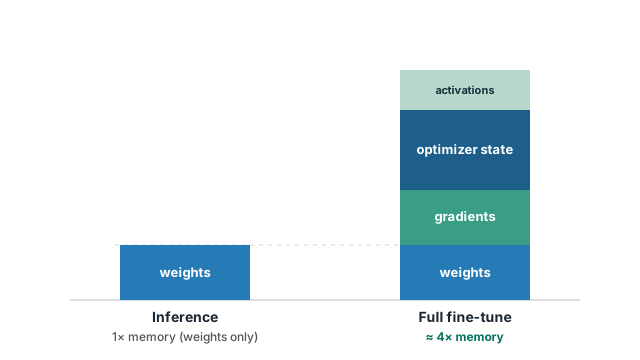
This single fact is why the inference fit tables do not carry over to training, and why the next idea (freezing most of the model) matters so much.
Full fine-tuning vs LoRA vs QLoRA
The lever that makes fine-tuning fit a single box is how many weights you actually update.
Full fine-tuning is rewriting the whole textbook: you can change anything, but you need room to lay out every page and track every edit. LoRA is leaving the textbook untouched and adding a thin stack of sticky notes in the margins; the book still guides the answers, your notes adjust them, and you only have to store and update the notes. QLoRA is the same sticky notes, but on a lightweight photocopy of the book (a compressed, 4-bit version), so the whole thing takes a fraction of the space.
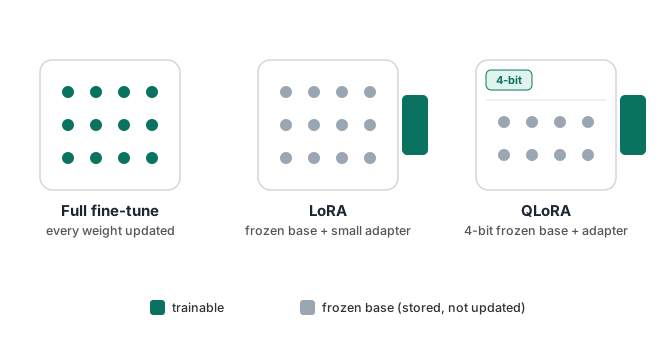
- Full fine-tuning: updates every weight. Highest ceiling on what it can learn, highest memory cost. Practical on a single box only for smaller models.
- LoRA: freezes the model, trains small adapter weights alongside it. Memory is dominated by holding the frozen model, not by the training, so much larger models fit.
- QLoRA: LoRA plus a 4-bit compressed frozen base. The frozen model shrinks to about a quarter of its size, so even very large models fine-tune on a single card. For most teams this is the default.
Quality-wise, LoRA and QLoRA reach most of what full fine-tuning achieves for typical adaptation tasks, at a fraction of the hardware. Full fine-tuning earns its cost mainly for deep domain shifts or when you are changing the model heavily.
Precision during training
Inference can lean hard on low precision (4-bit weights and so on). Training is more sensitive, because the tiny nudges to each weight can get lost if the numbers are too coarse. So training runs the math in 16-bit (usually a format called BF16), and keeps the optimizer’s master copy at full 32-bit precision for stability.
The exception is the frozen part. In QLoRA, the base model is frozen, so it can be safely compressed to 4-bit (nothing is being nudged there); only the small, trainable adapters run at 16-bit. That is the trick that lets a large model fine-tune in a small memory footprint without wrecking quality.
So “4-bit” means different things in the two worlds. In inference it can be the working precision of the whole model. In training it is only ever the frozen base of a QLoRA run; the parts actually learning are always higher precision.
Training is compute-bound, which rules the CPU out
Inference on a CPU box can work well because the CPU’s abundant memory offsets its lower speed, especially for models that only touch a fraction of their weights per step. Training removes that escape hatch for two reasons.
- Every step does more work. Training adds a backward pass on top of the forward pass, roughly tripling the computation per step, and repeats it over a whole dataset many times.
- There is no low-active shortcut. The memory-bandwidth advantage that helps some models infer on a CPU does not help training, which is limited by raw compute.
Training belongs on the GPU boxes (the H200 and NVIDIA RTX PRO 6000). The CPU box is not a training machine; its useful role in a training project is the surrounding work: preparing and cleaning data, tokenizing it, and orchestrating the run.
Data, time, checkpoints, and what fits one box
A few practical realities shape any run:
- Data is the real work. Fine-tuning quality is set mostly by the quality of your examples, not the model. A few thousand clean, well-formatted examples usually beat a huge messy pile.
- Runs take hours to days, not seconds. You pass over the dataset several times (each pass is an “epoch”), saving checkpoints along the way so you can stop, resume, and compare.
- These guides size single-card runs. Most fine-tuning, especially QLoRA, fits comfortably on one GPU. A run that exceeds a single card is a larger deployment we scope with you directly, rather than something to plan from a table.
The payoff of owning the box shows up here: a multi-day run on fixed monthly hardware has a predictable cost, whereas the same run on a metered per-hour service does not.
Use RAG (no training) when the goal is “answer from our documents” or “stay current with changing content.” Fine-tune when the goal is to change the model’s behavior: a fixed output format, a domain style, a specific language, reliable tool-calling, or a small fast model distilled from a big one. Often you do both: fine-tune the behavior, and use RAG for the facts. The inference use-case guide covers the RAG side; the training use-case guide covers the fine-tuning side.
Reference
Glossary and models reference
Every term used across these guides, plus the full table of models with owner and license, lives on the AI Deployment Guides hub.
Ready to size a run?
The training fit guide shows what you can fine-tune on each box and by which method. Or talk to an OpenMetal engineer to size and benchmark a specific run.
Open the training fit guide Talk to an engineerThese explanations describe how training behaves in general. Exact memory and time depend on your model, method, batch size, sequence length, and dataset; OpenMetal can size and benchmark a specific run on request. See also training use cases for real fine-tuning projects.